Cloud Computing & Deployment
TCSS 460 — Client/Server Programming
You have built software that runs on your laptop. In this reading, you will learn how that software gets from your machine to the internet — what cloud computing actually means, how modern deployment works, and the mindset shift required when your code is no longer running on hardware you can touch.
1 What is Cloud Computing?
At its simplest, cloud computing means using someone else's computers over the internet. Instead of buying a physical server, plugging it in, and managing it yourself, you rent computing resources from a provider who handles the hardware.
This idea is not as novel as it sounds. In the 1960s, computer scientists envisioned "utility computing" — computing delivered like electricity, where you pay for what you use without owning the generator. Cloud computing is that vision realized at scale.
1.1 The NIST Definition
The U.S. National Institute of Standards and Technology (NIST) defines cloud computing with five essential characteristics (Mell & Grance, 2011):
| Characteristic | What It Means |
|---|---|
| On-demand self-service | You provision resources (servers, databases) yourself, without calling anyone |
| Broad network access | Resources are available over the internet from any device |
| Resource pooling | The provider serves many customers from shared physical hardware |
| Rapid elasticity | Resources can scale up or down quickly based on demand |
| Measured service | You pay for what you use, like a utility bill |
For a student deploying a course project, the most relevant characteristics are on-demand self-service (you click a button and get a running server) and measured service (many platforms offer free tiers for small projects).
1.2 Service Models: IaaS, PaaS, and SaaS
Cloud services are categorized by how much the provider manages for you. Think of it as a spectrum from "you do everything" to "you do almost nothing."
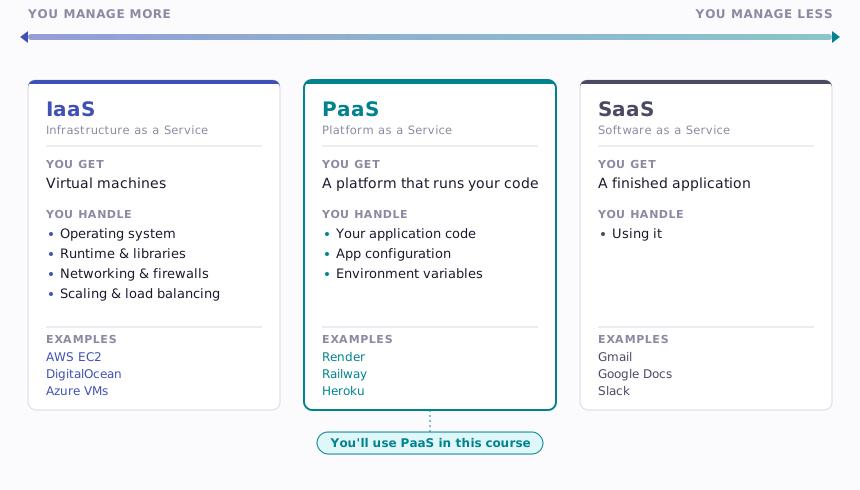
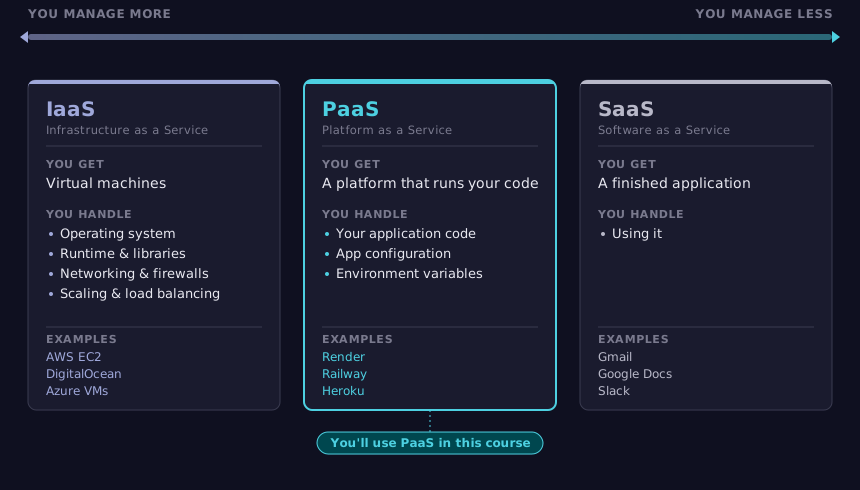
IaaS (Infrastructure as a Service) gives you raw virtual machines. You install the operating system, configure the firewall, set up the runtime, and deploy your code. This is powerful but requires significant operations knowledge.
PaaS (Platform as a Service) gives you a managed environment. You push your code, and the platform handles the operating system, runtime, scaling, and networking. This is where most student and small-team projects live — and where you will deploy your course project.
SaaS (Software as a Service) is a finished product you use through a browser. Gmail, Slack, and Canvas are all SaaS. You are a consumer, not a developer, in this model.
2 Why Developers Care
Deployment is not something that happens after the "real work" is done. It is part of the work. An application that only runs on your laptop is not a web application — it is a local program with a web framework attached.
2.1 The "Works on My Machine" Problem
Every developer has experienced this: code that runs perfectly in development breaks in a different environment. Common causes include:
- Different runtime versions — Your machine has Node.js 22, but production has Node.js 20
- Missing environment variables — The database URL is hardcoded on your machine but absent in production
- Operating system differences — File paths use
/on macOS but\on Windows - Network assumptions —
localhostworks on your machine but means nothing on a cloud server
Cloud deployment forces you to make your application environment-independent. Configuration comes from environment variables, not hardcoded values. Dependencies are declared explicitly, not assumed to be installed. This discipline makes your code more robust even in development.
2.2 Deployment as a Professional Skill
In industry, the boundary between "developer" and "operations" has blurred significantly. The DevOps movement, which gained momentum in the late 2000s, emphasizes that the people who write code should also understand how it runs in production. Modern job postings routinely expect developers to:
- Deploy their own services to cloud platforms
- Configure CI/CD pipelines (automated testing and deployment)
- Monitor application health and respond to errors
- Understand basic networking and infrastructure concepts
You do not need to become a cloud architect. But understanding the deployment pipeline — from local development to a running production service — is a baseline expectation for professional developers.
3 How Web Apps Get to the Internet
The journey from code on your laptop to a running application on the internet follows a predictable pattern. Understanding this pattern demystifies deployment.
3.1 The Local Development Loop
During development, you work in a tight loop:
- Edit code in your editor
- Run the application locally (e.g.,
npm start) - Test by visiting
http://localhost:3000in your browser - Repeat
Your application runs as a process on your machine. It listens on a port (like 3000), and your browser connects to it. No one else on the internet can reach it — it exists only on your local network.
3.2 The Deployment Pipeline
To make your application available on the internet, you need three things: your code in a remote repository, a platform that can build and run it, and a way to connect the two.
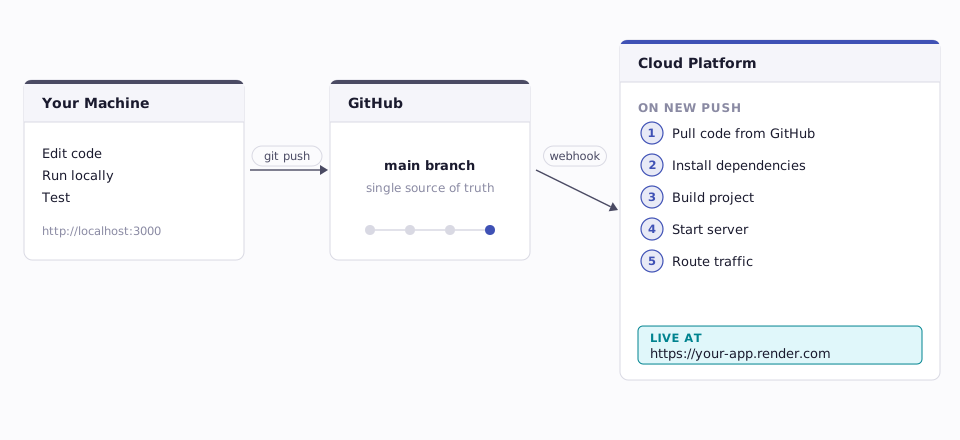
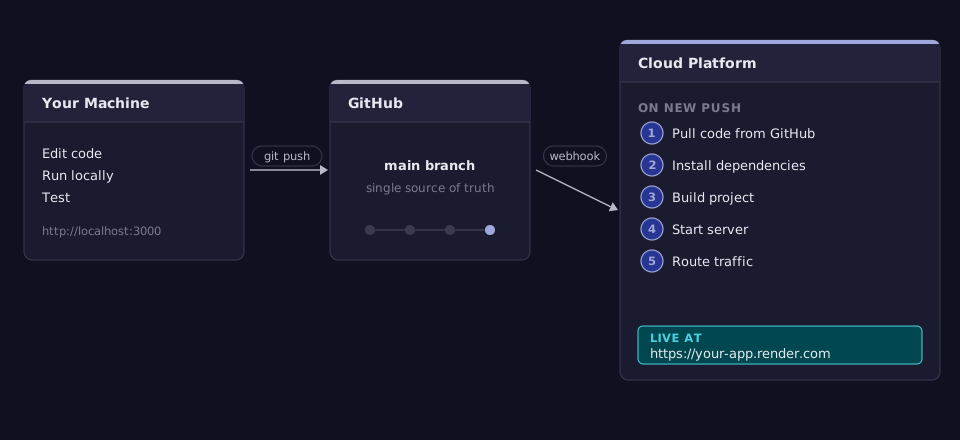
Here is what happens in each step:
- You push code to GitHub — Your repository is the single source of truth. The platform never looks at your laptop directly.
- The platform detects the change — Most PaaS platforms watch your repository. When you push to the configured branch (usually
main), they start a new deployment. - Install dependencies — The platform reads your
package.json(or equivalent) and installs all required packages. This is why declaring dependencies explicitly matters. - Build the project — If your project uses TypeScript, the platform compiles it to JavaScript. If you have a front-end build step, it runs that too.
- Start the server — The platform runs your start command (e.g.,
node dist/index.js) and waits for your application to bind to a port. - Route traffic — The platform assigns your application a URL and routes incoming HTTP requests to your running process.
3.3 Configuration Through Environment Variables
One critical detail in this pipeline: your application needs to know things like database connection strings, API keys, and which port to listen on. These values are different in every environment (your laptop, a teammate's laptop, production). Hardcoding them would break the pipeline.
The solution is environment variables — key-value pairs set outside your code that your application reads at runtime. We will cover these in detail in Section 6.
4 Platform Options
The cloud platform landscape is vast. This section provides an overview of the categories most relevant to deploying the kind of applications you will build in this course: a back-end API and a front-end web application, each with a managed database.
This is orientation, not a tutorial. You will follow platform-specific deployment guides when the time comes.
4.1 PaaS for Back-End APIs
These platforms run your server-side application (like an Express API). You push code, they handle the rest.
| Platform | Free Tier | Notes |
|---|---|---|
| Render | Yes (with limitations) | Popular for student projects. Auto-deploys from GitHub. Free tier services spin down after inactivity. |
| Railway | Trial credits | Usage-based pricing. Good developer experience. Includes built-in database hosting. |
| Fly.io | Yes (limited) | Deploys containers globally. More configuration required than Render/Railway. |
| Heroku | No (removed in 2022) | Pioneer of PaaS. Still widely referenced in tutorials but no longer offers a free tier. |
The free tier limitations are worth understanding. On Render's free tier, for example, your service "spins down" after 15 minutes of inactivity. The next request triggers a cold start that can take 30-60 seconds. This is fine for a course project but would be unacceptable for a production application serving real users.
4.2 Hosting for Front-End Applications
Front-end applications (like a Next.js app) have different hosting needs. They often consist of static files (HTML, CSS, JavaScript) that are served directly to the browser, plus server-side rendering for dynamic pages.
| Platform | Free Tier | Notes |
|---|---|---|
| Vercel | Yes | Built by the creators of Next.js. Excellent Next.js support. Generous free tier. |
| Netlify | Yes | Strong static site and serverless function support. Good for React/Vue/Svelte apps. |
| Render | Yes | Can host static sites and full-stack apps. Same platform as your API. |
Vercel and Netlify use a serverless model for dynamic functionality: instead of running a persistent server process, they execute your code in short-lived functions that spin up on demand. This is efficient for front-end applications that mostly serve static content with occasional server-side logic.
4.3 Managed Databases
Your application needs a database that is accessible from the cloud, not just from your laptop. Managed database providers handle backups, scaling, and uptime so you can focus on your schema and queries.
| Provider | Database | Free Tier | Notes |
|---|---|---|---|
| Supabase | PostgreSQL | Yes | Full Postgres with a REST API layer. Generous free tier (500 MB). |
| Neon | PostgreSQL | Yes | Serverless Postgres that scales to zero. Good for development. |
| Railway | PostgreSQL | Trial credits | Integrated with Railway's app hosting. Simple setup. |
| Render | PostgreSQL | Yes (90 days) | Convenient if your API is also on Render. Free databases expire. |
For this course, you will use PostgreSQL — the same database engine in development and production. This consistency prevents a category of bugs where queries work on one database engine but fail on another.
4.4 The Big Three: AWS, Azure, and Google Cloud
Amazon Web Services (AWS), Microsoft Azure, and Google Cloud Platform (GCP) dominate the cloud market. Together, they hold over 65% of global cloud infrastructure revenue (Synergy Research Group, 2024). They offer hundreds of services spanning compute, storage, networking, machine learning, and more.
These platforms are powerful but complex. Setting up a simple web application on AWS might involve EC2 (compute), RDS (database), S3 (file storage), CloudFront (CDN), IAM (permissions), and VPC (networking) — each with its own configuration surface. This is overkill for a course project and can overwhelm developers who are new to cloud concepts.
The PaaS platforms listed above (Render, Railway, Vercel) are built on top of the big three. Render, for instance, runs on AWS. When you deploy to Render, your code ultimately runs on AWS infrastructure — you just do not have to configure it yourself.
Understanding that these layers exist is valuable. You may work directly with AWS or Azure in future courses or jobs. For now, PaaS gives you the benefits of cloud deployment without the operational overhead.
5 What Happens When You Deploy
When you trigger a deployment (usually by pushing to main), a sequence of automated steps runs on the platform. Understanding these steps helps you diagnose problems when deployments fail — and they will fail.
5.1 The Build Step
The platform needs to transform your source code into something it can run. For a TypeScript project, this means:
- Install dependencies — The platform runs the equivalent of
npm install, reading yourpackage.jsonto know what packages are needed. - Compile TypeScript — If you have a build script (e.g.,
npm run buildthat callstsc), the platform runs it to produce JavaScript files. - Produce artifacts — The output is a
dist/orbuild/directory containing runnable JavaScript.
If the build step fails — maybe a dependency is missing from package.json, or there is a TypeScript compilation error — the deployment stops. The platform will show you the build logs, which look just like the output you would see running the same commands on your laptop.
5.2 The Start Command
After a successful build, the platform needs to know how to start your application. This is typically defined in your package.json:
The platform runs this command and waits for your application to begin listening on a port. This brings us to a critical detail: port binding.
5.3 Port Binding
On your laptop, you might hardcode app.listen(3000) and visit http://localhost:3000. In production, the platform assigns a port dynamically through an environment variable, typically called PORT.
Your application must read this variable and listen on whatever port the platform provides:
If your application ignores the PORT variable and always listens on 3000, the platform cannot route traffic to it, and your deployment will fail with a "health check" error.
5.4 Logs and Debugging in Production
When your application is running on someone else's server, you cannot open a debugger and set breakpoints. Your primary debugging tool is logs — text output that your application writes as it runs.
Every console.log() (or equivalent) in your code becomes a log entry on the platform. Most platforms provide a log viewer in their dashboard where you can see real-time output and search historical logs.
Effective production logging includes:
- Startup messages — "Server listening on port 8080" confirms your app started correctly
- Request logging — Middleware that logs each incoming request (method, path, status code, duration)
- Error details — When something fails, log enough context to diagnose the problem (but not so much that you leak sensitive data)
When a deployment fails or your app crashes in production, the logs are the first place you look. Developing a habit of writing meaningful log messages during development pays dividends when debugging production issues.
6 Environment Variables and Secrets
Environment variables are the standard mechanism for configuring applications across different environments. They are fundamental to cloud deployment, and mishandling them is one of the most common — and most dangerous — mistakes developers make.
6.1 Why You Never Commit API Keys
Consider what would happen if you pushed code like this to a public GitHub repository:
DATABASE_URL=postgresql://admin:s3cretP@ss@db.example.com:5432/myapp
API_KEY=sk-abc123-your-real-api-key
Automated bots continuously scan public repositories for patterns that look like API keys and database credentials. Within minutes of pushing a secret to GitHub, it can be discovered and exploited. The consequences range from unexpected bills (someone uses your API key to make thousands of requests) to data breaches (someone accesses your production database).
This is not hypothetical. In 2023, GitGuardian reported detecting over 12.8 million new secrets exposed in public GitHub repositories (GitGuardian, 2024). Companies have suffered significant breaches from accidentally committed credentials.
The rule is absolute: secrets never go in source code, and they never go in version control.
6.2 .env Files for Local Development
During local development, environment variables are typically stored in a .env file at the root of your project:
# .env — LOCAL DEVELOPMENT ONLY
# This file is in .gitignore and never committed

DATABASE_URL=postgresql://localhost:5432/myapp_dev
PORT=3000
API_KEY=your-development-api-key
CORS_ORIGIN=http://localhost:3001
Your application reads these values at startup. The .env file must be listed in your .gitignore so that git add never includes it:
When a teammate clones the repository, they create their own .env file with their own values. A .env.example file (which is committed) documents which variables are needed, without including real values:
# .env.example — commit this file
# Copy to .env and fill in your values

DATABASE_URL=postgresql://localhost:5432/your_db_name
PORT=3000
API_KEY=get-this-from-the-api-provider
CORS_ORIGIN=http://localhost:3001
6.3 Platform Configuration in Production
In production, there is no .env file. Instead, you set environment variables through the platform's dashboard or CLI. Each platform provides a configuration panel where you enter key-value pairs:
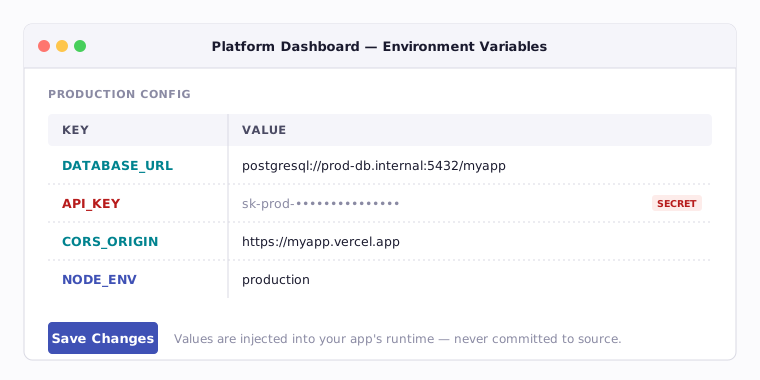
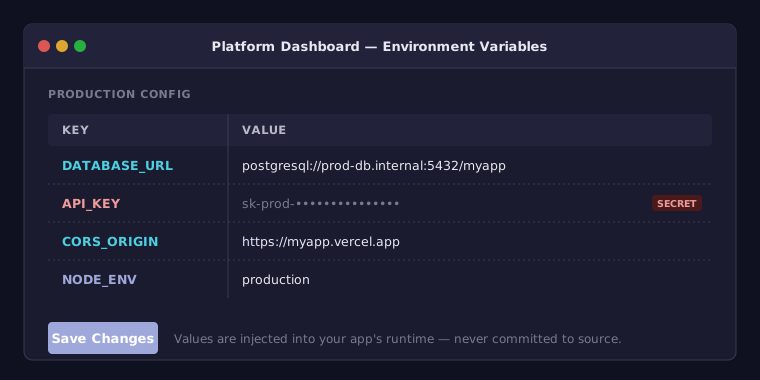
The platform injects these variables into your application's runtime environment. Your code reads them the same way regardless of whether they came from a .env file or the platform — the application does not know or care about the source.
This pattern — same code, different configuration — is a core principle of the Twelve-Factor App methodology, which has influenced how modern web applications are designed and deployed.
6.4 Common Environment Variables
These variables appear in nearly every web application deployment:
| Variable | Purpose | Example |
|---|---|---|
PORT |
Which port the server listens on | 8080 |
DATABASE_URL |
Connection string for the database | postgresql://user:pass@host:5432/db |
NODE_ENV |
Signals the runtime environment | production, development |
API_KEY |
Credentials for third-party services | sk-abc123... |
CORS_ORIGIN |
Allowed origins for cross-origin requests | https://myapp.vercel.app |
JWT_SECRET |
Secret key for signing authentication tokens | a-long-random-string |
The NODE_ENV variable deserves special mention. When set to production, many libraries and frameworks change their behavior: they serve minified assets, disable verbose error messages, enable caching, and optimize performance. Setting NODE_ENV=production in your deployment configuration is one of the simplest optimizations you can make.
7 The Production Mindset
Running code on your laptop is forgiving. The only user is you, the network is fast, and security does not matter because nothing is exposed to the internet. Production is different in every dimension.
Developing a "production mindset" means thinking about security, reliability, and correctness from the start — not as an afterthought.
7.1 HTTPS Everywhere
HTTP transmits data in plain text. Anyone between the client and server — an ISP, a coffee shop WiFi operator, a government — can read the contents of HTTP traffic. HTTPS encrypts the connection using TLS (Transport Layer Security), making the data unreadable to intermediaries.
In development, you use http://localhost:3000 and that is fine — there is no network to eavesdrop on. In production, HTTPS is non-negotiable. Every platform listed in Section 4 provides HTTPS automatically through free TLS certificates (typically from Let's Encrypt), so this is not something you configure manually. But you do need to understand why it matters:
- Passwords and tokens sent over HTTP can be intercepted
- API keys in request headers are visible to network observers
- User data in request and response bodies is exposed
- Modern browsers mark HTTP sites as "Not Secure," eroding user trust
Most browsers and many APIs refuse to work over plain HTTP entirely. HTTPS is not a nice-to-have — it is the baseline.
7.2 CORS Configuration
CORS (Cross-Origin Resource Sharing) is a browser security mechanism that controls which websites can make requests to your API. If your front-end is hosted at https://myapp.vercel.app and your API is at https://myapi.render.com, the browser will block requests from the front-end to the API unless the API explicitly allows it.
In development, everything runs on localhost, so CORS rarely causes problems. In production, your front-end and back-end are on different domains, and CORS configuration becomes essential.
The concept is straightforward: your API responds with headers that tell the browser "requests from this origin are allowed." The details — preflight requests, allowed methods, credentials handling — are covered in your Web API guides. The key point for the production mindset is this: CORS errors are deployment-time problems, not code bugs. They happen because your production configuration does not match your deployment architecture.
A common mistake is setting the CORS origin to * (allow all origins) to "fix" the problem. This works but defeats the purpose of CORS. In production, specify the exact origin of your front-end:
7.3 Error Handling That Doesn't Leak Internals
When your application encounters an error during development, detailed error messages are helpful. You want to see the stack trace, the database query that failed, and the line number where the exception occurred.
In production, that same information is a security risk. A detailed error message might reveal:
- Database table and column names — helping an attacker understand your data model
- File paths — revealing your server's directory structure
- Library versions — identifying known vulnerabilities to exploit
- SQL queries — enabling SQL injection attacks
The production approach to error handling follows a principle: log everything internally, reveal nothing externally.
| Environment | What the User Sees | What the Logs Contain |
|---|---|---|
| Development | Full stack trace, query details, file paths | Same as what the user sees |
| Production | "Something went wrong. Please try again." | Full stack trace, query details, request context, timestamps |
Your code should detect the environment (using NODE_ENV) and adjust error responses accordingly. In production, return a generic error message to the client while logging the full details to the platform's log system where only your team can access them.
7.4 Health Checks and Uptime
Cloud platforms need to know whether your application is running correctly. They do this through health checks — periodic requests to a specific endpoint (often /health or /) that expect a successful response.
If the health check fails repeatedly, the platform takes action: it might restart your application, mark it as unhealthy, or stop routing traffic to it. Understanding this mechanism is important because:
- A slow startup can cause health check failures before your app is ready
- An unhandled exception that crashes your process will trigger a restart cycle
- A database connection failure might make your app responsive but functionally broken
Building a health check endpoint that verifies your application's critical dependencies (database connection, external services) gives you and the platform confidence that your application is genuinely working, not just running.
7.5 Protecting the Main Branch
If your platform deploys automatically when you push to main, then every commit to main is a production release. Think about what that means: a typo in a database query, a missing environment variable check, or a half-finished feature pushed at 11 PM — all of these go live immediately. Your users see the breakage before you do.
This is Not a Desktop App
If you have built desktop or mobile applications before, deployment feels very different there. When you release a new version of a desktop app, users have to download an update, run an installer, or at least restart the application. There is a buffer between "developer ships code" and "user runs code." You can even pull a bad release before most users see it.
Web applications have no such buffer. The moment your code merges into main and the platform finishes building, it is live. The next HTTP request that hits your server runs the new code. There is no update prompt, no download, no "install later" button. Every user, every API consumer, every partner team building against your endpoints — they are all running your latest push, whether it works or not.
This is why professional teams never push directly to main. Instead, they use a workflow that puts guardrails between code changes and production:
- Create a branch — All new work happens on a feature or fix branch, not on
main. - Open a pull request — When the work is ready, you propose merging it into
mainthrough a pull request (PR). This creates a review checkpoint. - Run automated checks — CI (Continuous Integration) runs your test suite, linter, and build step against the proposed changes. If any check fails, the merge is blocked.
- Get a review — A teammate reads the changes and approves, catches issues, or requests modifications.
- Merge — Only after checks pass and the review is approved does the code enter
main— and only then does it deploy.
GitHub provides branch protection rules that enforce this workflow. You can require that pull requests pass status checks before merging, that at least one reviewer approves, and that the branch is up to date with main. With these rules in place, it becomes physically impossible to push a commit directly to main — GitHub will reject it.
In this course, your group's API auto-deploys from main. If a teammate pushes broken code directly to main at midnight, your team's live API goes down — and any team building a front-end against it discovers the breakage in the morning. Branch protection is not bureaucracy. It is the difference between a minor inconvenience ("my PR needs a fix") and a production outage that affects other teams.
Some platforms offer a second deployment pipeline on paid tiers. You can configure a dev or staging branch to auto-deploy to a separate URL — for example, dev-myapi.render.com alongside your production myapi.render.com. This lets your team test changes in a real cloud environment (with real environment variables, real database connections, real HTTPS) without touching production. When you are confident the staging build works, you merge dev into main and production updates. This two-pipeline setup is common in industry and eliminates the "it worked on my laptop" gap without risking your live application.
The Real Cost of Skipping Protection
In industry, pushing directly to main without review has caused outages at companies of every size. The few minutes saved by skipping a pull request are never worth the hours spent debugging a production failure, rolling back changes, and rebuilding trust with users or partner teams.
7.6 API Versioning
When your API is deployed and other applications depend on it, you cannot simply change your endpoints and expect everything to keep working. A front-end application, a mobile client, or a partner team's service may all be making requests to your API right now. If you rename a route, change a response shape, or remove a field, every one of those consumers breaks — instantly, in production, with no warning.
This is why production APIs use versioned routes. Instead of mounting your endpoints at the root:
You prefix them with a version number from the very beginning:
Start with /v1 even if you have no plans for a v2. This is not premature optimization — it is building the route structure with a growth mindset. Adding a version prefix later means changing every endpoint path, which means every consumer has to update their code simultaneously. Starting with /v1 from day one costs nothing and gives you room to evolve.
When the time does come for breaking changes — a new response format, a restructured resource, a different authentication scheme — you introduce /v2 alongside /v1:
GET /v1/books        ← still works, same behavior as always
GET /v1/books/:id

GET /v2/books        ← new response format, new fields
GET /v2/books/:id
Both versions run in the same deployed application. Consumers on v1 continue working without any changes. New consumers or updated clients use v2. Over time, as all consumers migrate, you can deprecate and eventually remove v1 — but that timeline is months, not days. Forcing an immediate migration on your consumers is a fast way to lose their trust.
Not every change warrants a new version. Bug fixes, performance improvements, and adding new fields to a response are all changes that existing clients can absorb without breaking. A new version is only necessary for breaking changes — changes that would cause existing client code to fail. Renaming a field, removing an endpoint, changing a response structure, or altering authentication requirements are breaking. Fixing a bug in how a query filters results is not. If a consumer's working code would continue to work after your change, it belongs in v1.
Versioning in This Course
In the group project, your API will serve consumers you do not control — another team is building a front-end against your endpoints. If you push a breaking change to your API without versioning, their application stops working and they have no way to fix it until you do. Versioned routes give you the freedom to improve your API without breaking the people who depend on it.
8 Summary
| Concept | Key Point |
|---|---|
| Cloud computing | Using someone else's computers on demand; defined by five NIST characteristics |
| IaaS / PaaS / SaaS | Spectrum from raw virtual machines (IaaS) to managed platforms (PaaS) to finished products (SaaS) |
| PaaS for web apps | Platforms like Render, Railway, and Vercel handle infrastructure so you focus on code |
| Deployment pipeline | Push to GitHub, platform builds, installs dependencies, starts your server, routes traffic |
| Port binding | Your app must read the PORT environment variable; do not hardcode port numbers |
| Environment variables | Configuration that lives outside your code; different values per environment |
.env files |
Local development configuration; never committed to version control |
| Secrets management | API keys and database passwords never go in source code; use platform configuration |
| HTTPS | Encrypts data in transit; non-negotiable in production; provided free by platforms |
| CORS | Browser security that controls cross-origin requests; must match your deployment architecture |
| Production error handling | Log full details internally; show generic messages to users |
| Health checks | Platform verifies your app is running; build endpoints that check critical dependencies |
| Branch protection | Never push directly to main; use branches, PRs, and CI checks to gate production deployments |
| API versioning | Start with /v1 from day one; run versions side-by-side so consumers migrate on their own timeline |
9 References
This reading draws from the following sources:
Standards & Definitions:
- Mell, P. & Grance, T. (2011). The NIST Definition of Cloud Computing (SP 800-145). National Institute of Standards and Technology.
Industry Reports:
- Synergy Research Group. (2024). Cloud Infrastructure Revenues Hit $80 Billion in Q4 2024. Synergy Research Group.
- GitGuardian. (2024). State of Secrets Sprawl 2024. GitGuardian.
Technical Documentation:
- Twelve-Factor App — Config. Heroku/Adam Wiggins.
- Render Documentation. Render.
- Vercel Documentation. Vercel.
- Railway Documentation. Railway.
- Let's Encrypt — How It Works. Internet Security Research Group.
Web Standards:
- MDN Web Docs — CORS. Mozilla.
- MDN Web Docs — HTTPS. Mozilla.
10 Further Reading
External Resources
- The Twelve-Factor App — Methodology for building modern, deployable web applications. Written by Heroku co-founder Adam Wiggins. Especially relevant: factors III (Config), V (Build/Release/Run), and XI (Logs).
- How Render Works — Platform documentation explaining the build and deploy pipeline from the perspective of the platform you will use in this course.
- NIST Cloud Computing Reference Architecture (SP 500-292) — The full NIST reference architecture for cloud computing, beyond the definition cited in this reading.
- Cloudflare — What is Cloud Computing? — Accessible overview with good diagrams covering the same IaaS/PaaS/SaaS distinctions discussed here.
- GitHub — Removing Sensitive Data from a Repository — What to do if you accidentally commit a secret. Important to know before it happens.
This reading is part of TCSS 460 — Client/Server Programming, School of Engineering and Technology, University of Washington Tacoma.