HTTP & the Web
TCSS 460 — Client/Server Programming
Every time you visit a web page, submit a form, or scroll through a social media feed, your browser and a server are having a conversation in HTTP. This reading breaks down that conversation — the protocol itself, the structure of its messages, and the design decisions that shaped the modern web. By the end, you will be able to read raw HTTP traffic and understand exactly what is happening between client and server.
1 What is HTTP?
HTTP — Hypertext Transfer Protocol — is the application-layer protocol that powers the World Wide Web. It defines how clients (usually browsers) request resources from servers and how servers respond.
Three properties define HTTP and distinguish it from other communication protocols:
-
Text-based. HTTP messages are human-readable text, not binary data. You can literally read a raw HTTP request and understand what it says. This was a deliberate design choice by Tim Berners-Lee to keep the protocol simple and debuggable.
-
Stateless. Each request-response pair is completely independent. The server does not remember anything about previous requests. If you send two requests one second apart, the server treats the second one as if it has never seen you before.
-
Request-response. Communication always follows the same pattern: the client sends a request, the server sends back a response. The server never initiates contact unprompted.
Imagine a restaurant where the entire staff has amnesia. Every time you walk in, nobody recognizes you. You cannot say "I'll have my usual" — you have to give your full order, show your ID to prove you are old enough for a drink, and pay from scratch. That is HTTP. Every request is a fresh visit to the amnesia restaurant. The server does not remember your last order, your name, or anything about you.
Of course, real restaurants do remember regulars — and real web applications need to remember users too. The workaround is giving you a loyalty card (in HTTP terms, a token) that encodes who you are. You flash the card on every visit, and the staff can look you up. We will cover tokens and authentication in Week 5.
1.1 A Brief History
Tim Berners-Lee designed HTTP in 1989 while working at CERN, alongside HTML and URLs, as the three pillars of the World Wide Web (Berners-Lee, 1989). The original version — HTTP/0.9 — was absurdly simple: the entire protocol was a single command (GET /path), and the server responded with an HTML document. No headers, no status codes, no metadata. The whole spec could fit on a napkin. Berners-Lee deliberately chose simplicity over power, betting that a protocol anyone could understand would spread faster than a sophisticated one — and he was right.
HTTP has evolved significantly since then, but each version built on the same core request-response model.
| Version | Year | Key Changes |
|---|---|---|
| HTTP/0.9 | 1991 | One-line protocol. GET only, no headers, HTML responses only (Berners-Lee, 1991) |
| HTTP/1.0 | 1996 | Added headers, status codes, POST method, content types. Each request required a new TCP connection (RFC 1945) |
| HTTP/1.1 | 1997 | Persistent connections (keep-alive), chunked transfer, Host header (virtual hosting), caching improvements (RFC 2616) |
| HTTP/2 | 2015 | Binary framing, multiplexing (multiple requests over one connection), header compression, server push (RFC 7540) |
| HTTP/3 | 2022 | Runs over QUIC (UDP-based) instead of TCP. Faster connection setup, better performance on lossy networks (RFC 9114) |
For this course, we focus on HTTP/1.1 semantics — the methods, headers, and status codes you will use every day. These semantics are the same across HTTP/2 and HTTP/3; only the transport mechanism changes. Understanding HTTP/1.1 means you understand all of them at the application level.
1.2 Where HTTP Fits
If you read the Networking Fundamentals reading, you know that HTTP sits at the application layer of the TCP/IP stack. It relies on TCP (or QUIC in HTTP/3) for reliable delivery, which in turn relies on IP for routing.
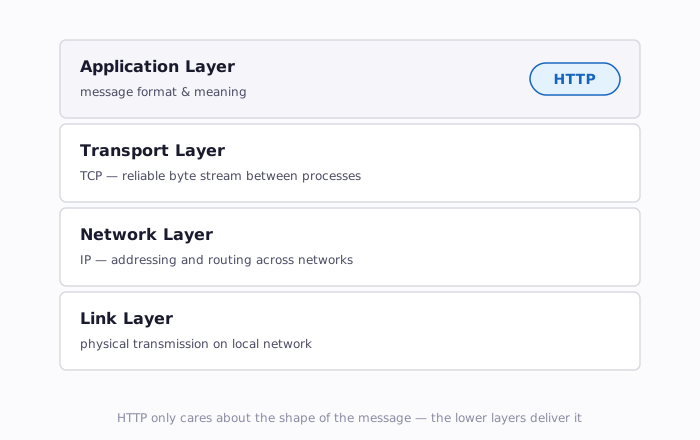
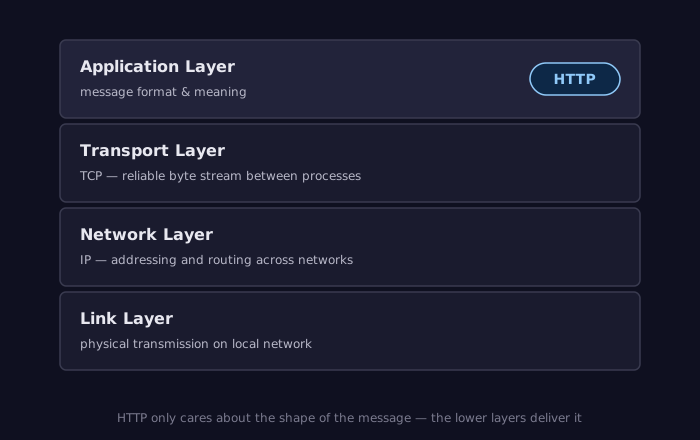
HTTP does not care how packets get from point A to point B. It only cares about the format and meaning of the messages themselves.
2 Anatomy of an HTTP Request
When your browser navigates to a URL, it constructs an HTTP request message and sends it to the server. That message has a precise structure.
2.1 The Raw Request
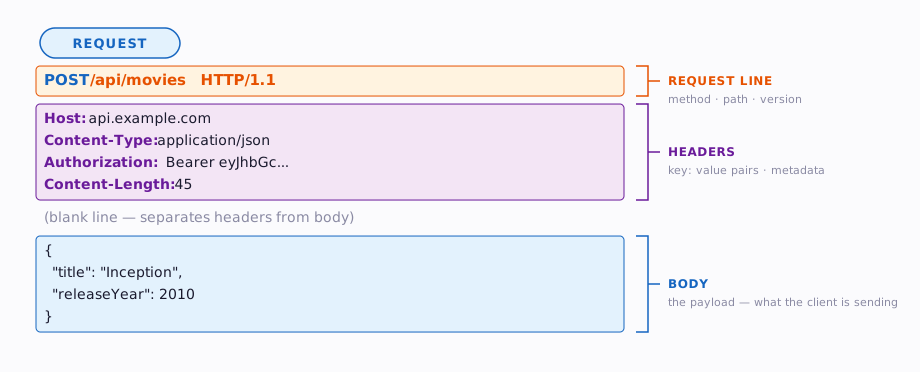
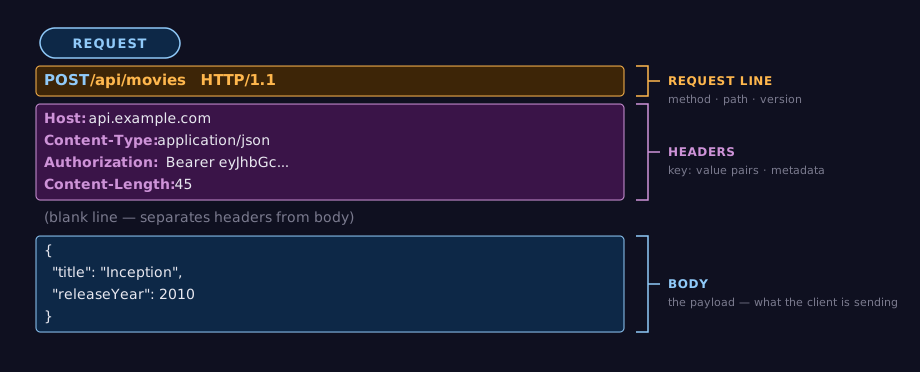
Here is what an actual HTTP request looks like on the wire — plain text, line by line:
That is it. Four lines of text. Let's break it down.
2.2 The Request Line
The first line is the request line and contains three pieces of information:
| Component | Purpose | Example |
|---|---|---|
| Method | What action to perform | GET |
| Path | Which resource to act on | /api/movies/550 |
| HTTP Version | Which version of the protocol | HTTP/1.1 |
The Java analogy: a method call like movieService.getMovie(550) maps directly to GET /api/movies/550. The method name is the HTTP method, the object and method are the path, and the argument is embedded in the URL.
2.3 Request Headers
After the request line come headers — key-value pairs that provide metadata about the request. Each header is on its own line, formatted as Name: Value.
Host: api.example.com
Accept: application/json
User-Agent: Mozilla/5.0
Authorization: Bearer eyJhbGciOiJIUzI1NiJ9...
Content-Type: application/json
Headers tell the server things like:
- Where the request is going (
Host) - What format the client wants back (
Accept) - Who is making the request (
User-Agent,Authorization) - What format the request body is in (
Content-Type)
You can think of headers as the metadata envelope around a letter. The letter itself is the body, but the envelope tells the postal service where it is going and where it came from.
2.4 Request Body
Some requests include a body — the actual data being sent to the server. GET requests typically have no body. POST, PUT, and PATCH requests usually do.
A blank line separates headers from the body:
POST /api/movies HTTP/1.1
Host: api.example.com
Content-Type: application/json
Content-Length: 45

{"title": "Inception", "releaseYear": 2010}
The blank line after Content-Length: 45 is not optional — it is how HTTP knows where headers end and the body begins.
2.5 Putting It All Together
Every HTTP request follows this structure:
3 Anatomy of an HTTP Response
The server receives the request, processes it, and sends back a response. Responses follow a structure that mirrors requests.
3.1 The Raw Response
HTTP/1.1 200 OK
Content-Type: application/json
Content-Length: 82
Date: Mon, 31 Mar 2026 18:00:00 GMT

{"id": 550, "title": "Fight Club", "releaseYear": 1999, "rating": 8.4}
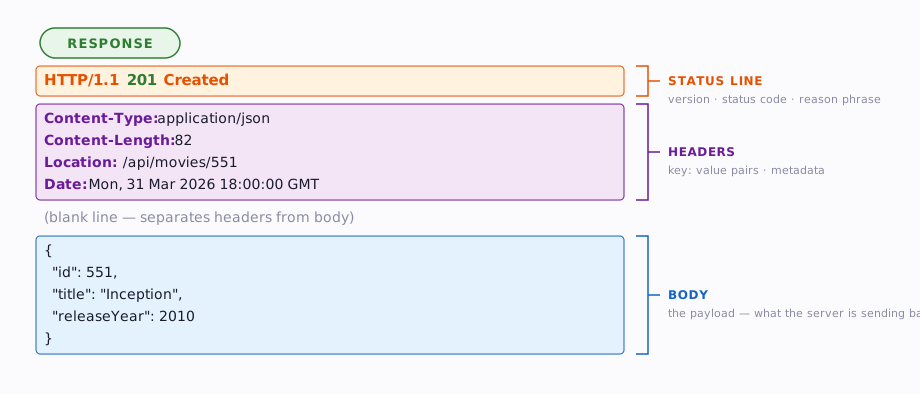
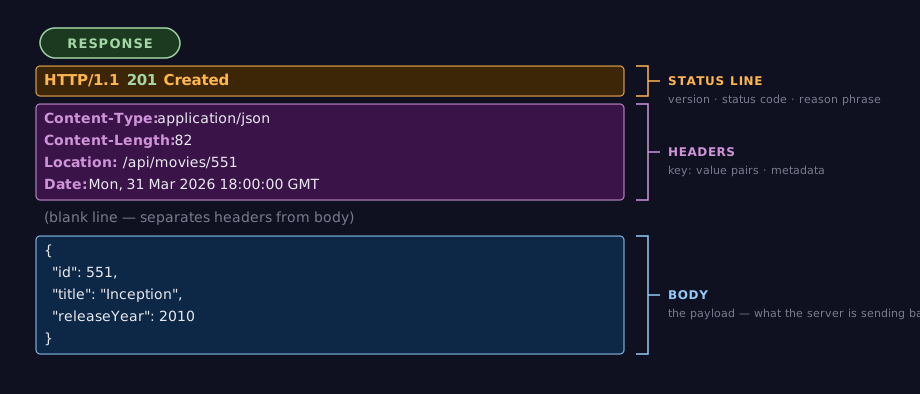
3.2 The Status Line
The first line of the response is the status line:
| Component | Purpose | Example |
|---|---|---|
| HTTP Version | Protocol version | HTTP/1.1 |
| Status Code | Numeric result code | 200 |
| Reason Phrase | Human-readable explanation | OK |
The status code is the most important part. It tells the client immediately whether the request succeeded, failed, or requires further action. We will cover status codes in detail in Section 5.
3.3 Response Headers
Response headers follow the same Name: Value format as request headers, but provide information about the response:
Content-Type: application/json
Content-Length: 82
Date: Mon, 31 Mar 2026 18:00:00 GMT
Cache-Control: max-age=3600
3.4 Content-Type: What Is the Server Sending Back?
The Content-Type header is critically important — it tells the client how to interpret the body. Without it, the client is looking at a stream of bytes with no idea what they mean.
| Content-Type | Meaning | Example |
|---|---|---|
application/json |
JSON data | API responses |
text/html |
HTML document | Web pages |
text/plain |
Plain text | Simple text responses |
text/css |
CSS stylesheet | Stylesheets |
image/png |
PNG image | Images |
application/octet-stream |
Raw binary data | File downloads |
In this course, nearly every API response will use application/json. When you build a front-end, the server will also respond with text/html.
3.5 Response Body
Like requests, the body comes after a blank line. For a JSON API, the body is a JSON object or array:
JSON is Not a JavaScript Object
Notice that every key is wrapped in double quotes: "id", "title", "releaseYear". This is JSON (JavaScript Object Notation) — a strict data interchange format. In a JavaScript object literal, you can write bare keys like { id: 550 }, but JSON requires { "id": 550 }. When your API sends and receives data, it is always JSON with quoted keys.
Not all responses have a body. A 204 No Content response, for example, intentionally returns no body — it confirms the action succeeded but has nothing to send back.
Putting every piece of a response together:
4 HTTP Methods
HTTP defines a set of methods (sometimes called "verbs") that indicate the desired action on a resource. You will use five of them constantly.
4.1 The Five Methods You Need
| Method | Purpose | Has Body? | Example |
|---|---|---|---|
| GET | Retrieve a resource | No | GET /api/movies/550 |
| POST | Create a new resource | Yes | POST /api/movies |
| PUT | Replace an entire resource | Yes | PUT /api/movies/550 |
| PATCH | Partially update a resource | Yes | PATCH /api/movies/550 |
| DELETE | Remove a resource | Rarely | DELETE /api/movies/550 |
Imagine a HashMap<Integer, Movie> that already contains movie 550:
GET /api/movies/550is likemap.get(550)— retrieves the moviePOST /api/moviesis likemap.put(nextId++, newMovie)— adds a new entryPUT /api/movies/550is likemap.put(550, entirelyNewMovie)— replaces the whole objectPATCH /api/movies/550is likemap.get(550).setRating(8.5)— updates specific fieldsDELETE /api/movies/550is likemap.remove(550)— removes the entry
4.2 Safe vs. Unsafe
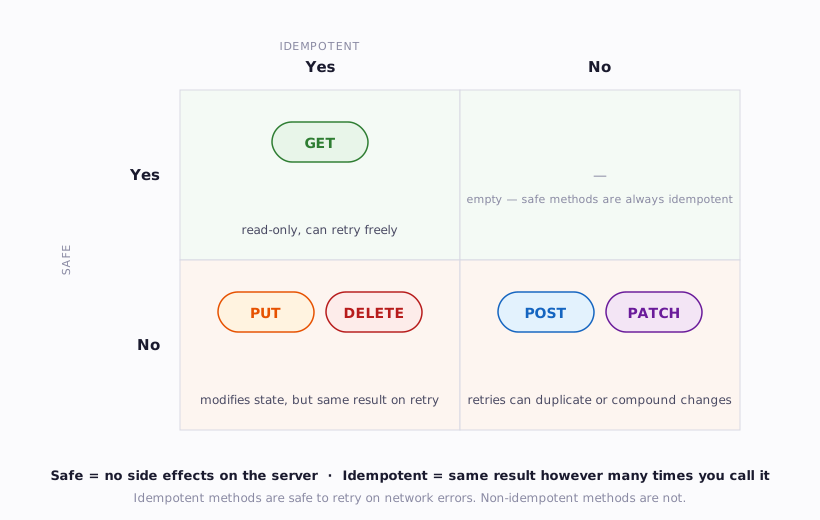
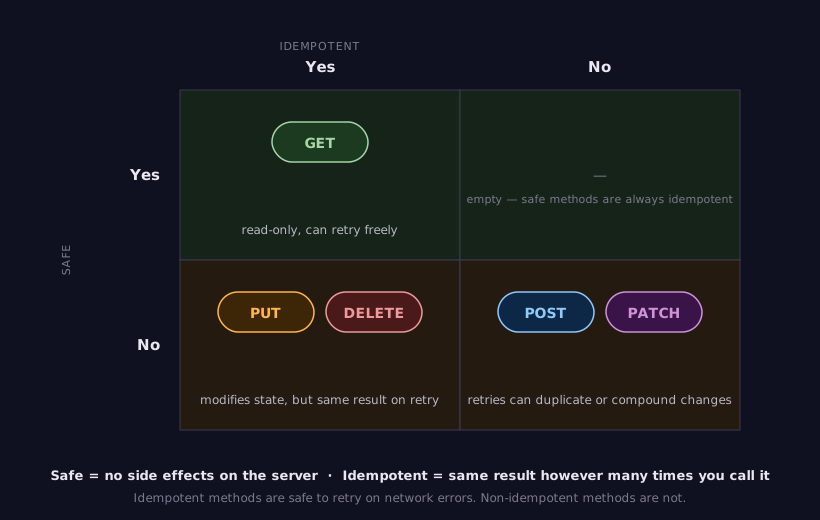
A method is safe if it does not modify server state. Calling it one time or one hundred times produces no side effects on the server.
| Safe | Unsafe |
|---|---|
| GET | POST, PUT, PATCH, DELETE |
GET is safe — retrieving a movie listing should never create, modify, or delete anything. POST is unsafe — submitting a new review changes the database.
Why does this matter? Browsers and caches treat safe methods differently. A browser will freely retry a failed GET request, but it will prompt you before resubmitting a POST form ("Are you sure you want to resubmit?"). Search engine crawlers only follow GET links — if your delete endpoint used GET, a crawler could accidentally delete your data.
4.3 Idempotent vs. Non-Idempotent
A method is idempotent (pronounced eye-dem-POH-tent) if calling it multiple times produces the same result as calling it once. The server state after N identical calls is the same as after one call.
| Idempotent | Not Idempotent |
|---|---|
| GET, PUT, DELETE | POST, PATCH |
DELETE /api/movies/550— the first call deletes the movie. The second call finds nothing to delete. Either way, the movie is gone. Same end state.PUT /api/movies/550with a complete movie object — whether you send it once or five times, the movie looks the same afterward.POST /api/movies— each call creates a new movie. Five calls create five movies. Not idempotent.
Idempotency matters for reliability. If a network glitch means the client is not sure whether a PUT request went through, it can safely retry. Retrying a POST could create duplicate records.
The two properties combine into a 2×2 matrix that places every HTTP method:
PATCH: It Depends
PATCH is technically non-idempotent because the specification allows operations like "increment the view count by 1" — repeated calls would keep incrementing. In practice, most PATCH requests set specific field values (e.g., {"rating": 8.5}) and behave idempotently. The RFC classifies it as non-idempotent to cover the general case (RFC 5789).
4.4 Mapping to CRUD
Most applications do four things with data: create new records, read existing ones, update them, and delete them. Developers abbreviate these four operations as CRUD — Create, Read, Update, Delete. You will hear this term constantly in web development.
HTTP methods map directly to CRUD operations:
| CRUD Operation | HTTP Method | SQL Equivalent | Example |
|---|---|---|---|
| Create | POST | INSERT |
Add a new movie |
| Read | GET | SELECT |
Retrieve a movie |
| Update | PUT / PATCH | UPDATE |
Change a movie's rating |
| Delete | DELETE | DELETE |
Remove a movie |
This mapping is not a formal specification — it is a widely-adopted convention. You will see it everywhere in REST API design, and we will follow it in this course. When someone says "build a CRUD API for movies," they mean: create endpoints that let clients create, read, update, and delete movies using the corresponding HTTP methods.
5 Status Codes
Every HTTP response includes a three-digit status code that tells the client what happened. Status codes are grouped into five categories by their first digit.
5.1 The Five Categories
| Range | Category | Meaning |
|---|---|---|
| 1xx | Informational | Request received, still processing |
| 2xx | Success | Request succeeded |
| 3xx | Redirection | Client needs to take additional action |
| 4xx | Client Error | The request was invalid |
| 5xx | Server Error | The server failed to process a valid request |
The most useful heuristic: 2xx = you did it right, 4xx = you did something wrong, 5xx = the server broke.
5.2 The Ones You Will See Daily
You do not need to memorize all 60+ status codes. Here are the ones you will encounter in nearly every project:
5.2.1 Success (2xx)
| Code | Name | When to Use |
|---|---|---|
| 200 | OK | Request succeeded. The standard success response. |
| 201 | Created | A new resource was created (typically after POST). |
| 204 | No Content | Success, but nothing to return (typically after DELETE). |
5.2.2 Redirection (3xx)
| Code | Name | When to Use |
|---|---|---|
| 301 | Moved Permanently | Resource has a new permanent URL. |
| 304 | Not Modified | Cached version is still valid — no need to re-download. |
You will not use 3xx codes directly in your API very often, but your browser handles them automatically behind the scenes.
5.2.3 Client Error (4xx)
| Code | Name | When to Use |
|---|---|---|
| 400 | Bad Request | The request body or parameters are malformed or invalid. |
| 401 | Unauthorized | Authentication required — the client did not provide valid credentials. |
| 403 | Forbidden | Authenticated, but not authorized. You know who they are, but they cannot do this. |
| 404 | Not Found | The requested resource does not exist. |
| 409 | Conflict | The request conflicts with current state (e.g., duplicate email). |
The distinction between 401 and 403 trips up many developers:
- 401: "I don't know who you are. Please log in." (Missing or invalid token.)
- 403: "I know who you are, but you can't do that." (Valid token, insufficient permissions.)
5.2.4 Server Error (5xx)
| Code | Name | When to Use |
|---|---|---|
| 500 | Internal Server Error | Something unexpected went wrong on the server. |
| 502 | Bad Gateway | The server got an invalid response from an upstream server. |
| 503 | Service Unavailable | The server is temporarily overloaded or under maintenance. |
If your API returns a 500, it means you have a bug. A 500 in production should always trigger investigation.
You Will See 500s During Development
Every developer sees 500 errors while building an API. It is normal. Here are the most common causes you will encounter in this course:
- Bad SQL or Prisma query — a typo in a query, referencing a column that does not exist, or a constraint violation the code did not anticipate
- Unhandled null/undefined — trying to access a property on something that does not exist (e.g.,
user.namewhenuserisnull) - Async handler crash — an
awaitcall that rejects and is not caught, crashing the route handler - Missing environment variable — the code reads
process.env.DATABASE_URLbut the.envfile is missing or incomplete
When you see a 500, check your server's terminal output. The error message and stack trace are printed there, not in the browser or Postman. The server logs are always your first stop.
5.3 Choosing the Right Status Code
When you build an API, choosing the right status code is a form of communication. A well-chosen status code tells the client exactly what happened without needing to parse the response body. A lazy approach — returning 200 for everything and putting error details in the body — forces every client to add custom error-parsing logic.
Request:  GET /api/movies/99999
Response: 404 Not Found

  vs.

Request:  GET /api/movies/99999
Response: 200 OK
          {"error": true, "message": "Movie not found"}
The first approach lets any HTTP client (browser, library, tool) detect the error automatically. The second looks like a success to every generic tool.
6 Headers You Should Know
HTTP defines dozens of standard headers. You will work with a handful of them regularly.
6.1 Content-Type
Specifies the media type of the request or response body.
When your API client sends JSON in a POST request, it must set Content-Type: application/json so the server knows how to parse the body. Forgetting this header is one of the most common debugging headaches for beginners — the server receives the body but treats it as plain text instead of parsing it as JSON.
6.2 Accept
Tells the server what response format the client prefers.
This is the client saying "I want JSON back, please." A well-built API checks this header and can return different formats (JSON, XML, HTML) based on what the client requests. This mechanism is called content negotiation.
6.3 Authorization
Carries authentication credentials — usually a token.
The Bearer scheme means "here is a token that proves who I am." We will cover tokens and authentication in detail during Week 5. For now, know that this is how clients prove their identity on every request (remember — HTTP is stateless, so the server does not remember you between requests).
6.4 CORS Headers
CORS — Cross-Origin Resource Sharing — is a browser security mechanism that restricts which websites can make requests to your API.
When a front-end at https://myapp.com tries to call an API at https://api.example.com, the browser blocks the request by default. The API must explicitly opt in by sending CORS headers:
Access-Control-Allow-Origin: https://myapp.com
Access-Control-Allow-Methods: GET, POST, PUT, DELETE
Access-Control-Allow-Headers: Content-Type, Authorization
| Header | Purpose |
|---|---|
Access-Control-Allow-Origin |
Which origins (domains) can call this API |
Access-Control-Allow-Methods |
Which HTTP methods are allowed |
Access-Control-Allow-Headers |
Which request headers are allowed |
CORS errors are the single most common frustration for students building their first full-stack application. The error shows up in the browser console, not in the server logs, which makes it confusing. The fix is always on the server side — the server must send the appropriate CORS headers.
CORS is a Browser Feature
CORS is enforced by browsers only. Tools like Postman, Thunder Client, and curl do not enforce CORS at all. This means your API can work perfectly in Postman and break immediately when called from a web page. If your browser console shows a CORS error, check your server configuration — the browser is doing its job correctly.
7 Statelessness and What It Means
HTTP's most important design property is also its most counterintuitive: every request is independent. The server does not remember anything about previous requests from the same client.
7.1 What Stateless Really Means
Consider this sequence of requests:
Request 1:  POST /api/auth/login   (username, password)
Response 1: 200 OK                 (here's your token)

Request 2:  GET /api/movies/favorites
Response 2: ???
In a stateful protocol, the server would remember that you just logged in and let you access your favorites. In HTTP, Request 2 has no connection to Request 1. Unless Request 2 includes proof of authentication (like a token in the Authorization header), the server has no idea who is asking.
This is a stark contrast to how objects work in Java. When you call methods on an object, the object retains its internal state between calls:
// Java: stateful object
ShoppingCart cart = new ShoppingCart();
cart.addItem("Movie A");   // cart remembers this
cart.addItem("Movie B");   // cart still has Movie A
cart.checkout();            // cart knows both items
HTTP does not work like this. Each request is like calling a static method with no shared instance variable — all context must be passed explicitly every time.
7.2 Why Statelessness?
Statelessness is not a limitation — it is a deliberate architectural decision with real benefits:
-
Scalability. Any server can handle any request. There is no need to route a user to the same server every time, because no server remembers them anyway. This allows load balancers to distribute traffic freely.
-
Reliability. If a server crashes, another can take over seamlessly. No session data is lost because no session data exists on the server.
-
Simplicity. Servers do not need to manage per-user state, eliminating an entire category of bugs related to session synchronization.
7.3 Working Around Statelessness
Of course, real applications need state. Users need to stay logged in. Shopping carts need to persist. Two mechanisms bridge the gap:
Tokens (the approach we use in this course):
- Client authenticates once (sends username/password).
- Server returns a signed token — a string that encodes the user's identity and permissions.
- Client sends that token with every subsequent request in the
Authorizationheader. - Server validates the token to identify the user — it does not "remember" them; it re-identifies them each time.
Server-side sessions (the traditional approach):
- Client authenticates once.
- Server creates a session — a data structure stored in server memory or a database, keyed by a random session ID.
- Server sends the session ID back as a cookie.
- Client automatically sends the cookie with every subsequent request.
- Server looks up the session ID to find the user's state.
Both approaches work around HTTP's statelessness. Tokens push the state to the client (the token carries identity information). Sessions push the state to the server (the server stores session data). In this course, we use tokens (specifically JWTs) because they align better with modern API architecture.
8 URLs, Paths, and Query Strings
Every HTTP request targets a specific URL — Uniform Resource Locator. Understanding URL structure is essential for building and consuming APIs.
8.1 Anatomy of a URL
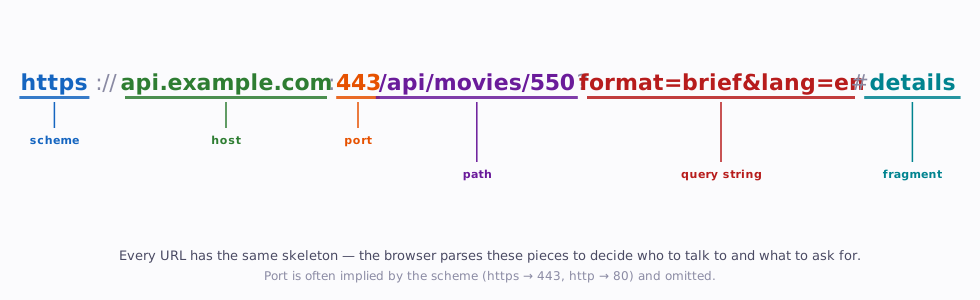
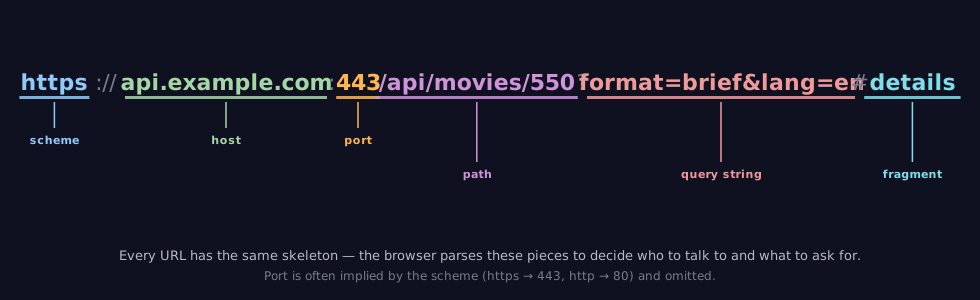
| Component | Purpose | Example |
|---|---|---|
| Scheme | Protocol to use | https |
| Host | Server to connect to | api.example.com |
| Port | Network port (optional — defaults to 443 for HTTPS, 80 for HTTP) | 443 |
| Path | Which resource on the server | /api/movies/550 |
| Query String | Additional parameters | ?format=brief&lang=en |
| Fragment | Client-side anchor (never sent to the server) | #details |
Fragments Stay Local
The fragment (#details) is handled entirely by the browser. It is never sent to the server. This is important to know because it means the server never sees fragment identifiers — they are purely a client-side navigation mechanism.
8.2 Path Parameters
Path parameters are embedded directly in the URL path. They identify a specific resource:
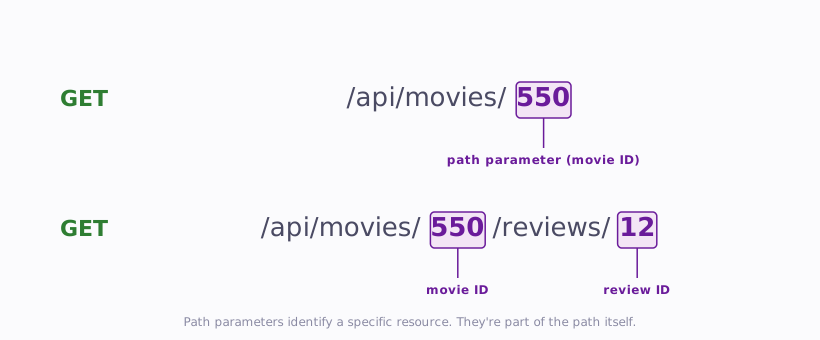
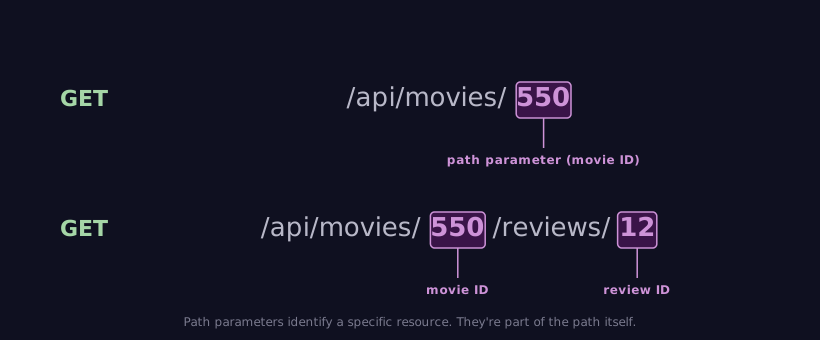
In API design, path parameters typically represent resource identifiers — "which specific thing?" The URL /api/movies/550 means "the movie with ID 550."
8.3 Query Strings
Query strings come after the ? and contain key-value pairs separated by &:
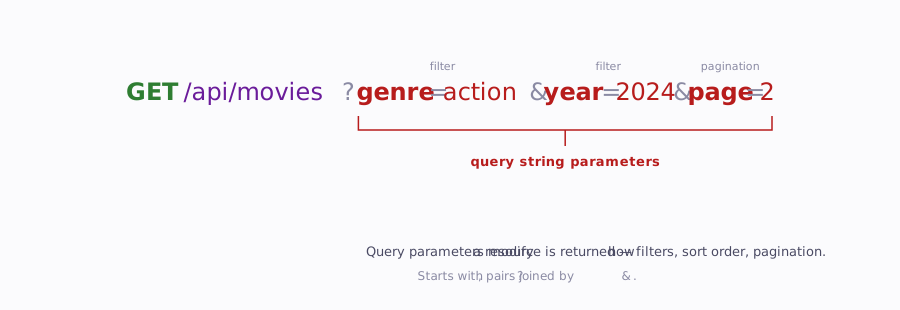
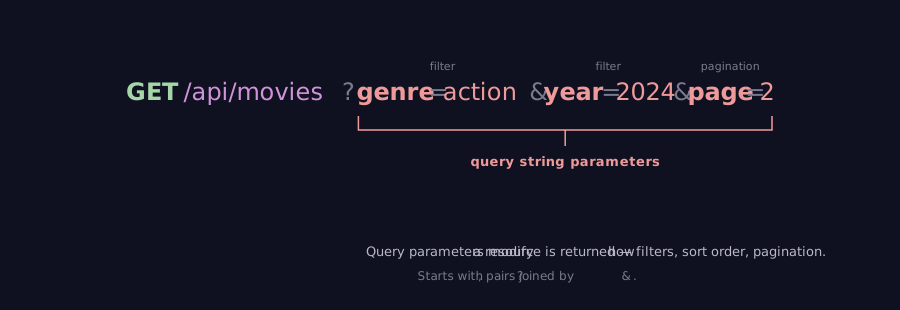
Query strings are used for filtering, sorting, pagination, and options — they modify how a collection is returned without changing which resource you are accessing. The URL /api/movies?genre=action means "the movies collection, filtered by genre."
8.4 Path Parameters vs. Query Strings
A common question: when do you put data in the path versus the query string?
| Use Case | Approach | Example |
|---|---|---|
| Identifying a specific resource | Path parameter | /api/movies/550 |
| Filtering a collection | Query string | /api/movies?genre=action |
| Sorting results | Query string | /api/movies?sort=rating |
| Pagination | Query string | /api/movies?page=2&limit=20 |
| Required identifier | Path parameter | /api/users/42/reviews |
| Optional modifier | Query string | /api/users/42/reviews?sort=newest |
The general rule: path parameters identify, query strings modify. The path tells you what you are looking at; the query string tells you how you want to look at it.
Another way to think about it: a path parameter identifies exactly one resource — you either get it or you get a 404. A query string filters a collection and can return zero, one, or many results. /api/movies/550 always means one specific movie. /api/movies?genre=action might return 200 movies, 3 movies, or none at all.
9 Summary
| Concept | Key Point |
|---|---|
| HTTP | A text-based, stateless, request-response protocol that powers the web |
| Request structure | Request line (method, path, version) + headers + optional body |
| Response structure | Status line (version, code, reason) + headers + optional body |
| Methods | GET (read), POST (create), PUT (replace), PATCH (update), DELETE (remove) |
| Safe methods | GET does not modify server state; unsafe methods do |
| Idempotent methods | GET, PUT, DELETE produce the same result on repeated calls; POST does not |
| Status codes | 2xx success, 3xx redirect, 4xx client error, 5xx server error |
| Content-Type | Header that tells the recipient how to interpret the body |
| Authorization | Header that carries authentication credentials (tokens) |
| CORS | Browser security mechanism requiring servers to opt in to cross-origin requests |
| Statelessness | Every request is independent — tokens or sessions work around this |
| Path parameters | Identify a specific resource: /api/movies/550 |
| Query strings | Filter, sort, or paginate a collection: /api/movies?genre=action |
10 References
This reading draws from the following sources:
Standards & Specifications:
- RFC 1945 — HTTP/1.0 (Berners-Lee, Fielding, & Frystyk, 1996)
- RFC 2616 — HTTP/1.1 (Fielding et al., 1999) — superseded by RFCs 7230-7235 (2014)
- RFC 7231 — HTTP/1.1 Semantics and Content
- RFC 7540 — HTTP/2 (Belshe, Peon, & Thomson, 2015)
- RFC 9114 — HTTP/3 (Bishop, 2022)
- RFC 5789 — PATCH Method for HTTP (Dusseault & Snell, 2010)
Technical Documentation:
- MDN Web Docs — HTTP
- MDN Web Docs — HTTP Headers
- MDN Web Docs — Content Negotiation
- MDN Web Docs — CORS
Historical Sources:
- Berners-Lee, T. (1989). Information Management: A Proposal. CERN. https://www.w3.org/History/1989/proposal.html
- Berners-Lee, T. (1991). The Original HTTP as defined in 1991. W3C. https://www.w3.org/Protocols/HTTP/AsImplemented.html
11 Further Reading
External Resources
- MDN Web Docs — An overview of HTTP — Comprehensive introduction covering all major HTTP concepts
- HTTP.dev — HTTP Status Codes — Complete reference of every status code with examples
- How HTTPS Works — Illustrated comic-style explainer of HTTPS and TLS
- Julia Evans — HTTP: Learn Your Browser's Language — Zine-format visual guide to HTTP (paid, but excellent)
- High Performance Browser Networking — HTTP/2 — Deep dive into HTTP/2's binary framing and multiplexing by Ilya Grigorik
This reading is part of TCSS 460 — Client/Server Programming, School of Engineering and Technology, University of Washington Tacoma.