What is a Web API?
TCSS 460 — Client/Server Programming
You already know how to call methods on objects and implement interfaces in Java. A web API takes that same idea — defining a contract between software components — and extends it across the network. This reading explains what web APIs are, how they evolved, and how they use HTTP and JSON to let applications talk to each other.
1 APIs Are Everywhere
An API (Application Programming Interface) is a contract between two pieces of software. One side promises to accept certain inputs and return certain outputs. The other side agrees to follow the rules. You have been using APIs since your first Java class — you just may not have called them that.
1.1 The Familiar API: Java Interfaces
Consider a Java interface you might write in TCSS 305:
public interface MessageService {
    String getMessage(int id);
    List<String> getAllMessages();
    void addMessage(String content);
    void deleteMessage(int id);
}
This interface is an API. It defines:
- What operations are available — get one message, get all messages, add a message, delete a message
- What inputs each operation expects — an
intid, aStringcontent - What outputs each operation returns — a
String, aList<String>, or nothing
Any class that implements this interface must follow the contract. Any code that uses this interface can call its methods without knowing how they work internally. That separation — defining what is available without exposing how it works — is the core idea of an API.
1.2 APIs as Boundaries
APIs exist at every boundary between software components:
| API Type | Example | Who Defines It |
|---|---|---|
| Language API | java.util.List |
Language designers |
| Library API | A logging library's public methods | Library authors |
| Operating System API | File I/O, network sockets | OS developers |
| Web API | Twitter's tweet endpoint, weather data service | Service providers |
In each case, the API serves the same purpose: it lets you use functionality without understanding the implementation. You can call list.add(item) without knowing whether the list uses an array or a linked structure internally. The API is the boundary between "your code" and "someone else's code."
1.3 Why APIs Matter
APIs matter because modern software is built from components that need to communicate. No application exists in isolation. Your phone's weather app does not contain a weather satellite — it calls an API to get forecast data. Your banking app does not process payments internally — it calls payment APIs. Instagram does not build its own maps — it calls a mapping API to show location data.
As a developer, you will spend more time working with APIs than writing algorithms from scratch. Understanding how APIs work — especially web APIs — is a foundational skill for building modern applications.
1.4 APIs You Already Use
Many of the applications you use every day are powered by web APIs behind the scenes. Here is a sampling of well-known APIs organized by domain:
| Domain | APIs | What They Provide |
|---|---|---|
| Sports | ESPN API, Strava API | Scores, stats, athlete activity data |
| Business/Finance | Stripe, Plaid, Square | Payment processing, banking data, point-of-sale |
| Social Media | Twitter/X API, Reddit API, Discord API | Posts, comments, messages, user data |
| Entertainment | Spotify API, TMDB*, Twitch API | Music catalogs, movie databases, live streams |
| Maps/Location | Google Maps API, Mapbox | Geocoding, directions, map tiles |
| Communication | Twilio, SendGrid | SMS/voice calls, transactional email |
| Weather | OpenWeatherMap, National Weather Service API | Forecasts, current conditions, historical data |
| AI/ML | OpenAI API, Anthropic API | Language models, text generation, embeddings |
*You will use TMDB (The Movie Database) in this course as a third-party API your back-end consumes.
Notice that some companies — Stripe, Twilio, SendGrid — build their entire business around providing APIs. They have no consumer-facing app. Their product is the API. Other companies like Spotify and Reddit offer APIs alongside their main product, enabling developers to build tools and integrations on top of their platform. Either way, the apps you use daily — from checking the weather to ordering food to streaming music — are built on layers of web API calls happening invisibly in the background.
2 Web APIs vs. Library APIs
A library API and a web API serve the same conceptual purpose — they define a contract for interacting with some functionality. But the network boundary between them changes almost everything about how they work in practice.
2.1 Library APIs: Same Machine, Same Process
When you call a method in Java, the call happens in the same process on the same machine:
// Library API call — instantaneous, reliable, type-checked at compile time
List<String> messages = messageService.getAllMessages();
This call is:
- Fast — nanoseconds, just a jump to another address in memory
- Reliable — if the method exists and your types match, the call will succeed
- Type-safe — the compiler catches mistakes before you run the program
- Synchronous — your code waits, the method runs, the result comes back immediately
2.2 Web APIs: Across the Network
A web API call crosses a network. Your code sends an HTTP request to another machine, waits for a response, and parses the result:
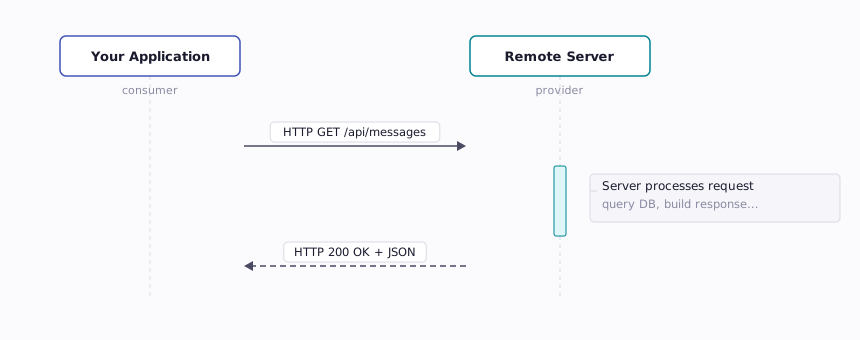
This call is fundamentally different:
- Slow — milliseconds to seconds, depending on network conditions and server load
- Unreliable — the network can drop, the server can crash, the request can time out
- Not type-safe — you send text over HTTP and hope the other side understands it
- Asynchronous by nature — your program needs a strategy for waiting
2.3 What the Network Boundary Changes
The network boundary introduces problems that library APIs do not have:
| Concern | Library API | Web API |
|---|---|---|
| Latency | Nanoseconds | Milliseconds to seconds |
| Failure | Crash = your bug | Failure can be network, server, DNS, timeout... |
| Data format | Native objects in memory | Serialized text (JSON, XML) |
| Versioning | Recompile with new library | Old clients must still work after server updates |
| Security | In-process, trusted | Over the network, untrusted — needs authentication |
| Error handling | Exceptions, return values | HTTP status codes + error bodies |
Every one of these differences will shape how you design, build, and test web applications in this course. When a method call takes nanoseconds, you do not think about retries or timeouts. When a web API call takes 500 milliseconds and might fail, you must.
3 Brief History of Web APIs
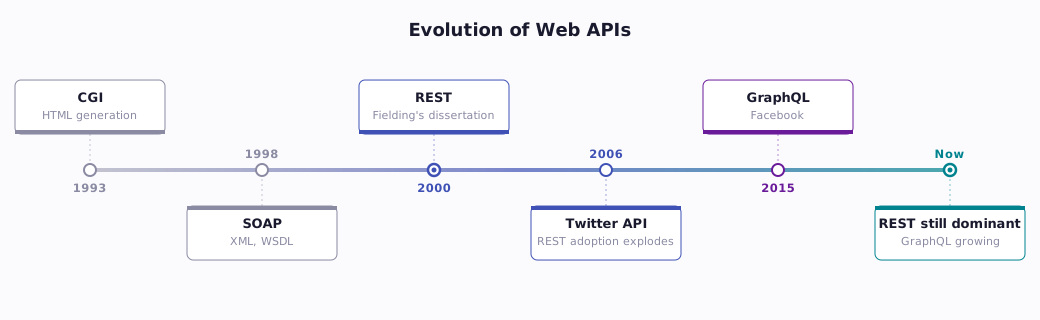
Web APIs did not appear overnight. They evolved through several generations, each solving problems the previous generation left behind. Understanding this history helps explain why the tools you will use in this course work the way they do.
3.1 CGI — The First Server-Side Web Programs (1993)
The earliest web servers could only serve static HTML files. The Common Gateway Interface (CGI), formalized in 1993 and later standardized as RFC 3875, changed that by allowing web servers to run programs in response to HTTP requests (Robinson & Coar, 2004). A CGI script could read form data, query a database, and generate HTML on the fly.
CGI was revolutionary, but it was designed for generating web pages, not for machine-to-machine communication. Each request spawned a new process, making it slow and resource-intensive. CGI scripts returned HTML — useful for browsers, but difficult for other programs to parse.
3.2 SOAP — The Enterprise Approach (late 1990s)
As businesses needed their systems to communicate — say, a purchasing system talking to an inventory system — SOAP (Simple Object Access Protocol) emerged. SOAP used XML for messages, had formal contracts defined in WSDL (Web Services Description Language), and supported complex features like transactions and security.
SOAP was powerful but heavy. A simple request to get a user's name might require dozens of lines of XML boilerplate. The tooling was complex, the messages were verbose, and the learning curve was steep. SOAP is still used in some enterprise systems today, but it has largely been replaced for new development.
3.3 REST — Simplicity Wins (2000)
In 2000, Roy Fielding published his doctoral dissertation at UC Irvine, defining REST (Representational State Transfer) as an architectural style for distributed systems (Fielding, 2000). Rather than inventing a new protocol, REST embraced HTTP itself — using URLs to identify resources, HTTP methods to define actions, and standard status codes to communicate results.
REST's appeal was its simplicity. Instead of SOAP's complex XML envelopes, a REST API might look like:
And return a simple JSON response. No special tooling needed — you could test it in a browser. This simplicity led to explosive adoption. By the mid-2000s, companies like Amazon, Twitter, and Google were exposing REST APIs, and the modern web API ecosystem was born.
3.4 GraphQL and Beyond (2015)
Facebook released GraphQL in 2015 to solve a specific problem: mobile clients needed different data than web clients, and building separate REST endpoints for each was unsustainable. GraphQL lets clients specify exactly what data they want in a single request.
3.4.1 What GraphQL Looks Like
Imagine you want to display a movie page that shows the movie's details, its reviews, and its cast. With REST, you might need three separate API calls:
That is three round trips over the network. Each response might include fields you do not need. With GraphQL, you send a single request describing exactly the data you want:
query {
  movie(id: 550) {
    title
    releaseYear
    rating
    reviews(limit: 5) {
      author
      score
      text
    }
    cast(limit: 10) {
      name
      character
    }
  }
}
The server returns exactly those fields — no more, no less — in one response. One round trip, no wasted data.
3.4.2 When GraphQL Shines
GraphQL is particularly effective in certain scenarios:
- Mobile clients — bandwidth is limited, so fetching only the fields you need reduces data transfer significantly
- Complex relationships — when resources have deep, nested relationships (movies → reviews → reviewers → other reviews), GraphQL can traverse them in a single query
- Multiple client types — a mobile app, a web dashboard, and an admin panel might all need different views of the same data. With REST, you either over-fetch (return everything) or build separate endpoints. With GraphQL, each client requests exactly what it needs
3.4.3 REST vs. GraphQL — Not a Replacement
Despite its advantages, GraphQL has not replaced REST — and likely will not. REST remains the dominant paradigm for web APIs for several reasons:
- Simplicity — REST APIs are easier to understand, build, cache, and debug. A
GET /api/movies/550URL is self-explanatory; a GraphQL query requires learning a query language - Caching — HTTP caching works naturally with REST (each URL is a cacheable resource). GraphQL sends all requests to a single endpoint via
POST, making standard HTTP caching ineffective - Complexity — GraphQL shifts complexity from the client to the server. The server must parse arbitrary queries, optimize database access for nested relationships, and guard against expensive queries that could overload the system
Many companies use both. GitHub offers both a REST API and a GraphQL API. Shopify migrated its storefront API to GraphQL while keeping REST for admin operations. Yelp offers GraphQL for its business search API. The choice depends on the use case — not on one approach being universally better.
In this course, you will build REST APIs — the standard approach that most developers encounter first and use most frequently. Understanding REST deeply will also help you evaluate when GraphQL (or another approach) might be the better tool for a given problem.
3.5 The Timeline
4 How Web APIs Work
At their core, web APIs use the same HTTP protocol your browser uses to load web pages. The difference is that instead of requesting an HTML page for a human to read, your code requests structured data (usually JSON) for another program to process.
4.1 HTTP as the Transport
You learned about HTTP in the previous reading ("HTTP & the Web"). Web APIs build directly on top of that foundation:
- HTTP methods define the action — GET to read, POST to create, PUT to replace, DELETE to remove
- URLs identify the resource —
/api/movies/550means "the movie with ID 550" - Headers carry metadata — what format you want, your authentication credentials
- The body carries data — the JSON payload of a new resource to create
A web API request is just an HTTP request. A web API response is just an HTTP response. There is no special protocol — the API and the web page use the same transport.
4.2 Endpoints as Resources
A web API exposes endpoints — specific URLs that represent resources or collections of resources. Think of each endpoint as one method in a Java interface:
| Java Method | Web API Endpoint | HTTP Method |
|---|---|---|
getMessage(42) |
/api/messages/42 |
GET |
getAllMessages() |
/api/messages |
GET |
addMessage(content) |
/api/messages |
POST |
deleteMessage(42) |
/api/messages/42 |
DELETE |
The Java method name tells you both what it does and what resource it acts on. In a web API, the URL tells you the resource and the HTTP method tells you the action. Same information, different format.
4.3 A Complete Request/Response Example
Here is what a complete web API interaction looks like at the HTTP level. The client wants to get information about a specific movie:
Request:
Response:
HTTP/1.1 200 OK
Content-Type: application/json

{
  "id": 550,
  "title": "Fight Club",
  "releaseYear": 1999,
  "genres": ["Drama", "Thriller"],
  "rating": 8.4
}
The request says: "I want the resource at /api/movies/550, and I would like it in JSON format." The response says: "Here it is (status 200), it is JSON (Content-Type header), and here is the data (body)."
4.4 When Things Go Wrong
Web APIs use HTTP status codes to communicate errors, just as Java uses exceptions. If you request a movie that does not exist:
Request:
Response:
HTTP/1.1 404 Not Found
Content-Type: application/json

{
  "error": "Not Found",
  "message": "No movie with id 99999"
}
The 404 status code tells the client the resource was not found. The body provides a human-readable message. This is the web API equivalent of catching a NoSuchElementException in Java — the pattern is different, but the concept is the same.
5 JSON — The Language of Web APIs
When a Java method returns an ArrayList<Movie>, the data lives in memory as Java objects. When a web API returns data, it must serialize that data into text that can travel over the network. JSON (JavaScript Object Notation) is the standard format for this serialization.
5.1 What JSON Looks Like
Before you look at the syntax, understand the most important thing about JSON: it is just plain text. Not binary data. Not compiled code. Not a program that executes. JSON is a string of characters that follows a specific formatting convention — curly braces, colons, commas, quoted keys. Your API serializes a data structure into this formatted string, sends it across the network as text, and the client on the other end parses that text back into a data structure. The name "JavaScript Object Notation" comes from the fact that JSON's syntax was inspired by JavaScript object literals, but JSON is not JavaScript. JSON is not tied to any programming language. It is not executed, it has no logic, and every mainstream language — Java, Python, TypeScript, Go, Rust, C# — can read and write it.
JSON is a lightweight text format for representing structured data. Despite its name referencing JavaScript, JSON is language-independent and used across virtually every programming language (Bray, 2017).
Here is a JSON object representing a movie:
{
  "id": 550,
  "title": "Fight Club",
  "releaseYear": 1999,
  "director": "David Fincher",
  "genres": ["Drama", "Thriller"],
  "ratings": {
    "imdb": 8.4,
    "rottenTomatoes": 79
  },
  "isReleased": true
}
5.2 JSON Data Types
JSON supports six data types:
| JSON Type | Example | Java Equivalent |
|---|---|---|
| String | "Fight Club" |
String |
| Number | 550, 8.4 |
int, double |
| Boolean | true, false |
boolean |
| Null | null |
null |
| Array | ["Drama", "Thriller"] |
List<String> or String[] |
| Object | { "key": "value" } |
A class instance with fields |
JSON does not have separate integer and floating-point types — all numbers are just "numbers." It also has no date type, no enum type, and no way to define types at all. This is a sharp contrast to Java's strong type system. You will learn strategies for dealing with this looseness when you start building APIs.
5.3 JSON vs. JavaScript Object Literals
Because JSON's syntax was inspired by JavaScript, the two look nearly identical at first glance. But they are fundamentally different things. Here is a JavaScript object literal:
const movie = {
  id: 550,
  title: "Fight Club",
  releaseYear: 1999,
  genres: ["Drama", "Thriller"],
  isReleased: true,
  getSummary() {
    return `${this.title} (${this.releaseYear})`;
  }
};
And here is the equivalent data expressed as JSON:
{
  "id": 550,
  "title": "Fight Club",
  "releaseYear": 1999,
  "genres": ["Drama", "Thriller"],
  "isReleased": true
}
They look similar, but the differences matter:
| Feature | JavaScript Object Literal | JSON |
|---|---|---|
| Keys | Unquoted (or quoted) | Must be double-quoted |
| Methods | Can contain functions | No functions allowed |
| Comments | Supports // and /* */ |
No comments allowed |
| Undefined | undefined is a valid value |
No undefined (use null) |
| Trailing commas | Allowed | Not allowed |
| What it is | A live data structure in memory | Always a string of text |
The last row is the most important distinction. A JavaScript object is a data structure that lives in your program's memory — you can call methods on it, modify its properties, and pass it to functions. JSON is a serialization format — it is always a string, never a live object. The whole point of JSON is to turn a data structure into text that can travel over a network.
The mental model is straightforward: when an API sends data, it serializes an object into a JSON string. That string travels across the network as plain text. When the client receives it, it parses the JSON string back into a live object in whatever language the client uses — JavaScript, Java, Python, or anything else. JSON is the lingua franca in the middle, understood by all sides but native to none.
5.4 Collections in JSON
When a web API returns multiple items, it typically returns a JSON array of objects:
[
  {
    "id": 550,
    "title": "Fight Club",
    "releaseYear": 1999
  },
  {
    "id": 680,
    "title": "Pulp Fiction",
    "releaseYear": 1994
  },
  {
    "id": 155,
    "title": "The Dark Knight",
    "releaseYear": 2008
  }
]
In Java terms, this is a List<Movie> — a collection of objects, each with the same structure. The pattern will be familiar; only the syntax is new.
5.5 Why JSON Won
JSON was not the first data interchange format. XML served this role for years. So why did JSON become the standard for web APIs?
| Feature | XML | JSON |
|---|---|---|
| Verbosity | <title>Fight Club</title> |
"title": "Fight Club" |
| Readability | Readable but noisy | Clean and compact |
| Parsing | Complex (DOM, SAX, XPath) | Simple (built into every language) |
| Data types | Everything is a string | Numbers, booleans, null, arrays |
| Schema | XSD (powerful but complex) | JSON Schema (optional, simpler) |
JSON is simpler to read, simpler to write, simpler to parse, and maps naturally to the data structures every language uses (objects/maps and arrays/lists). For web APIs, where you are sending data between programs that need to process it quickly, this simplicity matters.
6 API Consumers and Providers
A web API involves two parties: the provider (the server that exposes the API) and the consumer (the client that calls it). Understanding both sides — and the relationship between them — is essential for the work you will do in this course.
6.1 The Provider: Building the API
The API provider is the server. It:
- Defines the available endpoints and their behavior
- Handles incoming HTTP requests
- Processes data (queries databases, calls other services, applies business logic)
- Returns HTTP responses with appropriate status codes and data
In this course, you will build an API provider using Node.js and Express. Your server will define endpoints like /api/movies and /api/users, handle requests, interact with a PostgreSQL database, and return JSON responses.
The provider's responsibilities include:
- Documenting the API — so consumers know what endpoints exist and how to use them
- Validating inputs — so bad data does not corrupt the system
- Handling errors gracefully — so consumers get useful error messages, not crash dumps
- Maintaining backward compatibility — so existing consumers do not break when the API changes
6.2 The Consumer: Calling the API
The API consumer is any code that calls the API. Consumers include:
- Web front-ends — a React or Next.js app calling your API to display data
- Mobile apps — an iOS or Android app calling the same API
- Other servers — a different back-end service that needs your data
- Scripts and tools — a Python script that automates API calls
In this course, you will also build an API consumer — a Next.js front-end that calls your API to display data to users in a browser. And you will consume third-party APIs (like TMDB, a movie database API) as part of your back-end.
6.3 First-Party vs. Third-Party APIs
A first-party API is one you build and control. Your Express back-end exposing /api/movies to your own Next.js front-end is a first-party API. You control both sides.
A third-party API is one someone else built. When your back-end calls the TMDB API to fetch movie data, TMDB is a third-party API. You control the consumer side but not the provider side. You must follow their documentation, respect their rate limits, and handle any changes they make.
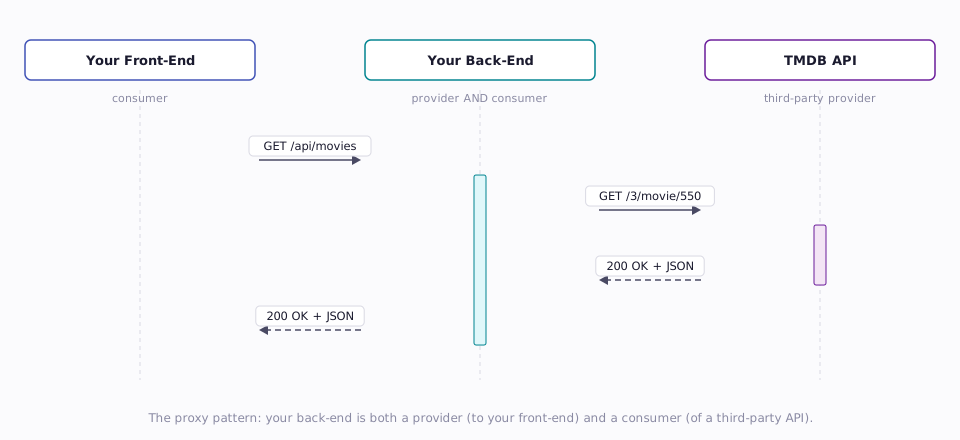
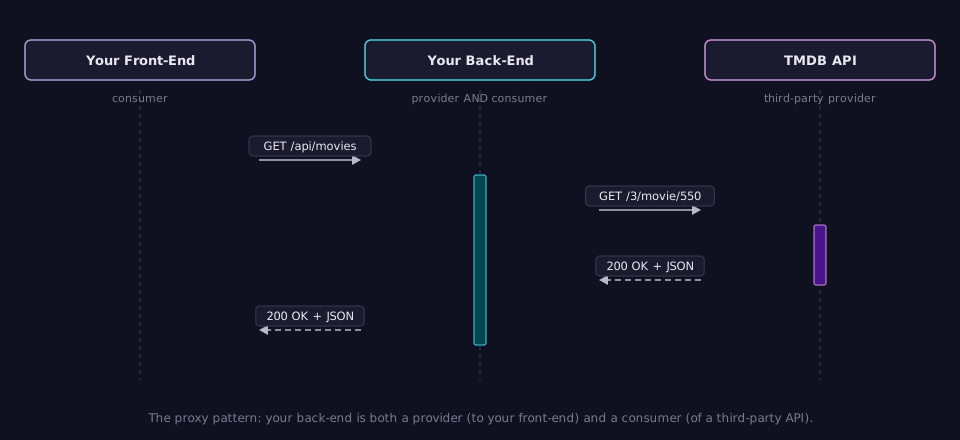
This diagram illustrates a pattern you will implement in this course: your back-end acts as both a provider (to your front-end) and a consumer (of TMDB's API). This is called a proxy pattern — your server sits between your client and the third-party service, forwarding requests and reshaping responses.
6.4 API Keys and Rate Limiting
Most third-party APIs require an API key — a unique string that identifies your application. API keys serve several purposes:
- Identification — the provider knows who is making the request
- Usage tracking — the provider can monitor how much you use the API
- Rate limiting — the provider can restrict how many requests you can make per minute/hour/day
- Billing — some APIs charge per request after a free tier
When you call a third-party API, you typically include your API key in the request:
Rate limiting is the provider's way of protecting itself from being overwhelmed. A rate limit might say "100 requests per minute per API key." If you exceed it, you get a 429 Too Many Requests response instead of your data. This is a real constraint you will deal with in your projects.
An important security rule: never expose your API key to the client. If your front-end JavaScript contains your TMDB API key, anyone who views your page source can steal it. This is another reason the proxy pattern exists — your back-end holds the API key and makes the third-party call on behalf of your front-end.
7 Trying an API Without Writing Code
One of the best ways to understand web APIs is to interact with one directly. You do not need to write any code to make your first API call — several tools let you send HTTP requests and inspect the responses.
7.1 The Browser Address Bar
The simplest tool is the one you already have open. When you type a URL in your browser's address bar and press Enter, your browser sends an HTTP GET request. If the URL points to an API that returns JSON, you will see the raw JSON response.
Try this in your browser right now:
Your browser sends a GET request to GitHub's API and displays the JSON response — information about GitHub's mascot user, "Octocat." No code, no tools, no setup.
The limitation is that browsers only send GET requests from the address bar. You cannot send POST, PUT, or DELETE requests this way, and you cannot set custom headers. For anything beyond simple GET requests, you need a dedicated tool.
7.2 Postman
Postman is a graphical application for building, sending, and inspecting HTTP requests. It is the most popular API testing tool and provides a full GUI for:
- Choosing the HTTP method (GET, POST, PUT, DELETE, etc.)
- Entering the URL
- Adding headers (like
Content-TypeorAuthorization) - Writing a request body (for POST/PUT requests)
- Viewing the response status code, headers, and body
- Saving requests into collections for later
Postman is particularly useful when you are building your own API and need to test endpoints that require specific methods, headers, or body data. It is free for individual use.
7.3 Thunder Client (VS Code Extension)
If you prefer to stay inside your code editor, Thunder Client is a VS Code extension that provides Postman-like functionality directly in your editor. You can send requests, inspect responses, and organize API calls — all without leaving VS Code.
Thunder Client is lighter-weight than Postman and convenient for quick testing during development. In this course, you may find it the most practical option since you will already have VS Code open.
7.4 curl (Command Line)
curl is a command-line tool for making HTTP requests. It is pre-installed on macOS and most Linux distributions. A simple GET request:
curl is powerful because you can precisely control every aspect of the request — method, headers, body, authentication, timeouts. It is also scriptable, making it useful for automation. However, the command-line interface can be intimidating at first, and reading raw JSON output in a terminal is less pleasant than a formatted GUI.
7.5 Choosing a Tool
| Tool | Best For | Limitations |
|---|---|---|
| Browser | Quick GET requests | GET only, no custom headers |
| Postman | Comprehensive testing, saving collections | Separate application, requires account |
| Thunder Client | Quick testing inside VS Code | Fewer features than Postman |
| curl | Scripting, precise control, automation | Less readable, steeper learning curve |
There is no single "right" tool — pick the one that fits your workflow. You will use at least one of these tools extensively in this course, starting with your first check-off assignment.
8 Summary
| Concept | Key Point |
|---|---|
| API | A contract between software components defining available operations, inputs, and outputs |
| Web API | An API accessed over HTTP — adds latency, failure modes, and serialization concerns |
| Library API vs. Web API | Library calls are fast, reliable, and type-safe; web API calls are slow, unreliable, and untyped |
| REST | The dominant architectural style for web APIs — uses HTTP methods, URLs, and status codes |
| JSON | Lightweight text format for structured data — maps naturally to objects and arrays |
| Endpoint | A specific URL that represents a resource or collection in a web API |
| Provider | The server that exposes the API and handles requests |
| Consumer | The client (front-end, mobile app, script) that calls the API |
| Third-party API | An API built and controlled by someone else — requires API keys, subject to rate limits |
| Proxy pattern | Your server calls a third-party API on behalf of your client, hiding keys and reshaping data |
| API testing tools | Postman, Thunder Client, curl — send HTTP requests without writing code |
9 References
This reading draws from the following sources:
Standards & Specifications:
- RFC 3875 — The Common Gateway Interface (CGI) Version 1.1 — Robinson, D. & Coar, K. (2004). The formal specification for CGI.
- RFC 8259 — The JavaScript Object Notation (JSON) Data Interchange Format — Bray, T. (2017). The current JSON standard.
- RFC 7231 — HTTP/1.1 Semantics and Content — Fielding, R. & Reschke, J. (2014). HTTP methods and status codes.
Historical Sources:
- Fielding, R. T. (2000). Architectural Styles and the Design of Network-Based Software Architectures (Doctoral dissertation). University of California, Irvine. https://www.ics.uci.edu/~fielding/pubs/dissertation/top.htm
- Facebook Engineering. (2015). GraphQL: A data query language — Original announcement.
- W3C. (2007). SOAP Version 1.2.
- W3C. (2001). Web Services Description Language (WSDL) 1.1.
Technical Documentation:
- MDN Web Docs — An overview of HTTP — Mozilla Foundation.
- MDN Web Docs — Working with JSON — Mozilla Foundation.
- JSON.org — Introducing JSON, the original specification site.
10 Further Reading
External Resources
- Postman Learning Center — Official tutorials for API testing with Postman
- GitHub REST API Documentation — A well-documented public API you can experiment with freely
- TMDB API Documentation — The movie database API you will use in this course
- RESTful Web APIs (O'Reilly) — Richardson & Amundsen. Comprehensive guide to REST API design
- Fielding's Dissertation, Chapter 5 — The original definition of REST, directly from the source
This reading is part of TCSS 460 — Client/Server Programming, School of Engineering and Technology, University of Washington Tacoma.