OAuth2 & Federated Identity¶
TCSS 460 — Client/Server Programming
Modern web applications rarely manage their own passwords. Instead, they delegate authentication to a trusted identity provider — the same pattern behind every "Sign in with Google" button you have ever clicked. This reading explains why that delegation exists, how OAuth2 makes it work, and what it means for your course project.
1 The Problem: Passwords Everywhere¶
Before we talk about solutions, we need to understand the problem they solve.
1.1 The Anti-Pattern: Every App Owns a Password¶
Imagine a world — not far from the one we lived in circa 2005 — where every website you visit requires you to create a new account with a unique username and password. Your email provider has one password. Your bank has another. Your social media has a third. Your class project has a fourth. Your favorite forum has a fifth.
Now consider what actually happens: most people reuse the same password (or a small handful of passwords) across all of those sites. Studies consistently show that over 60% of users reuse passwords across multiple services.
The consequences are predictable:
| Problem | What Happens |
|---|---|
| Credential stuffing | One site gets breached; attackers try those credentials on every other site |
| Phishing | Users are trained to type passwords into dozens of different login forms, making it hard to spot a fake one |
| Password fatigue | Users choose weaker passwords because they have too many to remember |
| Liability | Every app that stores passwords becomes a target and bears responsibility for securing them |
1.2 The Developer's Burden¶
From the developer's perspective, building a secure authentication system is surprisingly hard. You need to handle:
- Password hashing with proper algorithms (bcrypt, argon2 — not MD5)
- Secure password reset flows
- Account lockout after failed attempts
- Multi-factor authentication
- Session management and token rotation
- Compliance with privacy regulations
For a small team building, say, a TMDB-backed consumer app or a cross-group bug tracker, none of this is core functionality. It is infrastructure — necessary, expensive, and easy to get wrong.
This is the fundamental insight that motivates everything in this reading: authentication is a shared problem, and shared problems benefit from shared solutions.
2 Federated Identity¶
Federated identity is the shared solution. Instead of every application managing its own user accounts, applications delegate authentication to a trusted identity provider (IdP).
2.1 The Core Idea¶
Think of it like a driver's license. When you walk into a bar, the bartender does not administer their own identity verification test. They look at a credential issued by a trusted authority (the state DMV). The bartender trusts the DMV. You trust the DMV. That shared trust is what makes the system work.
In the web world:
- The identity provider (Google, GitHub, your course auth service) is the DMV — it verifies who you are
- The application (your project, a third-party app) is the bartender — it accepts the credential without running its own verification
- The user is the person — they authenticate once with the provider and use that identity across many apps
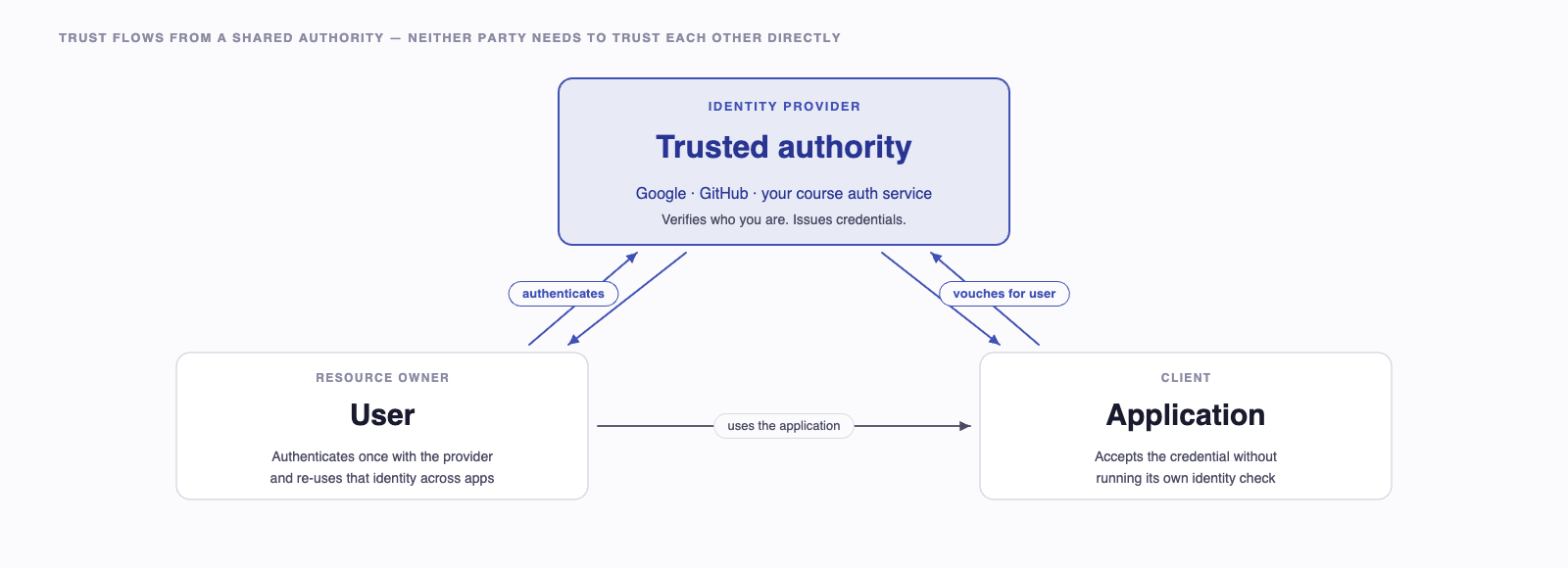
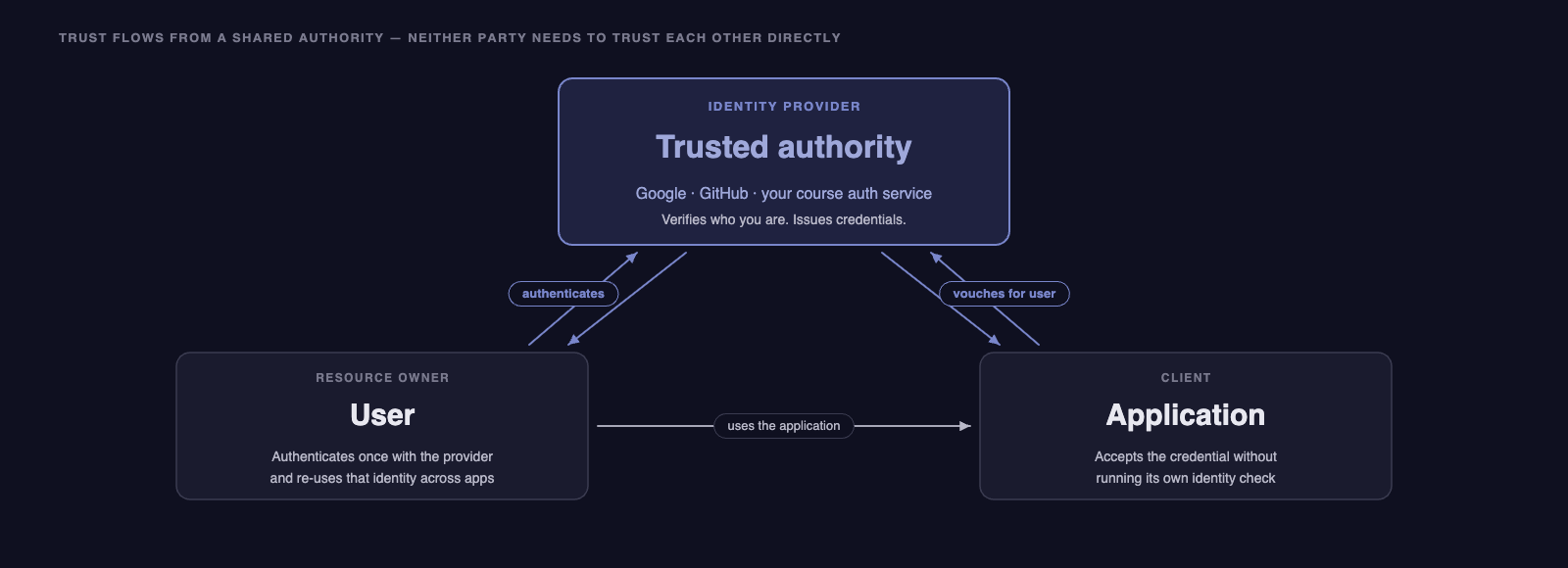
The trust chain is simple: the application trusts the identity provider, and the user trusts the identity provider. The application never needs to trust the user directly — it trusts the credential the provider issued.
2.2 "Sign in with..." Buttons¶
Every time you see a "Sign in with Google" or "Sign in with GitHub" button, you are seeing federated identity in action. The application is saying: "I don't want to manage your password. Go prove who you are to Google, and I'll trust what Google tells me."
This is a win for everyone:
| Stakeholder | Benefit |
|---|---|
| Users | Fewer passwords, stronger security from providers who specialize in it |
| Developers | No password storage, no reset flows, no compliance headaches |
| Providers | Centralized security investment, consistent MFA, breach response |
2.3 Federation vs. Single Sign-On¶
These terms are related but distinct:
- Federated identity means multiple independent services accept credentials from a shared provider. Google accounts work across YouTube, Gmail, Google Docs, and third-party apps that support "Sign in with Google."
- Single Sign-On (SSO) means you authenticate once and gain access to multiple services without logging in again. SSO is often built on federated identity, but they are not synonyms.
Your UW NetID is an example of both: UW acts as the identity provider (federation), and once you log in to MyUW, you can access Canvas, Panopto, and library resources without re-entering your password (SSO).
3 OAuth2 — The Authorization Framework¶
OAuth2 is the protocol that makes federated identity work on the modern web. But there is an important nuance to understand first.
3.1 Authorization, Not Authentication¶
You saw the authentication-vs-authorization distinction in Authentication & Authorization Concepts. OAuth2 is the half of that split that handles authorization — granting a third-party application limited access to a user's resources without sharing the user's password.
The classic OAuth2 use case was: "Let this photo-printing service access my Google Photos, without giving it my Google password." The printing service does not need to know who you are — it just needs permission to access your photos.
Authentication — the "who are you?" part — is added by OpenID Connect (OIDC), a thin layer built on top of OAuth2. In practice, almost every "Sign in with X" implementation uses OAuth2 + OIDC together. We will discuss OIDC ID tokens in Section 5. When people say "OAuth2 login," they almost always mean "OAuth2 + OIDC."
3.2 The Four Roles¶
OAuth2 defines four roles. Every interaction involves all four, even if some are played by the same entity:
| Role | Definition | Example |
|---|---|---|
| Resource Owner | The user who owns the data or identity | You |
| Client | The application requesting access | Your course project's front end |
| Authorization Server | Issues tokens after authenticating the user and obtaining consent | Google's OAuth server, your course auth service |
| Resource Server | Hosts the protected resources; accepts tokens | Your course project's API, Google Photos API |
In the SP26 project, the Authorization Server is Auth², the Resource Server is your group's API (or your upstream partner's, depending on which side of the ring you're on), the Client is your Next.js front end, and the Resource Owner is the student signed in to the system.
3.3 Grant Types¶
OAuth2 defines several "grant types" — different flows for different situations:
| Grant Type | Use Case | Security Level |
|---|---|---|
| Authorization Code | Server-side web apps, SPAs with backend | Highest |
| Client Credentials | Machine-to-machine (no user involved) | High |
| Device Code | Smart TVs, IoT devices (no browser) | Medium |
| Implicit | Deprecated — was used for browser-only apps | Low |
| Resource Owner Password | Deprecated — direct username/password | Lowest |
The Authorization Code flow is by far the most common and the most secure for web applications. It is what your course project uses, and it is what we will focus on for the rest of this reading.
In the SP26 project, your consumer app uses Authorization Code with PKCE — the modern recommendation for web apps with a server-side component. NextAuth wires this up for you. We cover PKCE in Section 7.
4 The Authorization Code Flow (Step by Step)¶
The Authorization Code flow is the heart of OAuth2 for web applications. It involves a carefully choreographed series of redirects between the user's browser, your application, and the identity provider.
4.1 The Big Picture¶
Before diving into the details, here is the flow at a high level:
- Your app redirects the user to the identity provider
- The user logs in at the provider (your app never sees the password)
- The provider redirects the user back to your app with a short-lived authorization code
- Your app's server exchanges that code for tokens (directly with the provider, server-to-server)
- Your app uses the tokens to access protected resources
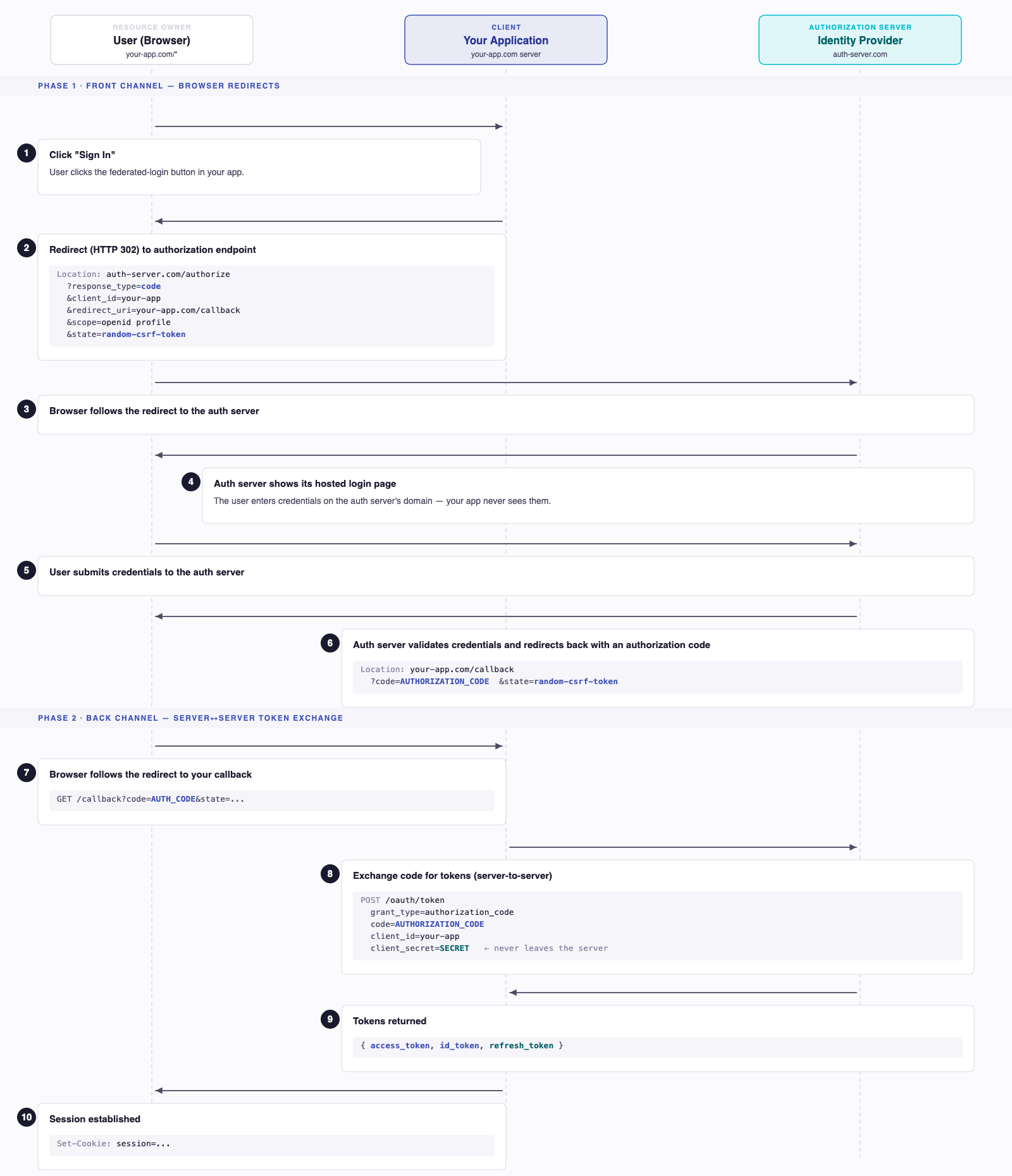
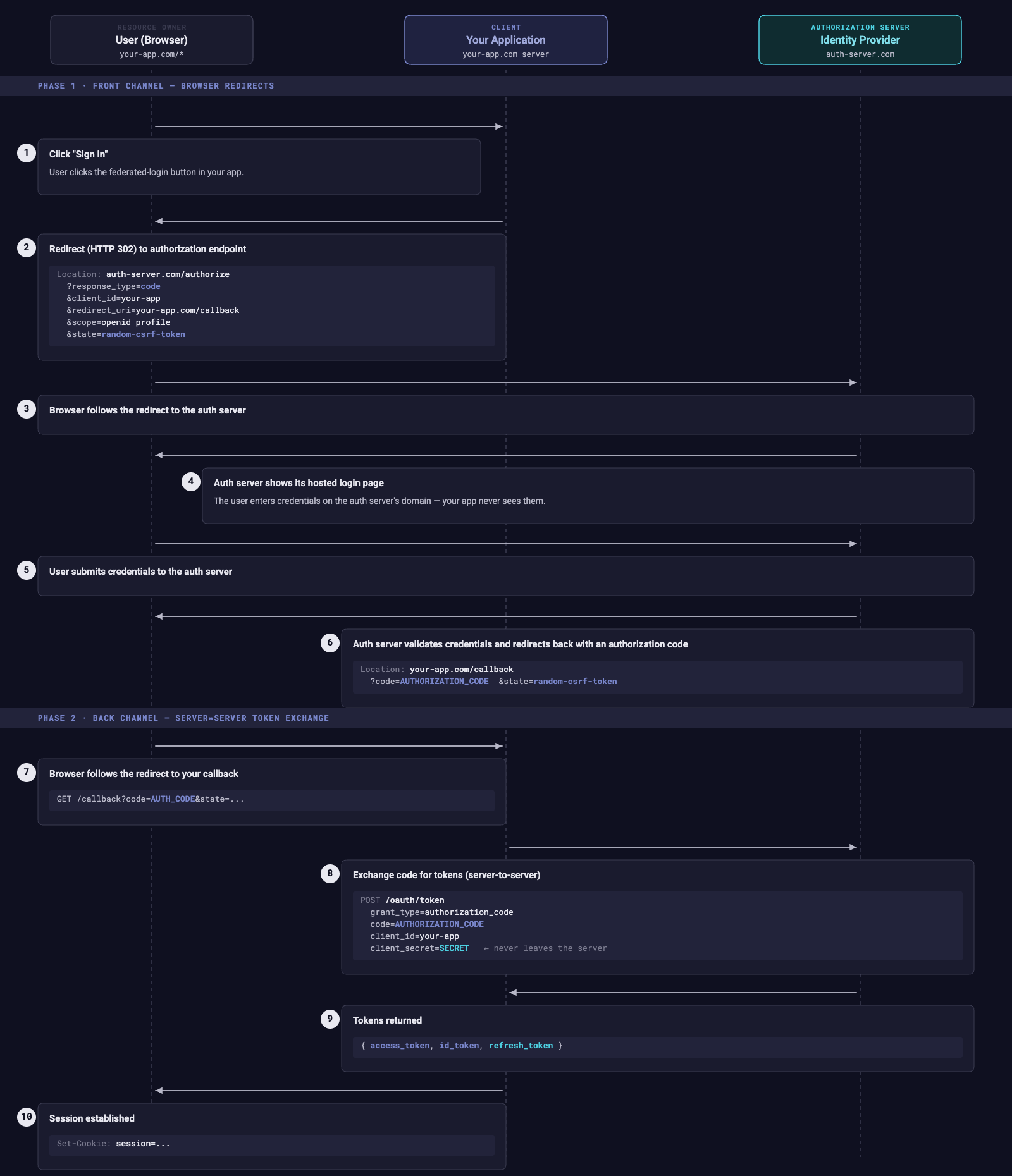
4.2 The Sequence Diagram¶
Here is the complete flow showing every HTTP interaction:
4.3 Why the Redirect Dance?¶
If you are looking at this flow and thinking "this seems unnecessarily complicated," you are not alone. But every step exists for a security reason.
Why redirect to the provider instead of showing a login form in the app?
Because the user's credentials (username and password) should only ever be entered on the identity provider's domain. Your application never sees, handles, transmits, or stores the password. If your app is compromised, the attacker does not get user passwords — because your app never had them.
Why return an authorization code instead of a token directly?
This is the key insight of the Authorization Code flow. The code comes back through the browser (in the URL via a redirect), which is a relatively exposed channel. But the code is useless by itself — it can only be exchanged for tokens through a server-to-server request that also requires the client_secret. That secret never touches the browser.
In the SP26 consumer app, this server-to-server exchange happens inside a Next.js Route Handler — the client_secret lives in server-side environment variables and is never shipped to the browser.
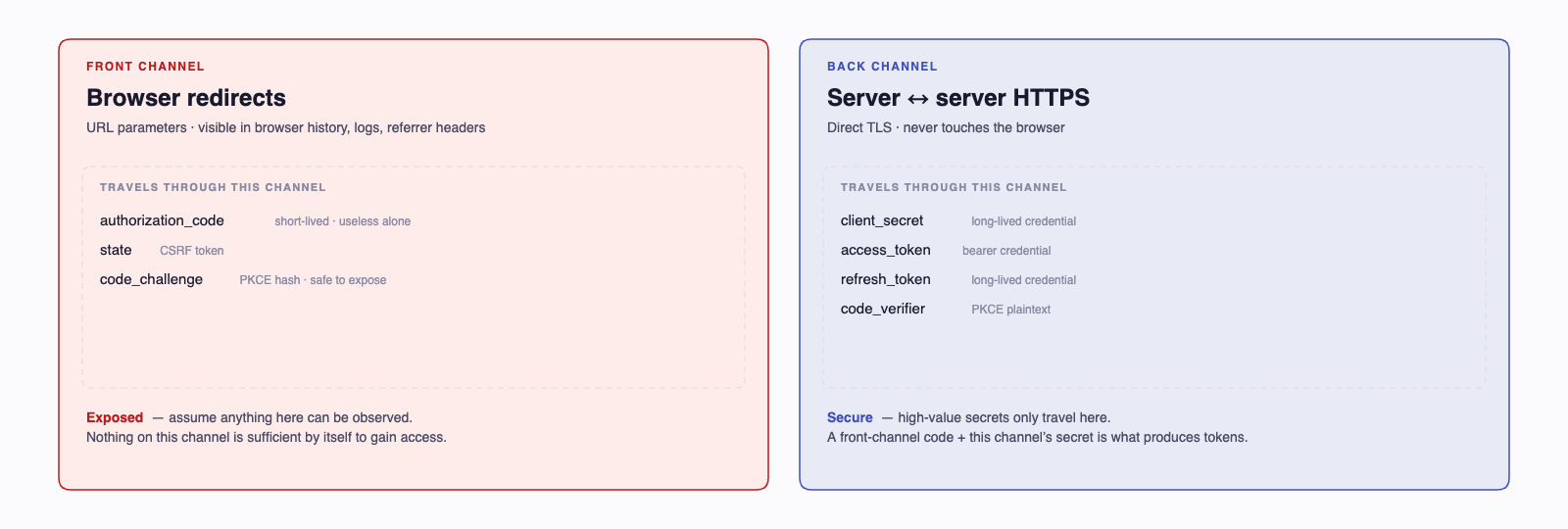
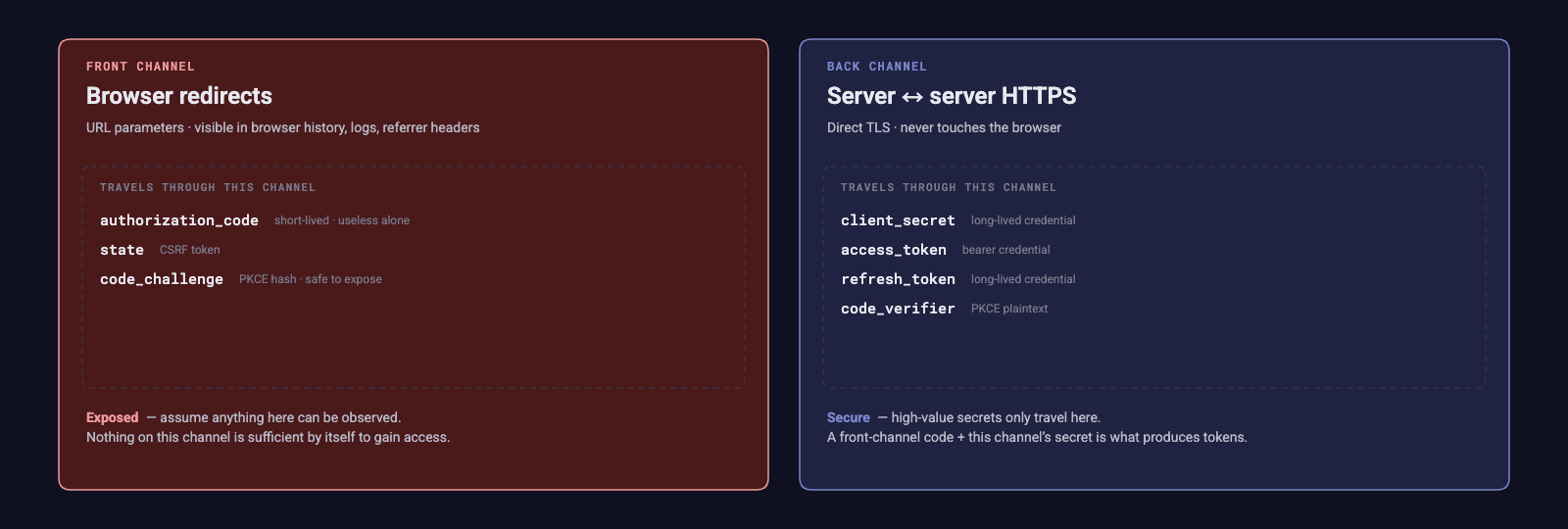
Think of it like a coat check: you get a ticket (the code) at the front desk (the browser). But to retrieve your coat (the tokens), you need to present the ticket at the back window (server-to-server) where they verify you are the rightful owner.
Why the state parameter?
The state parameter is a random value your app generates before the redirect and verifies when the user returns. It prevents Cross-Site Request Forgery (CSRF) attacks — where an attacker could trick your app into completing an OAuth flow initiated by the attacker, potentially linking the attacker's identity to the victim's session.
4.4 The Two Channels¶
A critical concept in the Authorization Code flow is the separation between the front channel and the back channel:
| Channel | Medium | Security | What Travels |
|---|---|---|---|
| Front channel | Browser redirects (URL parameters) | Lower — visible in browser history, logs, referrer headers | Authorization code, state |
| Back channel | Server-to-server HTTPS | Higher — never touches the browser | Client secret, tokens |
This two-channel design is why the Authorization Code flow is more secure than the deprecated Implicit flow, which returned tokens directly in the front channel.
5 Tokens in OAuth2¶
After the code exchange (Step 8-9 in the diagram above), the authorization server returns tokens. OAuth2 and OIDC together define three types of tokens, each with a distinct purpose.
5.1 Access Tokens¶
The access token is a credential that authorizes API calls. When your front end calls your API, it includes the access token (typically in the Authorization header), and the API verifies it before processing the request.
Key characteristics:
- Short-lived — typically 15 minutes to 1 hour
- Scoped — specifies what the bearer is allowed to do (e.g.,
read:profile,write:messages) - Bearer token — whoever possesses it can use it (like cash, not like a credit card)
- Format — often a JWT (JSON Web Token), but the OAuth2 spec does not require any particular format
An access token as a JWT might look like this when decoded:
{
  "sub": "auth-sq|abc123",
  "iss": "https://tcss-460-iam.onrender.com",
  "aud": "group-3-api",
  "exp": 1779152400,
  "iat": 1779148800,
  "scope": "openid profile",
  "role": "User"
}
The fields (called "claims") tell the API:
| Claim | Meaning |
|---|---|
sub |
Subject — who this token represents |
iss |
Issuer — who created this token |
aud |
Audience — who this token is intended for |
exp |
Expiration — when this token expires (Unix timestamp) |
iat |
Issued At — when this token was created |
scope |
What permissions this token grants |
You saw this JWT structure in Authentication & Authorization Concepts §4. What's new here is where it comes from — the token is minted by Auth², not by your own API, and the aud claim names a specific group's API rather than a generic resource server.
5.2 Refresh Tokens¶
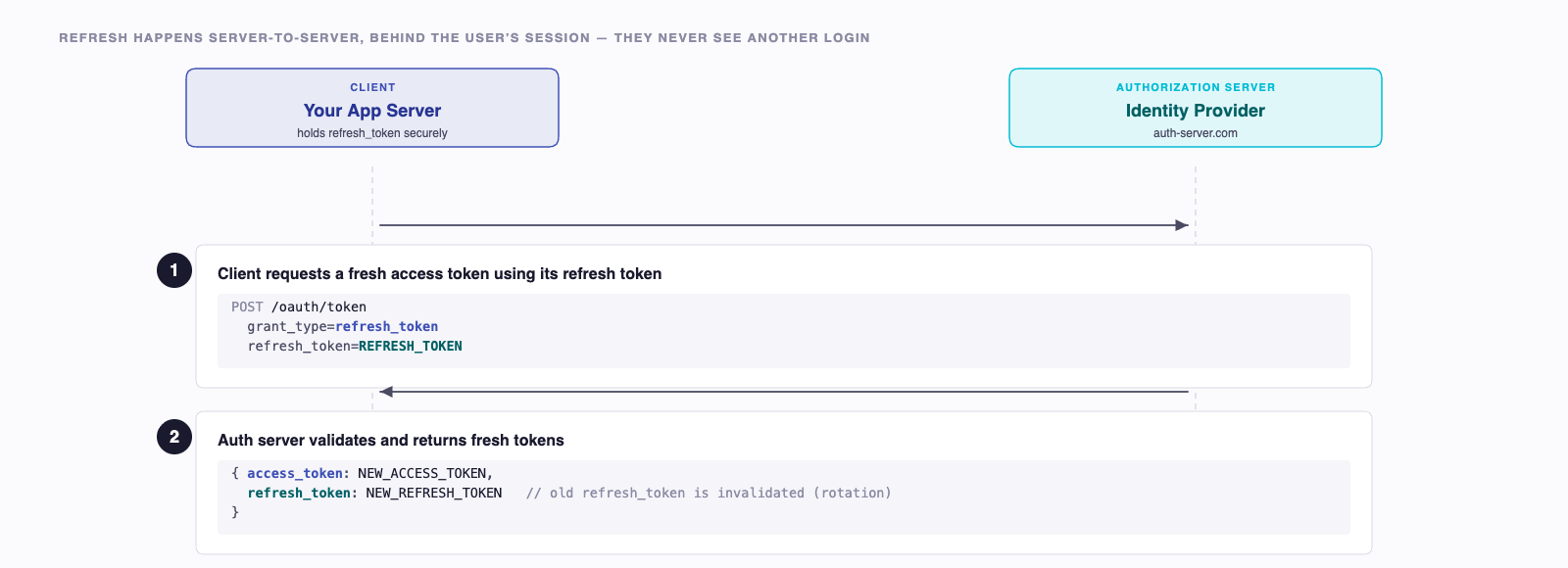
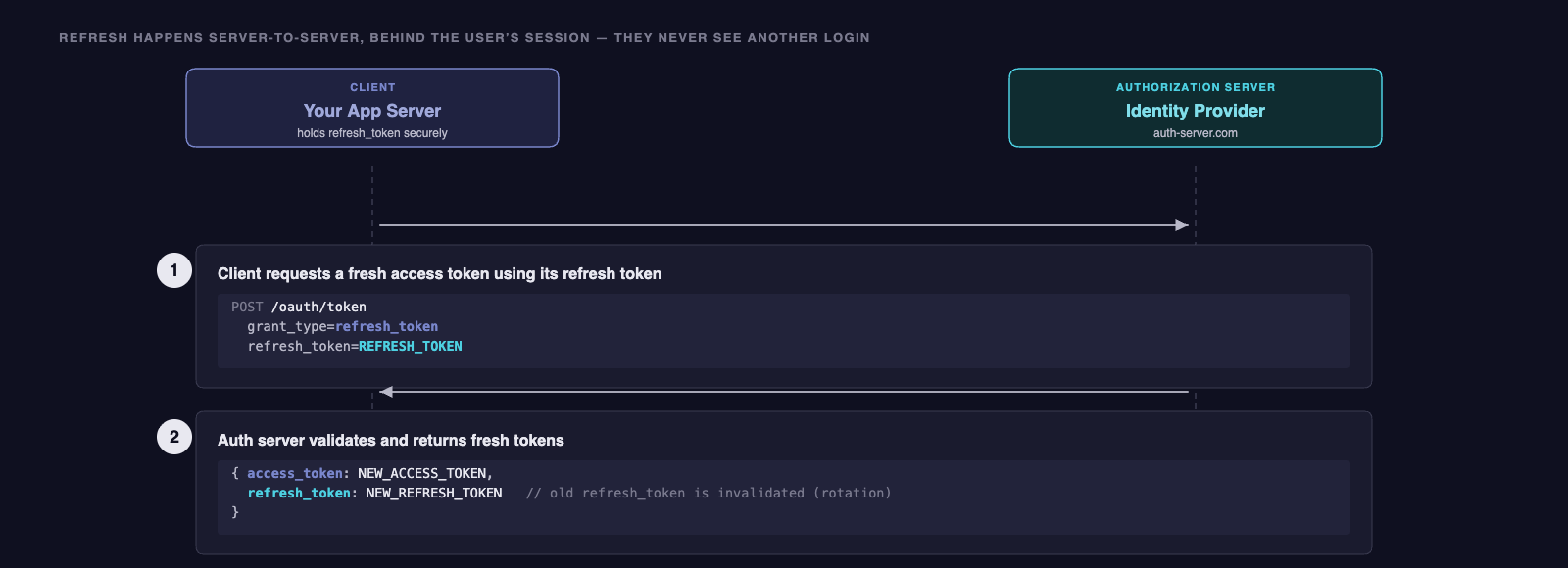
Access tokens are short-lived by design so a stolen one expires quickly. Refresh tokens cover the gap so users don't have to log in every 15 minutes: they live longer, never leave the server, and exist for one purpose — exchanging them for a fresh access token at the authorization server. You saw the rotation pattern in Authentication & Authorization Concepts §4.6. The refresh flow looks like:
5.3 ID Tokens (OpenID Connect)¶
This is where OIDC enters the picture. While access tokens answer "what can this bearer do?", ID tokens answer "who is this user?"
An ID token is always a JWT and contains identity claims:
{
  "sub": "user-12345",
  "iss": "https://auth.example.com",
  "aud": "your-client-id",
  "exp": 1711728000,
  "iat": 1711724400,
  "name": "Jane Doe",
  "email": "jane@example.com",
  "picture": "https://photos.example.com/jane.jpg"
}
The ID token is meant for the client application (your front end), not for APIs. It tells your app who just logged in so you can display their name, set up a session, or look up their local profile.
5.4 Token Summary¶
| Token | Purpose | Lifetime | Audience | Format |
|---|---|---|---|---|
| Access token | Authorize API calls | Short (minutes-hours) | Resource server (API) | JWT or opaque |
| Refresh token | Get new access tokens | Long (hours-weeks) | Authorization server | Opaque |
| ID token | Identify the user | Short (minutes-hours) | Client application | Always JWT |
6 How This Works in Your Project¶
Now let's connect these concepts to the architecture of your course project.
6.1 Auth² as the Identity Provider¶
Your course project does not delegate to Google or GitHub. It delegates to Auth² — a tenant-aware OAuth2 + OIDC provider hosted for this course at https://tcss-460-iam.onrender.com. You saw Auth² introduced in Authentication & Authorization Concepts. Here is how it fits the OAuth2 roles you just learned:
- Authorization Server: Auth². It authenticates users, issues tokens, and publishes its public signing keys at
/.well-known/jwks.json. - Resource Server: every group's Express API. Sprint 3 onward, your API verifies the RS256 signature on incoming tokens against Auth²'s JWKS — no shared secret travels between the IdP and your code.
- Client: your Next.js consumer app (Sprints 6-8). It initiates the Authorization Code flow when a user clicks "Sign In."
- Resource Owner: the signed-in student.
All nine groups' APIs and consumer apps live inside Auth²'s tcss460-sp26 tenant. Every group's API trusts the same Auth² — one identity provider, many resource servers — which is the textbook federated-identity arrangement.
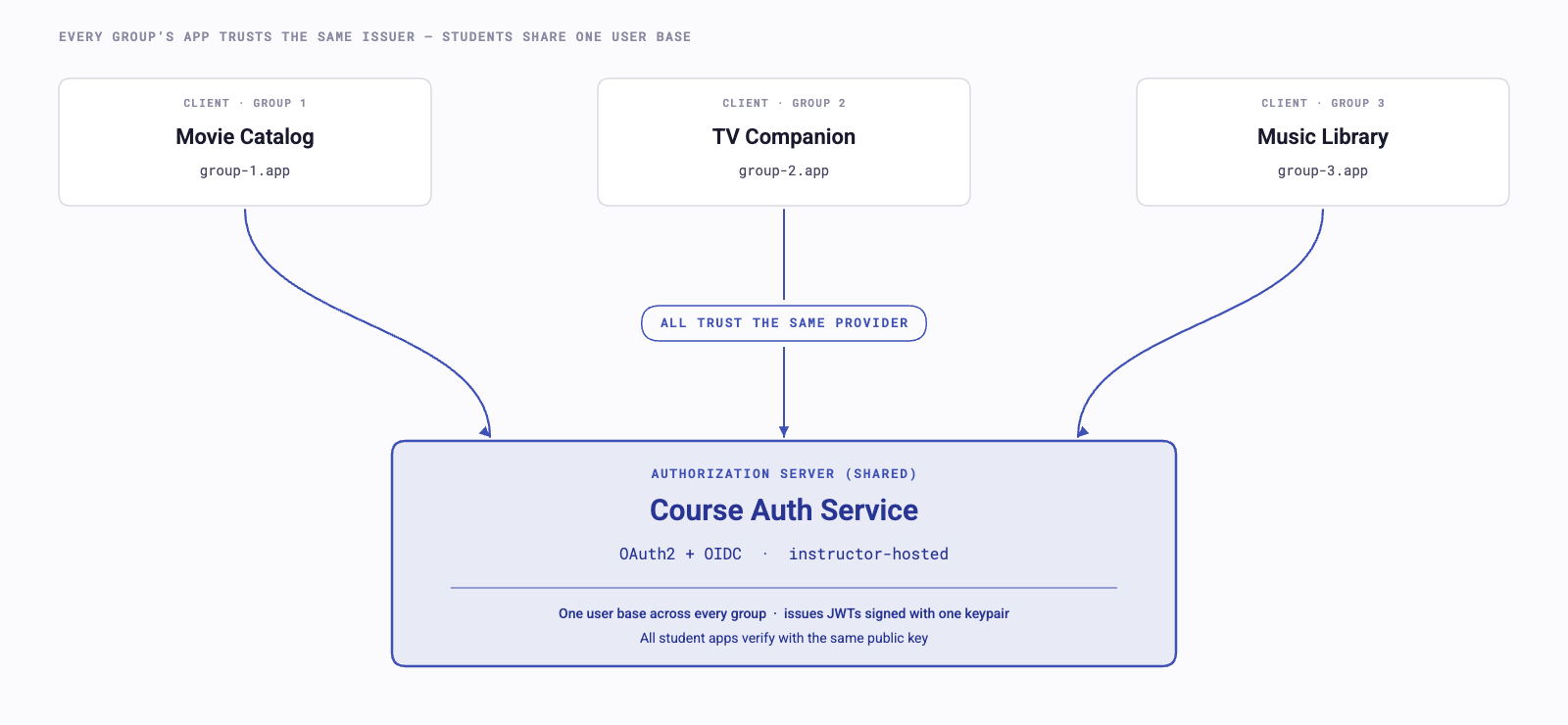
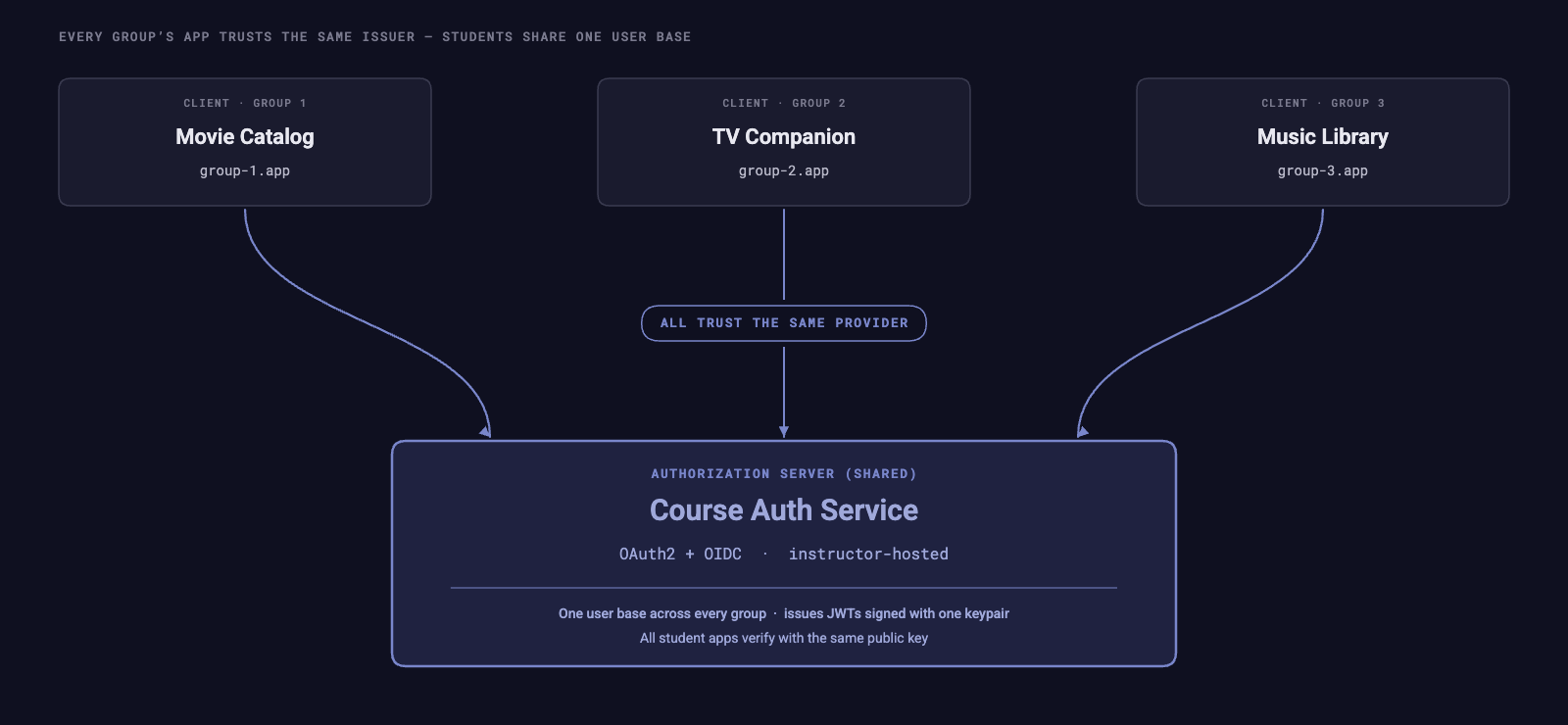
What the diagram doesn't show, and what makes the SP26 setup interesting, is that those APIs are not interchangeable from the token's perspective. That distinction is the next subsection.
6.2 Audience-Scoped Tokens¶
One token does not unlock every API in the tenant. Auth² mints tokens for a specific audience — a registered API identifier inside the tenant. Each group's API is registered as a distinct audience (group-1-api, group-2-api, …, group-9-api), and each API verifies that incoming tokens were minted for it.
When your consumer app starts the Authorization Code flow, it asks for a token aimed at the upstream partner's API audience. Auth² mints the token with that value in the aud claim. Your partner's API checks the claim. A token minted for group-3-api will be rejected if it shows up at group-4-api — even though both APIs trust the same Auth² and the user is the same person.
This is what enforces the ring: every edge of the ring is a separate "company," and a token issued for one company is not interchangeable with a token issued for another. You will see this rejection behavior firsthand in Check-Off 5 — a token minted for the wrong audience returns 401.
6.3 NextAuth Drives the Flow — in the Consumer App¶
You have two front-end projects in this course. The Bug Tracker FE (Sprint 5) is unauthenticated — it accepts public bug reports against your own group's /issues endpoint and has no sign-in flow. The consumer app (Sprints 6-8) is the one that uses OAuth2: it lets a student sign in and then calls the upstream partner group's authenticated API.
The consumer app does not implement the redirect dance from Section 4 manually. It uses NextAuth (also known as Auth.js), a Next.js library that is configured with three things:
- the issuer URL of Auth² (so it can discover the authorize and token endpoints from
/.well-known/openid-configuration), - a client ID and secret registered for your group inside the
tcss460-sp26tenant, and - the audience to request the access token for (your upstream partner's
group-N-api).
Given that configuration, NextAuth handles steps 2 through 9 of the sequence diagram automatically: redirect to authorize, return through the callback, exchange the code for tokens on the server, and stash the result in a session cookie. From your perspective as a developer, you wire it up once and call signIn(). From the perspective of the protocol, every redirect in Section 4 is still happening — it's just NextAuth handling each one.
6.4 Your API Verifies the JWT¶
When the consumer app calls your partner's API, it includes the access token in the request header:
The API's auth middleware runs four checks:
- Signature — verifies the RS256 signature using Auth²'s public key, fetched from
https://tcss-460-iam.onrender.com/.well-known/jwks.jsonand cached. Because the key is public, no secret ever leaves Auth². - Issuer — confirms the
issclaim equalshttps://tcss-460-iam.onrender.com. A token signed by anyone else is rejected. - Audience — confirms the
audclaim matches this API's identifier (e.g.,group-3-api). This is what enforces the per-edge boundary from §6.2. - Expiration — confirms the
expclaim is still in the future.
If any check fails, the API returns 401 without consulting Auth² over the network. The JWT carries everything the API needs to make the decision — that is the whole point of a self-contained token. You saw the JWKS verification pattern in Authentication & Authorization Concepts §9; the new piece here is the audience check, which is what gives each group's API its own independent permission boundary.
6.5 Identity Comes from Auth²; Permissions Live in Your Database¶
When the token clears verification, your API knows three things about the user: their stable Auth² identifier (the sub claim), their global Auth² role (the role claim — "User" for every student in SP26), and which audience the token was minted for. It does not know the user's password, their email at Auth², or anything else about their account.
Your application creates a local user record linked to that external sub. On the first authenticated request from a new user, you find-or-create a row in your own users table keyed by sub. On every later request, you look up the same row. Your users table has an external_id column where a password_hash would normally live — because you have delegated authentication entirely.
This is the deliberate authentication vs. authorization split. Auth² tells you who the user is — that's authentication, and it's a shared concern across every API in the ring. Your application tells you what that user can do here — that's authorization, and it's specific to your app. Auth²'s global role claim is intentionally coarse (every SP26 student is "User"); any app-specific role you need ("moderator," "owner of this review," "admin of this group's content") lives as a column on your local users table and is checked by your own middleware. You saw the authN-vs-authZ distinction abstractly in Week 5; this is what it looks like when it's wired into a real project.
7 OAuth2 Security Considerations¶
OAuth2 is secure when implemented correctly, but the protocol has several areas where mistakes can lead to vulnerabilities.
7.1 PKCE for Public Clients¶
The Authorization Code flow described in Section 4 assumes the client has a client_secret that it uses during the code exchange (Step 8). This works for server-side applications where the secret can be kept, well, secret.
But what about single-page applications (SPAs) or mobile apps where the code runs on the user's device? There is no safe place to store a secret in browser JavaScript — anyone can view the source.
PKCE (Proof Key for Code Exchange, pronounced "pixy") solves this. Instead of a static secret, the client generates a one-time random value for each authorization request:
- Client generates a random
code_verifier(a long random string) - Client computes
code_challenge = SHA256(code_verifier) - Client includes
code_challengein the authorization request (Step 2) - When exchanging the code for tokens (Step 8), client sends the original
code_verifier - Auth server computes
SHA256(code_verifier)and confirms it matches thecode_challengefrom Step 2
Even if an attacker intercepts the authorization code, they cannot exchange it for tokens because they do not have the code_verifier. The challenge (a hash) was sent over the front channel, but the verifier (the original value) is only sent over the back channel.
PKCE is now recommended for all OAuth2 clients, not just public ones. It provides defense-in-depth even when a client secret is also used.
7.2 Token Storage¶
OAuth2 doesn't dictate where the client stores tokens, but the choice matters enormously. You saw the full localStorage / sessionStorage / memory / httpOnly-cookie comparison in Authentication & Authorization Concepts §11. The OAuth-specific part is this: in the SP26 consumer app, NextAuth keeps the refresh token in a server-side session and only exposes the access token to the React tree through useSession(), so neither token is reachable from arbitrary JavaScript or stored in localStorage. That's why the configuration you do is so minimal — the library makes the storage decision you'd otherwise have to make for yourself.
7.3 Redirect URI Validation¶
Remember Step 6 in the Authorization Code flow — the auth server redirects back to your application at a URL you specified (redirect_uri). If an attacker can trick the auth server into redirecting to a different URL, they can steal the authorization code.
To prevent this, authorization servers enforce strict redirect URI validation:
- The client registers its allowed redirect URIs in advance
- The auth server only redirects to exact matches — no wildcards, no partial matches
- Even a trailing slash difference (
/callbackvs./callback/) can cause a rejection
This is why, when you configure your project with the shared auth service, you must register your exact callback URL. A mismatch will not produce a helpful error message — the auth server will simply refuse to redirect.
7.4 Common Pitfalls¶
Two pitfalls are specific to the OAuth2 flow itself; the others (skipping aud/iss validation, accepting unsigned tokens, algorithm confusion) you saw in Authentication & Authorization Concepts §13.
| OAuth-Flow Pitfall | Risk | Prevention |
|---|---|---|
Not validating the state parameter |
CSRF: an attacker initiates a flow and tricks your user into completing it, linking the attacker's identity to the victim's session | Generate, store, and verify state on every authorize request — libraries like NextAuth do this by default |
Storing client_secret in browser-shipped code |
A "confidential" client becomes effectively public; anyone can pull tokens | Keep the secret in server-side env vars (Next.js Route Handlers or API routes); for true browser-only clients, use PKCE instead of a secret |
8 Summary¶
| Concept | Key Point |
|---|---|
| Password anti-pattern | Every app managing its own passwords creates reuse, breach risk, and developer burden |
| Federated identity | Delegate authentication to a trusted identity provider; applications accept provider-issued credentials |
| OAuth2 | An authorization framework; authentication is added by OIDC on top |
| Four roles | Resource Owner (user), Client (app), Authorization Server (provider), Resource Server (API) |
| Authorization Code flow | Redirect → login at provider → code returned → code exchanged for tokens server-side |
| Front/back channels | Codes travel through the browser (front); secrets and tokens travel server-to-server (back) |
| Access tokens | Short-lived, authorize API calls, often JWTs |
| Refresh tokens | Longer-lived, used server-side to obtain new access tokens |
| ID tokens (OIDC) | Always JWTs, contain user identity claims (name, email), consumed by the client app |
| PKCE | One-time proof key that secures the code exchange even without a client secret |
| Token storage | httpOnly cookies for refresh tokens; memory for access tokens; never localStorage |
| Redirect URI validation | Auth servers only redirect to pre-registered, exact-match URIs |
| Auth² as IdP | One tenant-aware OAuth2 + OIDC provider serves the whole course; every group's API trusts it via JWKS |
| Audience scoping | Each group's API has its own aud identifier (group-N-api); tokens issued for one API are rejected by the others |
| NextAuth on the consumer app | NextAuth handles the Authorization Code flow for Sprints 6–8; the Bug Tracker FE (Sprint 5) is unauthenticated |
| AuthN vs AuthZ | Auth² says who you are (global role "User"); your local users table says what you can do in your app |
9 References¶
This reading draws from the following sources:
Standards & Specifications:
- RFC 6749 — The OAuth 2.0 Authorization Framework — The foundational OAuth2 specification defining authorization grant types, token endpoints, and client registration.
- RFC 6750 — The OAuth 2.0 Authorization Framework: Bearer Token Usage — Defines how access tokens are transmitted in HTTP requests (the
Authorization: Bearerheader). - RFC 7636 — Proof Key for Code Exchange (PKCE) — The PKCE extension for securing the Authorization Code flow in public clients.
- OpenID Connect Core 1.0 — The OIDC specification that adds authentication (ID tokens, userinfo endpoint) on top of OAuth2.
- OAuth 2.0 Security Best Current Practice (RFC 9700) — Current security recommendations for OAuth2 implementations.
Technical Documentation:
- MDN Web Docs — HTTP Authentication — Overview of HTTP authentication schemes including Bearer tokens.
- Auth.js Documentation — Authentication library for Next.js (formerly NextAuth.js).
- NextAuth.js Documentation — Legacy documentation for NextAuth.js.
10 Further Reading¶
External Resources
- OAuth 2.0 Simplified by Aaron Parecki — A practical, approachable guide to OAuth2 with clear diagrams and real-world examples
- The OAuth 2.0 Authorization Framework (RFC 6749) — The full specification; dense but authoritative
- An Illustrated Guide to OAuth and OpenID Connect — Okta's visual walkthrough of OAuth2 and OIDC concepts
- What is OpenID Connect? — The OpenID Foundation's own explanation of OIDC
- OpenID Connect Discovery 1.0 — Spec for the
/.well-known/openid-configurationmetadata document that lets clients auto-configure against an IdP - OWASP — OAuth 2.0 Security Cheat Sheet — Security-focused reference for common OAuth2 pitfalls and mitigations
This reading is part of TCSS 460 — Client/Server Programming, School of Engineering and Technology, University of Washington Tacoma.