Next.js¶
TCSS 460 — Client/Server Programming
This guide moves you from a Vite-scaffolded React app to a Next.js App Router app — the framework you will use to build the consumer applications in Sprints 5+ that talk to your partner team's back-end. By the end you should understand the App Router file conventions, the server vs client component split, layouts and dynamic routes, and how to fetch data on either side of the network boundary.
The lecture demo for this guide is TCSS460-frontend-2 — a Next.js 15 + React 19 + MUI v7 app that consumes backend-3's /v2/messages API. It demonstrates everything below in one cohesive codebase: server and client components, route groups for shared layouts, file-based routing, dynamic data fetching, environment variables, and middleware-based auth gating. References to specific FE-2 files appear inline; clone the repo and read alongside this guide.
This guide assumes you have read React Fundamentals. Where this guide needs to talk about fetch, error handling, headers, and CORS, it defers to the canonical reference: Consuming a Web API from the Browser. Read that guide first if you have not already.
Lecture demo repo
TCSS460-frontend-2 on GitHub — Next.js 15 + React 19 + MUI v7 + Auth.js v5. Clone it and read alongside this guide; inline links throughout point at specific files.
1 Why Next.js? (vs Plain React)¶
You have already built React apps on Vite. Vite gave you a development server, a build pipeline, and React itself — and then it stopped. Everything else was on you to wire up:
- Routing — React on its own has no concept of URLs. Most teams reach for React Router and configure it manually.
- Data fetching —
useEffect+fetchworks, but you write the loading/error/race-condition dance yourself in every component. - Server rendering — your Vite app ships an empty
<div id="root">and a JS bundle; the browser does all the work after the bundle arrives. Search engines and slow connections suffer. - Build optimization — code splitting, image optimization, font loading, prefetching: each is its own library.
React is "just the view layer." Next.js is the opinionated React framework that decides the rest of the stack for you.
The two big things you get from Next.js that React-on-Vite does not give you are:
- File-based routing — folders and files become URLs. No router config.
- Server rendering — components can run on the server, fetch data there, and ship HTML to the browser. CORS becomes a non-issue for those fetches; the user sees content sooner.
We use Next.js in TCSS 460 because the Sprint 5+ consumer apps need real multi-page routing, and because the NextAuth (Auth.js) integration you will add in Week 7 depends on Next.js's server-side primitives.
App Router vs Pages Router
Next.js has two routers: the App Router (the current default, built on React Server Components) and the Pages Router (the legacy router from before 2023). Both still work, but the App Router is what new projects use and what this guide teaches. If you find a tutorial that has files in a pages/ directory and uses getServerSideProps, you are looking at the legacy router — keep searching. Everything in this guide lives under app/.
2 Setup — create-next-app¶
Next.js scaffolds new projects with create-next-app, similar to how create vite@latest scaffolds React projects. As of 2026, Next.js 16 is the current major version and it ships with Turbopack as the default bundler (development and production builds), the App Router as the default router, and React 19.
2.1 Requirements¶
You need Node.js 20.9 or newer. Confirm with:
If you are on Node 18 or older, upgrade before running the scaffold — Next.js 16 will refuse to install otherwise.
2.2 Run the scaffold¶
From the directory where you want the project folder to be created:
You will first be asked the project name, then a single high-level prompt:
Would you like to use the recommended Next.js defaults?
- Yes, use recommended defaults — TypeScript, ESLint, Tailwind CSS, App Router, AGENTS.md
- No, reuse previous settings
- No, customize settings
For TCSS 460, answer Yes to defaults. The recommended set gets you a working starting point fast: TypeScript, ESLint, Tailwind, and the App Router.
If you choose customize, you will see this prompt sequence (recommended answers in bold):
| Prompt | Recommended | Notes |
|---|---|---|
| Use TypeScript? | Yes | All TCSS 460 front-end work is TypeScript. |
| Which linter? | ESLint | Biome is fine if you know it; ESLint is the path well-trodden. |
| Use React Compiler? | No | Optional optimization — leave off until you are comfortable with React. |
| Use Tailwind CSS? | Yes | Fine for one-off scaffolds. The lecture demo (FE-2) skips Tailwind in favor of MUI v7 to stay consistent with FE-1's component library — see the styling note below. |
Code inside src/? |
Yes | Keeps the repo root tidy. FE-2 uses this layout. |
| Use App Router? | Yes | Required — this guide is App Router only. |
| Customize import alias? | No | Keep the default @/*. |
Include AGENTS.md? |
Yes | A pointer file for AI coding assistants — useful in this course. |
Styling: Tailwind vs MUI
The Next.js scaffolder defaults to Tailwind, but the choice of styling library is independent of the framework. FE-2 uses MUI v7 (the same library FE-1 used) so that components like <PrioritySelector> port directly between the two. If your group already invested in MUI for Sprint 5+, keep using it; if you started fresh on Tailwind, that's also fine. The patterns in this guide work either way.
2.3 Generated structure¶
After the install completes:
my-app/
├── src/
│   └── app/
│       ├── favicon.ico
│       ├── globals.css         # Global styles (Tailwind directives live here)
│       ├── layout.tsx          # Root layout — wraps every page
│       └── page.tsx            # The home page (route: /)
├── public/                     # Static files served from the root
├── .eslintrc.json
├── .gitignore
├── next.config.ts              # Next.js configuration
├── package.json
├── postcss.config.mjs          # PostCSS config (used by Tailwind)
├── tailwind.config.ts          # Tailwind config
└── tsconfig.json               # TypeScript config (the @/* alias is here)
The whole router lives in src/app/. Everything else is configuration or static assets.
2.4 Run, build, start¶
cd my-app
npm run dev      # Development server with hot reload (Turbopack)
npm run build    # Production build
npm run start    # Run the production build locally
npm run dev starts a server at http://localhost:3000 by default. Open it — you should see the Next.js welcome page rendered from src/app/page.tsx.
Try It Yourself
- Run
npx create-next-app@latest tcss460-nextjs-demoand accept the recommended defaults. cd tcss460-nextjs-demo && npm run dev.- Open
http://localhost:3000and confirm the welcome page renders. - Open
src/app/page.tsx, change the<h1>text toHello TCSS 460, save. The browser updates instantly.
3 The App Router — File-Based Routing¶
In the App Router, the folder structure under src/app/ is the router. There is no routes.tsx file and no <Routes> component — you create routes by creating folders.
The translation rule is straightforward:
src/app/                              URL
├── page.tsx                          /
├── about/
│   └── page.tsx                      /about
├── dashboard/
│   ├── page.tsx                      /dashboard
│   └── settings/
│       └── page.tsx                  /dashboard/settings
└── items/
    └── [id]/
        └── page.tsx                  /items/<anything>
A folder by itself is not a route. Only when you put a page.tsx inside it does that folder become a routable URL.
3.1 The five special files¶
Next.js recognizes a small set of file names inside any route folder. Everything else (a component, a helper, a stylesheet) is just a regular file that lives next to the route but is not itself routable.
| File | Purpose |
|---|---|
page.tsx |
The leaf — the actual rendered route. Required for the folder to be a URL. |
layout.tsx |
Wraps every page in the folder and every nested folder. Persists across navigations. |
loading.tsx |
Shown while the page is fetching/streaming. Wraps the segment in a Suspense boundary automatically. |
error.tsx |
Catches errors thrown in the segment. Must be a client component. |
not-found.tsx |
Rendered when notFound() is called or no route matches. |
Anything in the folder that is not one of these names — say, Header.tsx, useDashboard.ts, helpers.ts — is just a private file that other route files can import. It will not become its own URL.
3.2 Route groups — share a layout without changing the URL¶
Sometimes you want a group of pages to share a layout without that grouping showing up in the URL. The "signed-in dashboard" is the canonical example: /dashboard, /messages/view, /messages/send, and /debug should all wear the same shell with nav and a sign-out button — but you don't want them living under a /dashboard/... URL prefix.
Wrap the folder name in parentheses: (dashboard)/. The parenthesized segment is invisible to the URL. Files under app/(dashboard)/messages/view/page.tsx resolve as /messages/view, not /dashboard/messages/view.
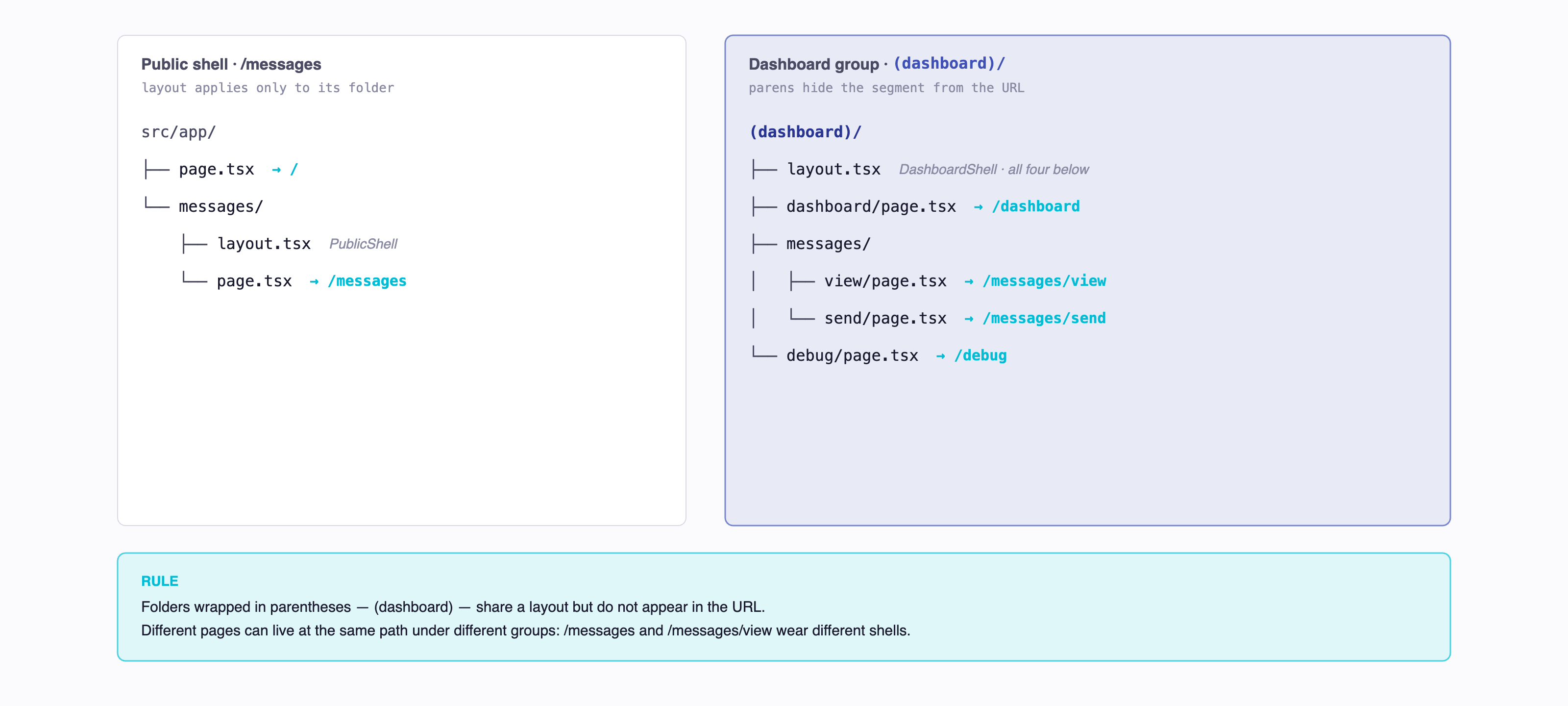
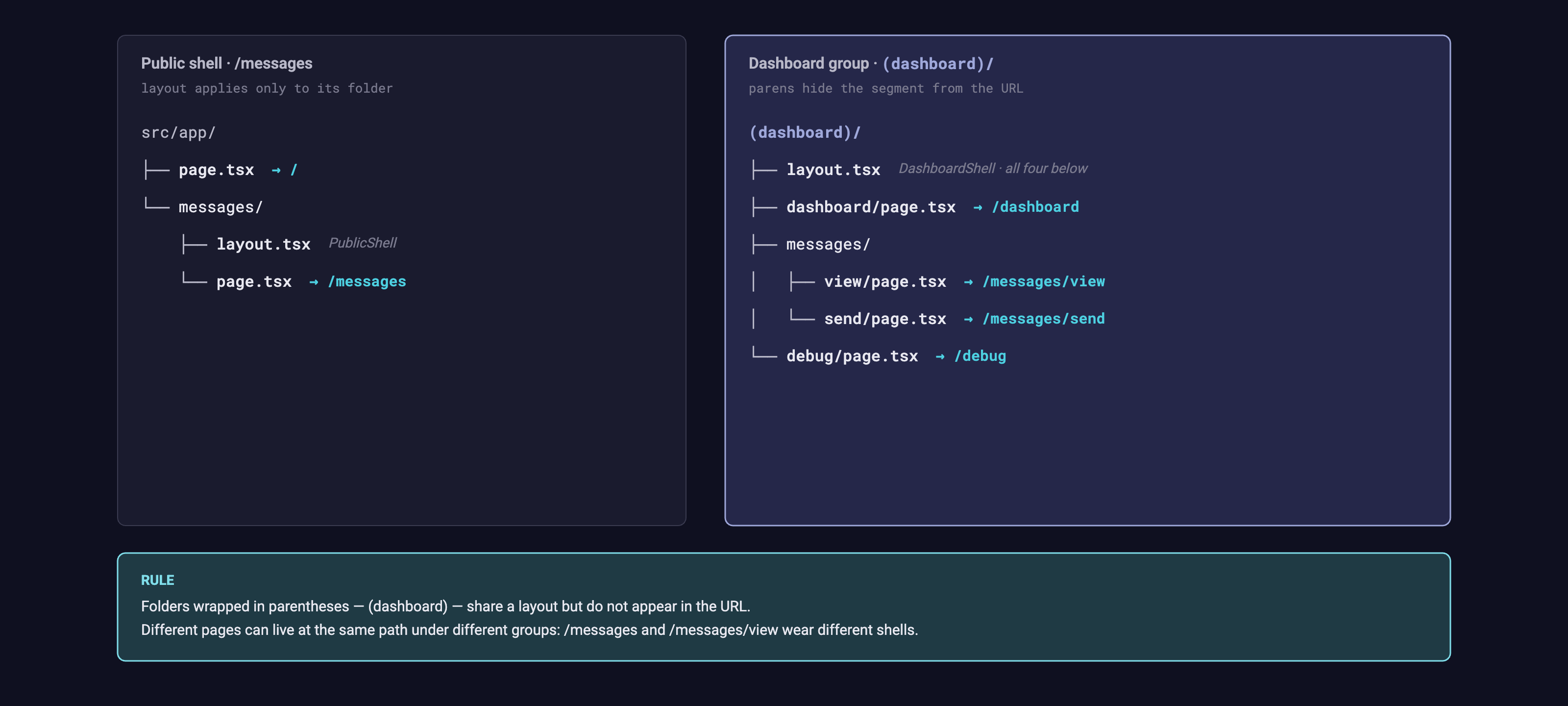
FE-2 uses this exact pattern: the public /messages list and the dashboard's /messages/view are different pages with different layouts (and different auth requirements), and they live at distinct URLs even though both contain "messages" in the path. See src/app/(dashboard)/layout.tsx and src/app/messages/layout.tsx.
Route groups + middleware: matchers can't see the parens
Route groups don't appear in URLs, so middleware matchers (§8.2 of the Auth guide) can't match by group name. You have to list the actual URLs that fall under the group: matcher: ['/dashboard', '/messages/view', '/messages/send', '/debug'], not /(dashboard)/:path*. Add a new page inside (dashboard)/ → update the matcher.
4 Pages and Layouts¶
4.1 page.tsx — the leaf¶
A page.tsx is a default-exported React component. The simplest possible page:
// src/app/about/page.tsx
export default function AboutPage() {
  return (
    <main>
      <h1>About</h1>
      <p>This is the about page.</p>
    </main>
  );
}
That is it. Visiting /about renders this component. There is no <Route path="/about" element={<AboutPage />} /> to write — the file path declares the URL.
4.2 layout.tsx — the wrapper¶
A layout wraps every page in its folder and every nested page below it. The layout receives a children prop — the rendered page goes there.
The root layout (src/app/layout.tsx) is special: it must contain the <html> and <body> tags, because it is the outermost wrapper on every page in the app.
// src/app/layout.tsx
import type { Metadata } from "next";
import "./globals.css";

export const metadata: Metadata = {
  title: "TCSS 460 Consumer App",
  description: "Consuming our partner backend with Next.js.",
};

export default function RootLayout({
  children,
}: {
  children: React.ReactNode;
}) {
  return (
    <html lang="en">
      <body>{children}</body>
    </html>
  );
}
You can nest layouts. A layout at src/app/dashboard/layout.tsx wraps every page under /dashboard/* in addition to the root layout. This is exactly what you want for things like a dashboard shell:
// src/app/dashboard/layout.tsx
import Link from "next/link";

export default function DashboardLayout({
  children,
}: {
  children: React.ReactNode;
}) {
  return (
    <div className="flex">
      <aside className="w-48">
        <nav>
          <Link href="/dashboard">Overview</Link>
          <Link href="/dashboard/settings">Settings</Link>
        </nav>
      </aside>
      <section className="flex-1">{children}</section>
    </div>
  );
}
Layouts persist across navigations within their segment. If a user navigates from /dashboard to /dashboard/settings, the dashboard layout does not re-render or unmount — only the children swap. This means form state in the sidebar, scroll position, etc. are preserved automatically.
FE-2 splits its app shell into two layouts mounted via route groups (§3.2): PublicShell (logo + sign-in CTA, applied to /messages) and DashboardShell (full nav + sign-out, applied to everything inside (dashboard)/). Both are MUI <AppBar> variants — the layouts themselves just pick which shell to render.
5 Server Components vs Client Components¶
This is the single most important concept in the App Router, and the one most likely to trip you up coming from React-on-Vite. Read this section twice.
5.1 The two flavors¶
In the App Router, every component is a Server Component by default. A Server Component:
- Runs on the server, in Node, when the request comes in.
- Has its output (HTML) sent to the browser.
- Never ships any JavaScript to the browser.
- Can
awaitdirectly inside the component function (server components can beasync). - Can read files, query databases, call internal APIs, hold secrets — none of it leaks to the client.
- Cannot use React hooks (
useState,useEffect,useRef, etc.). - Cannot attach event handlers (
onClick,onChange,onSubmit, etc.).
A Client Component is the React you already know. To make a component a client component, put the string "use client" as the very first line of the file:
// src/app/components/Counter.tsx
"use client";

import { useState } from "react";

export default function Counter() {
  const [count, setCount] = useState(0);
  return (
    <button onClick={() => setCount(count + 1)}>
      Clicked {count} times
    </button>
  );
}
A client component:
- Is sent to the browser as JavaScript.
- Hydrates after the HTML lands — the server still renders the initial markup once.
- Can use hooks and event handlers.
- Cannot be
asyncdirectly (youuseEffectfor that, just like Vite-React). - Should not contain secrets — its source is shipped to every visitor.
5.2 The mental model¶
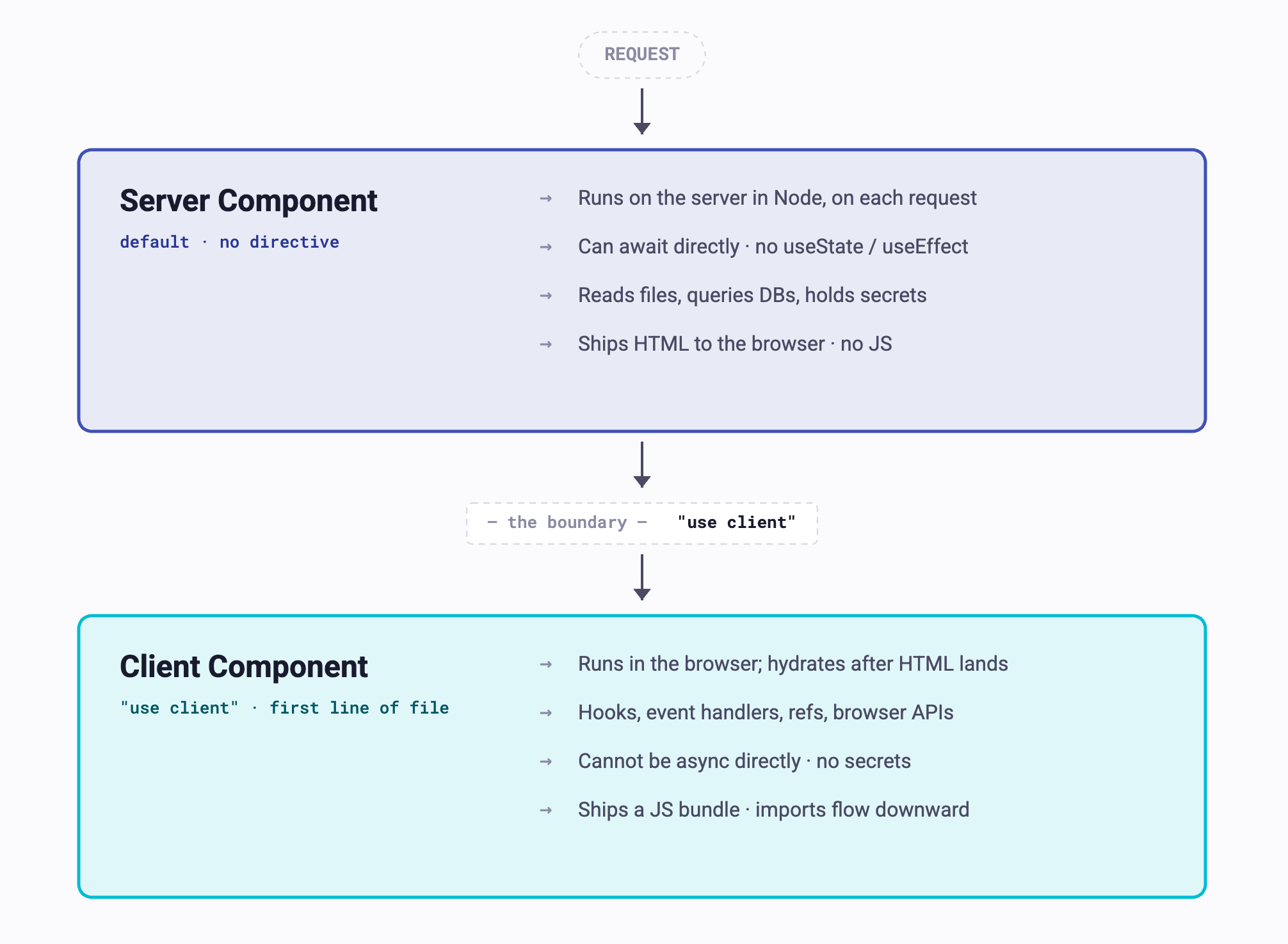
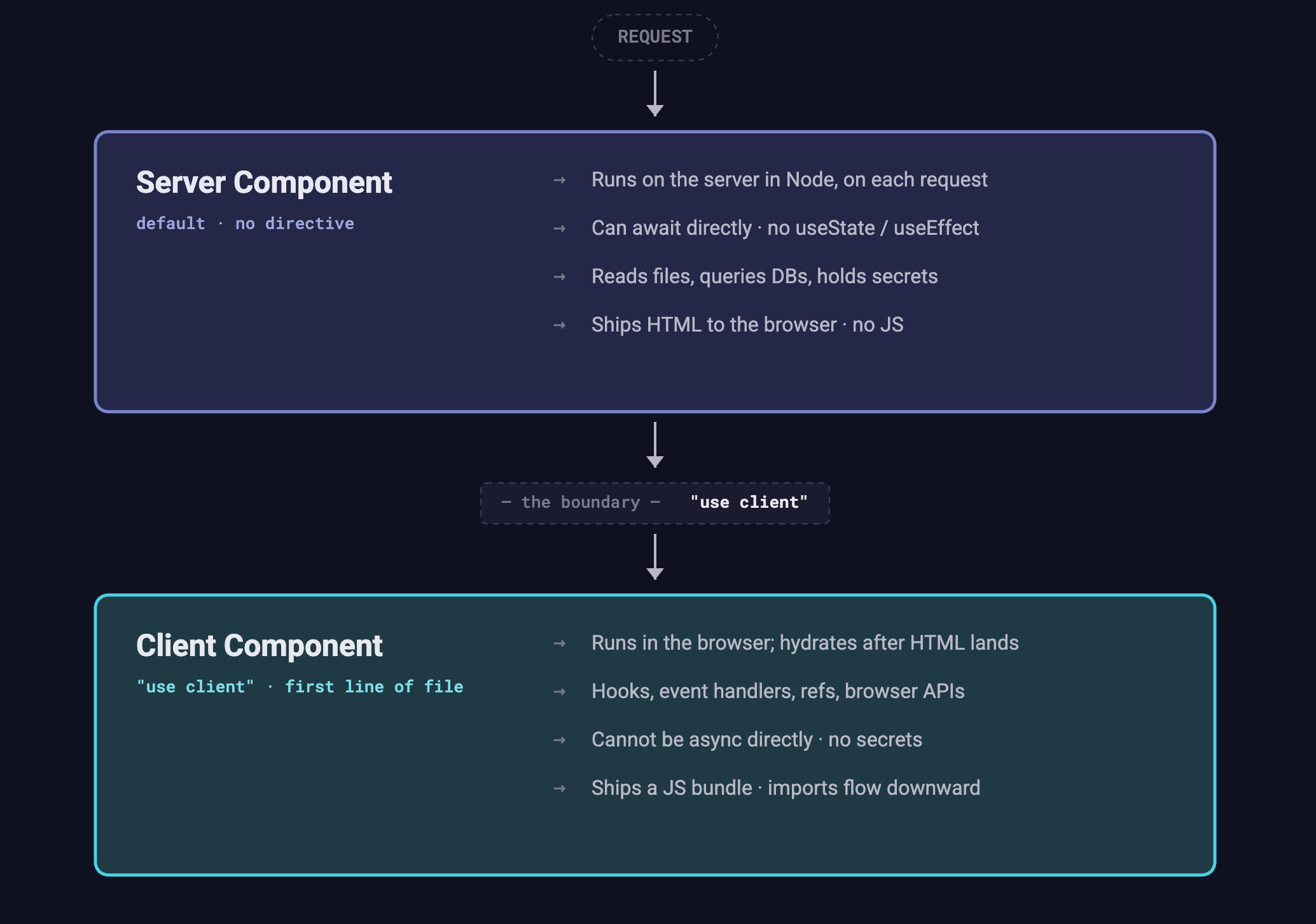
Use server components for data fetching and templating — wherever you would say "given this data, render this HTML."
Use client components for interactivity — anywhere you need state, effects, refs, browser APIs, or event handlers.
A page can mix both: the page itself is usually a server component that fetches data, and it can include client components inside it for the interactive bits. The pattern looks like this:
// src/app/items/page.tsx — Server Component (no "use client")
import FavoriteButton from "./FavoriteButton";  // Client Component

interface Item { id: string; name: string; }

export default async function ItemsPage() {
  const response = await fetch("https://partner-api.example.com/items");
  const items: Item[] = await response.json();

  return (
    <ul>
      {items.map((item) => (
        <li key={item.id}>
          {item.name}
          <FavoriteButton itemId={item.id} />
        </li>
      ))}
    </ul>
  );
}
The page renders on the server, builds the list HTML, and includes <FavoriteButton> in the markup. The button is a client component, so its JS gets shipped to the browser and hydrates — clicking it works.
5.3 The boundary rule (read this carefully)¶
!!! important 'Once "use client", all imports become client'
"use client" does not mark just one file. It marks the boundary between the server and client subtrees. Every component that a "use client" file imports — directly or transitively — also runs on the client.
This is the most-misunderstood part of the App Router.
Concretely: if Counter.tsx is a client component and it imports a helper component <Spinner /> from ./Spinner.tsx, then Spinner.tsx is also a client component, whether or not Spinner.tsx has its own "use client" directive. The directive flows downward through imports.
The opposite is not true. A server component cannot import a client component and have it still run on the server. When a server component renders a client component, the client component is treated as a boundary — the server emits a placeholder, and the client takes over rendering from there.
Two consequences students hit constantly:
- You do not need
"use client"on every file in a client subtree. Mark the topmost component that needs it; everything it imports inherits. - A server component cannot pass a function as a prop to a client component. Functions cannot be serialized across the boundary. Pass primitives, plain objects, arrays, or null. (Server Actions are an exception — they are functions specifically designed to cross this boundary; see §7.3.)
5.4 Common student mistake¶
If you came from React-on-Vite, your reflex is to put "use client" at the top of every file because you are used to every React file being client-side. Resist this. The right rule is:
Default to no directive. Add
"use client"only when a component needs a hook, an event handler, or a browser API.
If you "use client" your root layout, you forfeit all the benefits of server rendering — you have built React-on-Vite with extra steps.
For grounded examples: FE-2's /profile page is a server component that calls await auth() and redirect()s — no 'use client'. Its MessageSendForm is a client component (form state, onSubmit, useRouter) that the server-rendered /messages/send page renders. That page-renders-form pattern is the App Router norm.
Try It Yourself
- In
src/app/page.tsx, addconsole.log("rendering home page")at the top of the function. Save. - Reload the browser. Look in the terminal where
npm run devis running — the log appears there. It does not appear in the browser console. That is your proof the home page is a server component. - Now add
"use client"as the first line. Save. - Reload. The log now appears in the browser console, not the terminal.
- Remove the
"use client"line again before moving on.
6 Data Fetching¶
The browser primitive for HTTP requests is fetch, and the patterns for using it — checking response.ok, await response.json(), attaching headers, handling errors — are covered in detail in Consuming a Web API from the Browser. Read that guide first; this section focuses only on what is different about fetching in Next.js.
6.1 Fetching in a Server Component¶
Server Components can be async functions and await directly. There is no useEffect, no loading state, no race-condition guard:
// src/app/items/page.tsx
interface Item { id: string; name: string; }

export default async function ItemsPage() {
  const response = await fetch("https://partner-api.example.com/items");

  if (!response.ok) {
    throw new Error(`Failed to load items: ${response.status}`);
  }

  const items: Item[] = await response.json();

  return (
    <ul>
      {items.map((item) => (
        <li key={item.id}>{item.name}</li>
      ))}
    </ul>
  );
}
Two things are quietly wonderful here:
- No CORS. The fetch happens server-to-server, in the Node process. The browser is not involved. You can call any public URL without the partner backend needing to allow your origin. (You will still hit CORS the moment that fetch moves to a client component.)
- Secrets stay on the server. If the request needs an API key or a service-role token, you can read it from
process.env.PARTNER_API_KEYhere. It will never be visible in DevTools.
Errors thrown from a server component are caught by the nearest error.tsx (see §10).
6.2 Fetching in a Client Component¶
In a client component, you fall back to the useEffect + fetch pattern from React Fundamentals — exactly the same code you would write in a Vite app:
"use client";

import { useEffect, useState } from "react";

interface Item { id: string; name: string; }

export default function ItemsList() {
  const [items, setItems] = useState<Item[]>([]);
  const [error, setError] = useState<string | null>(null);

  useEffect(() => {
    const controller = new AbortController();

    fetch("https://partner-api.example.com/items", { signal: controller.signal })
      .then((response) => {
        if (!response.ok) throw new Error(`HTTP ${response.status}`);
        return response.json();
      })
      .then(setItems)
      .catch((error) => {
        if (error.name !== "AbortError") setError(error.message);
      });

    return () => controller.abort();
  }, []);

  if (error) return <p>Error: {error}</p>;
  return (
    <ul>
      {items.map((item) => (
        <li key={item.id}>{item.name}</li>
      ))}
    </ul>
  );
}
This is normal React. CORS applies. The user's browser makes the request.
FE-2's useMessages hook is a worked example: it fetches /v2/messages with a priority filter, cancels in-flight requests via AbortController when the filter changes, and returns { messages, loading, error, reload }. The wrapping helper apiGet is where the NEXT_PUBLIC_API_BASE_URL lookup and ApiError class live.
6.3 Server vs client — when to choose which¶
| Use a Server Component fetch when... | Use a Client Component fetch when... |
|---|---|
| The data is needed to render the page initially | The fetch is triggered by user interaction (click, submit) |
| The fetch needs a secret or service-role token | The fetch needs the user's session token (use the NextAuth guide for the right pattern) |
| You want fast first paint with HTML containing the data | You need the data to update without a full page navigation |
| The partner backend does not allow your origin via CORS | (CORS not relevant — same origin / public endpoint) |
A reasonable default for Sprints 5+: server-fetch the partner backend's public reads on page load; client-fetch anything user-triggered or auth-gated.
6.4 Caching — the surprise that bites everyone¶
In Next.js 14 and earlier, fetch requests in server components were cached by default, often forever, until you opted out. This was the most-complained-about behavior in the framework's history.
In Next.js 15 and later, the default flipped: fetch is not cached by default. Every server-component fetch goes to the network on every request, just like you would expect from a normal fetch call.
To opt back into caching, pass the cache option:
// Cache forever (until you redeploy or revalidate)
const response = await fetch(url, { cache: "force-cache" });

// Cache for 60 seconds
const response = await fetch(url, { next: { revalidate: 60 } });

// Explicit no-cache (the current default — equivalent to omitting it)
const response = await fetch(url, { cache: "no-store" });
For TCSS 460, the default behavior is what you want. Opt into caching only when you have a specific reason (a slow upstream, a rate-limited public API).
If you read older tutorials
Many tutorials and Stack Overflow answers were written against Next.js 13/14, where fetches were cached by default. They will tell you to add cache: 'no-store' "to fix stale data." In Next.js 15+ you do not need to — that is the default. Adding it is harmless but unnecessary.
7 Routing — Links and Navigation¶
7.1 <Link> — the navigation primitive¶
Use Next.js's <Link> instead of an <a> tag for any internal navigation. It does client-side navigation (no full page reload), prefetches the destination's bundle in the background when the link comes into view, and keeps your layouts mounted across the navigation.
import Link from "next/link";

export default function Nav() {
  return (
    <nav>
      <Link href="/">Home</Link>
      <Link href="/items">Items</Link>
      <Link href="/items/123">Item 123</Link>
    </nav>
  );
}
Use a plain <a href="..."> only for external links (links to other origins). For internal routes, always <Link>.
7.2 Programmatic navigation — useRouter¶
For navigating after an event (e.g., submit a form, then go to the new resource's page), use the useRouter hook from next/navigation. It is a client-only hook, so the component must be "use client":
"use client";

import { useRouter } from "next/navigation";

export default function NewItemForm() {
  const router = useRouter();

  const handleSubmit = async (event: React.FormEvent<HTMLFormElement>) => {
    event.preventDefault();
    const response = await fetch("/api/items", { method: "POST", /* ... */ });
    const item = await response.json();
    router.push(`/items/${item.id}`);
  };

  return <form onSubmit={handleSubmit}>{/* ... */}</form>;
}
Import path matters
Import useRouter from "next/navigation", not "next/router". The latter is the legacy Pages Router hook and behaves differently. If you copy-paste from an old tutorial, you will get a confusing import error.
7.3 Reading the URL — usePathname and useSearchParams¶
Two more client-only hooks from next/navigation:
"use client";

import { usePathname, useSearchParams } from "next/navigation";

export default function ActiveLinkIndicator() {
  const pathname = usePathname();        // e.g., "/items/123"
  const searchParams = useSearchParams(); // e.g., URLSearchParams from "?sort=asc"
  const sort = searchParams.get("sort");

  return <p>You are on {pathname}, sorted {sort ?? "default"}.</p>;
}
In server components, you read the URL via the params and searchParams props on the page component instead — see §8.
8 Dynamic Routes¶
Folders wrapped in square brackets become dynamic segments. The folder name (without the brackets) becomes a parameter passed to the page.
![Diagram showing how Next.js dynamic route segments map URLs to params. The folder src/app/items/[id]/page.tsx matches /items/123 with id equal to "123" and /items/abc with id equal to "abc". The nested folder src/app/users/[userId]/posts/[postId]/page.tsx matches /users/u1/posts/p9 with userId equal to "u1" and postId equal to "p9".](../../../../assets/images/nextjs/dynamic-routes.png#only-light)
![Diagram showing how Next.js dynamic route segments map URLs to params. The folder src/app/items/[id]/page.tsx matches /items/123 with id equal to "123" and /items/abc with id equal to "abc". The nested folder src/app/users/[userId]/posts/[postId]/page.tsx matches /users/u1/posts/p9 with userId equal to "u1" and postId equal to "p9".](../../../../assets/images/nextjs/dynamic-routes-dark.png#only-dark)
8.1 The params prop (it is a Promise)¶
The page component receives a params prop containing the dynamic segment values. As of Next.js 15, params is a Promise. You must await it:
// src/app/items/[id]/page.tsx
interface Item { id: string; name: string; description: string; }

export default async function ItemDetailPage({
  params,
}: {
  params: Promise<{ id: string }>;
}) {
  const { id } = await params;

  const response = await fetch(`https://partner-api.example.com/items/${id}`);
  if (!response.ok) {
    throw new Error(`Item ${id} not found`);
  }
  const item: Item = await response.json();

  return (
    <article>
      <h1>{item.name}</h1>
      <p>{item.description}</p>
    </article>
  );
}
The reason params is async: Next.js sometimes needs to render parts of the page before the request is fully parsed (for streaming and static generation). Making params a Promise lets the framework suspend on it cleanly.
8.2 The searchParams prop¶
The query string is exposed as searchParams, also a Promise:
// src/app/items/page.tsx — handles /items?sort=asc
export default async function ItemsPage({
  searchParams,
}: {
  searchParams: Promise<{ sort?: string }>;
}) {
  const { sort = "asc" } = await searchParams;
  const response = await fetch(`https://partner-api.example.com/items?sort=${sort}`);
  const items = await response.json();
  // ...
}
If a query parameter can appear multiple times (?tag=a&tag=b), its type is string[]. The full type is { [key: string]: string | string[] | undefined }.
8.3 Using params in a client component¶
If you need the dynamic param in a client component (because the component is interactive), accept the Promise as a prop and unwrap it with React's use hook:
"use client";

import { use } from "react";

export default function ItemEditor({
  params,
}: {
  params: Promise<{ id: string }>;
}) {
  const { id } = use(params);
  // id is now a string and you can pass it to useState, etc.
}
8.4 Catch-all routes¶
For routes that match an arbitrary number of segments (like docs paths), use [...slug]:
src/app/docs/[...slug]/page.tsx
                              /docs/intro          → slug = ["intro"]
                              /docs/guides/setup   → slug = ["guides", "setup"]
You will rarely need this in TCSS 460 — mention it so you recognize the syntax in the wild.
Try It Yourself
- Create
src/app/items/[id]/page.tsxwith the example above. - Visit
/items/1,/items/2,/items/abc— each should render with the correctid. - Now add a
<Link href="/items/1">Item 1</Link>to your home page and click it. Notice no full page reload happens.
9 Route Handlers (the BFF Pattern, Briefly)¶
Next.js can also serve as a tiny back-end. Files named route.ts (instead of page.tsx) inside src/app/api/ become HTTP endpoints. This is the App Router equivalent of an Express route handler:
// src/app/api/health/route.ts
import { NextResponse } from "next/server";

export function GET() {
  return NextResponse.json({ status: "ok" });
}

export async function POST(request: Request) {
  const body = await request.json();
  return NextResponse.json({ received: body }, { status: 201 });
}
The exported function name (GET, POST, PUT, PATCH, DELETE, OPTIONS) is the HTTP method.
9.1 When you would actually use this¶
For most TCSS 460 work, you are consuming a partner team's back-end directly from your Next.js app. You do not need route handlers for that.
The two times you reach for them:
- Hiding a secret. If your front-end needs to call an API that requires a secret key, you do not want that key in client JavaScript. Add a route handler that takes the client's request, attaches the secret server-side, and forwards to the upstream API. This is the BFF (Backend-For-Frontend) pattern.
- Cross-origin proxy. If the partner backend's CORS policy blocks your front-end origin and you cannot get them to update it, route the request through your own server.
For the rest of this guide we assume you are talking to a partner backend directly — you will not need to write route handlers in the Try It Yourself.
10 Loading and Error UI¶
Two of the special files from §3.1 give you per-route loading states and error boundaries — for free, no useState/useEffect needed.
10.1 loading.tsx¶
Drop a loading.tsx next to a page.tsx, and Next.js automatically wraps the segment in a Suspense boundary. While the page (specifically: any data it awaits) is resolving, the loading UI shows:
This works for server components — there is no useState involved. The framework handles the suspension when the page's await fetch(...) is in flight.
10.2 error.tsx¶
If a server component throws, the nearest error.tsx catches it. Error boundaries must be client components, because they take an interactive reset callback:
// src/app/items/error.tsx
"use client";

export default function Error({
  error,
  reset,
}: {
  error: Error & { digest?: string };
  reset: () => void;
}) {
  return (
    <div>
      <h2>Something went wrong loading items.</h2>
      <p>{error.message}</p>
      <button onClick={() => reset()}>Try again</button>
    </div>
  );
}
10.3 not-found.tsx¶
If your page calls the notFound() helper, or a route does not match any file, the nearest not-found.tsx renders:
// src/app/items/[id]/page.tsx
import { notFound } from "next/navigation";

export default async function ItemDetailPage({ params }: { params: Promise<{ id: string }> }) {
  const { id } = await params;
  const response = await fetch(`https://partner-api.example.com/items/${id}`);
  if (response.status === 404) notFound();
  // ...
}
// src/app/items/[id]/not-found.tsx
export default function NotFound() {
  return <p>That item does not exist.</p>;
}
11 Environment Variables¶
Next.js loads environment variables from .env.local (development) and from your hosting provider's dashboard (production). The rule that catches every student at least once:
Variables prefixed with
NEXT_PUBLIC_are shipped to the browser. Everything else stays on the server.
This is a hard security boundary. Treat the NEXT_PUBLIC_ prefix as "this value will appear in DevTools — never put a secret here."
11.1 Setting them¶
# .env.local
NEXT_PUBLIC_API_URL=https://partner-team.onrender.com
PARTNER_API_KEY=secret-do-not-ship-to-client
.env.local is git-ignored by default — confirm this by checking your .gitignore. Never commit .env.local.
11.2 Reading them¶
Anywhere in your code:
const baseUrl = process.env.NEXT_PUBLIC_API_URL;        // OK in server OR client component
const apiKey = process.env.PARTNER_API_KEY;             // ONLY readable in server component / route handler
If you read a non-NEXT_PUBLIC_ variable from a client component, you get undefined — Next.js silently strips it out to prevent the leak.
11.3 Worked example — what is safe to expose¶
| Variable | Where it lives | Why |
|---|---|---|
NEXT_PUBLIC_API_URL=https://partner.onrender.com |
OK to be public | A URL is not a secret. The user's browser is going to call it anyway. |
PARTNER_API_KEY=sk_live_abc123 |
Never NEXT_PUBLIC_ |
The key gives full API access. Use it only in server components / route handlers. |
NEXTAUTH_SECRET=... |
Never NEXT_PUBLIC_ |
Used to sign session cookies; if leaked, anyone can forge sessions. |
Production redeploys
Changing an env var in your hosting dashboard does not affect already-built bundles. You must redeploy. Especially confusing for NEXT_PUBLIC_* vars — they are baked into the JS at build time, not read fresh per request.
FE-2's .env.example is annotated end-to-end and is the cleanest reference for the auth-squared + backend-3 setup: it documents AUTH_SECRET, the provider-specific AUTH_TCSS460_* block, and the NEXT_PUBLIC_API_BASE_URL switch between local and remote backends.
12 Static Assets and Metadata¶
12.1 The public/ folder¶
Anything you drop into public/ is served at the site root. A file at public/logo.svg is reachable at /logo.svg:
Use public/ for favicons, robots.txt, OG images, and small static assets that do not need to be processed by the build.
12.2 The <Image> component¶
For real images, prefer Next.js's <Image> component over <img>. It generates responsive sizes, lazy-loads off-screen images, and serves modern formats (WebP/AVIF) automatically:
import Image from "next/image";

<Image src="/logo.svg" alt="Logo" width={200} height={50} priority />
You must provide explicit width and height to prevent layout shift. For images from external URLs, you also need to configure the allowed domains in next.config.ts.
12.3 Metadata¶
The <title> and <meta> tags for a page come from a metadata export in layout.tsx or page.tsx:
// src/app/items/page.tsx
import type { Metadata } from "next";

export const metadata: Metadata = {
  title: "Items | TCSS 460 Consumer App",
  description: "Browse items from our partner team's API.",
};

export default async function ItemsPage() { /* ... */ }
For metadata that depends on dynamic data (e.g., the item's name on a detail page), export a generateMetadata function instead:
// src/app/items/[id]/page.tsx
import type { Metadata } from "next";

export async function generateMetadata({
  params,
}: {
  params: Promise<{ id: string }>;
}): Promise<Metadata> {
  const { id } = await params;
  const response = await fetch(`https://partner-api.example.com/items/${id}`);
  const item = await response.json();
  return {
    title: `${item.name} | TCSS 460 Consumer App`,
    description: item.description,
  };
}
Metadata exports only work in server components. They cannot live in a "use client" file.
13 Try It Yourself — Build a Multi-Page Consumer App¶
You will build a small consumer app that talks to a CRUD-shaped backend. The endpoints assumed below — GET /items, GET /items/:id, POST /items/:id/favorite — are placeholders. Substitute the actual paths your partner team's backend exposes (or use your own Sprint 2/3 backend during development).
13.1 Scaffold and configure¶
npx create-next-app@latest tcss460-consumer-app
# Accept the recommended defaults
cd tcss460-consumer-app
Create .env.local at the project root:
(Adjust the URL to point at whichever backend you are consuming. No trailing slash.)
13.2 Home page — list items (Server Component)¶
Replace src/app/page.tsx:
// src/app/page.tsx
import Link from "next/link";

interface Item {
  id: string;
  name: string;
}

export default async function HomePage() {
  const baseUrl = process.env.NEXT_PUBLIC_API_URL;
  const response = await fetch(`${baseUrl}/items`);

  if (!response.ok) {
    throw new Error(`Failed to load items: ${response.status}`);
  }

  const items: Item[] = await response.json();

  return (
    <main>
      <h1>Items</h1>
      <ul>
        {items.map((item) => (
          <li key={item.id}>
            <Link href={`/items/${item.id}`}>{item.name}</Link>
          </li>
        ))}
      </ul>
    </main>
  );
}
13.3 Detail page — dynamic route (Server Component)¶
Create src/app/items/[id]/page.tsx:
// src/app/items/[id]/page.tsx
import { notFound } from "next/navigation";
import FavoriteButton from "./FavoriteButton";

interface Item {
  id: string;
  name: string;
  description: string;
}

export default async function ItemDetailPage({
  params,
}: {
  params: Promise<{ id: string }>;
}) {
  const { id } = await params;
  const baseUrl = process.env.NEXT_PUBLIC_API_URL;
  const response = await fetch(`${baseUrl}/items/${id}`);

  if (response.status === 404) notFound();
  if (!response.ok) throw new Error(`HTTP ${response.status}`);

  const item: Item = await response.json();

  return (
    <main>
      <h1>{item.name}</h1>
      <p>{item.description}</p>
      <FavoriteButton itemId={item.id} />
    </main>
  );
}
13.4 Favorite button — interactivity (Client Component)¶
Create src/app/items/[id]/FavoriteButton.tsx:
// src/app/items/[id]/FavoriteButton.tsx
"use client";

import { useState } from "react";

export default function FavoriteButton({ itemId }: { itemId: string }) {
  const [isFavorite, setIsFavorite] = useState(false);
  const [pending, setPending] = useState(false);
  const [error, setError] = useState<string | null>(null);

  const baseUrl = process.env.NEXT_PUBLIC_API_URL;

  const toggle = async () => {
    setPending(true);
    setError(null);
    try {
      const response = await fetch(`${baseUrl}/items/${itemId}/favorite`, {
        method: "POST",
        headers: { "Content-Type": "application/json" },
        body: JSON.stringify({ favorite: !isFavorite }),
      });
      if (!response.ok) throw new Error(`HTTP ${response.status}`);
      setIsFavorite((current) => !current);
    } catch (error) {
      setError(error instanceof Error ? error.message : "Unknown error");
    } finally {
      setPending(false);
    }
  };

  return (
    <div>
      <button onClick={toggle} disabled={pending}>
        {isFavorite ? "★ Favorited" : "☆ Favorite"}
      </button>
      {error && <p>Error: {error}</p>}
    </div>
  );
}
Notice the split: the page (server component) fetches the item once on load and renders it as HTML — no JS needed for that part. The button (client component) only ships the JavaScript needed for the favorite-toggle behavior. The user sees the item's content the moment the HTML lands, even if the JS is still downloading.
13.5 Add loading and not-found UI¶
Create src/app/items/[id]/loading.tsx:
Create src/app/items/[id]/not-found.tsx:
13.6 Run it¶
Open http://localhost:3000. Click an item — you navigate to its detail page (no full reload, layouts persist). Click favorite — only that button updates, the rest of the page is untouched.
Open the Network tab in DevTools and reload the home page. You will see the initial HTML response already contains the item list — there is no second request to fetch it. That is server rendering at work.
14 Common Mistakes¶
The eight most common Next.js gotchas in the App Router, in approximate order of how often they bite TCSS 460 students.
14.1 Using useState / useEffect in a server component¶
Error: useState only works in Client Components.
Add the "use client" directive at the top of the file to use it.
Hooks need a runtime — they cannot run on the server during HTML generation. Either mark the file "use client", or move the hook into a child component that is itself "use client".
14.2 Forgetting "use client" on a component with event handlers¶
If your component uses onClick, onChange, etc., it must be a client component. Add "use client" as the first line.
14.3 Putting "use client" at the top of every file¶
The opposite mistake — born of habit from React-on-Vite. You forfeit server rendering and ship more JS to the user than you need to. Default to no directive; add "use client" only on the components that actually need it.
14.4 Reading params synchronously¶
// WRONG (Next.js 15+): treats params as a plain object
export default function Page({ params }: { params: { id: string } }) {
  return <p>{params.id}</p>;  // Warning in dev, error in prod
}

// RIGHT
export default async function Page({ params }: { params: Promise<{ id: string }> }) {
  const { id } = await params;
  return <p>{id}</p>;
}
If you copied a tutorial from before late 2024, this is the most likely culprit when something stops working after upgrading.
14.5 Importing from next/router instead of next/navigation¶
next/router is the Pages Router's hook (useRouter with a different shape). The App Router's hooks live in next/navigation. Mixing them produces confusing errors about missing methods.
14.6 Hardcoding API URLs¶
// Bad
const response = await fetch("http://localhost:8000/items");

// Good
const response = await fetch(`${process.env.NEXT_PUBLIC_API_URL}/items`);
Hardcoded localhost:8000 works in dev and breaks the moment you deploy. Always use an env var for the backend URL.
14.7 Putting secrets in NEXT_PUBLIC_* and shipping them to the browser¶
A secret prefixed with NEXT_PUBLIC_ is no longer a secret — it appears in the JavaScript bundle that every visitor downloads. View Source and DevTools will both show it. Only public values (URLs, feature flags, public keys) belong in NEXT_PUBLIC_*.
14.8 Caching surprises ("why is my data stale?")¶
Two flavors:
- You upgraded from a Next 14 tutorial that added
cache: 'no-store'"as a fix" — and now in Next 15+ you have written it everywhere unnecessarily. Harmless but cluttered. - You changed a
NEXT_PUBLIC_*env var on Vercel/Render and the page still shows the old value. Cause: those vars are baked in at build time. Trigger a redeploy.
14.9 Treating app/api/ as if it were Express¶
Route handlers in app/api/ are Web Request/Response objects, not Express's req/res. There is no res.send(...), no middleware chain, no Express body parser. You return a NextResponse (or a Web Response) from the function. Do not try to port Express middleware patterns directly.
14.10 Passing functions from server to client components¶
// WRONG — server component cannot pass a function as a prop
export default async function Page() {
  const onClick = () => console.log("hi");
  return <ClientButton onClick={onClick} />;  // Error: cannot serialize function
}
Server components can pass primitives, plain objects, and arrays to client components. They cannot pass functions (functions cannot be serialized over the boundary). The exception is a Server Action — a specially-marked function that is allowed to cross the boundary; see the Next.js docs for the "use server" directive when you are ready.
15 Summary¶
| Concept | Key Point |
|---|---|
| Next.js vs Vite-React | Vite gives you React; Next.js gives you a framework around React (routing, server rendering, build, data fetching all decided). |
| App Router | Folders under src/app/ are the router. page.tsx makes a folder a route. |
| Special files | page.tsx, layout.tsx, loading.tsx, error.tsx, not-found.tsx. Everything else is just a regular file. |
| Server Components | Default. Run on the server, ship HTML, never ship JS, can await directly, no hooks. |
| Client Components | Marked "use client". Can use hooks and event handlers. The directive flows through imports. |
| Boundary rule | Once "use client", all imports are client. Cannot pass functions from server to client (except Server Actions). |
| Data fetching | Server components: await fetch(...) directly, no CORS. Client components: useEffect + fetch, normal CORS rules. |
fetch caching |
Not cached by default in Next 15+. Opt in with cache: 'force-cache' or next: { revalidate: N }. |
| Dynamic routes | [id] folder, params: Promise<{ id: string }>, must await. |
searchParams |
Same shape — Promise<{ [key: string]: string \| string[] \| undefined }>. |
| Navigation | <Link href="..."> for internal, useRouter from next/navigation for programmatic. |
| Env vars | NEXT_PUBLIC_* ships to the browser; everything else stays on the server. Never put secrets in NEXT_PUBLIC_*. |
| Metadata | export const metadata (static) or generateMetadata (dynamic) from a server component. |
16 References¶
Official Documentation:
- Next.js Docs — App Router — The current router; this guide's primary reference.
- Next.js Docs — Getting Started: Installation — Authoritative for
create-next-appprompts and Node version requirements. - Next.js Docs — Server and Client Components — Deeper coverage of the boundary rule.
- Next.js Docs — page.js conventions — Exact shape of the
paramsandsearchParamsprops. - Next.js Docs — fetch — Caching behavior and options.
- Next.js Docs — generateMetadata — The metadata API surface.
- Next.js 15 Release Notes — Where async
paramsand the caching default flip were introduced. - Next.js 16 Release Notes — Turbopack stable as default, async
paramsbecoming required. - React Server Components RFC — The original design document for the server/client split.
- MDN — Fetch API — The browser primitive everything sits on top of.
Course Cross-References:
- React Fundamentals — Prerequisite. Components, hooks, JSX.
- Consuming a Web API from the Browser — Canonical reference for
fetch, error handling, headers, CORS. - Authentication with NextAuth (Auth.js) — Adding sign-in and bearer-token attachment.
- Deploying a Next.js App — Going to production on Vercel or Render.
- TCSS460-frontend-2 — The lecture demo this guide aligns with. Next.js 15 + React 19 + MUI v7 + Auth.js v5. Server and client components, route groups, middleware-gated dashboard, and a real
/v2/messagesconsumer.
17 Further Reading¶
External Resources
- Next.js Learn — Vercel's official interactive tutorial. The dashboard course covers the App Router end-to-end.
- Patterns.dev — Rendering Patterns — Background on SSR, SSG, ISR, and where each fits.
- The React docs on Server Components — Conceptual reference, framework-agnostic.
- Lee Robinson — Next.js App Router talks — Vercel's developer-experience lead; clear explanations of the design decisions.
This guide is part of TCSS 460 — Client/Server Programming, School of Engineering and Technology, University of Washington Tacoma.