The Proxy Pattern
TCSS 460 — Client/Server Programming
So far, your Express API has returned data that you created — hardcoded objects, in-memory arrays, or values from request parameters. But real-world APIs rarely work in isolation. They call other APIs to get data: weather forecasts, movie databases, payment processors, mapping services. This guide teaches you how to build proxy routes — endpoints where your server calls a third-party API on behalf of your client, keeping secrets safe and giving you control over the response shape.
1 What is a Proxy API?
A proxy is a middleman. In the context of a web API, a proxy route is an endpoint on your server that, instead of returning data it owns, forwards the request to a third-party API, receives the response, and passes it back to your client.
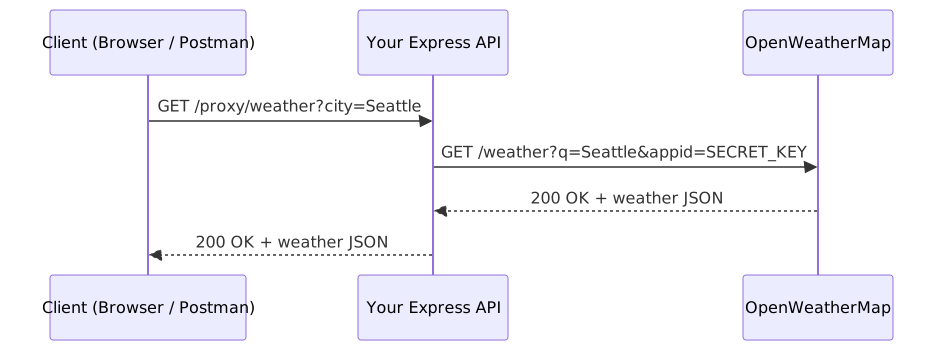
The client never talks to OpenWeatherMap directly. It talks to your API, and your API handles the third-party call behind the scenes.
1.1 Why Not Call the Third-Party API Directly?
If the client (a browser, a React app, a mobile app) can make HTTP requests, why not have it call OpenWeatherMap directly? Three reasons:
API key security. Most third-party APIs require an API key. If your front-end JavaScript contains the key, anyone who opens the browser's developer tools can see it — and steal it. Your server holds the key. Your client never sees it.
CORS restrictions. Browsers enforce Cross-Origin Resource Sharing (CORS). A front-end app running on localhost:3001 may not be allowed to call api.openweathermap.org directly. Your Express API can call any URL — servers are not restricted by CORS. The client calls your API (which has CORS configured), and your API calls the third party.
Data reshaping. Third-party APIs often return far more data than your client needs. A proxy lets you filter, rename, and restructure the response before sending it to the client. Your front-end gets exactly the shape it expects, regardless of how the third party formats its data.
2 Getting a Third-Party API Key
The lecture demo uses the OpenWeatherMap API, a free weather data service. You will need an API key to follow along.
2.1 What is an API Key?
An API key is a unique string of characters that identifies your application to a third-party service. Think of it like a library card — it tells the service who you are so it can track your usage, enforce limits, and revoke access if needed.
Why do APIs require keys?
- Authentication — The service needs to know who is making requests. Without a key, anyone could use the API anonymously, making it impossible to enforce rules or contact abusers.
- Rate limiting — Free tiers typically cap how many requests you can make per minute or per day. The key is how the service counts your requests separately from everyone else's.
- Billing — Paid APIs charge per request. The key ties usage to your account.
- Abuse prevention — If someone uses the API maliciously, the service can revoke their key without affecting other users.
When you sign up for a third-party API, the service generates a key for you. You include this key in every request you make — usually as a query parameter (like appid=YOUR_KEY) or as an HTTP header. The service checks the key before processing your request.
API Keys Are Secrets
An API key is a credential, like a password. Anyone who has your key can make requests as you — burning through your rate limit, running up charges on paid tiers, or getting your account banned. Treat API keys like passwords: never put them in source code, never commit them to git, never expose them to the browser.
2.2 Sign Up for a Key
- Go to openweathermap.org and create a free account
- Navigate to API keys in your account settings
- Copy your default API key (it may take a few minutes to activate after sign-up)
2.3 Store the Key in .env
Your API key is a secret. It should never appear in your source code or be committed to git.
Create a .env file in your project root:
Never Commit .env Files
Your .gitignore should include .env. If you accidentally commit an API key, the key is in your git history forever — even if you delete the file later. If this happens, revoke the key immediately and generate a new one.
The lecture demo includes a .env.example file that shows which environment variables are needed without including real values. This is a common pattern — commit the example, never commit the real file.
2.4 Checking for the Key at Runtime
What if someone clones your repo but forgets to set up their .env file? The server should fail clearly, not crash with a cryptic error from OpenWeatherMap. The lecture demo handles this with middleware:
export const requireEnvVar = (key: string) => {
    return (_request: Request, response: Response, next: NextFunction) => {
        if (!process.env[key]) {
            response.status(500).json({ error: `${key} is not configured` });
            return;
        }
        next();
    };
};
Applied to the router, this middleware runs before every proxy route:
If WEATHER_API_KEY is not set, the client gets a clear 500 error and the third-party call never happens.
3 Making HTTP Requests from Express
Up to this point, your Express server has only received requests. Now it needs to send them too — your server is both a server (to your client) and a client (to OpenWeatherMap).
3.1 The Fetch API
Node.js 18 and later include the Fetch API as a built-in global — no extra packages needed. If you have used fetch() in browser JavaScript, the server-side version works the same way:
const result = await fetch('https://api.openweathermap.org/data/2.5/weather?q=Seattle&appid=YOUR_KEY&units=metric');
fetch() returns a Promise that resolves to a Response object. You then call .json() on the response to parse the body:
Because both fetch() and .json() return Promises, your route handler must be async.
3.2 Checking for Errors
fetch() does not throw on HTTP errors like 404 or 500. It only throws on network failures (the server is unreachable, DNS fails, etc.). You must check result.ok to know whether the request succeeded:
const result = await fetch(url);
const data = (await result.json()) as Record<string, unknown>;

if (!result.ok) {
    // The server responded, but with an error status (4xx or 5xx)
    response.status(result.status).json({ error: data.message || 'API request failed' });
    return;
}

// If we get here, the request succeeded
response.json(data);
This is different from some HTTP libraries (like Axios) that throw on non-2xx responses. With fetch(), you always need to check result.ok yourself. You will see this if (!result.ok) pattern in every proxy controller throughout the lecture demo.
4 Building a Raw Proxy Route (Pass-Through)
The simplest proxy pattern is a pass-through — your server calls the third-party API and forwards the response directly to the client, unchanged. This is useful when the third-party response is already in the shape your client needs.
4.1 The Full Pattern
Here is the getWeather controller from the lecture demo:
import { Request, Response } from 'express';

const BASE_URL = 'https://api.openweathermap.org/data/2.5';

export const getWeather = async (request: Request, response: Response) => {
    const city = request.query.city || request.params.city;
    const apiKey = process.env.WEATHER_API_KEY;

    try {
        const result = await fetch(
            `${BASE_URL}/weather?q=${encodeURIComponent(String(city))}&appid=${apiKey}&units=metric`
        );
        const data = (await result.json()) as Record<string, unknown>;

        if (!result.ok) {
            response.status(result.status).json({ error: data.message || 'Weather API error' });
            return;
        }

        response.json(data);
    } catch (_error) {
        response.status(502).json({ error: 'Failed to reach weather service' });
    }
};
Let's walk through each piece.
4.2 Reading the Client's Input
The handler accepts the city from either a query parameter (/proxy/weather?city=Seattle) or a route parameter (/proxy/weather/Seattle). Supporting both gives clients flexibility.
4.3 Building the Third-Party URL
const result = await fetch(
    `${BASE_URL}/weather?q=${encodeURIComponent(String(city))}&appid=${apiKey}&units=metric`
);
Four things to notice:
BASE_URL— The OpenWeatherMap base URL is extracted into a constant at the top of the file. Every handler reuses it, so if the API version changes (e.g., from2.5to3.0), you update one line.encodeURIComponent()— User input goes into a URL, so it must be URL-encoded. A city like "New York" becomesNew%20York. Without encoding, spaces and special characters break the URL.appid=${apiKey}— The API key is injected fromprocess.env. The client never sent it and never sees it.units=metric— A server-side decision. Your API always returns Celsius. The client does not need to know or care about OpenWeatherMap's unit options.
4.4 Forwarding the Response
In a pass-through proxy, you send the entire third-party response to the client as-is. The client gets exactly what OpenWeatherMap returned.
Try It Yourself
- Clone the lecture demo repo and run
npm install - Copy
.env.exampleto.envand add your OpenWeatherMap API key - Start the server:
npm run dev - In Postman or your browser, visit
http://localhost:3000/proxy/weather?city=Seattle - Compare the response to what you see at
https://api.openweathermap.org/data/2.5/weather?q=Seattle&appid=YOUR_KEY&units=metric— they should be identical
5 Passing Client Parameters Through
Your proxy routes need to accept parameters from the client and forward them to the third-party API. Before looking at how, let's start with an important rule: validate before forwarding.
5.1 Validating Before Forwarding
Never blindly forward client input to a third-party API. If the client sends a bad request, you should reject it immediately — before your server wastes an API call on input that will fail anyway. The lecture demo uses requireCity middleware to enforce this:
export const requireCity = (request: Request, response: Response, next: NextFunction) => {
    const city = request.query.city || request.params.city;
    if (!city) {
        response.status(400).json({ error: 'City is required (query param or route param)' });
        return;
    }
    next();
};
If the client forgets the city parameter, they get a 400 error immediately. The request never reaches OpenWeatherMap. This is the same route-level middleware pattern from the Routing & Middleware guide — the middleware runs before the handler, and if validation fails, the handler never executes.
With validation in place, the lecture demo offers two ways for clients to pass the city parameter.
5.2 Query Parameters
The client sends: GET /proxy/weather?city=Seattle
The route definition reads left to right: when a GET request hits /weather, run requireCity first (reject if no city), then run getWeather. Inside the handler, request.query.city contains "Seattle", which gets forwarded to OpenWeatherMap as the q parameter.
5.3 Route Parameters
The client sends: GET /proxy/weather/Seattle
Here the city is part of the URL path itself. Inside the handler, request.params.city contains "Seattle". The same getWeather controller handles both styles because it checks both sources: request.query.city || request.params.city.
The same requireCity middleware works for both — it checks request.query.city || request.params.city too, so it validates regardless of how the client passes the value.
5.4 Different Endpoints, Same Pattern
The lecture demo also proxies the 5-day forecast endpoint, using a different OpenWeatherMap path but the same pattern:
export const getForecast = async (request: Request, response: Response) => {
    const city = request.query.city;
    const apiKey = process.env.WEATHER_API_KEY;

    try {
        const result = await fetch(
            `${BASE_URL}/forecast?q=${encodeURIComponent(String(city))}&appid=${apiKey}&units=metric`
        );
        const data = (await result.json()) as Record<string, unknown>;

        if (!result.ok) {
            response.status(result.status).json({ error: data.message || 'Weather API error' });
            return;
        }

        response.json(data);
    } catch (_error) {
        response.status(502).json({ error: 'Failed to reach weather service' });
    }
};
The only difference: the URL path is /forecast instead of /weather. The error handling, key injection, and response forwarding are identical. Once you understand the proxy pattern, adding new proxy routes is mechanical.
6 Reshaping the Response (Transformed Proxy)
A pass-through proxy is simple, but it forces your client to deal with whatever structure the third-party API returns. A transformed proxy fetches the same data but reshapes it into a cleaner format before sending it to the client. This is where the proxy pattern really adds value.
6.1 The Problem: Raw Third-Party Responses
Here is what OpenWeatherMap returns for a current weather request (abbreviated):
{
    "coord": { "lon": -122.33, "lat": 47.61 },
    "weather": [
        {
            "id": 800,
            "main": "Clear",
            "description": "clear sky",
            "icon": "01d"
        }
    ],
    "base": "stations",
    "main": {
        "temp": 18.5,
        "feels_like": 17.9,
        "temp_min": 16.2,
        "temp_max": 20.1,
        "pressure": 1023,
        "humidity": 62
    },
    "visibility": 10000,
    "wind": { "speed": 3.6, "deg": 200 },
    "clouds": { "all": 0 },
    "dt": 1560350645,
    "sys": {
        "type": 1,
        "id": 5169,
        "country": "US",
        "sunrise": 1560343627,
        "sunset": 1560396563
    },
    "timezone": -25200,
    "id": 5809844,
    "name": "Seattle",
    "cod": 200
}
This response has deeply nested objects (main.temp, weather[0].description, sys.country), internal fields the client does not care about (base, cod, dt, visibility), and a structure that does not match what a simple weather widget needs.
6.2 The Solution: Reshape Before Sending
The lecture demo's getWeatherSummary controller fetches the same data but transforms it into a flat, clean shape:
export const getWeatherSummary = async (request: Request, response: Response) => {
    const city = request.query.city || request.params.city;
    const apiKey = process.env.WEATHER_API_KEY;

    try {
        const result = await fetch(
            `${BASE_URL}/weather?q=${encodeURIComponent(String(city))}&appid=${apiKey}&units=metric`
        );
        const data = (await result.json()) as Record<string, unknown>;

        if (!result.ok) {
            response.status(result.status).json({ error: data.message || 'Weather API error' });
            return;
        }

        // Transform the raw response into a clean, simplified shape
        const main = data.main as Record<string, unknown>;
        const weather = (data.weather as Record<string, unknown>[])?.[0];
        const wind = data.wind as Record<string, unknown>;

        response.json({
            city: data.name,
            country: (data.sys as Record<string, unknown>)?.country,
            temperature: {
                current: main?.temp,
                feelsLike: main?.feels_like,
                min: main?.temp_min,
                max: main?.temp_max,
            },
            conditions: weather?.description,
            humidity: main?.humidity,
            windSpeed: wind?.speed,
        });
    } catch (_error) {
        response.status(502).json({ error: 'Failed to reach weather service' });
    }
};
The client receives:
{
    "city": "Seattle",
    "country": "US",
    "temperature": {
        "current": 18.5,
        "feelsLike": 17.9,
        "min": 16.2,
        "max": 20.1
    },
    "conditions": "clear sky",
    "humidity": 62,
    "windSpeed": 3.6
}
6.3 Walking Through the Transformation
The transformation happens in three steps:
Step 1: Extract nested objects. The raw response buries useful data inside main, weather[0], wind, and sys. Pull these out into local variables:
const main = data.main as Record<string, unknown>;
const weather = (data.weather as Record<string, unknown>[])?.[0];
const wind = data.wind as Record<string, unknown>;
The as Record<string, unknown> casts tell TypeScript "I know this is an object with string keys." The ?.[0] safely accesses the first element of the weather array — if the array is missing or empty, you get undefined instead of a crash.
Step 2: Pick the fields you want. From the 20+ fields in the raw response, select only what your client needs. In this case: city name, country, temperature values, conditions, humidity, and wind speed.
Step 3: Rename and restructure. OpenWeatherMap uses feels_like (snake_case). Your API uses feelsLike (camelCase). The raw response scatters temperature data across main.temp, main.temp_min, main.temp_max — your API groups them under a temperature object. These are design decisions you control.
6.4 Defining a TypeScript Interface for the Response
For a production codebase, you would define an interface for your reshaped response. This gives you type safety and documents your API's contract:
interface WeatherSummary {
    city: string;
    country: string;
    temperature: {
        current: number;
        feelsLike: number;
        min: number;
        max: number;
    };
    conditions: string;
    humidity: number;
    windSpeed: number;
}
Now anyone reading your code (or building a front-end against your API) knows exactly what shape to expect.
6.5 When to Reshape vs. Pass Through
Both approaches are valid. Choose based on your needs:
| Pass-Through | Transformed |
|---|---|
| Quick to implement | More work up front |
| Client gets all available data | Client gets only what it needs |
| Your API contract = third-party contract | Your API contract = your design |
| If the third party changes their response, your client breaks | If the third party changes their response, you update the proxy — client is unaffected |
The Key Insight
A transformed proxy decouples your API from the third party. Your client depends on your response shape, not OpenWeatherMap's. If OpenWeatherMap renames feels_like to apparent_temperature next year, you update one line in your proxy controller and your client never notices.
Gen AI & Learning: Generating Transformation Code
Writing transformation code is tedious but mechanical — you are mapping fields from one shape to another. This is exactly the kind of task where an AI coding agent excels. Paste the raw third-party JSON response and your desired output shape, and ask the agent to write the transformation. The agent is fast at this because the task is well-defined: input shape, output shape, write the mapping. The hard part — deciding what your API's response shape should look like — is still your job. Define the contract first, then let the agent write the plumbing.
7 Error Handling in Proxy Routes
Proxy routes have an extra source of errors that normal routes do not: the third-party API can fail. Your error handling needs to cover both client mistakes and upstream failures.
7.1 Upstream API Errors
When the third-party API returns an error (invalid city, expired key, rate limited), check result.ok and translate the error:
if (!result.ok) {
    response.status(result.status).json({ error: data.message || 'Weather API error' });
    return;
}
The lecture demo forwards the upstream status code (result.status). Common cases:
| Upstream Status | Meaning | What the Client Sees |
|---|---|---|
401 |
Your API key is invalid or expired | { "error": "Invalid API key..." } |
404 |
The city was not found | { "error": "city not found" } |
429 |
You exceeded the rate limit | { "error": "API rate limit exceeded" } |
Don't Leak Internal Details
The error message data.message comes from OpenWeatherMap. For a production API, you might want to replace it with your own message rather than forwarding the third party's exact wording. This prevents leaking information about which upstream service you use.
7.2 Network Failures
If OpenWeatherMap is down, DNS fails, or the network times out, fetch() throws an exception. The try/catch around the entire block handles this:
try {
    const result = await fetch(url);
    // ... handle response
} catch (_error) {
    response.status(502).json({ error: 'Failed to reach weather service' });
}
A 502 Bad Gateway is the correct status code here — it means "I (your server) tried to reach an upstream service, and it failed." This tells the client that the problem is not with their request but with a service your server depends on.
7.3 Validation Errors
Client input errors are caught by middleware before the proxy call happens:
Client sends: GET /proxy/weather
                 ↓
        requireCity middleware
        → city parameter is missing
        → 400 { "error": "City is required" }
        → handler never runs
        → fetch() never called
This is important for two reasons: you do not waste a third-party API call on bad input, and the client gets a fast, clear error message.
8 Organizing Proxy Routes
The lecture demo organizes proxy routes using the same Router pattern covered in the Routing & Middleware guide.
8.1 The Router File
All proxy routes live in their own file with a dedicated router:
// routes/protected/proxy.ts
import { Router } from 'express';
import { getWeather, getWeatherSummary, getForecast } from '../../controllers/proxy';
import { requireEnvVar, requireCity, requireCityQuery } from '../../middleware/validation';

const proxyRouter = Router();

// All proxy routes require the API key to be configured
proxyRouter.use(requireEnvVar('WEATHER_API_KEY'));

// Raw pass-through
proxyRouter.get('/weather', requireCity, getWeather);
proxyRouter.get('/weather/:city', requireCity, getWeather);
proxyRouter.get('/forecast', requireCityQuery, getForecast);

// Transformed response — curates the raw data into a simplified shape
proxyRouter.get('/summary', requireCity, getWeatherSummary);
proxyRouter.get('/summary/:city', requireCity, getWeatherSummary);

export { proxyRouter };
Notice the structure:
requireEnvVar('WEATHER_API_KEY')is applied to the entire router with.use()— it runs before every proxy routerequireCityandrequireCityQueryare applied to individual routes — different routes have different validation needs- Controllers are imported from a separate file — the router file only wires things together
8.2 Mounting Under a Protected Namespace
The proxy router is mounted inside a protectedRoutes parent router:
// routes/protected/index.ts
import { Router } from 'express';
import { proxyRouter } from './proxy';

const protectedRoutes = Router();

// Week 5: add JWT middleware here
// protectedRoutes.use(verifyJwt);
protectedRoutes.use('/proxy', proxyRouter);

export { protectedRoutes };
This gives the proxy routes a /proxy prefix and sets up a place to add authentication middleware later (Week 5). When you add JWT verification, every proxy route will automatically require a valid token — no changes to the proxy router itself.
8.3 Extracting Configuration
The controller extracts the base URL into a constant:
This avoids repeating the full URL in every handler. If OpenWeatherMap changes their API version (e.g., from 2.5 to 3.0), you update one line.
Try It Yourself
- In the lecture demo, add a new proxy route:
GET /proxy/air-quality?city=Seattle - Create a new controller that calls OpenWeatherMap's Air Pollution API
- Add the route to
proxyRouterwithrequireCitymiddleware - Test it in Postman — does the middleware catch missing cities? Does the error handling catch bad responses?
9 Summary
| Concept | Key Point |
|---|---|
| Proxy pattern | Your server calls a third-party API on behalf of your client |
| API key security | Keys stay in .env on the server — the client never sees them |
fetch() |
Built into Node.js 18+ — no extra packages needed |
result.ok |
fetch() does not throw on HTTP errors — you must check result.ok |
encodeURIComponent() |
Always encode user input before putting it in a URL |
| Pass-through proxy | Forwards the third-party response unchanged |
| Transformed proxy | Reshapes the response — selects fields, renames, restructures |
| Decoupling | A transformed proxy isolates your client from third-party API changes |
| Error handling | Check result.ok for upstream errors, try/catch for network failures |
502 Bad Gateway |
The correct status when an upstream service is unreachable |
| Validation middleware | Reject bad input before making third-party API calls |
10 References
Official Documentation:
- OpenWeatherMap — Current Weather Data — API endpoints, parameters, and response format
- MDN — Fetch API — Using
fetch()for HTTP requests - MDN —
encodeURIComponent()— URL-encoding user input - Node.js — Fetch API — Built-in
fetch()in Node.js - Express.js — Routing — Route organization with
express.Router()
TCSS 460 Lecture Demo
github.com/UWT-SET-TCSS460-LECTURE-MATERIALS/TCSS-460-Backend-1 — proxy routes with OpenWeatherMap
11 Further Reading
External Resources
- What is a Web API? — Section 6: API Consumers and Providers — concept reading on why the proxy pattern exists
- Routing & Middleware Guide — middleware chain, Router, and route organization
- Error Handling & Validation Guide — centralized error handling and input validation patterns
- OpenWeatherMap — 5 Day Forecast — forecast endpoint used in the
getForecastexample
This guide is part of TCSS 460 — Client/Server Programming, School of Engineering and Technology, University of Washington Tacoma.