REST API Design Principles
TCSS 460 — Client/Server Programming
You have seen what HTTP looks like and what a web API is. This reading tackles the question every API developer faces next: how do you design a good one? REST provides a set of architectural constraints that, when followed, produce APIs that are predictable, consistent, and easy for other developers to use. Understanding these principles now will shape every API you build in this course and beyond.
1 What REST Actually Means
REST stands for Representational State Transfer. It was introduced by Roy Fielding in his 2000 doctoral dissertation at the University of California, Irvine (Fielding, 2000). Fielding was not inventing a new technology — he was describing the architectural principles that already made the World Wide Web successful, and formalizing them as a set of constraints for building networked applications.
1.1 REST Is Not a Specification
This is the single most important thing to understand about REST: it is not a protocol, not a standard, and not a specification. There is no RFC that defines REST the way RFC 9110 defines HTTP. REST is a set of architectural constraints — design rules that, when followed together, produce systems with desirable properties like scalability, simplicity, and modifiability.
This distinction matters because you will encounter endless debates online about whether an API is "truly RESTful." Most production APIs follow REST principles loosely rather than adhering to every constraint Fielding described. The industry term for this pragmatic middle ground is "RESTful" or "REST-like" APIs.
1.2 The Key Constraints
Fielding defined six constraints. You do not need to memorize these for an exam, but understanding them helps you see why REST APIs are designed the way they are:
| Constraint | What It Means | Why It Matters |
|---|---|---|
| Client-Server | The client and server are separate components with distinct responsibilities | Either side can evolve independently |
| Stateless | Each request contains all the information the server needs to process it | No server-side session memory required; easier to scale |
| Cacheable | Responses must declare whether they can be cached | Reduces redundant requests, improves performance |
| Uniform Interface | All resources are accessed through a consistent, standardized interface | Clients can interact with any REST API using the same patterns |
| Layered System | The client does not need to know whether it is talking directly to the server or through intermediaries (proxies, load balancers) | Enables infrastructure flexibility |
| Code on Demand (optional) | The server can send executable code to the client | Rarely used in modern APIs; originally envisioned for browser applets |
The constraint that most shapes day-to-day API design is Uniform Interface. It is the reason REST APIs follow predictable patterns for URLs, HTTP methods, and response formats — and it is the focus of the rest of this reading.
1.3 An Analogy: Food Delivery Apps
Think about how food delivery apps work. Whether you use DoorDash, Uber Eats, or Grubhub, the pattern is the same: you browse restaurants, add items to a cart, place an order, and track delivery. You do not need to learn a new system every time you switch apps because they all follow the same conventions. That uniformity is what REST provides for web APIs. Once you learn the patterns, you can predict how most REST APIs will behave — even ones you have never seen before.
2 Resources and URIs
In REST, everything is a resource. A resource is any piece of information that can be named: a user, a book, a movie, a comment, an order, a session. The central design decision in a REST API is identifying your resources and giving them clear, consistent addresses.
2.1 Nouns, Not Verbs
The most common mistake in API design is putting actions in URLs. REST URLs identify things (nouns), not actions (verbs). The HTTP method tells you the action; the URL tells you the target.
| Bad (Verbs in URL) | Good (Nouns in URL) | Why |
|---|---|---|
GET /getUsers |
GET /users |
The HTTP method already says "get" |
POST /createUser |
POST /users |
POST means "create" — no need to repeat it |
POST /deleteUser/42 |
DELETE /users/42 |
Use DELETE method, not a POST with "delete" in the path |
GET /fetchMovieById/7 |
GET /movies/7 |
The path identifies the resource; the method says to fetch it |
PUT /updateUserEmail |
PATCH /users/42 |
PATCH the resource; the body specifies what changed |
This pattern works because HTTP already provides a fixed set of verbs (methods). When you put verbs in your URLs, you are inventing your own vocabulary on top of HTTP's, and every consumer of your API must learn your custom language. When you use nouns, consumers already know the verbs.
2.2 Plural Resource Names
Use plural nouns for collection resources. This is a convention, not a rule, but it is so widely followed that breaking it creates confusion:
| Consistent (Plural) | Inconsistent | Problem |
|---|---|---|
GET /users |
GET /user |
Does /user return one user or all users? |
GET /users/42 |
GET /user/42 |
Mixing singular and plural is confusing |
GET /movies |
GET /movie-list |
Adding suffixes like -list is unnecessary |
The pattern is simple: /users is the collection, /users/42 is one item in that collection. Plural throughout.
2.3 Resource Hierarchies
Resources often have relationships. A user has posts. A movie has reviews. Express these relationships through nested paths:
GET /users/42/posts          ← All posts by user 42
GET /users/42/posts/7        ← Post 7 by user 42
GET /movies/99/reviews       ← All reviews for movie 99
GET /movies/99/reviews/3     ← Review 3 for movie 99
Keep nesting shallow — one or two levels deep. Deeply nested URLs become hard to read and hard to implement:
# Too deep — avoid this
GET /users/42/posts/7/comments/3/likes/1

# Better — flatten when nesting gets deep
GET /comments/3/likes
A good rule of thumb: if a resource can be identified on its own (like a comment with a unique ID), it probably deserves its own top-level endpoint.
3 HTTP Methods as Actions
HTTP defines a set of methods (sometimes called "verbs") that map naturally to the operations you perform on resources. This mapping is at the heart of REST API design.
3.1 The Five Core Methods
| Method | Purpose | Acts On | Has Request Body? | Typical Response |
|---|---|---|---|---|
| GET | Read / retrieve | Collection or single resource | No | 200 with data |
| POST | Create a new resource | Collection | Yes | 201 with created resource |
| PUT | Replace a resource entirely | Single resource | Yes | 200 with updated resource |
| PATCH | Update part of a resource | Single resource | Yes | 200 with updated resource |
| DELETE | Remove a resource | Single resource | No (usually) | 204 with no body |
3.2 Mapping Methods to a Resource
Here is what a complete set of endpoints looks like for a users resource:
GET    /users          ← List all users
GET    /users/42       ← Get user 42
POST   /users          ← Create a new user
PUT    /users/42       ← Replace user 42 entirely
PATCH  /users/42       ← Update specific fields of user 42
DELETE /users/42       ← Delete user 42
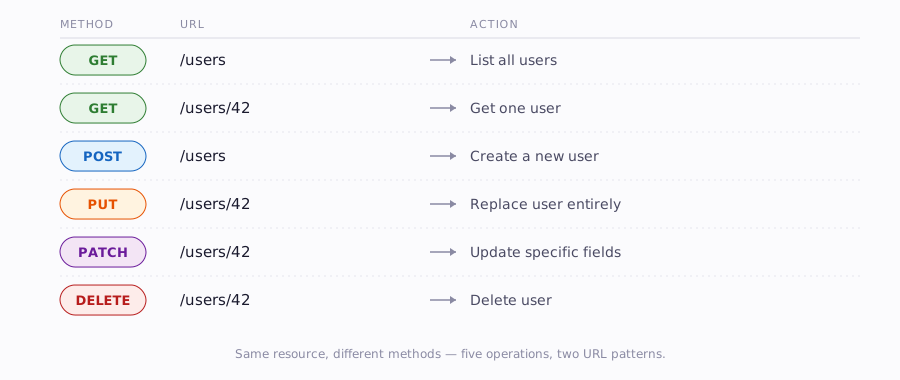
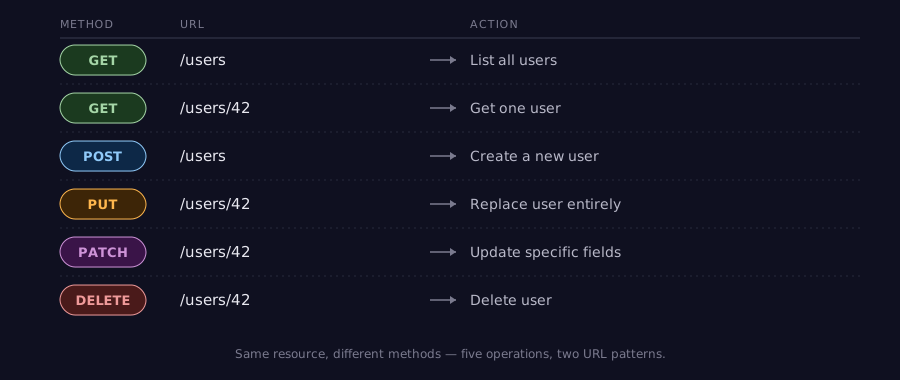
Notice the pattern: the URL stays the same and the method changes. This is the Uniform Interface constraint in practice — five different operations, two URL patterns.
3.3 PUT vs. PATCH
The difference between PUT and PATCH causes frequent confusion. Think of it this way:
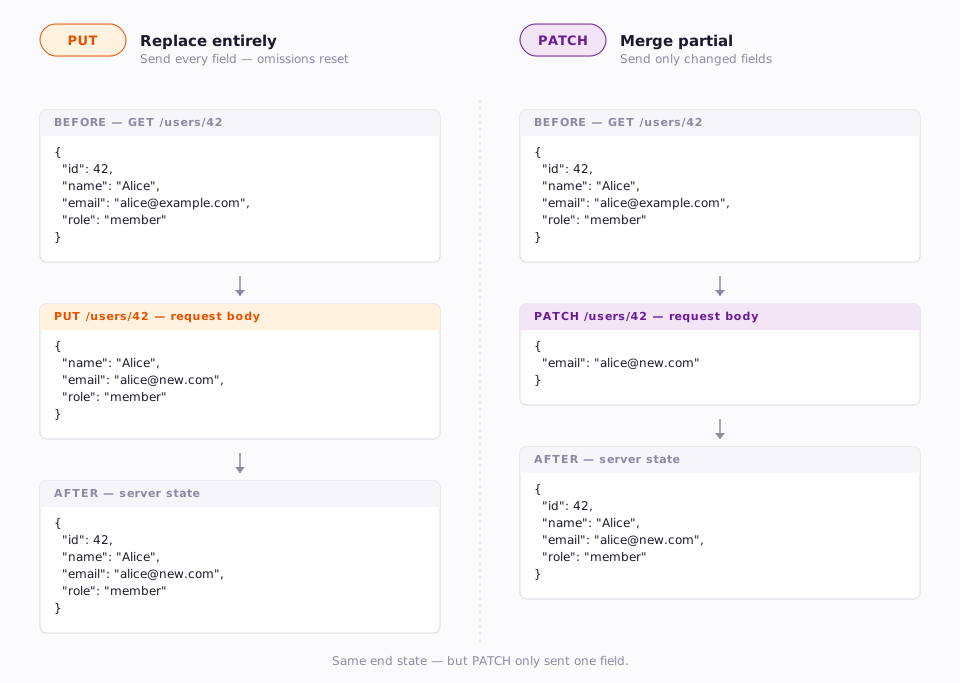
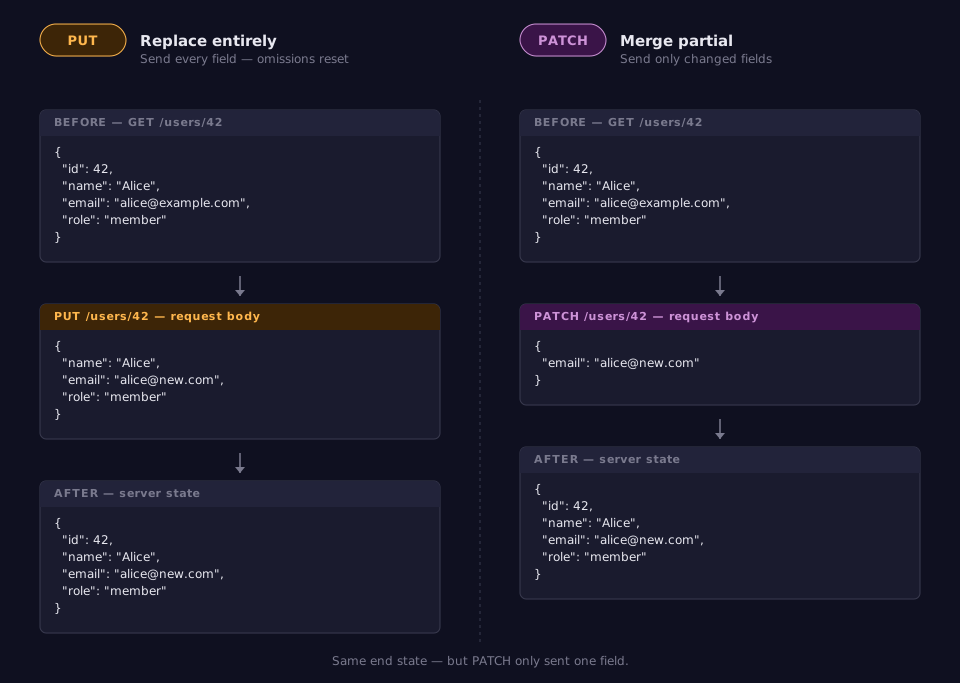
PUT replaces the entire resource. If you send a PUT request, you must include every field, even the ones that did not change. Any field you omit will be set to its default or removed.
PATCH updates only the fields you include. Everything else stays as it was.
Here is an example. Suppose user 42 currently looks like this:
A PUT request to change the email must include all fields:
Notice that id is not in the request body. The URL already identifies the resource (/users/42), so including the ID in the body would be redundant. The same applies to POST — the client does not set the ID. The server assigns it and returns it in the response. The client never controls resource IDs.
A PATCH request only needs the changed field:
In practice, most APIs use PATCH for updates because it is simpler for the client and less error-prone. PUT is used when you want to guarantee that the server has exactly the state you sent — no leftover fields from a previous version.
3.4 Safe and Idempotent Methods
Two properties of HTTP methods matter for API design:
- A method is safe if it does not modify the resource. GET is safe — calling it should never change data.
- A method is idempotent if calling it multiple times produces the same result as calling it once. PUT and DELETE are idempotent — deleting user 42 twice has the same end result as deleting them once.
| Method | Safe? | Idempotent? |
|---|---|---|
| GET | Yes | Yes |
| POST | No | No |
| PUT | No | Yes |
| PATCH | No | No (in general) |
| DELETE | No | Yes |
The first DELETE call might return 204 No Content (success). The second might return 404 Not Found (already gone). The HTTP responses are different, but the server state is the same — user 42 is gone either way. That is what idempotent means: the same outcome on the server, not the same response.
Why does this matter? Because network failures happen. If a client sends a DELETE request and the connection drops before the response arrives, the client does not know if the delete succeeded. Because DELETE is idempotent, the client can safely retry — if the resource is already gone, the server returns 404, but no harm is done. POST is not idempotent, which is why you sometimes see duplicate orders when a user clicks "Submit" twice.
4 Path Parameters vs. Query Strings
URLs in a REST API carry two kinds of variable information: path parameters and query strings. Using the right one in the right place makes your API intuitive.
4.1 Path Parameters Identify Resources
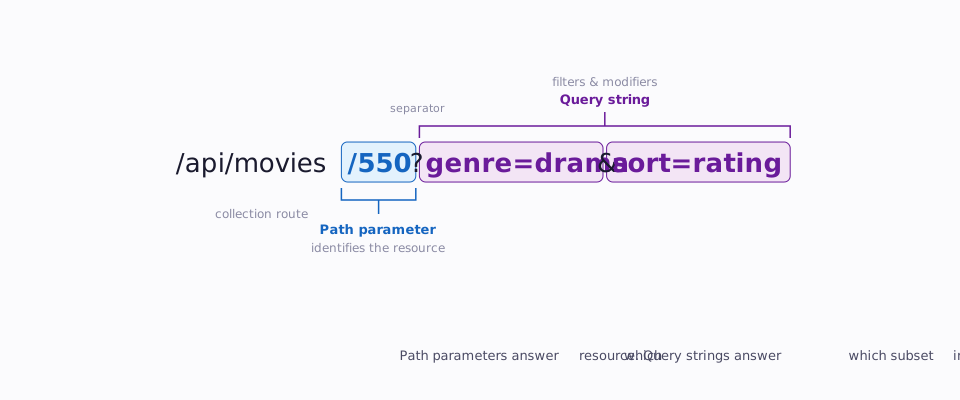
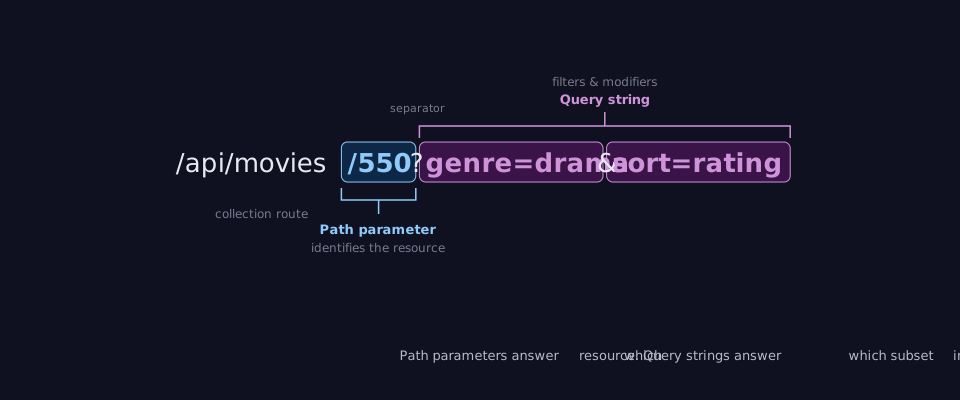
A path parameter is part of the URL path itself. It identifies which resource you want:
GET /users/42           ← User with ID 42
GET /movies/tt0111161   ← Movie with ID tt0111161
GET /courses/TCSS460    ← Course with code TCSS460
Path parameters answer the question: "Which specific resource?"
Express Terminology
Express (the framework used in this course) calls these "route parameters" and accesses them via request.params. Same concept, different terminology.
4.2 Query Strings Filter and Modify
A query string comes after the ? in a URL. It does not change which resource you are targeting — it changes how you want the data:
GET /users?role=admin            ← Filter: only admin users
GET /movies?genre=drama&year=2024 ← Filter: drama movies from 2024
GET /users?sort=name&order=asc    ← Sort: alphabetical ascending
GET /movies?page=2&limit=20       ← Paginate: page 2, 20 per page
Query strings answer the question: "Which subset, or in what order?"
4.3 When to Use Which
The rule is straightforward:
| Use Case | Mechanism | Example |
|---|---|---|
| Identify a specific resource | Path parameter | /users/42 |
| Identify a nested resource | Path parameter | /users/42/posts/7 |
| Filter a collection | Query string | /users?role=admin |
| Sort results | Query string | /users?sort=created_at |
| Paginate results | Query string | /users?page=3&limit=25 |
| Search within a collection | Query string | /movies?q=inception |
A helpful test: if removing the parameter would change which resource you are talking about, it is a path parameter. If removing it would just change the view of the same collection, it is a query string.
Another way to think about it: a path parameter returns a single resource or a 404. A query string filters a collection and can return zero, five, or five hundred results — it returns 200 with an empty array, never a 404 for no matches.
4.4 A Complete Example
Consider an API for a movie database. Here is how path parameters and query strings work together:
GET /movies                              ← All movies
GET /movies?genre=sci-fi                 ← Sci-fi movies only
GET /movies?genre=sci-fi&sort=rating     ← Sci-fi movies, sorted by rating
GET /movies/tt0111161                    ← One specific movie
GET /movies/tt0111161/reviews            ← Reviews for that movie
GET /movies/tt0111161/reviews?rating=5   ← Only 5-star reviews for that movie
Each URL reads naturally, and a developer seeing this API for the first time can guess what most endpoints do without reading documentation.
4.5 Search and Filtering Patterns
One of the first design decisions you will face in your projects is how to handle search and filtering. Students tend toward one of two extremes — both problematic.
4.5.1 The Anti-Pattern: Many Search Endpoints
Some developers create a separate endpoint for every filter:
GET /movies/search-by-genre?genre=drama
GET /movies/search-by-year?year=2024
GET /movies/search-by-rating?min=8
GET /movies/search-by-director?name=nolan
This seems organized, but it creates a combinatorial problem. What if a consumer wants drama movies from 2024 with a rating above 8? There is no endpoint for that combination. You would need to create a new endpoint for every possible filter combination — and the number of combinations grows exponentially.
4.5.2 The Idiomatic Approach: One Endpoint, Composable Filters
The standard REST pattern is a single collection endpoint with optional query string filters that can be freely combined:
GET /movies                                      ← All movies
GET /movies?genre=drama                          ← Filter by genre
GET /movies?year=2024                            ← Filter by year
GET /movies?genre=drama&year=2024&rating_min=8   ← Combine any filters
GET /movies?genre=drama&sort=rating&order=desc   ← Filter + sort
GET /movies?genre=drama&page=2&limit=20          ← Filter + paginate
This is how major APIs work — Stripe, GitHub, and TMDB all use this pattern. One endpoint, many optional query parameters, all composable. The consumer picks the filters they need and ignores the rest.
The benefits are significant:
| Concern | Many Endpoints | One Endpoint + Query Strings |
|---|---|---|
| Composability | Each combination needs its own endpoint | Filters combine freely |
| Documentation | N endpoints to document | One endpoint with a parameter table |
| Maintenance | Adding a new filter means a new endpoint | Adding a new filter means a new query parameter |
| Predictability | Consumer must discover each endpoint | Consumer already knows the pattern |
4.5.3 When a Dedicated Search Endpoint Makes Sense
There is one exception to the "one endpoint" rule: full-text search. If your API supports searching across multiple fields with a single query string — the way a search engine works — a dedicated search endpoint can be appropriate:
Full-text search is semantically different from structured filtering. A query like q=dark knight might match titles, descriptions, actor names, and director names, possibly with relevance scoring. That behavior is different enough from filtering by specific fields that a separate endpoint is justified.
The key distinction: structured filtering (?genre=drama&year=2024) narrows a collection by known fields. Full-text search (?q=dark knight) asks "find me anything that matches this phrase." Different intent, different endpoint.
5 Request and Response Bodies
Not every HTTP request carries a body — GET and DELETE typically do not. But when you create or update resources, the request body is how you send data to the server, and the response body is how the server sends data back.
5.1 When Bodies Are Used
| Method | Request Body | Response Body |
|---|---|---|
| GET | None | The requested resource(s) |
| POST | The new resource data | The created resource (with server-assigned fields like id) |
| PUT | The complete replacement resource | The updated resource |
| PATCH | Only the fields to change | The updated resource |
| DELETE | None (usually) | None (usually) or confirmation message |
5.2 JSON as the Standard Format
Modern REST APIs almost universally use JSON (JavaScript Object Notation) for request and response bodies. If you have read the "What is a Web API?" reading, you have already seen JSON syntax. Here is a quick reminder:
{
  "id": 42,
  "name": "Alice Chen",
  "email": "alice@example.com",
  "role": "member",
  "created_at": "2026-01-15T09:30:00Z"
}
When sending JSON in a request, you must include the Content-Type header so the server knows how to parse the body:
POST /users HTTP/1.1
Host: api.example.com
Content-Type: application/json

{
  "name": "Bob Martinez",
  "email": "bob@example.com"
}
5.3 Consistent Response Structure
Well-designed APIs use a consistent structure for all responses. There is no universal standard for this, but a common pattern separates the actual data from metadata:
Single resource response:
Collection response with pagination metadata:
{
  "data": [
    { "id": 42, "name": "Alice Chen" },
    { "id": 43, "name": "Bob Martinez" }
  ],
  "pagination": {
    "page": 1,
    "limit": 20,
    "total": 157
  }
}
Error response:
The status code belongs in the HTTP response, not the body. Some APIs (like Google's) duplicate it in the body as a convenience, but it is redundant — the client already has the status code from the HTTP response itself.
The key principle is consistency. Once a consumer learns your response format from one endpoint, they should be able to predict the format of every other endpoint.
5.4 Request Bodies Are Not URLs
A common beginner mistake is trying to send data through the URL for operations that should use a request body:
# Bad — data crammed into the URL
POST /users?name=Alice&email=alice@example.com

# Good — data in the request body
POST /users
Content-Type: application/json

{
  "name": "Alice",
  "email": "alice@example.com"
}
Query strings are for filtering and sorting existing resources. Request bodies are for sending new data to the server.
6 Status Codes as Communication
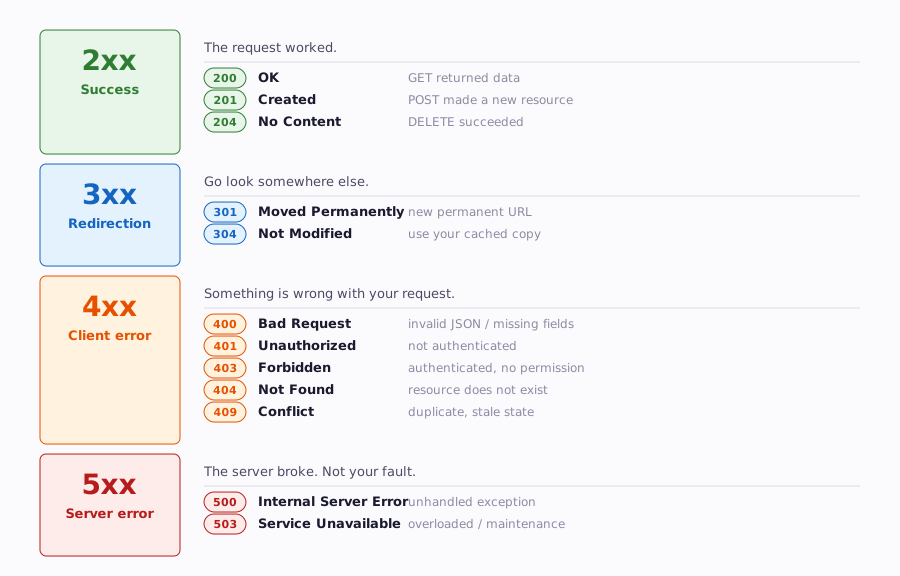
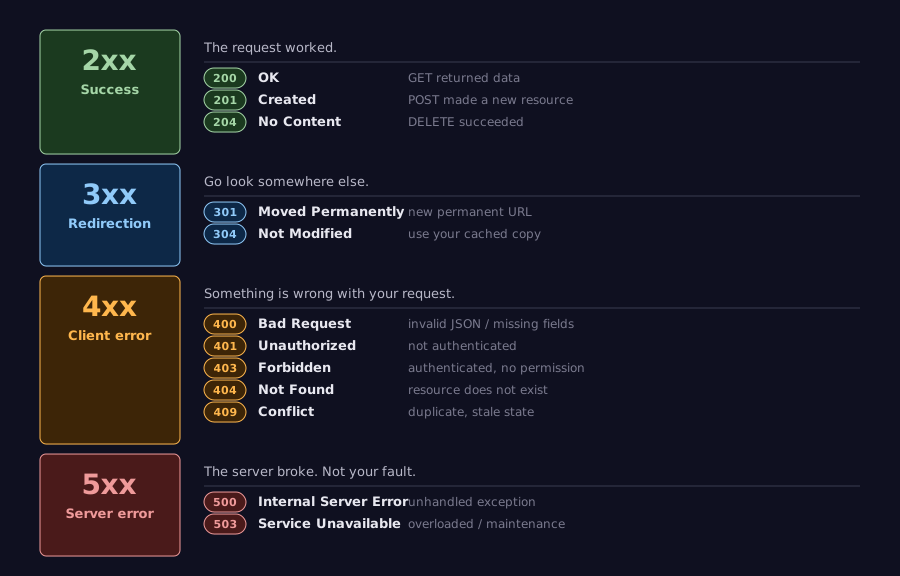
HTTP status codes are not decoration — they are the primary mechanism for communicating the outcome of a request. A well-designed API uses status codes precisely, so clients can handle responses programmatically without parsing the body.
Status codes are organized into four families by the first digit, each with a distinct meaning:
6.1 Choosing the Right Code
You encountered status codes in the HTTP reading. Here is how they map to common REST API operations:
| Situation | Status Code | When to Use |
|---|---|---|
| Successful retrieval | 200 OK |
GET returned data |
| Resource created | 201 Created |
POST successfully created a resource |
| Successful, no content | 204 No Content |
DELETE succeeded; nothing to return |
| Bad request data | 400 Bad Request |
Client sent invalid JSON, missing fields, wrong types |
| Not authenticated | 401 Unauthorized |
No credentials provided, or credentials invalid |
| Not authorized | 403 Forbidden |
Authenticated, but lacking permission |
| Resource not found | 404 Not Found |
The requested resource does not exist |
| Method not allowed | 405 Method Not Allowed |
Tried DELETE on a resource that does not support it |
| Conflict | 409 Conflict |
Creating a user with an email that already exists |
| Server error | 500 Internal Server Error |
Something broke on the server side |
6.2 The Lazy 200 Anti-Pattern
One of the most common API design mistakes is returning 200 OK for everything and putting the real status in the body:
# Good — status code communicates the outcome
HTTP/1.1 404 Not Found

{
  "error": {
    "code": 404,
    "message": "User not found"
  }
}
Why does this matter? Because HTTP clients, proxies, caches, and monitoring tools all use status codes to understand what happened. A cache that sees 200 OK will store the response. A monitoring dashboard that sees 404 will flag it. When you return 200 for errors, you break the entire ecosystem of tools built around HTTP.
6.3 Error Response Bodies
A status code tells the client what category of problem occurred. The response body tells the client specifically what went wrong. Good error responses include:
- A human-readable message — What happened, in plain language
- A machine-readable code or type — So the client can handle it programmatically
- Details — Specific information to help fix the problem
Compare these two error responses for a POST request with a missing email field:
Unhelpful:
Helpful:
{
  "error": {
    "code": 400,
    "message": "Validation failed",
    "details": [
      {
        "field": "email",
        "message": "Email is required"
      },
      {
        "field": "email",
        "message": "Must be a valid email address"
      }
    ]
  }
}
The second response tells the client exactly which fields failed and why. A frontend developer building a form against this API can map each error to the correct input field without guessing.
Never Expose Implementation Details
Helpful error messages are for expected errors like validation failures. For unexpected server errors, never send stack traces, file paths, SQL queries, or internal variable names to clients. Compare these two 500-level responses:
Dangerous — leaks internals to the client:
{
  "error": {
    "message": "Server error",
    "stack": "TypeError: Cannot read properties of undefined (reading 'email')\n    at /app/src/routes/users.ts:47:22\n    at Layer.handle [as handle_request] (/app/node_modules/express/lib/router/layer.js:95:5)"
  }
}
Safe — generic message to the client:
Information like the stack trace belongs in server-side logs where your team can see it, not in HTTP responses where attackers can see it. Log the full error with error.stack on the server, but send only a generic message to the client.
7 API Documentation
You can build the most elegant API in the world, but if no one can figure out how to use it, it might as well not exist. Documentation is not an afterthought — it is a core part of API design.
7.1 Why Documentation Matters
Think about the Java APIs you have used. When you need to use ArrayList, you look up the Javadoc to see what methods are available, what parameters they take, and what they return. Web APIs need the same thing, but the stakes are higher:
- No compiler to catch mistakes. If you call a Java method with the wrong argument type, the compiler stops you. If you send the wrong JSON field to an API, you get a runtime error — or worse, silent incorrect behavior.
- Network boundary means no source code. You cannot read the server's source code to figure out how an endpoint works. Documentation is your only window.
- Multiple consumers. Your API might be used by a frontend team, a mobile team, third-party developers, and automated systems. Each needs to learn your API independently.
7.2 What Good Documentation Includes
At minimum, API documentation should describe each endpoint with:
| Element | Description | Example |
|---|---|---|
| Method + URL | The HTTP method and path | GET /users/{id} |
| Description | What this endpoint does | "Retrieve a single user by ID" |
| Path parameters | Variable parts of the URL | id (integer) — The user's unique identifier |
| Query parameters | Optional filters/modifiers | fields (string) — Comma-separated list of fields to include |
| Request body | Required fields and types for POST/PUT/PATCH | { "name": string, "email": string } |
| Response body | What the response looks like | { "id": 42, "name": "Alice" } |
| Status codes | Possible responses | 200 OK, 404 Not Found, 400 Bad Request |
| Example | A concrete request/response pair | Full HTTP request and response shown |
Do not just document the happy path. API consumers spend most of their debugging time on errors — invalid input, missing resources, authentication failures. Document error responses with the same detail as success responses. If your GET /users/{id} can return 200, 404, and 401, all three should appear in the documentation with example response bodies.
7.3 OpenAPI and Interactive Documentation
Writing documentation by hand is tedious and tends to fall out of sync with the actual API. OpenAPI is a specification for describing REST APIs in a machine-readable format (YAML or JSON). An OpenAPI document describes every endpoint, parameter, request body, and response in a structured way.
The power of OpenAPI is that tools can read the specification and automatically generate:
- Interactive documentation — A web page where developers can browse endpoints and try them directly in the browser
- Client libraries — Code in various languages that knows how to call your API
- Server stubs — Skeleton code for implementing the API
- Tests — Automated tests that verify the API matches the specification
In this course, you will use Scalar as your interactive documentation viewer. Scalar reads your OpenAPI spec and renders it as a clean, interactive page mounted at /api-docs on your project's server. When you visit that URL, you will see auto-generated documentation for every endpoint — complete with parameter descriptions, example request bodies, and the ability to send live requests without writing any client code.
7.4 Documentation-First vs. Code-First
There are two approaches to API documentation:
- Documentation-first: Write the OpenAPI spec before writing any code. Design the API on paper, get agreement from stakeholders, then implement it. This is ideal for large teams and public APIs.
- Code-first: Write the code, then annotate it with comments or decorators that generate the OpenAPI spec automatically. This is faster for small teams and internal APIs.
Both are valid. In this course, you will use a code-first approach — adding @openapi annotations to your code that generate the OpenAPI spec automatically. Scalar then reads that spec and renders the interactive documentation. The important thing is that documentation exists and is accurate, regardless of how it was created.
8 Common Design Mistakes
Now that you know the principles, here are the mistakes you will see most often — in your own code and in APIs you consume. Learning to recognize these patterns will save you significant debugging time.
8.1 Verbs in URLs
This was covered earlier, but it bears repeating because it is the most common mistake:
| Mistake | Correct Alternative |
|---|---|
GET /getAllMovies |
GET /movies |
POST /createReview |
POST /reviews |
PUT /updateUser/42 |
PUT /users/42 |
DELETE /removeComment/7 |
DELETE /comments/7 |
GET /searchMovies?q=alien |
GET /movies?q=alien |
The only widely accepted exception is for operations that do not map cleanly to CRUD. For example, POST /users/42/deactivate is common because "deactivation" is an action, not a resource. Even then, many API designers prefer PATCH /users/42 with { "status": "inactive" } in the body.
8.2 Inconsistent Naming Conventions
Pick one naming convention and stick with it throughout your entire API. For URL paths, the industry standard is kebab-case. URLs are case-insensitive by convention, hyphens are the natural word separator in URLs, and this is what the vast majority of production APIs use — GitHub, Stripe, Google, Twitch, and TMDB all use kebab-case paths.
| Convention | Example | Common In | Recommended? |
|---|---|---|---|
| kebab-case | /movie-reviews |
Most REST APIs, URLs in general | Yes — industry standard |
| snake_case | /movie_reviews |
Some Python-based APIs | Less common |
| camelCase | /movieReviews |
Some JavaScript-based APIs | Less common |
For JSON keys in request and response bodies, camelCase is the dominant convention. JavaScript and TypeScript use camelCase natively, and since JSON originated from JavaScript, most modern APIs follow suit. In this course, your URL paths will use kebab-case and your JSON keys will use camelCase.
Do not mix conventions:
# Bad — inconsistent casing
GET /users              ← lowercase plural
GET /Movie-Reviews      ← mixed case with kebab
GET /user_profiles      ← snake_case singular
8.3 Wrong Status Codes
Using the wrong status code sends false signals to clients and tools:
| Mistake | Problem | Correct Code |
|---|---|---|
200 for a created resource |
Client does not know to refresh its list | 201 Created |
200 for a deletion |
Client may expect a body that is not there | 204 No Content |
200 for a validation error |
Client thinks the request succeeded | 400 Bad Request |
500 for a missing resource |
Triggers server error alerts | 404 Not Found |
403 when not authenticated |
Client cannot tell if it needs to log in or lacks permission | 401 Unauthorized |
8.4 Missing or Useless Error Messages
Returning a status code without an explanation forces the client developer to guess:
# Good — specific, actionable
HTTP/1.1 400 Bad Request

{
  "error": {
    "code": 400,
    "message": "Validation failed",
    "details": [
      { "field": "email", "message": "Must be a valid email address" },
      { "field": "name", "message": "Must be between 1 and 100 characters" }
    ]
  }
}
The goal is that a developer receiving an error can fix the problem without having to contact you or read your source code.
8.5 Forgetting About Pagination
An endpoint that returns all resources without pagination is a time bomb:
This works fine during development when you have 10 test users. In production, it will be slow, consume excessive memory, and potentially crash clients that cannot handle a massive JSON array. Always design collection endpoints with pagination from the start:
8.6 Exposing Internal Implementation
Your API's URL structure should reflect the resources your consumers care about, not your internal database tables or code organization:
| Leaks Implementation | Clean Design |
|---|---|
GET /tbl_users |
GET /users |
GET /api/v1/handlers/user-handler |
GET /api/v1/users |
GET /users/findByEmailAndRole |
GET /users?email=alice@example.com&role=admin |
If you rename a database table, your API consumers should not notice.
9 Summary
| Concept | Key Point |
|---|---|
| REST | Architectural constraints, not a specification — Fielding's 2000 dissertation |
| Resources and URIs | Everything is a resource; use nouns (/users), not verbs (/getUsers) |
| Plural names | /users for the collection, /users/42 for one item |
| HTTP methods | GET = read, POST = create, PUT = replace, PATCH = update, DELETE = remove |
| PUT vs. PATCH | PUT replaces the whole resource; PATCH updates only specified fields |
| Safe / Idempotent | GET is safe; PUT and DELETE are idempotent; POST is neither |
| Path parameters | Identify a specific resource: /users/42 |
| Query strings | Filter, sort, or paginate a collection: /users?role=admin |
| Request bodies | POST, PUT, PATCH send JSON bodies; GET and DELETE typically do not |
| Consistent responses | Same structure for all endpoints — data, errors, pagination |
| Status codes | Use precise codes (201, 204, 400, 404) — do not return 200 for everything |
| Error messages | Include a human-readable message, a code, and specific details |
| API documentation | OpenAPI spec + Scalar viewer provides interactive, auto-generated docs |
| Common mistakes | Verbs in URLs, inconsistent naming, wrong status codes, missing errors, no pagination |
10 References
This reading draws from the following sources:
Foundational Work:
- Fielding, R. T. (2000). Architectural Styles and the Design of Network-based Software Architectures (Doctoral dissertation, University of California, Irvine). https://ics.uci.edu/~fielding/pubs/dissertation/top.htm
Standards & Specifications:
- RFC 9110 — HTTP Semantics — Defines HTTP methods, status codes, and their semantics
- RFC 5789 — PATCH Method for HTTP — Defines the PATCH method
- OpenAPI Specification — The standard for describing REST APIs
Technical Documentation:
- MDN Web Docs — HTTP Request Methods — Comprehensive reference for HTTP methods
- MDN Web Docs — HTTP Response Status Codes — Complete status code reference
- Scalar Documentation — Interactive API documentation viewer used in this course
- OpenAPI Tools — Community-maintained directory of tools built on the OpenAPI specification
11 Further Reading
External Resources
- RESTful Web API Design with Node.js (Microsoft Learn) — Practical REST design best practices from Microsoft's architecture guides
- HTTP API Design Guide (Heroku) — Opinionated guide to designing HTTP+JSON APIs, extracted from real-world experience
- JSON API Specification — A specification for building consistent JSON APIs, including conventions for pagination, filtering, and error handling
- REST API Tutorial — Beginner-friendly reference covering REST constraints, methods, and naming conventions
- Zalando RESTful API Guidelines — A comprehensive, opinionated set of guidelines used in production by a large engineering organization
This reading is part of TCSS 460 — Client/Server Programming, School of Engineering and Technology, University of Washington Tacoma.