Consuming a Web API from the Browser
TCSS 460 — Client/Server Programming
This is the canonical front-end-side reference for talking to a web API. The patterns here — fetch, async/await, error handling, headers, CORS, bearer tokens — show up unchanged in the React, Next.js, and NextAuth guides that follow. Read this guide once, deeply; the rest of the front-end half of the course will reference it constantly.
1 Why This Guide Exists
The front-end half of TCSS 460 is fundamentally about consuming web APIs. First you'll consume your own back-end — the one you built in Sprints 1–3. Later, in the cross-group swap (Sprints 5+), you'll consume a partner team's API. Every week from here forward, your front-end code's main job is asking a server for data and rendering what comes back.
Every framework you'll use sits on top of the same browser primitive: fetch. React's useEffect calls fetch. Next.js Server Components call fetch. NextAuth uses fetch internally to talk to OAuth2 token endpoints. Learning fetch cleanly here means the rest is just sugar.
You already know HTTP from the back-end side. You've sent requests with Postman. You've written Express route handlers that respond with JSON. What you have not done is make a web page send an HTTP request from inside the browser. That's what this guide teaches.
Prerequisite
This guide assumes you've worked through HTML, CSS & the DOM. You don't need to be fluent — you need to know what a <button>, an event handler, and document.querySelector are.
2 The Problem — Browser Talking to Server
The HTML/CSS/DOM guide ended with a fully static page: open index.html, see content, click a button, change some text. That's the full extent of what HTML and CSS alone can do.
A real application needs more. It needs to load current data — not whatever was hard-coded into the HTML when you wrote the file. It needs to send user input back to a server so it can be saved, validated, or shared with other users.
The browser already knows how to do this. Every time you visit a URL, the browser sends an HTTP request and parses the response. What we want is to do the same thing from inside JavaScript — programmatically, after the page has loaded, in response to user actions.
That's what fetch does.
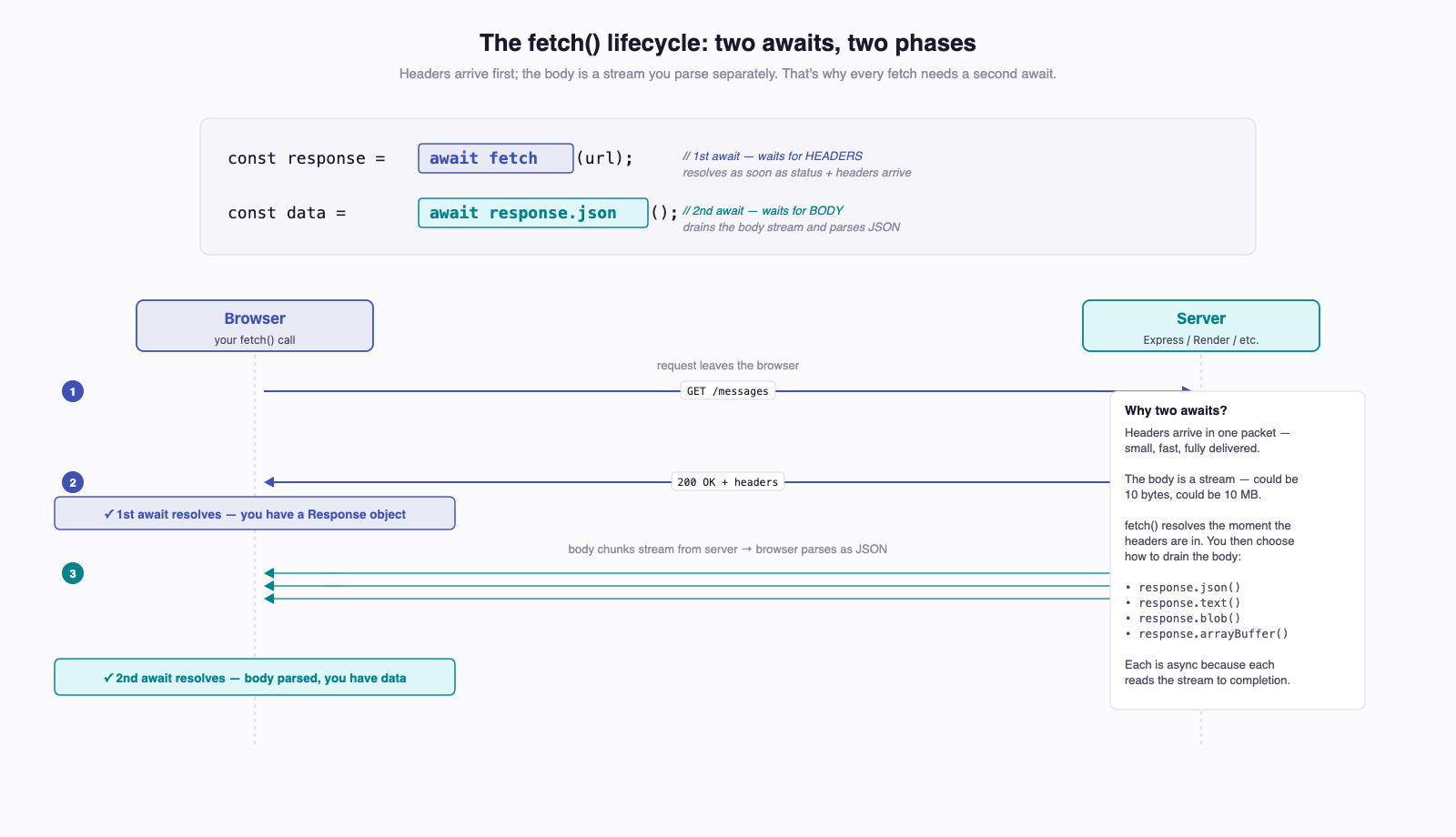
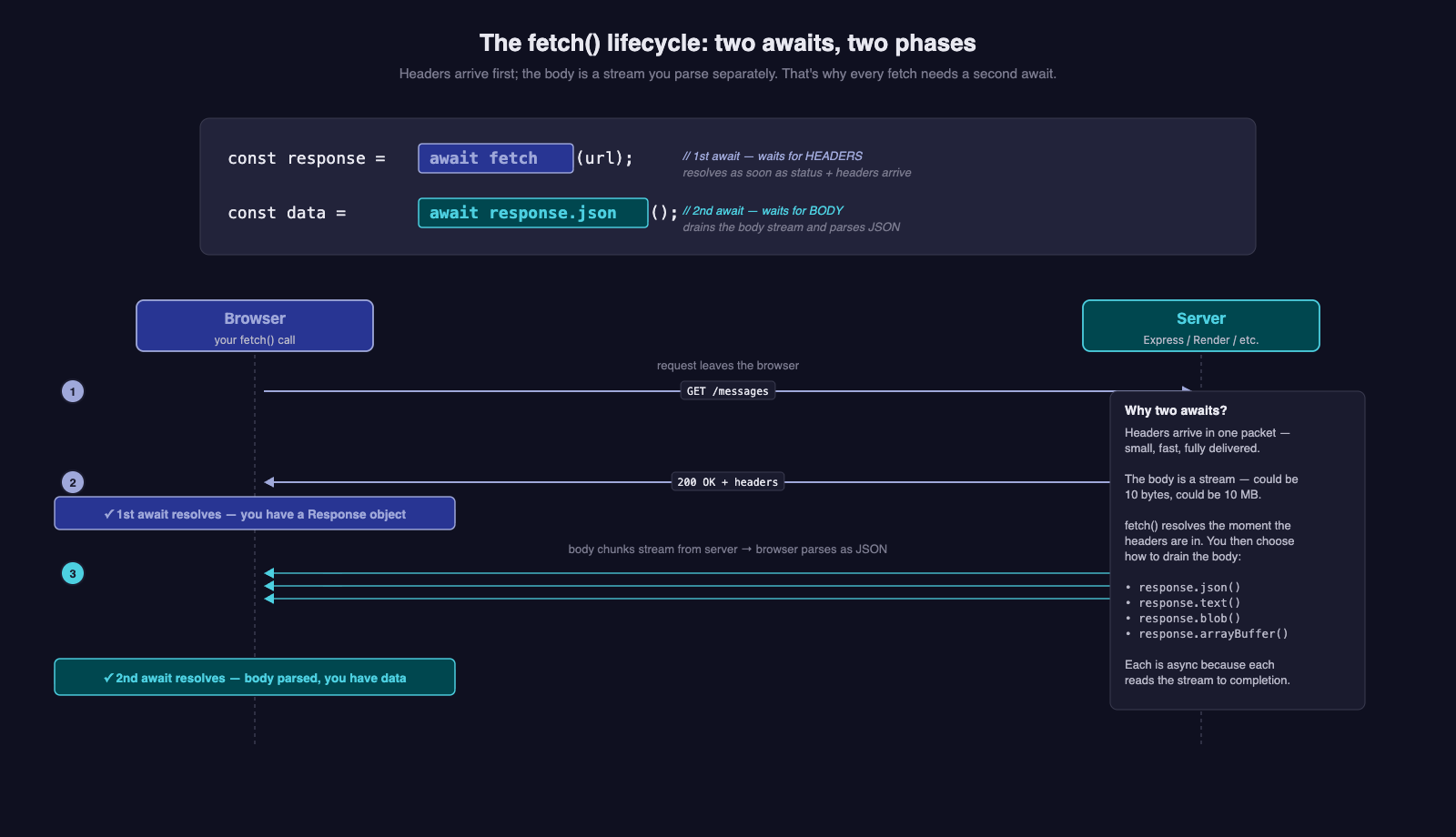
The request/response model is exactly what you saw in Week 1. The new piece is the JavaScript code on the left that drives the request.
3 The fetch API
fetch is a function built into every modern browser. You call it with a URL; it returns a Promise<Response>.
const response = await fetch("https://your-app.onrender.com/messages");
const data = await response.json();
console.log(data);
Three things to notice:
fetchis a single function call — no setup, no library, no constructor. The platform gives it to you for free.- Two
awaits. The first waits for the headers to arrive. The second waits for the body to arrive and parses it as JSON. The body is treated as a stream that you consume separately, which is why parsing is its own asynchronous step. fetchis asynchronous. Network calls take time. The browser refuses to block on them, so the result is wrapped in aPromise.
3.1 A Word on Other HTTP Libraries
You may have seen older tutorials that use XMLHttpRequest (XHR), or axios, or jQuery.ajax. Here's the short version:
XMLHttpRequest— the legacy primitivefetchreplaced. Don't use it for new code.axios— a popular npm package that wrapsfetchwith automatic JSON parsing and error-on-non-2xx. It's fine, but adds a dependency for thingsfetchalready does.jQuery.ajax— historical. The HTML/CSS/DOM guide covers why jQuery exists.
This course uses fetch exclusively. Next.js extends fetch with its own caching and revalidation features; NextAuth uses fetch internally; React has no opinion but the React community defaults to fetch. Learning fetch is the highest-leverage choice.
4 async / await in the Browser
You've seen async/await on the back-end side — Express route handlers that await a Prisma query. The browser side is identical.
async function loadMessages(): Promise<void> {
  const response = await fetch("https://your-app.onrender.com/messages");
  const data = await response.json();
  console.log(data);
}

loadMessages();
Any function that uses await must be declared async. The async keyword has one effect: the function now returns a Promise instead of its raw return value. That's it.
4.1 Top-Level await — Modules vs Script Tags
Inside an ES module (a .ts or .js file loaded with <script type="module">), you can await at the top level:
// app.ts loaded as <script type="module" src="app.js"></script>
const response = await fetch("/messages");
const data = await response.json();
console.log(data);
Inside a classic script tag (no type="module"), top-level await is a syntax error. You'll need to wrap the code in an async function and call it:
async function main(): Promise<void> {
  const response = await fetch("/messages");
  const data = await response.json();
  console.log(data);
}

main();
For the rest of this guide, assume modules. When you scaffold a Vite project for React (next guide), you'll be in module-land automatically.
5 Sending Each HTTP Method
fetch defaults to GET. For anything else, pass a second argument — an options object — with method, headers, and body as needed.
5.1 GET — The Default
const response = await fetch("https://your-app.onrender.com/messages");
const messages = await response.json();
No options object, no method, no body. Just a URL.
5.2 POST with a JSON Body
interface NewMessage {
  text: string;
  priority: number;
}

const payload: NewMessage = { text: "Hello, world", priority: 1 };

const response = await fetch("https://your-app.onrender.com/messages", {
  method: "POST",
  headers: { "Content-Type": "application/json" },
  body: JSON.stringify(payload),
});

const created = await response.json();
Three things must line up:
method: "POST"— the verb.headers: { "Content-Type": "application/json" }— tells the server "the body is JSON, please parse it as such." Without this, Express'sexpress.json()middleware will not run, andrequest.bodyon the server will be empty.body: JSON.stringify(payload)— the body must be a string, not an object.JSON.stringifydoes the conversion.
5.3 PUT, PATCH, DELETE
Same shape, different verb:
// PUT — full replacement
await fetch(`https://your-app.onrender.com/messages/${id}`, {
  method: "PUT",
  headers: { "Content-Type": "application/json" },
  body: JSON.stringify({ text: "Updated", priority: 2 }),
});

// PATCH — partial update
await fetch(`https://your-app.onrender.com/messages/${id}`, {
  method: "PATCH",
  headers: { "Content-Type": "application/json" },
  body: JSON.stringify({ priority: 3 }),
});

// DELETE — usually no body
await fetch(`https://your-app.onrender.com/messages/${id}`, {
  method: "DELETE",
});
The semantics are exactly what you implemented on the back-end side. Nothing about fetch is special-cased per verb.
6 Headers — Content-Type and Authorization
Headers are key/value pairs the browser sends with the request. The two you'll care about:
6.1 Content-Type
Content-Type describes the body. For a JSON body, always send:
For a GET or DELETE with no body, you can omit it. Some servers ignore unexpected Content-Type headers; some reject them. The safe default: include it on requests that have a body, omit it on those that don't.
6.2 Authorization
Once the user has signed in (Week 5 onward), every request to a protected endpoint must carry a bearer token:
const token: string = "eyJhbGciOiJSUzI1NiIs..."; // from auth-squared

const response = await fetch("https://your-app.onrender.com/messages", {
  headers: {
    "Authorization": `Bearer ${token}`,
  },
});
The exact string format is Bearer (literally — with the space) followed by the JWT. The Authorization header is what requireAuth middleware on the back-end reads to identify the user.
For now, treat the token as something you have. Section 12 covers where it comes from and how to store it; the Authentication with NextAuth guide formalizes the whole flow.
6.3 Reading Response Headers
The response object has a headers property with a get method:
const response = await fetch(url);
const contentType: string | null = response.headers.get("content-type");
const total: string | null = response.headers.get("x-total-count");
Header names are case-insensitive. response.headers.get("Content-Type") and response.headers.get("content-type") return the same value.
7 Working with JSON
Almost every API in this course speaks JSON. A few specifics matter:
7.1 response.json() Is Async
// CORRECT
const data = await response.json();

// WRONG — `data` is a Promise, not your data
const data = response.json();
Forgetting the second await is one of the most common new-fetch mistakes. The symptom: you console.log(data) and see Promise { <pending> } instead of the object you expected.
7.2 When the Response Isn't JSON
Sometimes a server responds with HTML (an error page from a misconfigured proxy), an empty body (HTTP 204 No Content), or plain text. Calling .json() on a non-JSON body throws a SyntaxError.
For empty bodies:
For unknown content types, check the header first:
const contentType = response.headers.get("content-type") ?? "";
if (contentType.includes("application/json")) {
  return await response.json();
}
return await response.text();
7.3 Typing the Response
response.json() returns Promise<any>. TypeScript can't know the shape — that's a runtime contract between you and the server. Type the data manually:
interface Message {
  id: number;
  text: string;
  priority: number;
  createdAt: string;
}

const response = await fetch("/messages");
const messages = (await response.json()) as Message[];
This is one of the few places as is appropriate. You're asserting "I know the back-end returns this shape." If the back-end lies, you'll find out at runtime — usually with a Cannot read property 'x' of undefined somewhere downstream.
8 Error Handling — The fetch Gotcha
This section is the single most important one in the guide. Internalize it now and you'll save yourself hours of debugging.
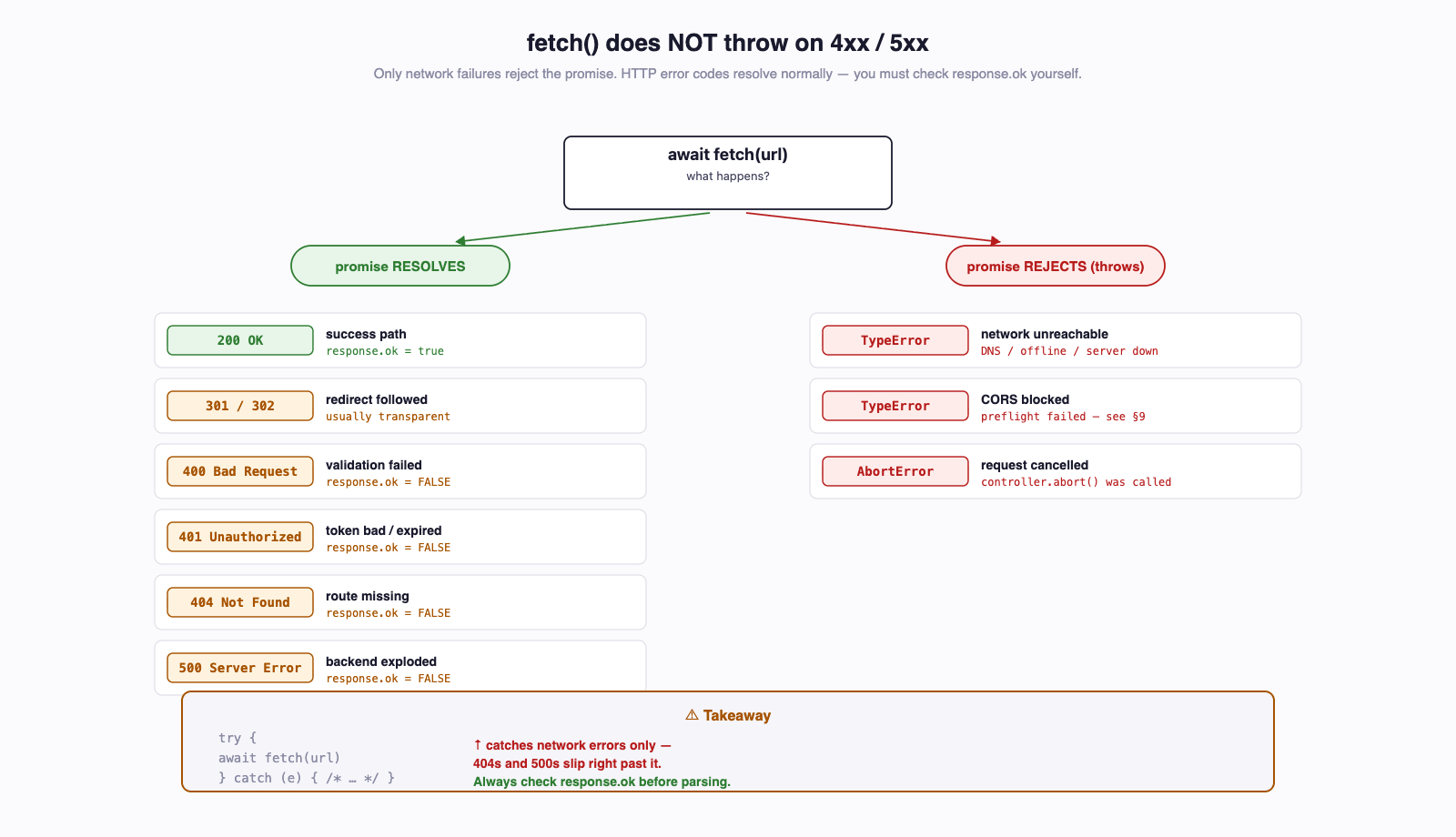
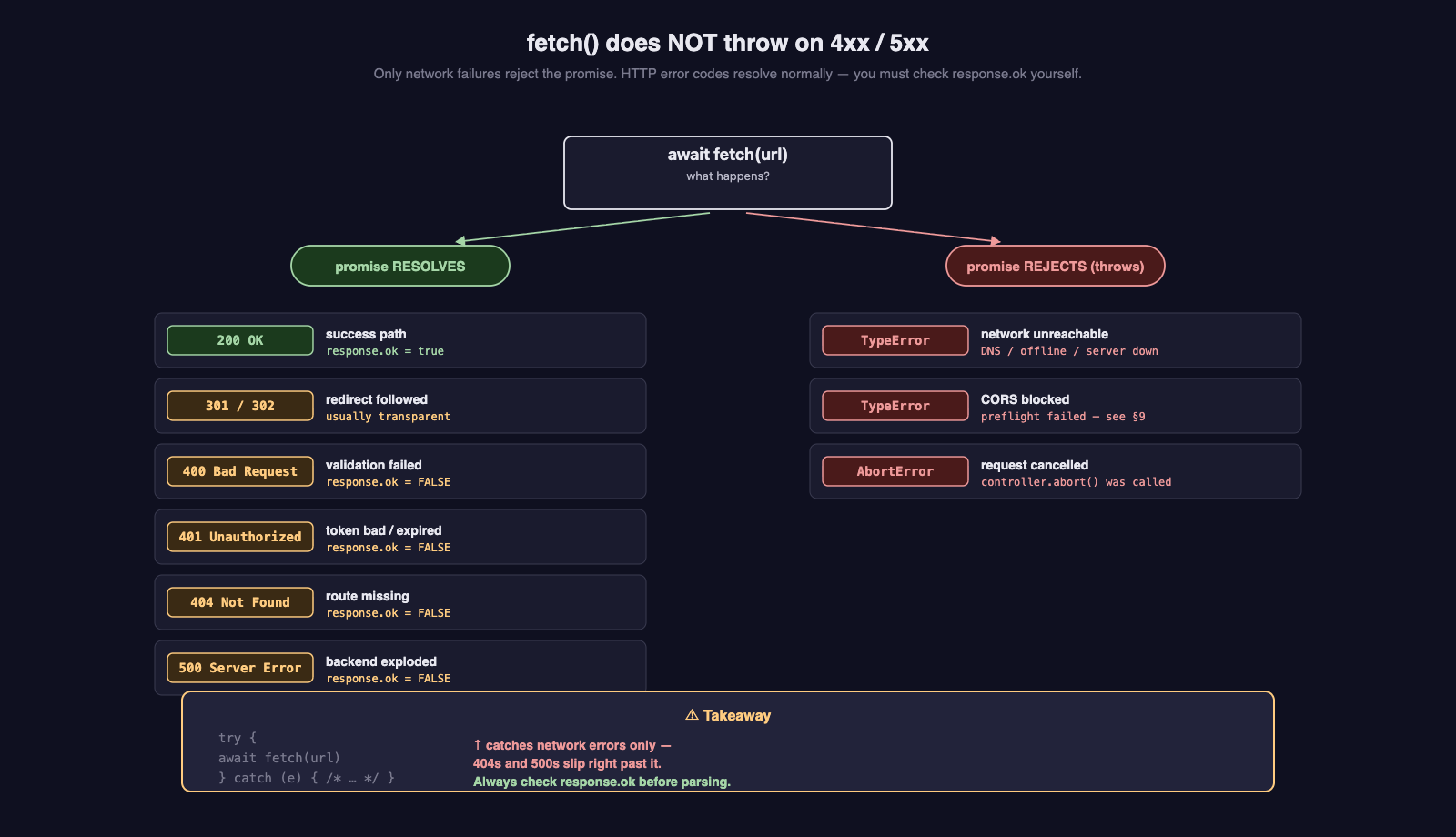
fetch Does NOT Throw on HTTP Error Codes
A 404, 500, or 401 response does not reject the fetch promise. The await succeeds. The only way to know the request failed is to check response.ok.
The try/catch block you'd reach for from other languages catches network failures (DNS error, server unreachable, request aborted) — not HTTP errors. This is the most common new-fetch mistake.
Here's the correct pattern:
const response = await fetch("/messages");

if (!response.ok) {
  throw new Error(`Request failed: ${response.status} ${response.statusText}`);
}

const data = await response.json();
response.ok is true only for status codes in the 200–299 range. Anything else — 301, 404, 500, 502 — is false.
8.1 What Each Failure Mode Looks Like
| Scenario | await fetch(...) |
response.ok |
What to do |
|---|---|---|---|
| 200 OK | resolves | true |
parse body, render |
| 404 Not Found | resolves | false |
show "not found" message |
| 500 Server Error | resolves | false |
show "something went wrong" |
| 401 Unauthorized | resolves | false |
redirect to sign-in |
| Network error (DNS, offline, server down) | throws | n/a | show "offline" message |
Request aborted (AbortController) |
throws AbortError |
n/a | usually ignore — user navigated away |
8.2 A Reusable apiFetch Helper
Wrapping the boilerplate in a helper function is the canonical move. Copy this into your projects:
export async function apiFetch<T>(
  url: string,
  options: RequestInit = {},
): Promise<T> {
  const response = await fetch(url, {
    ...options,
    headers: {
      "Content-Type": "application/json",
      ...options.headers,
    },
  });

  if (!response.ok) {
    const body = await response.text();
    throw new Error(`${response.status} ${response.statusText}: ${body}`);
  }

  if (response.status === 204) {
    return undefined as T;
  }

  return (await response.json()) as T;
}
Use it like this:
interface Message {
  id: number;
  text: string;
}

// GET
const messages = await apiFetch<Message[]>("/messages");

// POST
const created = await apiFetch<Message>("/messages", {
  method: "POST",
  body: JSON.stringify({ text: "Hello" }),
});

// DELETE
await apiFetch<void>(`/messages/${id}`, { method: "DELETE" });
Generic type parameter T lets the caller declare what shape they expect. The helper handles the response.ok check, the JSON.stringify, the Content-Type header, and the empty-body case. From this point forward in the course, prefer apiFetch over raw fetch for any non-trivial code.
Try It Yourself
- Create
api.tsand paste theapiFetchfunction. - In
app.ts, import it and callapiFetch<Message[]>("/messages")against your Sprint 2/3 backend's URL. - Stop your back-end server and reload the page — observe the network error in the console.
- Restart the server but request a path that doesn't exist (
/notreal) — observe the 404 thrown as a regularError.
9 CORS — What It Is, Why It Will Bite You
The browser's same-origin policy is a baseline security rule: JavaScript running on https://example.com is not allowed to read responses from https://other.com unless other.com explicitly opts in. The opt-in mechanism is CORS — Cross-Origin Resource Sharing.
An "origin" is the triple (scheme, host, port). http://localhost:3000 and http://localhost:5173 are different origins. So are https://my-app.vercel.app and https://your-app.onrender.com. The first time you serve your front-end on one URL and your back-end on another, you will see a CORS error.
9.1 What the Error Looks Like
In the browser's DevTools Console, a CORS failure looks like this:
Access to fetch at 'https://your-app.onrender.com/messages'
from origin 'https://my-frontend.vercel.app' has been blocked
by CORS policy: No 'Access-Control-Allow-Origin' header is
present on the requested resource.
The Network tab shows the request as failed (red). The fetch promise rejects with a generic TypeError: Failed to fetch — there's no useful information in the error itself. The Console message is the only signal.
9.2 Whose Problem Is It? The Server's.
CORS is a server-side concern. The browser is just enforcing what the server tells it. To fix the error, you (or whoever owns the back-end) must add the Access-Control-Allow-Origin header to responses.
In Express, the cors middleware does this for you:
import cors from "cors";

const app = express();

// Dev — allow everyone (NOT for production)
app.use(cors());

// Prod — allow specific origins only
app.use(cors({
  origin: ["https://my-frontend.vercel.app", "http://localhost:5173"],
  credentials: true,
}));
You already added app.use(cors()) to your back-end in the Routing & Middleware guide. The deployment problem is usually that production needs an explicit allowlist — cors() with no arguments allows everything, which is fine for dev but a bad practice (and sometimes a security finding) in prod.
On the Back-End Side
The Express cors() middleware setup is covered in the Routing & Middleware guide. When you deploy your front-end, you'll need to add the production origin to the back-end's allowlist and redeploy the back-end.
9.3 Preflight — Why You Sometimes See Two Requests
For "non-simple" requests, the browser sends an OPTIONS request first to ask the server "is this allowed?" before sending the real request. This is called a preflight.
A request is "non-simple" (and triggers preflight) when any of these are true:
- The method is
PUT,PATCH, orDELETE(anything other thanGET,HEAD, orPOST) - The
Content-Typeisapplication/json(anything other thantext/plain,application/x-www-form-urlencoded, ormultipart/form-data) - A custom header like
Authorizationis present
In practice, almost every request you'll write in this course triggers preflight — they're all JSON, and most carry an Authorization header.
The flow looks like this:
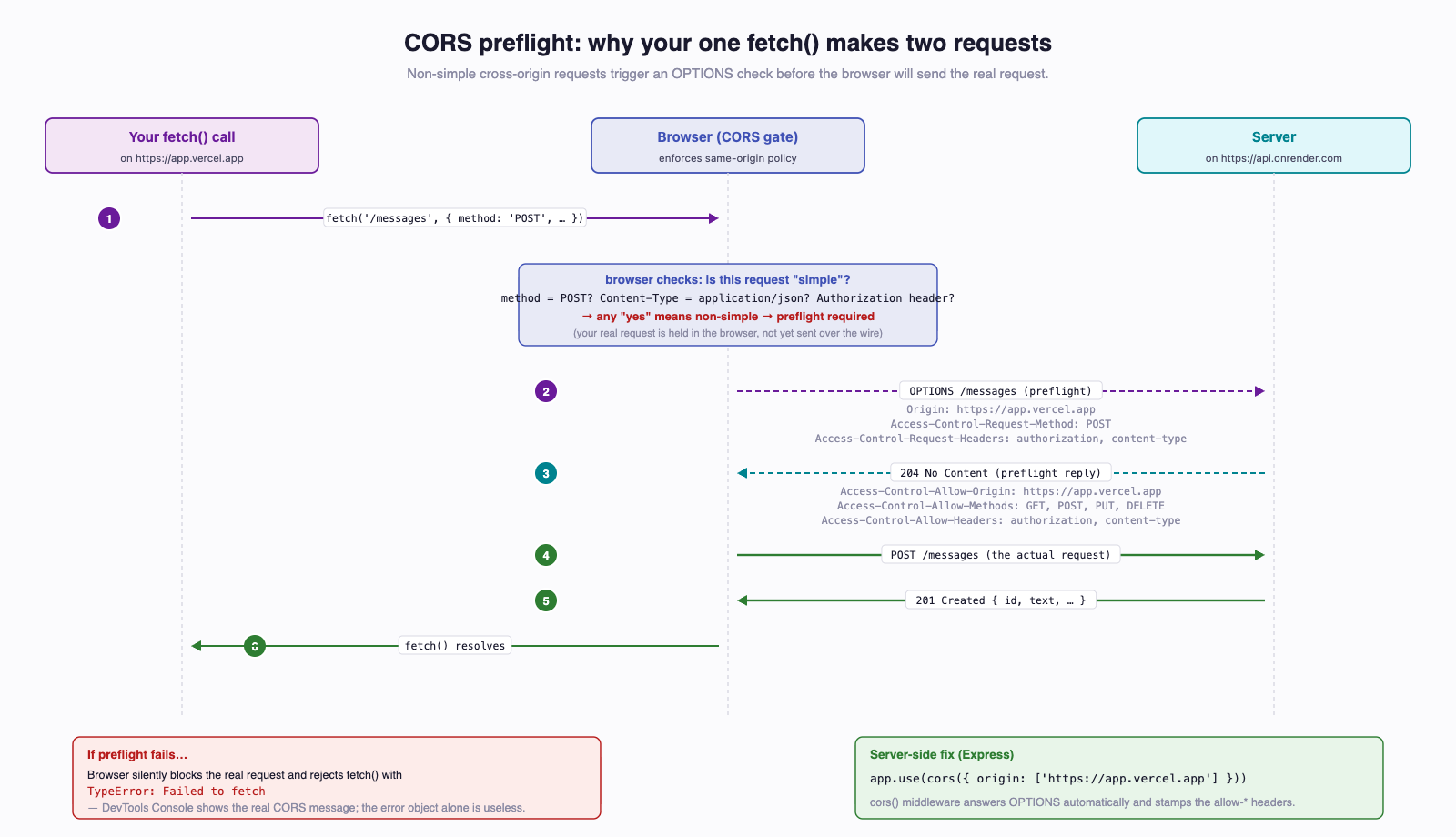
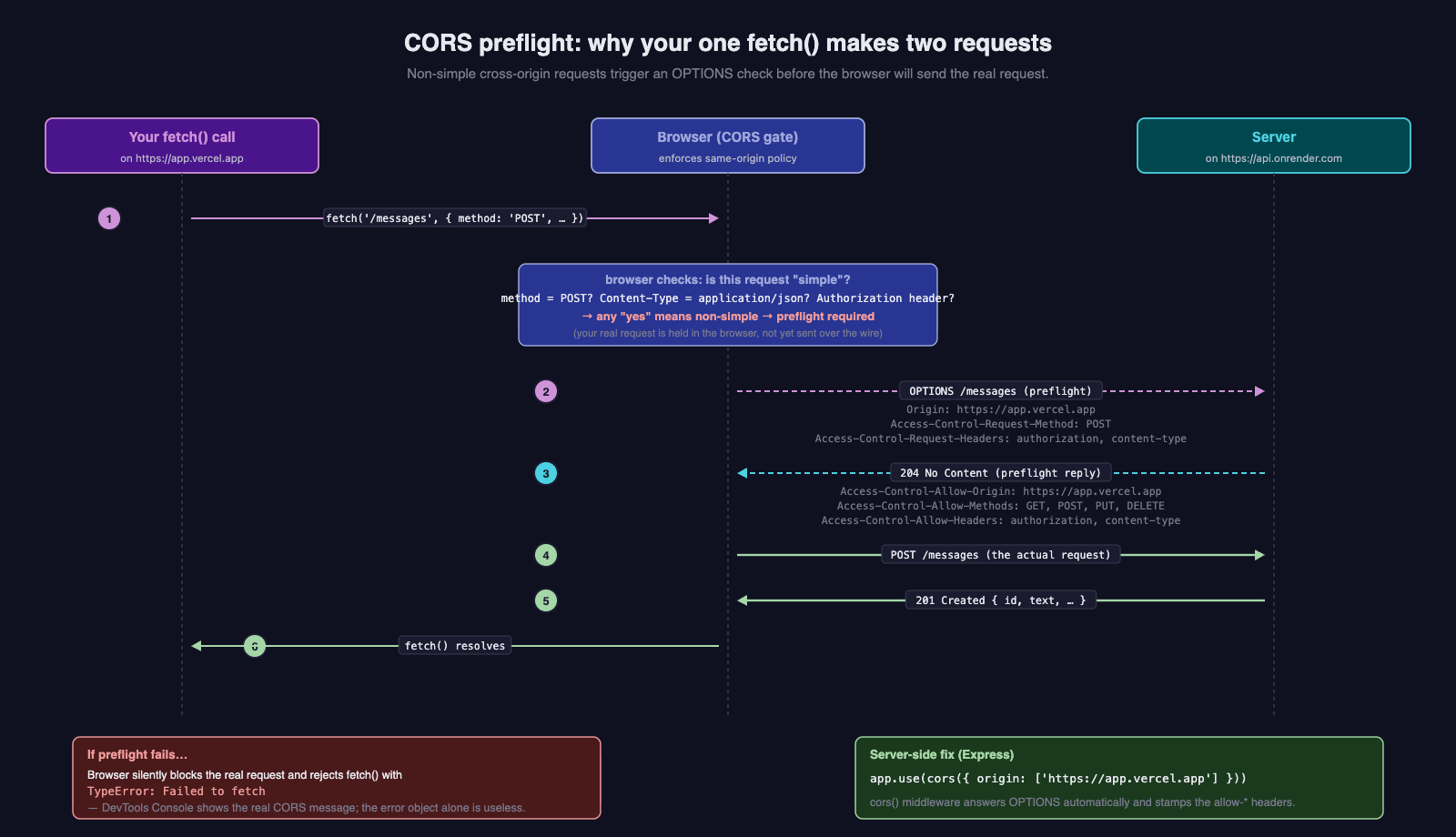
If you see two requests in DevTools (one OPTIONS, one POST) for what feels like a single fetch call, that's preflight working. The cors middleware handles the OPTIONS automatically.
9.4 Why Dev Often "Just Works"
In development, students often don't see CORS errors because:
- They serve front-end and back-end from the same origin (e.g., both on
localhost, or via a Vite proxy that hides the cross-origin call). - They have
app.use(cors())with no allowlist, so every origin is allowed.
Then they deploy. The front-end is on https://my-app.vercel.app. The back-end is on https://your-app.onrender.com. Suddenly: CORS error. Section 5 of the deployment guide walks through fixing this.
10 Inspecting Requests in DevTools
The browser's DevTools Network tab is the most important debugging tool for front-end-to-back-end work. Open it now and keep it open whenever you're writing fetch code.
Open DevTools with F12 (or right-click → "Inspect"). Click the Network tab.
10.1 What You See
Every HTTP request the page makes shows up as a row. Useful columns:
| Column | What it tells you |
|---|---|
| Name | The path (and host on hover) |
| Status | The HTTP status code — your first signal |
| Type | fetch, xhr, document, script, stylesheet, etc. |
| Initiator | Which line of code started the request — clickable |
| Time | How long the request took |
| Size | Payload size |
Click any row to open a detail panel with tabs:
- Headers — request headers, response headers, the
Authorizationvalue, theContent-Type - Payload — the request body (your
JSON.stringify'd POST) - Response — the response body, JSON-formatted
- Preview — the response body in a tree view, often easier to read
- Initiator — the JavaScript call stack that triggered the request
10.2 Filtering
The page makes lots of requests beyond your fetch calls — every image, stylesheet, and font shows up here. Filter to just your API calls:
- Click the Fetch/XHR filter button at the top of the Network tab.
- Or type into the filter box:
method:POST,status-code:401,domain:your-app.onrender.com.
10.3 Copy as cURL — The Best Debugging Trick
Right-click a request → Copy → Copy as cURL. You now have a complete shell command that reproduces the exact request the browser sent — headers, body, everything.
Paste it into your terminal. Does it work outside the browser? If yes, the back-end is fine and the bug is in your front-end. If no, the back-end has a problem and you can iterate on the cURL command independently of your front-end code.
This is the single most useful trick in the front-end debugging toolkit.
10.4 The Console Tab
The Console tab shows console.log output and any errors thrown from your code. CORS errors and uncaught exceptions show up here. Get used to checking it.
const response = await fetch("/messages");
console.log("status:", response.status);
console.log("ok:", response.ok);
const data = await response.json();
console.log("data:", data);
When in doubt, log everything. Remove the logs before committing.
11 Loading and Error States
A real UI has at least three states for any data it shows: loading, data, error. The naive code shape leads to a flash of "no data" before "loading" appears, which looks broken.
11.1 The Wrong Shape
let data: Message[] | null = null;
let error: string | null = null;

async function load(): Promise<void> {
  try {
    data = await apiFetch<Message[]>("/messages");
  } catch (err) {
    error = (err as Error).message;
  }
  render();
}

function render(): void {
  // Bug: when data is null and error is null, what do we show?
  if (error) {
    document.body.textContent = `Error: ${error}`;
    return;
  }
  if (data) {
    document.body.textContent = JSON.stringify(data);
    return;
  }
  // Falls through — nothing rendered, blank screen
}
Three independent variables and an order-dependent render: it's easy to get a blank screen during the first render, before the fetch resolves.
11.2 The Right Shape — A Single State Object
type Status = "loading" | "success" | "error";

interface State<T> {
  status: Status;
  data: T | null;
  error: string | null;
}

let state: State<Message[]> = { status: "loading", data: null, error: null };

async function load(): Promise<void> {
  state = { status: "loading", data: null, error: null };
  render();

  try {
    const data = await apiFetch<Message[]>("/messages");
    state = { status: "success", data, error: null };
  } catch (err) {
    state = { status: "error", data: null, error: (err as Error).message };
  }
  render();
}

function render(): void {
  if (state.status === "loading") {
    document.body.textContent = "Loading...";
  } else if (state.status === "error") {
    document.body.textContent = `Error: ${state.error}`;
  } else {
    document.body.textContent = JSON.stringify(state.data);
  }
}
One variable. Three exhaustive states. The render function can never fall through to "nothing." This is the same shape React's data-fetching libraries (TanStack Query, SWR) use, and the same shape the React Fundamentals guide adapts to useState.
11.3 Cancelling In-Flight Requests with AbortController
When a user navigates away or triggers a new search before the previous one finishes, you want to cancel the stale request. AbortController does this:
const controller = new AbortController();

try {
  const response = await fetch("/messages", { signal: controller.signal });
  const data = await response.json();
} catch (err) {
  if ((err as Error).name === "AbortError") {
    return; // user cancelled, ignore
  }
  throw err;
}

// Somewhere else — e.g., user navigates away
controller.abort();
When controller.abort() is called, the in-flight fetch rejects with a DOMException named AbortError. The React guide uses this pattern in useEffect cleanup functions to prevent setting state on unmounted components.
12 Auth — Bearer Tokens
Once a user signs in via auth-squared (Week 5), they receive a JWT. Every subsequent request to a protected endpoint must carry that token in the Authorization: Bearer <token> header.
12.1 Where the Token Comes From
For now, in this guide, we treat the token as a string you have. In real life it comes from one of:
- The Token Playground (used in Check-Off 5 for manual testing)
- A login form that POSTs to auth-squared's token endpoint (rare in this course — we use redirect-based OAuth)
- NextAuth's session (Week 7 — the production path)
The deeper picture is in the Week 5 auth concepts reading. The mechanics of getting a token into NextAuth's session are covered in the Authentication with NextAuth guide.
12.2 Where to Store the Token
Three options:
| Storage | Survives reload? | Survives tab close? | Risk |
|---|---|---|---|
| In-memory variable | No | No | Lowest — token never written to disk or persisted |
localStorage |
Yes | Yes | XSS — any script on the page can read it |
| HttpOnly cookie | Yes | Yes | Lowest — JavaScript cannot read it; CSRF concerns instead |
The course default for the React/Next.js portion is HttpOnly cookies, managed automatically by NextAuth. You won't write localStorage.setItem("token", ...) directly in production code — that's the path that gets hacked. The auth-concepts reading covers the trade-offs in depth.
12.3 Attaching the Token to Every Request
If you have the token as a string, attach it explicitly:
const token = await getToken(); // implementation depends on storage choice

const response = await apiFetch<Message[]>("/messages", {
  headers: {
    "Authorization": `Bearer ${token}`,
  },
});
Or extend the apiFetch helper to attach it automatically:
export async function authedFetch<T>(
  url: string,
  options: RequestInit = {},
): Promise<T> {
  const token = await getToken();
  return apiFetch<T>(url, {
    ...options,
    headers: {
      ...options.headers,
      "Authorization": `Bearer ${token}`,
    },
  });
}
12.4 Handling 401 Unauthorized
A 401 means "your token is missing, expired, or invalid." The user has to sign in again (or refresh the token, which NextAuth handles in Week 7). For now, the simplest reaction:
try {
  const data = await authedFetch<Message[]>("/messages");
} catch (err) {
  const message = (err as Error).message;
  if (message.startsWith("401")) {
    window.location.href = "/login";
    return;
  }
  throw err;
}
In Week 7, NextAuth replaces this manual handling with built-in session-expiry logic.
13 Try It Yourself — Talking to Your Sprint 2/3 Backend
Build a single-page CRUD UI against your own deployed back-end. No frameworks, no build step — index.html and app.ts only.
Setup
- Create a folder
crud-demo/. - Create
index.htmlandapp.tsinside it. - Compile
app.tstoapp.jswithtsc app.ts(or skip TS and useapp.jsdirectly while learning). - Serve with
npx serveso you're onhttp://localhost:3000and notfile://(CORS won't work fromfile://).
index.html
<!doctype html>
<html lang="en">
  <head>
    <meta charset="utf-8" />
    <title>CRUD Demo</title>
  </head>
  <body>
    <h1>Messages</h1>

    <form id="new-message-form">
      <input id="text" type="text" placeholder="Message" required />
      <button type="submit">Add</button>
    </form>

    <ul id="messages"></ul>

    <p id="status"></p>

    <script type="module" src="app.js"></script>
  </body>
</html>
app.ts
const API_BASE = "https://your-app.onrender.com"; // replace with your URL

interface Message {
  id: number;
  text: string;
}

async function apiFetch<T>(
  url: string,
  options: RequestInit = {},
): Promise<T> {
  const response = await fetch(url, {
    ...options,
    headers: { "Content-Type": "application/json", ...options.headers },
  });
  if (!response.ok) {
    throw new Error(`${response.status} ${response.statusText}`);
  }
  if (response.status === 204) return undefined as T;
  return (await response.json()) as T;
}

const list = document.querySelector<HTMLUListElement>("#messages")!;
const form = document.querySelector<HTMLFormElement>("#new-message-form")!;
const input = document.querySelector<HTMLInputElement>("#text")!;
const status = document.querySelector<HTMLParagraphElement>("#status")!;

async function refresh(): Promise<void> {
  status.textContent = "Loading...";
  try {
    const messages = await apiFetch<Message[]>(`${API_BASE}/messages`);
    list.innerHTML = "";
    for (const m of messages) {
      const li = document.createElement("li");
      li.textContent = m.text;

      const del = document.createElement("button");
      del.textContent = "Delete";
      del.addEventListener("click", async () => {
        await apiFetch<void>(`${API_BASE}/messages/${m.id}`, {
          method: "DELETE",
        });
        await refresh();
      });

      li.appendChild(del);
      list.appendChild(li);
    }
    status.textContent = "";
  } catch (err) {
    status.textContent = `Error: ${(err as Error).message}`;
  }
}

form.addEventListener("submit", async (e) => {
  e.preventDefault();
  await apiFetch<Message>(`${API_BASE}/messages`, {
    method: "POST",
    body: JSON.stringify({ text: input.value }),
  });
  input.value = "";
  await refresh();
});

refresh();
Adapt the endpoint paths (/messages, /items, /notes, whatever your back-end uses) to match your own routes. The shape of the code stays the same.
Bonus: add a hard-coded bearer token at the top and hit a protected route:
const TOKEN = "eyJhbGciOiJSUzI1NiIs..."; // from the Token Playground

await apiFetch<Message[]>(`${API_BASE}/protected/messages`, {
  headers: { "Authorization": `Bearer ${TOKEN}` },
});
This is exactly what NextAuth does for you in Week 7 — the only difference is who manages the token's lifecycle.
14 Common Mistakes
A focused list of the bugs students hit most often. If your fetch isn't working, this list catches ~80% of cases.
14.1 Forgetting await on response.json()
// WRONG
const data = response.json();
console.log(data); // Promise { <pending> }

// RIGHT
const data = await response.json();
14.2 Not Checking response.ok
The response promise resolves on 404 and 500. Without an ok check, your code happily parses the error JSON as if it were the success shape, then renders undefined everywhere. See Section 8.
14.3 Sending an Object Instead of a String
// WRONG — fetch can't serialize an object as the body
fetch(url, { method: "POST", body: payload });

// RIGHT
fetch(url, { method: "POST", body: JSON.stringify(payload) });
14.4 Forgetting Content-Type: application/json
If the header is missing, Express's express.json() middleware does not parse the body. request.body is empty, your validation fails, and you get a confusing 400. Always send the header on JSON POSTs/PUTs.
14.5 CORS Works in Dev, Breaks in Prod
Dev often colocates origins or uses cors() with no allowlist. Prod has separate origins on Vercel and Render. Add the prod front-end origin to the back-end's CORS allowlist and redeploy the back-end. See Section 9.
14.6 Serving index.html via file://
Opening index.html directly in the browser uses the file:// protocol. CORS is stricter on file://, localStorage may behave oddly, and modules don't load. Always serve via a real dev server: npx serve, Vite, or Next.js's npm run dev.
14.7 Using == Instead of ===
if (response.status == 200) { ... }   // works, but...
if (response.status === 200) { ... }  // always use this
== does type coercion with surprising rules. === is strict equality. The TypeScript-Fundamentals guide series covers this; in fetch code, defaulting to === avoids one whole category of bug.
15 Looking Ahead
Everything in this guide is reused — usually with a thin framework wrapper — by every subsequent front-end guide:
- React Fundamentals —
fetchmoves insideuseEffect, the loading/data/error state object becomes threeuseStatecalls (or a reducer). The patterns are identical; the React-specific overlay is when the fetch runs and how cleanup works on unmount. - Next.js — Server Components let you
await fetch(url)directly in the component body. Because the request runs on the server, CORS does not apply for server-side fetches. Client Components still use theuseEffect+fetchpattern from React Fundamentals. - Auth with NextAuth — the bearer token attached manually here gets pulled from
useSession()(client) orawait auth()(server) and attached automatically. TheapiFetchhelper grows an auth-aware sibling.
The Week 5 auth concepts reading covers the deeper question of where the token lives and why HttpOnly cookies beat localStorage for production. This guide deliberately stays mechanical — once you know how fetch and the Authorization header work, the auth concepts reading and the NextAuth guide are about applying that knowledge under real threat models.
16 Summary
| Concept | Key Point |
|---|---|
fetch(url) |
The browser primitive. Returns Promise<Response>. |
Two awaits |
One for the headers (fetch), one for the body (response.json()). |
method, headers, body |
The three options you'll set. body must be a string — use JSON.stringify. |
Content-Type: application/json |
Required on JSON POSTs/PUTs/PATCHes. Missing it breaks express.json(). |
Authorization: Bearer <token> |
The header that carries the JWT to protected back-end routes. |
response.ok |
true only for 2xx. fetch does not throw on 4xx/5xx. Always check. |
response.json() is async |
Forgetting the second await gives you a Promise, not data. |
| CORS | Same-origin policy blocks cross-origin reads unless the server opts in via Access-Control-Allow-Origin. Server's problem to fix. |
Preflight OPTIONS |
JSON requests, PUT/DELETE/PATCH, and custom headers all trigger an extra OPTIONS request. Handled by cors() middleware. |
apiFetch<T> helper |
The reusable wrapper — Content-Type header, response.ok check, generic typing. Use it everywhere. |
AbortController |
Cancels in-flight fetch calls. Used in React useEffect cleanup. |
| Loading/data/error state | Use one state object, not three independent variables. |
| DevTools Network tab | Open it. Always. "Copy as cURL" is the best debugging trick on the platform. |
17 References
Official Documentation:
- MDN — Using the Fetch API — the canonical
fetchreference - MDN — Response.ok — the property that decides success
- MDN — Cross-Origin Resource Sharing (CORS) — the full CORS specification, in tutorial form
- MDN — Preflight request — what triggers
OPTIONSand what the server must answer - MDN — AbortController — cancelling in-flight requests
- Express
corsmiddleware — the npm package and its options - OWASP — Cross-Origin Resource Sharing Cheat Sheet — security-focused CORS guidance
Course Cross-References:
- HTML, CSS & the DOM — the previous guide; assumed knowledge
- Routing & Middleware (Express
cors()) — the back-end side of CORS - React Fundamentals — these patterns adapted to React
- Next.js — server-side fetches, no CORS
- Auth with NextAuth — bearer tokens via session
- Week 5 — Auth Concepts — token storage trade-offs
18 Further Reading
External Resources
- Jake Archibald — That's so fetch! — older but still excellent on the design rationale of
fetch - web.dev — Introduction to fetch() — Google's tutorial-style intro
- Chrome DevTools — Network features reference — every column, every filter, every panel
- HTTP Status Code Reference — when in doubt, look up what 422 actually means
- Auth.js (NextAuth) docs — the production-grade place for tokens, sessions, and OAuth flows
This guide is part of TCSS 460 — Client/Server Programming, School of Engineering and Technology, University of Washington Tacoma.