React Fundamentals¶
TCSS 460 — Client/Server Programming
You just spent a guide learning how to manipulate the DOM by hand: document.querySelector, el.textContent = "...", addEventListener, appendChild. It works, and for a page with two interactive elements it is fine. The moment you have five interacting features, you are tracking which DOM nodes exist, which event listeners are bound, what the current state is, and whether the page reflects that state — all in your head. React exists because that is not sustainable.
This guide gets you from "I can manipulate the DOM" to "I can build a multi-component React app that fetches from my back-end." We will use Vite, function components, and hooks only — no class components, no Redux, no advanced patterns.
Lecture demo repo
TCSS460-frontend-1 on GitHub — Vite + React 19 + React Router 7 + MUI v7. Clone it and read alongside this guide; inline links throughout point at specific files.
1 Why React?¶
React's central idea is small and worth memorizing:
UI is a function of state. You declare what the UI should look like for a given state, and React figures out how to mutate the DOM to match.
That is a different mental model from what you just did with the DOM, and it is the mental shift you need to make.
1.1 Imperative DOM vs Declarative React¶
The HTML/CSS/DOM guide ended with this kind of code:
// Imperative — you describe HOW to update the page step by step
const button = document.querySelector("#send") as HTMLButtonElement;
const list = document.querySelector("#messages") as HTMLUListElement;
const input = document.querySelector("#new-message") as HTMLInputElement;

button.addEventListener("click", () => {
  const li = document.createElement("li");
  li.textContent = input.value;
  list.appendChild(li);
  input.value = "";
});
You are giving the browser a recipe: query the nodes, create a new one, append it, clear the input. If you also want a delete button, a priority indicator, and a count of unread messages, every interaction has to update every relevant node. Forget one update and the page lies about its own state.
Now the React version of the same idea:
// Declarative — you describe WHAT the UI should look like for the current state
function MessageList() {
  const [messages, setMessages] = useState<string[]>([]);
  const [draft, setDraft] = useState("");

  return (
    <div>
      <input value={draft} onChange={(e) => setDraft(e.target.value)} />
      <button onClick={() => { setMessages([...messages, draft]); setDraft(""); }}>
        Send
      </button>
      <ul>
        {messages.map((m, i) => <li key={i}>{m}</li>)}
      </ul>
    </div>
  );
}
Notice what is missing: there is no appendChild, no querySelector, no manual DOM mutation. You changed messages from [] to ["server is down"] and the <ul> updated itself. That is what "UI is a function of state" means. You stopped writing the recipe and started writing the picture.
1.2 The Component Model¶
The other big idea: a component is a reusable piece of UI. A component is just a function that returns JSX (React's HTML-like syntax — covered in §4). Components compose — you build big UIs by nesting small ones.
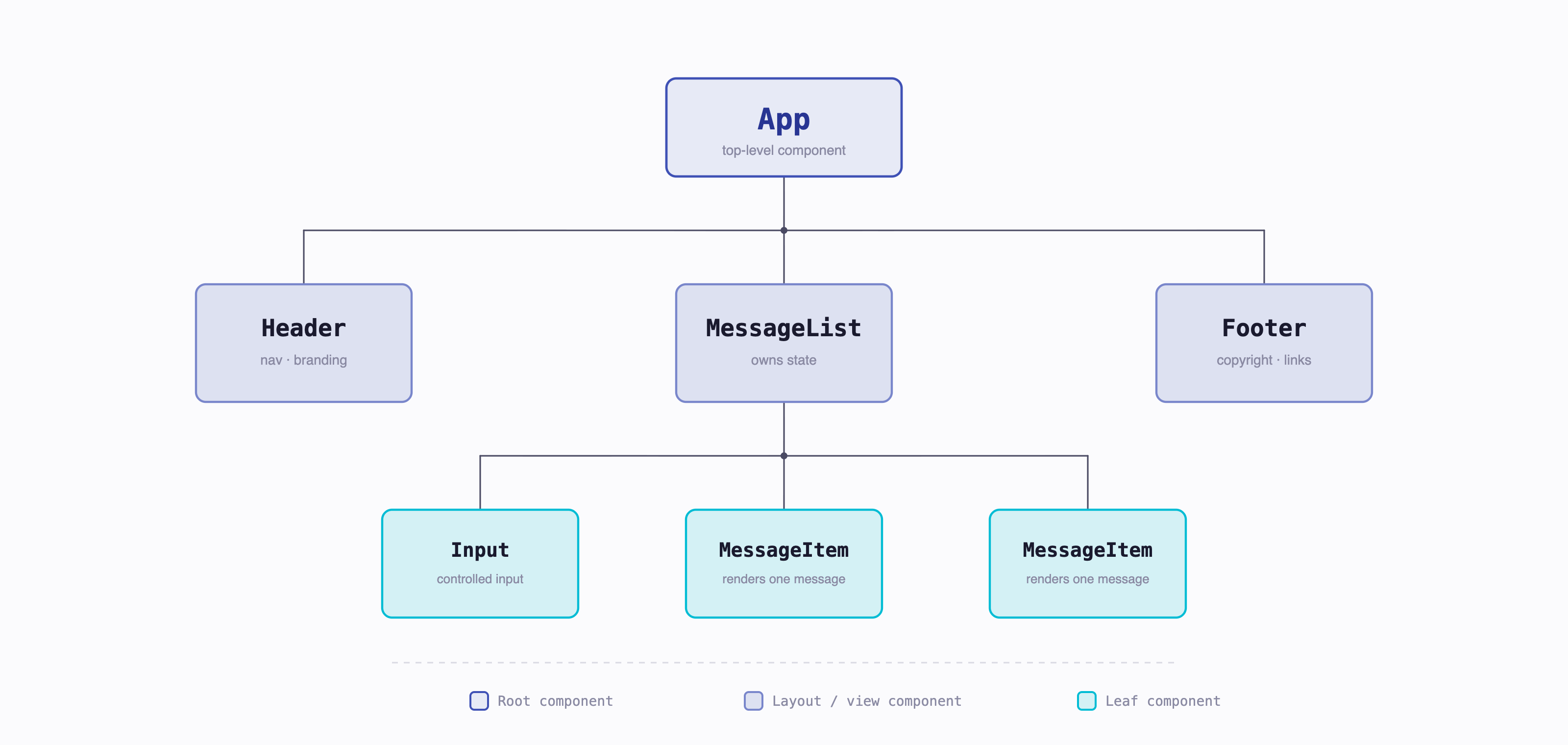
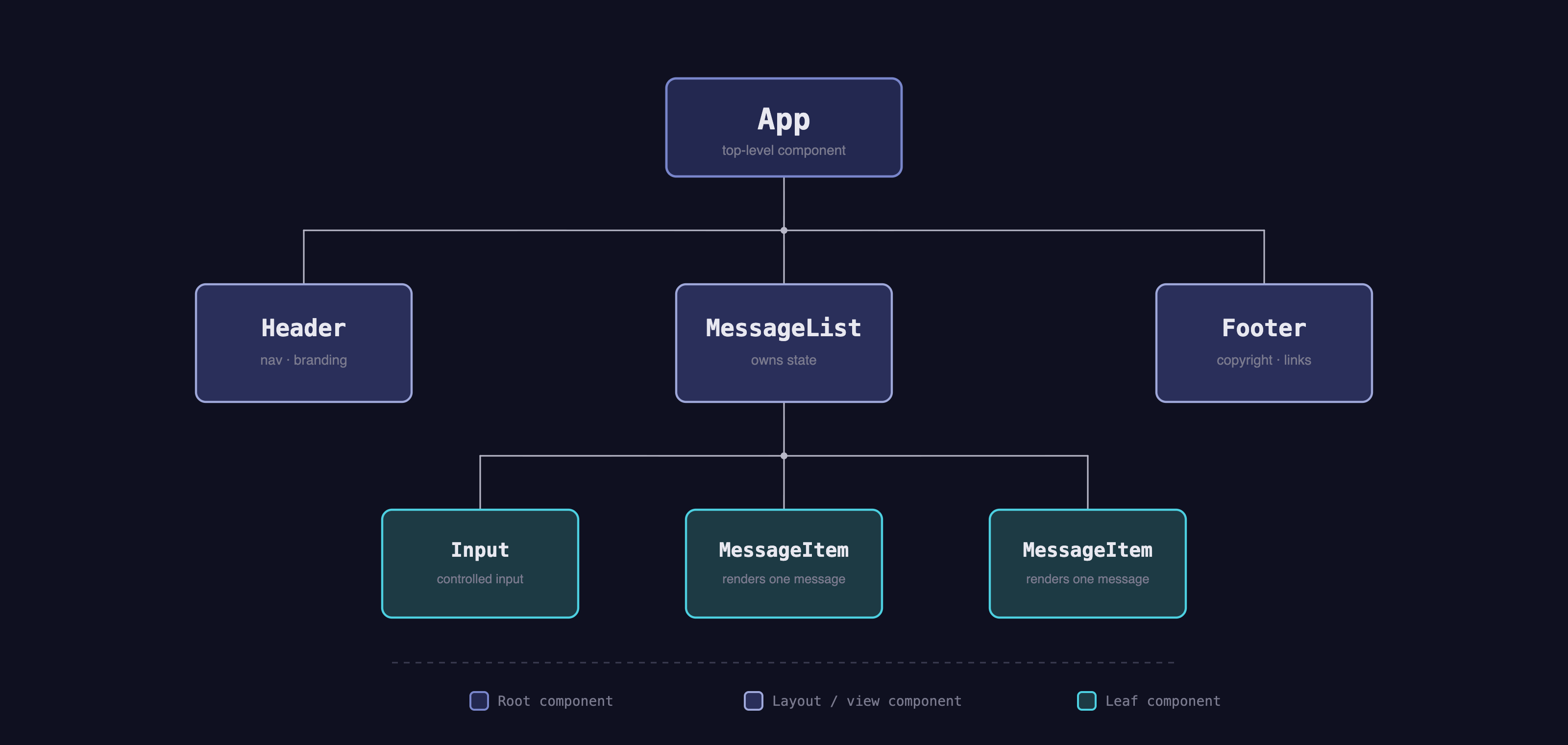
Each box is a function. Each function returns JSX. Each can take inputs (props) and own a piece of state. That is essentially the whole API surface.
2 Setup — Vite + React + TypeScript¶
We use Vite as the build tool and dev server. Vite is fast, modern, and is what the React documentation itself recommends for new projects.
Don't Use Create React App
You will see tutorials that start with npx create-react-app. Do not use it. The React team officially deprecated CRA in February 2025. It is not maintained, recommends old patterns, and has been replaced by Vite (or, for full-stack apps, Next.js — covered in the next guide).
2.1 Scaffolding the Project¶
From a terminal, in the directory where you keep your projects:
The --template react-ts flag tells Vite "React with TypeScript, no questions asked." If you omit the flag, Vite walks you through interactive prompts (framework: React; variant: TypeScript). Either path works.
npm run dev starts the Vite dev server on http://localhost:5173. Open that URL — you should see the Vite + React starter page with a counter button.
2.2 The Generated Structure¶
my-app/
├── index.html             # The single HTML page Vite serves
├── package.json           # Dependencies and scripts
├── tsconfig.json          # TypeScript config
├── vite.config.ts         # Vite config (rarely needs editing)
├── public/                # Static assets served at root (favicon, etc.)
└── src/
    ├── main.tsx           # The entry point — mounts <App /> into #root
    ├── App.tsx            # The top-level component
    ├── App.css            # Component-scoped styles
    ├── index.css          # Global styles
    ├── assets/
    └── vite-env.d.ts      # TypeScript ambient types for Vite
A few files worth opening:
index.html — there is one HTML file. It contains a single <div id="root"></div> and a <script type="module" src="/src/main.tsx">. Everything else is React.
src/main.tsx — the bootstrap:
import { StrictMode } from "react";
import { createRoot } from "react-dom/client";
import "./index.css";
import App from "./App.tsx";

createRoot(document.getElementById("root")!).render(
  <StrictMode>
    <App />
  </StrictMode>
);
This is the only place you'll see createRoot and the #root div connected. It says "find the #root element, render <App /> inside it." <StrictMode> is a development-only wrapper that helps catch bugs (it intentionally runs some code twice in dev — more on that in §10).
src/App.tsx — the top-level component, where you'll start replacing the demo with your own UI.
2.3 Build Scripts¶
| Command | What It Does |
|---|---|
npm run dev |
Start the dev server with hot module reloading on http://localhost:5173 |
npm run build |
Type-check and produce an optimized build in dist/ |
npm run preview |
Serve the dist/ build locally — sanity-check before deploying |
npm run lint |
Run ESLint over the project |
In dev, edits to your .tsx files appear in the browser within milliseconds — no manual reload. That fast feedback loop is most of why we use Vite.
Try It Yourself
- Run the four commands above (
npm create vite@latest …,cd,npm install,npm run dev). - Open
http://localhost:5173and click the counter button on the demo page. - Open
src/App.tsxand change the<h1>text. Save the file. The browser should update without a refresh.
3 Your First Component¶
Replace the contents of src/App.tsx with this:
function App() {
  return (
    <div>
      <h1>Hello, TCSS 460!</h1>
      <p>This is a React component.</p>
    </div>
  );
}

export default App;
That is a complete, valid React component. Three things to notice:
- It is a function. No class, no
extends, norender()method. - It returns JSX. That
<div>...</div>is not a string — it is JSX, which we will demystify in §4. - The name is capitalized.
App, notapp. This is required.
3.1 Naming Convention — PascalCase¶
React decides what a JSX tag means by its first letter:
- Lowercase first letter → HTML element:
<div>,<span>,<button>. - Uppercase first letter → React component:
<App />,<MessageList />,<UserProfile />.
If you name your component app (lowercase), React thinks you are referencing the HTML tag <app> (which doesn't exist) and silently renders nothing, or warns that React tags should be capitalized. Always PascalCase your component names.
3.2 Default vs Named Exports¶
The Vite template uses default exports for components:
// MyComponent.tsx
export default function MyComponent() { /* ... */ }

// elsewhere
import MyComponent from "./MyComponent";
Some files prefer named exports:
// utils.ts
export function formatDate(d: Date) { /* ... */ }
export const MAX_ITEMS = 50;

// elsewhere
import { formatDate, MAX_ITEMS } from "./utils";
Pick a convention and apply it consistently. The lecture demo's rule is the one used in most React projects: default export for "the one thing this file is" (a view, a component), named exports for utilities, hooks, types, and constants. A view file like MessageList.tsx exports MessageList as default; a Priority.ts types file exports the Priority type and PRIORITY constant by name. Either works as long as the file's top-level intent is clear at a glance.
4 JSX — HTML-in-TypeScript¶
JSX looks like HTML but is not. It is a JavaScript expression that the build tool compiles into function calls. This:
…compiles to something roughly like:
You will never write React.createElement yourself. But knowing it is "just function calls" demystifies the rest: JSX is a normal JavaScript expression, you can put it in variables, return it from functions, and embed JavaScript inside it with { }.
4.1 Differences from HTML¶
JSX uses HTML's vocabulary but tweaks a few names because some HTML attribute names collide with JavaScript keywords:
| HTML | JSX |
|---|---|
class="..." |
className="..." |
for="..." (on <label>) |
htmlFor="..." |
onclick="..." |
onClick={handler} |
tabindex |
tabIndex |
<input> (self-closing not required) |
<input /> (must self-close) |
Event handler names are camelCase (onClick, onChange, onSubmit) and take a function reference, not a string.
4.2 Embedding Expressions with { }¶
Anything inside { } in JSX is a JavaScript expression — its value gets rendered:
const name = "Alice";
const items = ["a", "b", "c"];
const user = { age: 21 };

return (
  <div>
    <p>Hello, {name}</p>                    {/* "Hello, Alice" */}
    <p>Item count: {items.length}</p>       {/* "Item count: 3" */}
    <p>Age: {user.age}</p>                  {/* "Age: 21" */}
    <p>Sum: {2 + 2}</p>                     {/* "Sum: 4" */}
  </div>
);
It must be an expression — something that evaluates to a value. You cannot put if/else/for statements inside { }. (Conditional rendering uses ternaries; we get to it in §8.)
4.3 Fragments — <>...</>¶
A component must return a single JSX node. If you want to return two siblings without wrapping them in a <div>:
// Won't compile — returns two top-level elements
function Header() {
  return (
    <h1>Title</h1>
    <p>Subtitle</p>
  );
}

// Wrap in a fragment
function Header() {
  return (
    <>
      <h1>Title</h1>
      <p>Subtitle</p>
    </>
  );
}
<>...</> is the Fragment shorthand. It produces no actual DOM node — the children get inserted directly into the parent. Use a fragment when you need multiple siblings but don't want an extra <div> cluttering the DOM.
5 Props — Data Flowing Down¶
Props are how a parent component passes data into a child. Props are read-only inside the child — the parent owns the data.
interface GreetingProps {
  name: string;
  excited?: boolean;  // optional, with `?`
}

function Greeting({ name, excited = false }: GreetingProps) {
  return <h1>Hello, {name}{excited && "!"}</h1>;
}

// Used like:
function App() {
  return (
    <div>
      <Greeting name="Alice" />
      <Greeting name="Bob" excited />
    </div>
  );
}
Three patterns to notice:
- Define an
interfacefor the props. This is the idiomatic TypeScript pattern —interfacefor object shapes,typefor unions and aliases. - Destructure in the function signature.
({ name, excited })pulls those values out of the props object directly. Cleaner than(props)and thenprops.nameeverywhere. - Pass JSX values like HTML attributes.
name="Alice"(string),excited(boolean shorthand forexcited={true}),count={42}(any other expression).
5.1 The children Prop¶
children is a special prop that holds whatever JSX is passed between a component's opening and closing tags. Use the ReactNode type:
import type { ReactNode } from "react";

interface CardProps {
  title: string;
  children: ReactNode;
}

function Card({ title, children }: CardProps) {
  return (
    <div className="card">
      <h2>{title}</h2>
      <div className="card-body">{children}</div>
    </div>
  );
}

// Used like:
<Card title="Welcome">
  <p>This text becomes the `children` prop.</p>
  <button>So does this button.</button>
</Card>
ReactNode covers anything renderable: a string, a number, JSX, an array of JSX, null, undefined, false. This is the right type 95% of the time.
5.2 One-Way Data Flow¶
Props go down the component tree. A child cannot reach back up and modify a parent's state directly. If a child needs to communicate something upward, the parent passes a callback function as a prop:
function Parent() {
  const [count, setCount] = useState(0);
  return <Child onIncrement={() => setCount(count + 1)} />;
}

function Child({ onIncrement }: { onIncrement: () => void }) {
  return <button onClick={onIncrement}>+1</button>;
}
The button calls onIncrement, which is a function the parent provided, which mutates the parent's state. State stays where it lives; only callbacks travel down.
On React.FC
Older tutorials use const Greeting: React.FC<GreetingProps> = ({ name }) => {...}. The current React community guidance (and what react.dev shows in 2026) is to use plain function declarations with typed props, as in the examples above. React.FC adds nothing useful and was rough on children typing in older versions. Skip it.
6 State — Data That Changes¶
Props are read-only. State is data a component owns and can change. State is what makes a component interactive.
A hook is a special React function whose name starts with use — useState, useEffect, and so on. Hooks let function components tap into React features like state and side effects. They have a few rules (covered in §13.1), the main one being: always call them at the top level of your component, never inside a loop or condition. You'll meet useState here, useEffect in §10, and write your own custom hook in §11.2.
State lives in the useState hook:
import { useState } from "react";

function Counter() {
  const [count, setCount] = useState(0);

  return (
    <div>
      <p>Count: {count}</p>
      <button onClick={() => setCount(count + 1)}>+1</button>
    </div>
  );
}
In the Lecture Demo
The lecture demo's incrementor (src/views/state/State.tsx) is exactly this pattern with MUI's <Card> and <IconButton> instead of plain <button>. The state mechanics — useState, the setter, the re-render — are identical. Don't let the MUI markup distract you from what's actually happening: state changes, function re-runs, DOM updates.
useState(0) returns a tuple: the current value and a setter function. The convention is [thing, setThing]. TypeScript usually infers the type from the initial value; you can be explicit when needed:
const [messages, setMessages] = useState<string[]>([]);  // empty array, must annotate
const [user, setUser] = useState<User | null>(null);     // null initially, annotate union
6.1 Why You Can't Just Mutate¶
This does not work:
// BROKEN — does not trigger a re-render
function Counter() {
  let count = 0;
  return <button onClick={() => count++}>{count}</button>;
}
count++ increments a local variable, but React has no way of knowing the variable changed, so it never re-runs the function. The displayed count stays 0 forever.
The setter (setCount) is what tells React "state changed, re-render this component." That re-render is when React calls your function again, sees count has a new value, and updates the DOM.
The same rule applies to objects and arrays — never mutate them in place:
// BROKEN — mutating the existing array doesn't trigger a re-render
const [messages, setMessages] = useState<string[]>([]);
messages.push("new message");        // mutation — React doesn't notice
setMessages(messages);                // same array reference — React still doesn't notice

// Correct — produce a new array and set it
setMessages([...messages, "new message"]);
React compares the reference, not the contents. If you give it back the same array reference, it skips the re-render. Always create a new array/object when updating state.
6.2 Functional Updates¶
When the new state depends on the previous state, prefer the functional form:
// Works in simple cases
setCount(count + 1);

// Safer — `c` is guaranteed to be the latest value
setCount(c => c + 1);
The c => c + 1 form matters when you call the setter multiple times in a row, or from inside an asynchronous callback where count might be stale. A common bug:
function increment() {
  setCount(count + 1);  // adds 1 (count was 5, now 6)
  setCount(count + 1);  // adds 1 again, but count is still 5! result: 6, not 7
}

// With functional updates:
function increment() {
  setCount(c => c + 1); // c is 5, returns 6
  setCount(c => c + 1); // c is 6, returns 7 — correct
}
Use the functional form by default for "increment-style" updates. It's safer and reads about the same.
6.3 Lifting State Up¶
When two components need to share state, move the state up to their nearest common ancestor and pass it down through props:
function App() {
  const [filter, setFilter] = useState("");      // shared state lives here

  return (
    <div>
      <SearchBox filter={filter} onChange={setFilter} />
      <ResultsList filter={filter} />
    </div>
  );
}
SearchBox reads and writes filter; ResultsList only reads it. Both stay in sync because both render from the same source of truth. This pattern — "lift state up" — is the answer to most "how do I share state between components" questions.
7 Lists & Keys¶
Rendering a list is the canonical use of array.map():
const fruits = ["apple", "banana", "cherry"];

return (
  <ul>
    {fruits.map(fruit => <li key={fruit}>{fruit}</li>)}
  </ul>
);
You map each array element to a JSX element, and the resulting array of JSX gets rendered. React handles iterating it.
If You're Coming From Java Streams
array.map(x => x.toUpperCase()) in JavaScript is the same idea as stream.map(String::toUpperCase) in Java. JSX-in-{ } lets you embed the resulting array directly in the rendered output — no Stream-to-Collection step needed.
7.1 The key Prop¶
Every element produced by .map() needs a key prop. The key tells React which item is which across renders, so that when the list changes (an item added, removed, reordered), React can patch the DOM efficiently instead of throwing it away and rebuilding it.
Good keys:
- Stable database IDs:
key={user.id} - A unique string field:
key={message.id}whereidis a UUID
Bad keys:
- The array index:
key={index}— fine if items never reorder, broken if they do Math.random()— different every render, defeats the entire purpose
Concretely, if you delete the first item from a list keyed by index, React thinks every remaining item changed (because each one's key shifted by one). With stable IDs, React sees that one specific item disappeared.
If you forget the key entirely, you'll see this in the console:
Always add a stable key.
8 Conditional Rendering¶
You can't put if/else inside JSX, but you have three patterns that cover everything:
// 1. Ternary — when there's an "if/else"
{isLoggedIn ? <Profile /> : <LoginButton />}

// 2. Short-circuit (&&) — when there's just "if (true)"
{error && <ErrorBanner message={error} />}

// 3. Early return — for "if/else" at the top of a component
function Profile({ user }: { user: User | null }) {
  if (!user) return <LoginButton />;
  return <div>Welcome, {user.name}</div>;
}
The short-circuit && form has one quiet trap: if the left side is 0, JSX renders the literal 0:
{items.length && <List items={items} />}
// If items.length is 0, this renders... 0. Not nothing.

{items.length > 0 && <List items={items} />}
// Always boolean — safe
Use a real boolean expression on the left of && and you'll avoid the surprise.
9 Events & Forms¶
Event handlers are functions you attach to JSX elements with camelCase prop names:
function ClickButton() {
  function handleClick() {
    console.log("clicked");
  }

  return <button onClick={handleClick}>Click me</button>;
}
onClick={handleClick} passes the function reference. Don't write onClick={handleClick()} — that calls the function during render and passes the return value (likely undefined) as the handler.
If You're Coming From Java Swing
button.addEventListener("click", handleClick) and Swing's button.addActionListener(this::handleClick) are doing the same thing: register a function to run when the button fires its event. React's onClick={handleClick} is the JSX-flavored version of the same idea — the listener registration happens behind the scenes.
9.1 Typing the Event¶
The handler can take an event argument when you need to read from it. TypeScript provides specific event types:
function SearchInput() {
  function handleChange(e: React.ChangeEvent<HTMLInputElement>) {
    console.log(e.target.value);
  }

  return <input onChange={handleChange} />;
}
React.ChangeEvent<HTMLInputElement> is React's wrapper around the native event. You rarely need to dig into the wrapper — e.target.value for inputs and e.preventDefault() for forms cover most uses.
9.2 Controlled Inputs¶
The idiomatic React pattern is controlled inputs: the input's value comes from state, and changes flow through the setter:
function NameForm() {
  const [name, setName] = useState("");

  return (
    <input
      value={name}
      onChange={(e) => setName(e.target.value)}
    />
  );
}
Now name is the single source of truth for the input's value. You can read it, validate it, transform it, reset it — all by changing the state.
9.3 A Login Form¶
Putting it together — a complete (controlled) login form:
import { useState } from "react";
import type { FormEvent } from "react";

interface LoginFormProps {
  onSubmit: (email: string, password: string) => void;
}

function LoginForm({ onSubmit }: LoginFormProps) {
  const [email, setEmail] = useState("");
  const [password, setPassword] = useState("");

  function handleSubmit(e: FormEvent<HTMLFormElement>) {
    e.preventDefault();        // prevent the browser's default page reload
    onSubmit(email, password);
  }

  return (
    <form onSubmit={handleSubmit}>
      <label>
        Email
        <input
          type="email"
          value={email}
          onChange={(e) => setEmail(e.target.value)}
          required
        />
      </label>
      <label>
        Password
        <input
          type="password"
          value={password}
          onChange={(e) => setPassword(e.target.value)}
          required
        />
      </label>
      <button type="submit">Sign in</button>
    </form>
  );
}
Key points: e.preventDefault() stops the form from submitting normally (which would reload the page); the form's state lives in the component; the parent gets the values via the onSubmit callback prop.
10 Side Effects with useEffect¶
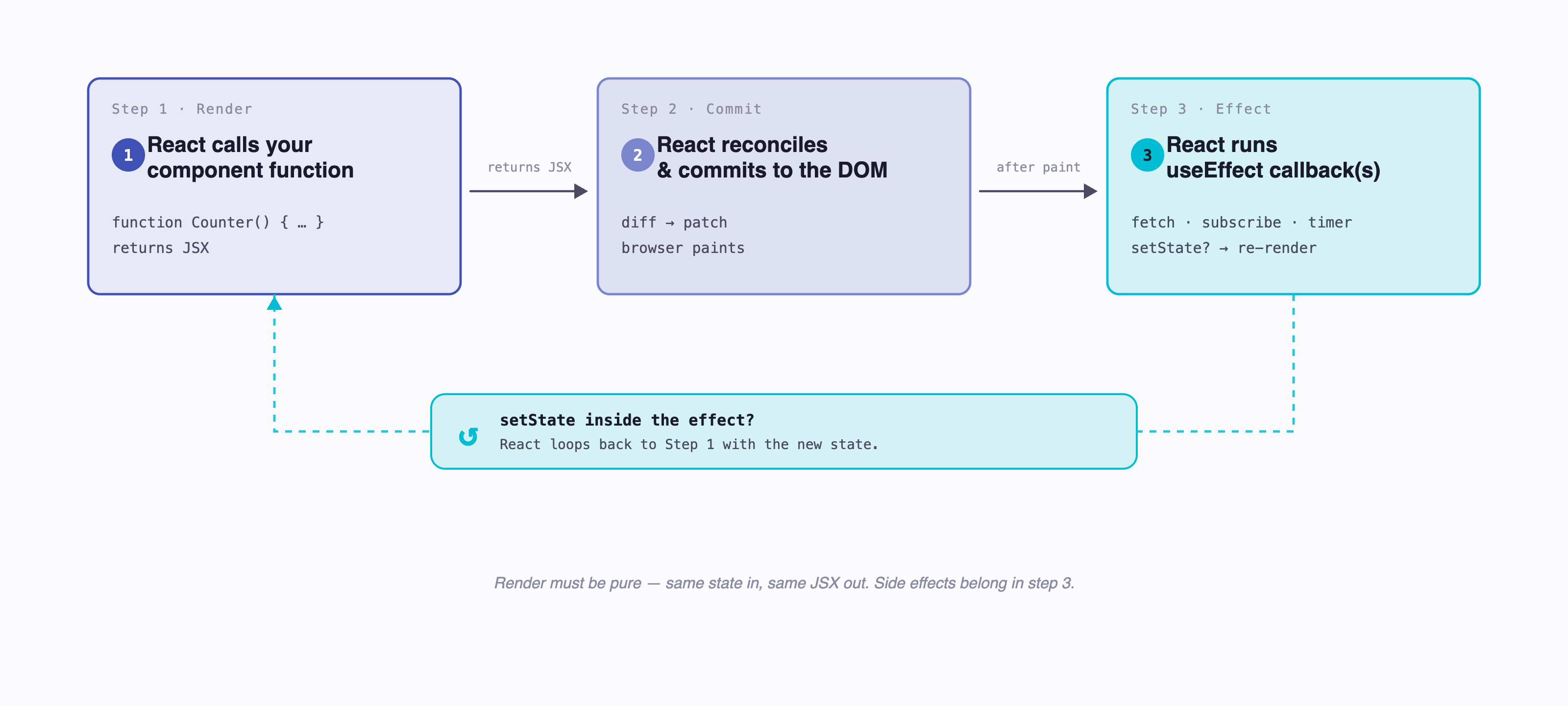
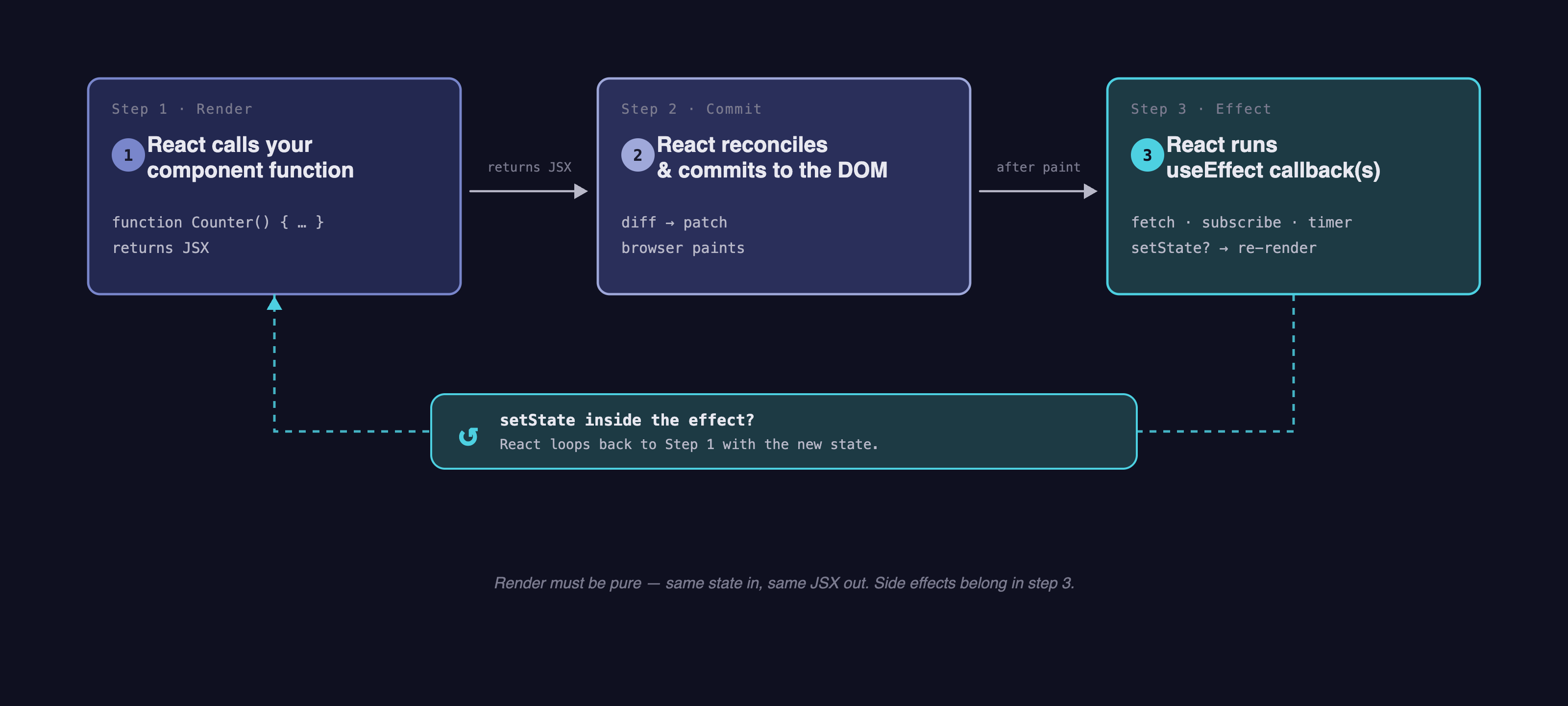
A side effect is anything a component does outside of just returning JSX from state: fetch data, set a timer, subscribe to a WebSocket, log to an analytics service, manually focus an input. React's render must be pure (same state in → same JSX out), so side effects go in the useEffect hook.
import { useState, useEffect } from "react";

function ItemList() {
  const [items, setItems] = useState<Item[]>([]);

  useEffect(() => {
    fetch("/api/items")
      .then(r => r.json())
      .then(data => setItems(data));
  }, []);  // empty deps — run once on mount

  return <ul>{items.map(i => <li key={i.id}>{i.name}</li>)}</ul>;
}
The render-and-effect cycle, conceptually:
10.1 The Dependency Array¶
The second argument to useEffect controls when the effect re-runs:
| Form | Behavior |
|---|---|
useEffect(fn, []) |
Run once after the first render (mount only) |
useEffect(fn, [a, b]) |
Run after first render, then re-run any time a or b changes |
useEffect(fn) (no array) |
Run after every render — almost always a bug |
The deps array is React's way of asking "what does this effect read from?" If your effect uses a state value or prop, that value goes in the array. The ESLint rule react-hooks/exhaustive-deps will flag missing deps — listen to it.
10.2 Cleanup Functions¶
If your effect sets up something that needs tearing down (a timer, a subscription, a fetch in flight), return a cleanup function:
useEffect(() => {
  const id = setInterval(() => console.log("tick"), 1000);
  return () => clearInterval(id);     // cleanup runs before the next effect or on unmount
}, []);
React calls the cleanup function before the component unmounts, and also before re-running the effect if a dep changed. This is how you avoid memory leaks and stale subscriptions.
10.3 Fetching Data — The Race-Condition Pattern¶
Fetching from your back-end inside useEffect is the most common reason students reach for it. The mechanics of fetch itself — the response.ok check, JSON parsing, error handling — are covered in detail in the prior guide. Read Consuming a Web API from the Browser first. The React-specific part is here: handling the component's lifecycle.
The classic bug: the user navigates fast, the component unmounts, the fetch resolves anyway, and you call setState on a component that doesn't exist:
// BUGGY
useEffect(() => {
  fetch(`/api/users/${userId}`)
    .then(r => r.json())
    .then(data => setUser(data));     // might fire after unmount, or after userId changed
}, [userId]);
The idiomatic fix uses AbortController to cancel the fetch when the effect re-runs or the component unmounts:
useEffect(() => {
  const controller = new AbortController();

  async function load() {
    try {
      const response = await fetch(`/api/users/${userId}`, {
        signal: controller.signal,
      });
      if (!response.ok) throw new Error(`HTTP ${response.status}`);
      const data = await response.json();
      setUser(data);
    } catch (err) {
      if ((err as Error).name === "AbortError") return;  // expected on cleanup
      setError((err as Error).message);
    }
  }

  load();
  return () => controller.abort();        // cancel in-flight fetch on cleanup
}, [userId]);
Two things happen in the cleanup: the fetch is aborted (the browser actually cancels the request), and the AbortError that would otherwise fire as a rejection is caught and ignored. Now if userId changes mid-flight, the old request goes away cleanly.
StrictMode runs effects twice in dev
The <StrictMode> wrapper in main.tsx intentionally double-invokes effects in development to surface missing cleanup. You'll see two fetch calls in the Network tab on initial load. This only happens in dev — production builds run effects once. If a double-fetch in dev breaks your code, your cleanup is incomplete.
The full request/response/error pattern (loading state, error state, retry, headers, auth) lives in the prior guide. We are not re-explaining it here; the React-specific overlay is the cleanup function and where the state lives.
11 Composing the App¶
A small project is one App.tsx. A real project is many components in many files. The lecture demo (TCSS460-frontend-1) is laid out this way:
src/
├── main.tsx                    # entry point — don't edit much
├── App.tsx                     # top-level layout + routes
├── components/                 # reusable UI pieces
│   ├── DemoShell.tsx
│   ├── MessageListItem.tsx
│   └── PrioritySelector.tsx
├── views/                      # one component per route ("page")
│   ├── home/HomePage.tsx
│   ├── messages/MessageList.tsx
│   └── state/State.tsx
├── hooks/                      # custom hooks (when you have them)
├── types/                      # shared TypeScript interfaces and unions
│   ├── Message.ts
│   └── Priority.ts
├── theme/                      # design tokens (colors, typography)
│   └── index.ts
└── config/                     # app-wide constants
    └── index.ts
Don't over-engineer this on day one. Start with everything in App.tsx and split things out when they earn it.
11.1 When to Extract a Component¶
Three signs:
- Reuse — you need this same UI in two places. Extract it.
- Length —
App.tsxis 300 lines and you can't see what's where. Extract. - Conceptual unit — this chunk is "the user profile card" or "the search bar." Even if it's only used once, naming it clarifies the code.
The wrong reason to extract: "every component should be small." Splitting a coherent 50-line component into five trivial 10-line ones makes things harder to read, not easier.
11.2 When to Extract a Custom Hook¶
When two components have the same useState + useEffect pattern, lift the logic into a custom hook (a function whose name starts with use):
// hooks/useLocalStorage.ts
export function useLocalStorage<T>(key: string, initial: T) {
  const [value, setValue] = useState<T>(() => {
    const stored = localStorage.getItem(key);
    return stored ? (JSON.parse(stored) as T) : initial;
  });

  useEffect(() => {
    localStorage.setItem(key, JSON.stringify(value));
  }, [key, value]);

  return [value, setValue] as const;
}

// usage
function Settings() {
  const [theme, setTheme] = useLocalStorage("theme", "light");
  // ...
}
A custom hook is just a function that calls other hooks. The "starts with use" naming is what tells React (and the linter) that the Rules of Hooks apply.
11.3 Conventions in the Lecture Demo¶
The lecture demo (TCSS460-frontend-1) is your reference for "what does a real, small React project look like?" A few conventions that aren't obvious from this guide alone:
@/*import alias —@/types/Messageresolves tosrc/types/Message.ts. Configured in bothtsconfig.app.json(paths) andvite.config.ts(resolve.alias); they must stay in sync. You'll see imports likeimport type { Message } from '@/types/Message';everywhere — that's not a published package, it's a path alias.- Single quotes, 2-space indent, trailing commas — Prettier-enforced. Run
npm run formatbefore committing. This guide uses double quotes for readability in prose; the demo uses single quotes consistently. - Default exports for component/view files; named exports for utilities, types, and hooks. See §3.2.
- JSDoc on prop interfaces and exported components — short
@paramand@exampleblocks. This is documentation, not type information (TypeScript already has the types). It pays off the moment another student or AI assistant has to consume your component. - Routing via React Router 7 —
<BrowserRouter>wraps the route tree inApp.tsx; pages are wired with<Route path element={<Page />} />. Routes that share an AppBar nest under a parent route whose element renders<Outlet />. We don't cover Router in this guide — read reactrouter.com or jump ahead to the Next.js guide, which uses file-based routing instead. - MUI v7 with the
sxprop — components like<Box>,<Card>,<Typography>,<IconButton>come from@mui/material. Styling lives inline viasx={{ mt: 2, color: 'secondary.main' }}, wheresecondary.mainis a theme token (defined insrc/theme/index.ts, not a hex value). Theme is the single source of truth for colors and typography — don't sprinkle hex literals into components.
You don't need to memorize any of this — you'll absorb it from reading the demo. The point of naming it here is so nothing in the demo looks like magic.
12 Talking to a Backend¶
The actual fetch mechanics — response.ok, JSON parsing, error handling, headers, CORS — are covered in Consuming a Web API from the Browser. Read that guide first if you haven't. This section is the React-specific overlay: where state lives, and how to factor the loading/error/data dance into a reusable hook.
12.1 Where Should the Fetch Live?¶
| Situation | Where the state lives |
|---|---|
| One component needs the data | Local useState + useEffect in that component |
| Two siblings need the same data | Lift state up to the common parent |
| Many components across the tree need it | Context, or a custom hook that uses Context |
| Server data with caching, retries, dedup | A library like TanStack Query (out of scope here) |
For TCSS 460 work, the first two cases cover almost everything. Only reach for Context when you're plumbing the same data through five layers of props.
12.2 Extracting a useApi Hook¶
Every component that fetches has the same shape:
const [data, setData] = useState<T | null>(null);
const [error, setError] = useState<string | null>(null);
const [loading, setLoading] = useState(true);

useEffect(() => {
  // fetch, set states, cleanup
}, [url]);
After you write that twice, lift it:
// hooks/useApi.ts
import { useState, useEffect } from "react";

interface ApiState<T> {
  data: T | null;
  error: string | null;
  loading: boolean;
}

export function useApi<T>(url: string, token?: string): ApiState<T> {
  const [state, setState] = useState<ApiState<T>>({
    data: null, error: null, loading: true,
  });

  useEffect(() => {
    const controller = new AbortController();
    setState({ data: null, error: null, loading: true });

    async function load() {
      try {
        const headers: HeadersInit = {};
        if (token) headers.Authorization = `Bearer ${token}`;

        const response = await fetch(url, { headers, signal: controller.signal });
        if (!response.ok) throw new Error(`HTTP ${response.status}`);
        const data = (await response.json()) as T;
        setState({ data, error: null, loading: false });
      } catch (err) {
        if ((err as Error).name === "AbortError") return;
        setState({ data: null, error: (err as Error).message, loading: false });
      }
    }

    load();
    return () => controller.abort();
  }, [url, token]);

  return state;
}

// usage
function UserList() {
  const { data, error, loading } = useApi<User[]>("/api/users");

  if (loading) return <p>Loading…</p>;
  if (error) return <p>Error: {error}</p>;
  if (!data) return null;
  return <ul>{data.map(u => <li key={u.id}>{u.name}</li>)}</ul>;
}
Now any component that wants to fetch is one line and three reads. The race-condition cleanup is centralized.
12.3 Bearer Tokens¶
Once your back-end has authentication (Week 5, Auth Concepts), every protected request needs an Authorization: Bearer <token> header. The cleanest pattern: the token lives in one place (Context, localStorage, or — in Week 7 — a NextAuth session) and gets attached by your useApi hook automatically:
const token = localStorage.getItem("accessToken") ?? undefined;
const { data, loading } = useApi<Issue[]>("/api/issues", token);
In Week 7 we'll replace the localStorage read with useSession() from NextAuth, but the shape stays the same. See Consuming a Web API from the Browser for the storage trade-offs (localStorage vs in-memory vs cookies).
13 Common Mistakes¶
These are the bugs every React student writes once. Recognize them on sight and you'll save hours.
13.1 Hook Rules Violations¶
Hooks must be called:
- At the top level of a function component or another hook — never inside a loop, condition, or nested function.
- From a React function — components or custom hooks. Never from regular functions or class methods.
// BROKEN — conditional hook
function Profile({ user }: { user: User | null }) {
  if (user) {
    const [name, setName] = useState(user.name);   // hook order changes between renders
  }
  // ...
}

// FIXED — hook at top level, condition in the JSX
function Profile({ user }: { user: User | null }) {
  const [name, setName] = useState(user?.name ?? "");
  if (!user) return null;
  // ...
}
React tracks hooks by call order. If you sometimes call three hooks and sometimes call four, React's bookkeeping breaks. The lint rule react-hooks/rules-of-hooks catches this — don't disable it.
13.2 Mutating State Directly¶
// BROKEN
const [messages, setMessages] = useState<Message[]>([]);
messages.push(newMessage);             // mutation
setMessages(messages);                  // same reference — no re-render

// FIXED
setMessages([...messages, newMessage]); // new array

// Also broken — mutating an object
const [user, setUser] = useState({ name: "Alice", age: 21 });
user.age = 22;
setUser(user);

// Fixed
setUser({ ...user, age: 22 });
Always produce a new array/object. The spread (...) syntax is your friend.
13.3 Stale Closures in useEffect¶
If your effect captures a state value but you forget to put it in the dep array, the effect "sees" a stale snapshot:
// BUGGY — `count` in the closure is whatever it was on the first render
useEffect(() => {
  const id = setInterval(() => {
    console.log(count);     // always logs the initial value
  }, 1000);
  return () => clearInterval(id);
}, []);                      // missing `count`

// FIXED — declare the dependency
useEffect(() => {
  const id = setInterval(() => console.log(count), 1000);
  return () => clearInterval(id);
}, [count]);                 // re-runs when count changes
The react-hooks/exhaustive-deps ESLint rule catches this. Don't suppress it without understanding why.
13.4 The Reference-Identity Re-Render Trap¶
Objects and arrays in the dependency array compare by reference, not contents. If you create one inline, it's a new reference every render — and the effect runs forever:
// INFINITE LOOP
function Search({ filter }: { filter: string }) {
  const options = { filter, limit: 10 };          // new object every render
  useEffect(() => {
    fetch("/api/search", { /* ... */ });
    // ...
  }, [options]);                                   // options is "new" every render → fires forever
}

// FIX 1 — depend on the primitives, not the object
useEffect(() => { /* ... */ }, [filter]);

// FIX 2 — memoize the object with `useMemo`
const options = useMemo(() => ({ filter, limit: 10 }), [filter]);
useEffect(() => { /* ... */ }, [options]);
When in doubt, depend on the primitive values inside the object, not the object itself.
13.5 key={index} on Reorderable Lists¶
// BROKEN if items can reorder, get inserted, or get deleted
{items.map((item, i) => <MessageItem key={i} message={item} />)}

// CORRECT — use a stable id
{items.map(item => <MessageItem key={item.id} message={item} />)}
If a list is read-only and never reorders, indexes are fine. The moment items move, indexes lie about identity, and you get bugs where input fields hold the wrong text or animations glitch.
13.6 Calling the Setter or Handler Instead of Passing It¶
// BROKEN — calls handleClick during render, passes its return value
<button onClick={handleClick()}>Click</button>

// CORRECT — passes the function reference
<button onClick={handleClick}>Click</button>

// CORRECT — wraps in an arrow if you need to pass arguments
<button onClick={() => handleClick(item.id)}>Delete</button>
The same trap applies to setters: onChange={setValue} or onChange={e => setValue(e.target.value)}, never onChange={setValue(e.target.value)}.
14 Try It Yourself — Build a Messages App¶
Two phases. Phase 1 is pure React with local state. Phase 2 wires it to your back-end.
14.1 Phase 1 — A Local Messages App¶
Scaffold a fresh Vite project (npm create vite@latest my-messages -- --template react-ts) and replace src/App.tsx with this. The data shape — Priority enum and Message interface — is intentionally the same shape the lecture demo uses, so the patterns transfer directly.
import { useState } from "react";
import type { FormEvent } from "react";

// Priority as a typed enum: a const object + a union derived from its values.
// This is the idiomatic TS pattern for a small fixed set — type-safe and no `enum` keyword.
const PRIORITY = { LOW: 1, MEDIUM: 2, HIGH: 3 } as const;
type Priority = (typeof PRIORITY)[keyof typeof PRIORITY];

interface Message {
  id: number;
  priority: Priority;
  name: string;
  message: string;
}

const MOCK_MESSAGES: Message[] = [
  { id: 1, priority: PRIORITY.HIGH,   name: "Alice", message: "Server is down — need eyes on it." },
  { id: 2, priority: PRIORITY.LOW,    name: "Bob",   message: "Lunch?" },
  { id: 3, priority: PRIORITY.MEDIUM, name: "Carol", message: "Standup at 10." },
];

function App() {
  const [messages, setMessages] = useState<Message[]>(MOCK_MESSAGES);
  const [filter, setFilter] = useState<Priority | null>(null);
  const [draft, setDraft] = useState({ name: "", message: "", priority: PRIORITY.LOW as Priority });

  function send(e: FormEvent<HTMLFormElement>) {
    e.preventDefault();
    if (!draft.name.trim() || !draft.message.trim()) return;
    const next: Message = { id: Date.now(), ...draft };
    setMessages([...messages, next]);
    setDraft({ name: "", message: "", priority: PRIORITY.LOW });
  }

  function remove(id: number) {
    setMessages(messages.filter(m => m.id !== id));
  }

  const visible = filter === null
    ? messages
    : messages.filter(m => m.priority === filter);

  return (
    <main>
      <h1>Messages</h1>

      <form onSubmit={send}>
        <input
          placeholder="Your name"
          value={draft.name}
          onChange={(e) => setDraft({ ...draft, name: e.target.value })}
        />
        <input
          placeholder="Message"
          value={draft.message}
          onChange={(e) => setDraft({ ...draft, message: e.target.value })}
        />
        <select
          value={draft.priority}
          onChange={(e) => setDraft({ ...draft, priority: Number(e.target.value) as Priority })}
        >
          <option value={PRIORITY.LOW}>Low</option>
          <option value={PRIORITY.MEDIUM}>Medium</option>
          <option value={PRIORITY.HIGH}>High</option>
        </select>
        <button type="submit">Send</button>
      </form>

      <div>
        Filter:{" "}
        <button onClick={() => setFilter(null)}>All</button>
        <button onClick={() => setFilter(PRIORITY.LOW)}>Low</button>
        <button onClick={() => setFilter(PRIORITY.MEDIUM)}>Medium</button>
        <button onClick={() => setFilter(PRIORITY.HIGH)}>High</button>
      </div>

      <ul>
        {visible.map(m => (
          <li key={m.id}>
            <strong>[P{m.priority}]</strong> <em>{m.name}</em>: {m.message}
            <button onClick={() => remove(m.id)}>Delete</button>
          </li>
        ))}
      </ul>

      <p>{visible.length} of {messages.length} shown</p>
    </main>
  );
}

export default App;
That single file exercises every concept from §3–§9: components, JSX, state (three pieces of it), lists & keys with stable IDs, conditional filtering, controlled inputs, events, and the as const enum pattern. Run npm run dev and play with it.
Stretch — extract <MessageListItem />:
The lecture demo has a separate components/MessageListItem.tsx. Extract one yourself:
interface MessageListItemProps {
  message: Message;
  onDelete: (id: number) => void;
}

function MessageListItem({ message, onDelete }: MessageListItemProps) {
  return (
    <li>
      <strong>[P{message.priority}]</strong> <em>{message.name}</em>: {message.message}
      <button onClick={() => onDelete(message.id)}>Delete</button>
    </li>
  );
}
Now App owns the state and MessageListItem only renders + emits events. That's the whole pattern. (The lecture demo's MUI version uses the same shape, just with <ListItem>, <ListItemText>, and an <IconButton>.)
14.2 Phase 2 — Wire It to Your Back-End¶
Now persist via your Sprint 2/3 back-end. You should have a /messages endpoint that supports GET, POST, PATCH, and DELETE — that's the API shape frontend-2 will consume in Week 7. (If you're reusing backend-3, the same pattern applies.)
Replace the in-memory state with useEffect-driven loading:
import { useState, useEffect } from "react";

const API = "http://localhost:3000";  // or your deployed back-end

function App() {
  const [messages, setMessages] = useState<Message[]>([]);
  const [error, setError] = useState<string | null>(null);
  // ...draft, filter as before

  // Load on mount
  useEffect(() => {
    const controller = new AbortController();
    fetch(`${API}/messages`, { signal: controller.signal })
      .then(r => {
        if (!r.ok) throw new Error(`HTTP ${r.status}`);
        return r.json();
      })
      .then(setMessages)
      .catch(err => {
        if (err.name === "AbortError") return;
        setError(err.message);
      });
    return () => controller.abort();
  }, []);

  async function send(e: FormEvent<HTMLFormElement>) {
    e.preventDefault();
    if (!draft.name.trim() || !draft.message.trim()) return;
    const response = await fetch(`${API}/messages`, {
      method: "POST",
      headers: { "Content-Type": "application/json" },
      body: JSON.stringify(draft),
    });
    if (!response.ok) { setError(`HTTP ${response.status}`); return; }
    const created: Message = await response.json();
    setMessages([...messages, created]);
    setDraft({ name: "", message: "", priority: PRIORITY.LOW });
  }

  async function remove(id: number) {
    const response = await fetch(`${API}/messages/${id}`, { method: "DELETE" });
    if (!response.ok) { setError(`HTTP ${response.status}`); return; }
    setMessages(messages.filter(m => m.id !== id));
  }

  // (rest of the JSX is identical to Phase 1, plus an {error && ...} banner)
}
What changed: every state mutation now also makes an HTTP request. The optimistic pattern — update local state alongside the back-end — is the simplest. (A more robust approach would re-fetch after each mutation, or roll back local state on a failed request.)
If your back-end requires a bearer token, add Authorization: Bearer ${token} to every request's headers. The full guide to fetch error handling, headers, and CORS is Consuming a Web API from the Browser — keep it open in another tab.
Stretch goals:
- Refactor the three fetches into a
useApihook (§12.2). - Add a loading spinner during the initial fetch.
- Add an error banner that disappears when the next request succeeds.
- Add a
PATCH /messages/:idto edit a message in place.
15 Summary¶
| Concept | Key Point |
|---|---|
| Mental model | UI is a function of state. Declare what, not how. |
| Component | A function that returns JSX. PascalCase name. |
| JSX | Not HTML — JS expressions that compile to function calls. className, htmlFor, camelCase events. |
| Props | Read-only inputs from a parent. Type with interface, destructure in the signature. |
| State | const [v, setV] = useState(initial). Never mutate — replace. |
| Lists | array.map(item => <X key={item.id} />). Stable keys, not indexes. |
| Conditionals | Ternary, &&, or early return. No if inside JSX. |
| Events | onClick={handler}. Pass the reference, don't call it. |
| Forms | Controlled inputs: value={state} onChange={setter}. |
| Side effects | useEffect(fn, deps). Empty deps = mount. Cleanup function for teardown. |
| Fetching | useEffect + fetch + AbortController cleanup. State for data, error, loading. |
| Composition | Extract on reuse, length, or conceptual unit. Lift state up. Custom hooks for repeated state logic. |
You now have the React you need for the rest of the front-end half of TCSS 460. The next guide moves to Next.js, which adds file-based routing, server rendering, and a real opinion about project structure on top of everything you just learned.
16 References¶
Official Documentation:
- react.dev — The official React docs (replaced
reactjs.orgin 2023). Start with the Learn section. - react.dev — Hooks reference — All built-in hooks, with examples.
- Vite — Getting Started — The current Vite docs and CLI reference.
- TypeScript — JSX — How TS handles JSX.
- MDN —
AbortController— The fetch-cancellation primitive used in §10.
Cross-References:
- HTML, CSS & the DOM — The substrate React renders to.
- Consuming a Web API from the Browser —
fetch, error handling, headers, CORS. - Auth Concepts — Where bearer tokens come from.
- TCSS460-frontend-1 — The lecture demo this guide aligns with. Vite + React 19 + React Router 7 + MUI v7. Read the source after Phase 1 of §14.
- Next.js — The next guide in this sequence.
17 Further Reading¶
External Resources
- Thinking in React — The official walkthrough of how to design a React app from a mockup. Read it after Phase 1 of §14.
- Rules of Hooks — The full ruleset, with rationale.
- You Might Not Need an Effect — A surprising number of
useEffectcalls are bugs. Worth reading once you're comfortable with the basics. - TanStack Query — Out of scope for TCSS 460, but the standard tool for non-trivial server-state in React. Look at it once you have built a few
useApi-style hooks by hand.
This guide is part of TCSS 460 — Client/Server Programming, School of Engineering and Technology, University of Washington Tacoma.