SQL Fundamentals
TCSS 460 — Client/Server Programming
Every web application you use — from Canvas to Instagram to your bank's website — stores data in a database. When you log in, submit an assignment, or post a photo, the server runs a query against a database to read or write data. This guide introduces SQL (Structured Query Language), the standard language for working with relational databases, and the relational model that underpins it. By the end, you will be able to create tables, insert rows, query data with filters, update records, delete records, and understand how SQL maps directly to the CRUD operations your web API exposes.
Gen AI & Learning: SQL and AI Coding Assistants
AI coding assistants are excellent at writing SQL queries — give them a table schema and a plain-English description of the data you need, and they will generate the SQL. But you need to understand SQL well enough to verify what they produce. A query that returns the wrong data is worse than no query at all. Understanding WHERE, JOIN, GROUP BY, and constraints gives you the vocabulary to describe what you want accurately and the knowledge to spot when the generated SQL does not match your intent.
1 Relational Databases
Review from the Concept Reading
This section reviews material from the Relational Model & Data Modeling concept reading. If you have already read that guide, feel free to lightly skim this section — the terminology and concepts are the same, presented here for quick reference.
Before learning the language, you need to understand the data model it operates on. A relational database organizes data into tables — structured collections of related information. If you have used a spreadsheet, the mental model is similar: rows and columns, with rules about what each column can contain.
1.1 Tables, Rows, and Columns
A relational database stores data in tables. Each table represents a single type of entity — users, books, orders, movies. Within a table:
- A column defines a named attribute with a specific data type (like
nameas text orageas an integer) - A row (also called a record) is a single entry — one user, one book, one order
Here is what a users table might look like:
| id | name | created_at | |
|---|---|---|---|
| 1 | Alice | alice@example.com | 2026-04-01 10:00:00 |
| 2 | Bob | bob@example.com | 2026-04-02 14:30:00 |
| 3 | Charlie | charlie@uw.edu | 2026-04-03 09:15:00 |
Each row is one user. Each column is one attribute of a user. The table enforces structure — every user has the same set of columns, and each column has a defined type.
If you have taken TCSS 305, this should feel familiar. In Java, you model data as objects with fields:
public class User {
    private int id;
    private String name;
    private String email;
    private LocalDateTime createdAt;
}
A table row is the same idea as an object instance — it holds a specific set of values. A column is the same idea as a field — it defines what kind of data goes there. The difference is where the data lives: Java objects exist in memory while your program runs; database rows persist on disk and survive restarts, crashes, and deployments.
1.2 Primary Keys
Every table needs a way to uniquely identify each row. A primary key is a column (or set of columns) whose value is guaranteed to be unique across the entire table. No two rows can have the same primary key value, and the value cannot be null.
In the users table above, id is the primary key. Alice is user 1, Bob is user 2 — these numbers never repeat and never change. When another part of the system needs to refer to "Alice," it uses her id, not her name (names are not unique — there could be two Alices).
Most tables use an auto-incrementing integer as their primary key. The database assigns the next number automatically when you insert a new row, so you never have to worry about picking a unique value yourself.
1.3 Foreign Keys
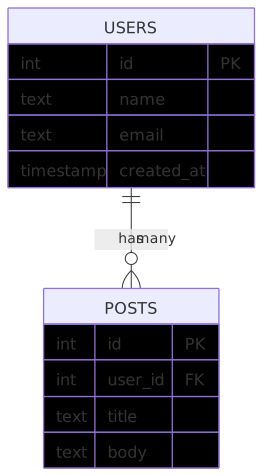
Tables do not exist in isolation. A foreign key is a column in one table that references the primary key of another table. It creates a link between two tables.
Consider a posts table where each post belongs to a user:
| id | user_id | title | body |
|---|---|---|---|
| 1 | 1 | Hello World | My first post! |
| 2 | 1 | SQL is Fun | Learning databases... |
| 3 | 2 | Weekend Plans | Going hiking tomorrow. |
The user_id column is a foreign key — it references the id column in the users table. Post 1 and Post 2 belong to Alice (user 1). Post 3 belongs to Bob (user 2). The database enforces this relationship: you cannot insert a post with user_id = 99 if there is no user with id = 99.
1.4 Why "Relational"?
The word "relational" refers to the relationships between tables. Users have posts. Posts have comments. Comments belong to users. These relationships are expressed through foreign keys, and SQL gives you tools (like joins, covered in Section 8) to query across related tables in a single operation.
This is the same concept you know from Java OOP — a User object might have a List<Post> field, and each Post has a User reference. The relational database models the same relationships, just with tables and foreign keys instead of objects and references.
2 What is SQL?
SQL (Structured Query Language) is the standard language for communicating with relational databases. Nearly every relational database — PostgreSQL, MySQL, SQLite, SQL Server, Oracle — speaks SQL. The syntax varies slightly between systems, but the core language is the same everywhere.
2.1 Declarative, Not Imperative
SQL is a declarative language. You describe what data you want, and the database figures out how to get it. This is different from the imperative code you write in Java or TypeScript, where you specify each step.
Compare these two approaches to finding all users named "Alice":
Imperative (TypeScript):
const results: User[] = [];
for (const user of allUsers) {
    if (user.name === 'Alice') {
        results.push(user);
    }
}
Declarative (SQL):
In the TypeScript version, you tell the computer how to search: loop through every user, check the name, add matches to a list. In the SQL version, you tell the database what you want: all rows from users where the name is Alice. The database decides how to execute the query — it might use an index, a sequential scan, or some other strategy. You do not care. You just describe the result.
2.2 SQL Statement Categories
SQL statements fall into two broad categories:
- DDL (Data Definition Language) — Defines the structure of your database: creating tables, adding columns, setting constraints. Think of DDL as building the spreadsheet's column headers.
- DML (Data Manipulation Language) — Works with the data itself: inserting rows, querying data, updating values, deleting records. Think of DML as filling in and editing the spreadsheet's cells.
This guide covers both, starting with DDL (creating tables) and then moving to DML (the CRUD operations).
3 Creating Tables (DDL)
Before you can store any data, you need to define the table's structure — its columns, their data types, and any rules (constraints) about what values are allowed.
3.1 The CREATE TABLE Statement
Here is a complete CREATE TABLE statement for a users table in PostgreSQL:
CREATE TABLE users (
    id          SERIAL PRIMARY KEY,
    name        TEXT NOT NULL,
    email       TEXT NOT NULL UNIQUE,
    age         INTEGER,
    is_active   BOOLEAN DEFAULT true,
    created_at  TIMESTAMP DEFAULT CURRENT_TIMESTAMP
);
Let's break this down:
CREATE TABLE users— Creates a new table calledusersid SERIAL PRIMARY KEY— An auto-incrementing integer column that uniquely identifies each row.SERIALtells PostgreSQL to assign the next number automatically on each insertname TEXT NOT NULL— A text column that cannot be empty (null)email TEXT NOT NULL UNIQUE— A text column that cannot be empty and must be different for every rowage INTEGER— An integer column that can be null (noNOT NULLconstraint)is_active BOOLEAN DEFAULT true— A boolean column that defaults totrueif no value is providedcreated_at TIMESTAMP DEFAULT CURRENT_TIMESTAMP— A timestamp that automatically records when the row was inserted
3.2 Common PostgreSQL Data Types
PostgreSQL supports a wide range of data types. Here are the ones you will use most often in this course:
| Type | Description | Example Values |
|---|---|---|
INTEGER (or INT) |
Whole numbers | 42, -7, 0 |
SERIAL |
Auto-incrementing integer (for primary keys) | 1, 2, 3, ... |
TEXT |
Variable-length string (no limit) | 'Hello', 'alice@uw.edu' |
VARCHAR(n) |
Variable-length string with max length n |
'WA' (with VARCHAR(2)) |
BOOLEAN |
True or false | true, false |
TIMESTAMP |
Date and time | '2026-04-07 14:30:00' |
DATE |
Date only (no time) | '2026-04-07' |
NUMERIC(p, s) |
Exact decimal number with precision p and scale s |
19.99, 3.14 |
REAL |
Floating-point number (approximate) | 3.14159 |
JSON / JSONB |
JSON data (JSONB is binary, faster to query) |
'{"key": "value"}' |
TEXT vs. VARCHAR
In PostgreSQL, TEXT and VARCHAR perform identically — there is no performance difference. The PostgreSQL documentation recommends using TEXT unless you have a specific reason to enforce a maximum length. In this course, prefer TEXT for simplicity.
SERIAL and Identity Columns
SERIAL is a PostgreSQL convenience shorthand — it creates an integer column backed by a sequence that auto-increments. The SQL standard defines an alternative syntax: id INTEGER GENERATED ALWAYS AS IDENTITY. Both accomplish the same thing. This guide uses SERIAL because it is shorter and you will see it in most tutorials. When you use Prisma (covered in the Prisma ORM guide), the ORM handles this detail for you.
3.3 Constraints
Constraints are rules that the database enforces on every insert and update. They prevent bad data from ever entering your table.
| Constraint | What It Does | Example |
|---|---|---|
PRIMARY KEY |
Unique identifier for each row; cannot be null | id SERIAL PRIMARY KEY |
NOT NULL |
Column cannot be empty | name TEXT NOT NULL |
UNIQUE |
No two rows can have the same value in this column | email TEXT UNIQUE |
DEFAULT |
Provides a value when none is given | is_active BOOLEAN DEFAULT true |
REFERENCES |
Foreign key — must match a value in another table | user_id INTEGER REFERENCES users(id) |
CHECK |
Custom condition that must be true | age INTEGER CHECK (age >= 0) |
Constraints are your first line of defense against invalid data. Even if your application code has a bug that forgets to validate input, the database will reject bad data at the constraint level. This is why databases enforce constraints independently of the application — they are the last line of defense.
3.4 Creating a Table with a Foreign Key
Here is how you would create the posts table that references users:
CREATE TABLE posts (
    id          SERIAL PRIMARY KEY,
    user_id     INTEGER NOT NULL REFERENCES users(id),
    title       TEXT NOT NULL,
    body        TEXT NOT NULL,
    created_at  TIMESTAMP DEFAULT CURRENT_TIMESTAMP
);
The REFERENCES users(id) clause is the foreign key constraint. PostgreSQL will reject any insert where user_id does not match an existing id in the users table. This guarantees that every post belongs to a real user.
Table Creation Order Matters
You must create the users table before the posts table. The posts table references users(id), so users must already exist. If you try to create posts first, PostgreSQL will return an error: relation "users" does not exist.
Try It Yourself
If you have PostgreSQL installed (see the PostgreSQL Setup guide), try creating these tables:
- Open
psqland connect to a test database - Run the
CREATE TABLE users (...)statement from Section 3.1 - Run the
CREATE TABLE posts (...)statement above - Use
\dtto list your tables — you should see bothusersandposts - Use
\d usersto see the column definitions and constraints
4 Inserting Data
With a table in place, you can add rows using the INSERT statement.
4.1 The INSERT Statement
This inserts one row into the users table. Notice:
- You list the columns you are providing values for:
(name, email, age) - You provide the values in the same order:
('Alice', 'alice@example.com', 22) - You do not provide
id(auto-generated bySERIAL),is_active(defaults totrue), orcreated_at(defaults to the current timestamp)
You can insert multiple rows in a single statement:
INSERT INTO users (name, email, age)
VALUES
    ('Bob', 'bob@example.com', 25),
    ('Charlie', 'charlie@uw.edu', 21);
4.2 RETURNING — Get the Created Row Back
When you insert a row, you often need to know the id that was assigned — especially in a web API where you need to send the created resource back to the client. PostgreSQL's RETURNING clause does this:
The RETURNING * clause tells PostgreSQL to return the full row after insertion, including the auto-generated id and default values:
| id | name | age | is_active | created_at | |
|---|---|---|---|---|---|
| 4 | Diana | diana@example.com | 23 | true | 2026-04-07 14:30:00 |
You can also return specific columns: RETURNING id, name if you only need a subset.
RETURNING is PostgreSQL-Specific
The RETURNING clause is a PostgreSQL extension — it is not part of the SQL standard. MySQL and SQLite do not support it (they have different mechanisms). Since this course uses PostgreSQL, you will use RETURNING frequently. When you use Prisma, the ORM handles this automatically — every create() call returns the full created record.
4.3 What Happens When Constraints Are Violated?
If you try to insert data that violates a constraint, PostgreSQL rejects the entire insert:
-- This will FAIL — email must be unique
INSERT INTO users (name, email) VALUES ('Alice2', 'alice@example.com');
-- ERROR: duplicate key value violates unique constraint "users_email_key"

-- This will FAIL — name cannot be null
INSERT INTO users (name, email) VALUES (NULL, 'test@example.com');
-- ERROR: null value in column "name" violates not-null constraint
These errors are your friend. They mean the database is doing its job — preventing bad data from entering the system. In your web API, you will catch these errors and translate them into appropriate HTTP responses (typically 409 Conflict for duplicates or 400 Bad Request for missing fields).
5 Querying Data
The SELECT statement is how you read data from the database. It is by far the most frequently used SQL statement — every page load, search, and data display in your web API starts with a SELECT.
5.1 Basic SELECT
Retrieve all columns from all rows:
The * means "all columns." This returns every row in the users table with every column.
Retrieve specific columns:
This returns only the name and email columns. In a web API, selecting specific columns is good practice — you avoid sending data the client does not need (like internal IDs or timestamps).
5.2 Filtering with WHERE
The WHERE clause filters rows based on conditions:
-- Find a specific user by ID
SELECT * FROM users WHERE id = 1;

-- Find users older than 21
SELECT * FROM users WHERE age > 21;

-- Find active users
SELECT * FROM users WHERE is_active = true;
You can combine conditions with AND and OR:
-- Active users older than 21
SELECT * FROM users WHERE is_active = true AND age > 21;

-- Users named Alice OR Bob
SELECT * FROM users WHERE name = 'Alice' OR name = 'Bob';
5.3 Pattern Matching with LIKE
The LIKE operator searches for patterns in text columns:
-- Names that start with 'A'
SELECT * FROM users WHERE name LIKE 'A%';

-- Emails ending in '@uw.edu'
SELECT * FROM users WHERE email LIKE '%@uw.edu';

-- Names containing 'li'
SELECT * FROM users WHERE name LIKE '%li%';
The % is a wildcard that matches any sequence of characters. LIKE is case-sensitive in PostgreSQL. For case-insensitive matching, use ILIKE:
-- Case-insensitive search
SELECT * FROM users WHERE name ILIKE 'alice';  -- Matches 'Alice', 'ALICE', 'alice'
5.4 Sorting with ORDER BY
Control the order of results:
-- Sort by name alphabetically (ascending is the default)
SELECT * FROM users ORDER BY name;

-- Sort by creation date, newest first
SELECT * FROM users ORDER BY created_at DESC;

-- Sort by age ascending, then by name alphabetically
SELECT * FROM users ORDER BY age ASC, name ASC;
ASC (ascending) is the default — you can omit it. DESC (descending) reverses the order.
5.5 Limiting Results with LIMIT and OFFSET
When a table has thousands of rows, you rarely want all of them at once. LIMIT and OFFSET control how many rows are returned and where to start:
-- First 10 users
SELECT * FROM users ORDER BY id LIMIT 10;

-- Next 10 users (skip the first 10)
SELECT * FROM users ORDER BY id LIMIT 10 OFFSET 10;

-- Users 21-30
SELECT * FROM users ORDER BY id LIMIT 10 OFFSET 20;
This is the foundation of pagination — the technique your web API will use to return data in pages rather than all at once. A client requests page 1 (rows 1-10), then page 2 (rows 11-20), and so on.
Always Use ORDER BY with LIMIT
Without ORDER BY, the database does not guarantee the order of results. If you use LIMIT 10 without ORDER BY, you might get different rows each time you run the query. Always specify an order when using LIMIT.
Try It Yourself
- Insert 5-10 rows into your
userstable usingINSERTstatements - Run
SELECT * FROM users;to see all rows - Try filtering:
SELECT * FROM users WHERE age > 21; - Try sorting:
SELECT * FROM users ORDER BY name; - Try pagination:
SELECT * FROM users ORDER BY id LIMIT 2 OFFSET 0;then changeOFFSETto2
6 Updating Data
The UPDATE statement modifies existing rows.
6.1 The UPDATE Statement
This changes user 2's name to "Robert" and age to 26. The SET clause specifies which columns to change and their new values. The WHERE clause specifies which rows to update.
You can use RETURNING with updates too:
This returns the full row after the update, which is exactly what your web API needs to send back in a PUT or PATCH response.
6.2 The Danger of Forgetting WHERE
Without a WHERE clause, UPDATE modifies every row. This is a valid SQL statement — PostgreSQL will not warn you. If you accidentally run this, every user in the table is now inactive.
Always Use WHERE with UPDATE
Every UPDATE statement should have a WHERE clause unless you genuinely intend to update all rows. In a web API route handler, the WHERE clause typically uses the id from the request parameter: WHERE id = $1 (where $1 is a parameterized value from the route). Double-check your WHERE clause before running an UPDATE — especially in production.
7 Deleting Data
The DELETE statement removes rows from a table.
7.1 The DELETE Statement
This removes user 3 from the table. The row is gone permanently — there is no "undo" in SQL (unless you are inside a transaction, which is beyond the scope of this guide).
You can also use RETURNING to see what was deleted:
7.2 The Danger of Forgetting WHERE
Just like UPDATE, a DELETE without WHERE affects all rows. The table still exists (its structure is intact), but every row of data is gone.
Always Use WHERE with DELETE
The same rule applies: every DELETE should have a WHERE clause unless you truly want to empty the table. In a web API, the WHERE clause uses the id from the request.
7.3 Foreign Key Constraints and Deletion
What happens if you try to delete a user who has posts?
DELETE FROM users WHERE id = 1;
-- ERROR: update or delete on table "users" violates foreign key constraint on table "posts"
PostgreSQL refuses to delete user 1 because posts reference that user. The foreign key constraint protects data integrity — you cannot leave orphaned posts that reference a user who no longer exists.
There are strategies for handling this (cascading deletes, setting references to null), but the default behavior — rejecting the delete — is usually what you want. It forces you to handle related data explicitly.
8 Joins
So far, every query has read from a single table. But data is often spread across multiple tables — users in one, posts in another. Joins let you combine rows from two or more tables based on a related column.
The examples in this section use the following sample data. Keep these tables in mind as you read through each join type:
users table:
| id | name | created_at | |
|---|---|---|---|
| 1 | Alice | alice@example.com | 2026-04-01 10:00:00 |
| 2 | Bob | bob@example.com | 2026-04-02 14:30:00 |
| 3 | Charlie | charlie@uw.edu | 2026-04-03 09:15:00 |
| 4 | Diana | diana@example.com | 2026-04-04 11:00:00 |
posts table:
| id | user_id | title | body |
|---|---|---|---|
| 1 | 1 | Hello World | My first post! |
| 2 | 1 | SQL is Fun | Learning databases... |
| 3 | 2 | Weekend Plans | Going hiking tomorrow. |
8.1 INNER JOIN
An INNER JOIN returns only the rows where there is a match in both tables:
This returns:
| name | title |
|---|---|
| Alice | Hello World |
| Alice | SQL is Fun |
| Bob | Weekend Plans |
The ON clause specifies how the tables are related: match users whose id equals the post's user_id. If a user has no posts, they do not appear in the results. If a post somehow had no matching user (impossible with our foreign key, but hypothetically), it would also be excluded.
8.2 LEFT JOIN
A LEFT JOIN returns all rows from the left table, even if there is no match in the right table:
This returns:
| name | title |
|---|---|
| Alice | Hello World |
| Alice | SQL is Fun |
| Bob | Weekend Plans |
| Charlie | NULL |
| Diana | NULL |
Charlie and Diana have no posts, so title is NULL for their rows. But they still appear in the results — that is the difference between INNER JOIN (only matches) and LEFT JOIN (all from the left table, matches or not).
8.3 When You Need Joins
Joins are essential whenever you need data from multiple related tables in a single response. Common examples in a web API:
- Display a user's profile with their posts
- Show a post with the author's name
- List all comments on a post with commenter details
Joins in This Course
You will not write many raw SQL joins in this course. Prisma handles joins for you through its include syntax (e.g., prisma.user.findUnique({ include: { posts: true } })). But understanding what a join is helps you understand what Prisma is doing under the hood and debug performance issues when they arise.
9 Aggregation
Sometimes you do not want individual rows — you want a summary. Aggregate functions compute a single value from a set of rows.
9.1 Common Aggregate Functions
-- How many users are there?
SELECT COUNT(*) FROM users;

-- What is the average age?
SELECT AVG(age) FROM users;

-- What is the total of all ages? (not useful here, but illustrates SUM)
SELECT SUM(age) FROM users;

-- Oldest and youngest users
SELECT MAX(age), MIN(age) FROM users;
Each of these returns a single row with the computed value.
9.2 GROUP BY — Aggregate Per Category
GROUP BY splits the rows into groups and applies the aggregate function to each group separately:
-- How many posts does each user have?
SELECT users.name, COUNT(posts.id) AS post_count
FROM users
LEFT JOIN posts ON users.id = posts.user_id
GROUP BY users.name;
This returns:
| name | post_count |
|---|---|
| Alice | 2 |
| Bob | 1 |
| Charlie | 0 |
| Diana | 0 |
The AS post_count gives the computed column a readable name. Without GROUP BY, COUNT() would return a single number for the entire table. With GROUP BY users.name, it returns a count per user.
Try It Yourself
- Insert a few posts for different users
- Run the
GROUP BYquery above to see post counts per user - Try
SELECT COUNT(*) FROM posts;to get the total number of posts - Try adding
ORDER BY post_count DESCto sort users by most posts first
10 SQL in the Context of a Web API
Everything in this guide connects directly to the web API you are building. Each route handler in your Express application runs one or more SQL queries to fulfill the client's request.
10.1 CRUD Maps to SQL
The CRUD operations your API exposes map directly to SQL statements:
| HTTP Method | Route Example | Operation | SQL Statement |
|---|---|---|---|
POST |
/users |
Create | INSERT INTO users (...) VALUES (...) RETURNING * |
GET |
/users |
Read (all) | SELECT * FROM users |
GET |
/users/:id |
Read (one) | SELECT * FROM users WHERE id = $1 |
PUT |
/users/:id |
Update | UPDATE users SET ... WHERE id = $1 RETURNING * |
DELETE |
/users/:id |
Delete | DELETE FROM users WHERE id = $1 |
This is why SQL and REST fit together so naturally. Each HTTP method corresponds to a specific SQL operation, and the route parameter (:id) maps directly to the WHERE clause.
10.2 The Route Handler Pattern
In a typical Express route handler, the flow is:
- Receive the HTTP request (parameters, body, query string)
- Execute one or more SQL queries using the request data
- Return the query result as a JSON response
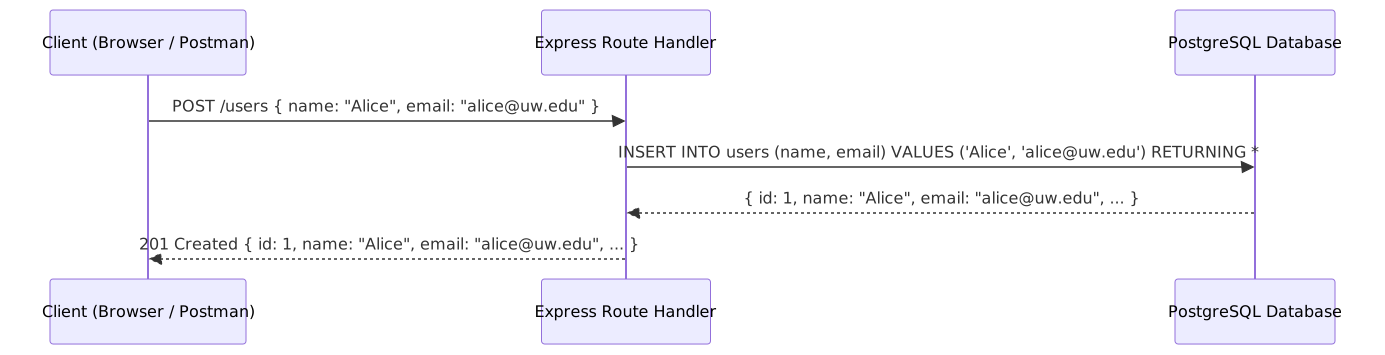
In this course, you will not write raw SQL strings in your route handlers. Instead, you will use Prisma — an ORM (Object-Relational Mapper) that lets you write TypeScript method calls instead of SQL strings. But every Prisma call generates SQL under the hood. Understanding SQL helps you understand what Prisma is doing, debug slow queries, and know when the ORM's abstraction is helping versus hiding a problem.
11 Summary
| Concept | Key Point |
|---|---|
| Relational database | Stores data in tables with rows and columns; enforces structure and relationships |
| Primary key | Unique identifier for each row — typically an auto-incrementing integer |
| Foreign key | A column that references another table's primary key, creating a relationship |
| SQL | Declarative language — describe what you want, not how to get it |
CREATE TABLE |
Defines a table's columns, types, and constraints (DDL) |
| Constraints | Rules the database enforces: NOT NULL, UNIQUE, DEFAULT, REFERENCES, CHECK |
INSERT INTO |
Adds new rows to a table |
RETURNING |
PostgreSQL extension that returns the affected row(s) after an insert, update, or delete |
SELECT ... WHERE |
Reads data with optional filtering, sorting (ORDER BY), and pagination (LIMIT/OFFSET) |
UPDATE ... SET ... WHERE |
Modifies existing rows — always include WHERE |
DELETE FROM ... WHERE |
Removes rows — always include WHERE |
INNER JOIN |
Combines rows from two tables where a match exists in both |
LEFT JOIN |
Returns all rows from the left table, with matches from the right (or NULL) |
| Aggregate functions | COUNT(), AVG(), SUM(), MAX(), MIN() — summarize groups of rows |
GROUP BY |
Splits rows into groups for per-group aggregation |
| CRUD to SQL mapping | POST = INSERT, GET = SELECT, PUT = UPDATE, DELETE = DELETE |
12 References
Official Documentation:
- PostgreSQL — Data Types — Complete reference for all PostgreSQL data types
- PostgreSQL — SQL Commands — Full syntax reference for every SQL statement
- PostgreSQL — CREATE TABLE — Table creation syntax, constraints, and options
- PostgreSQL — SELECT — Query syntax including WHERE, ORDER BY, LIMIT, and joins
- PostgreSQL — INSERT — Insert syntax including RETURNING
- PostgreSQL — Identity Columns — The SQL-standard alternative to SERIAL
13 Further Reading
External Resources
- The Relational Model & Data Modeling — TCSS 460 concept reading on relational theory and data modeling
- PostgreSQL Setup Guide — Installing PostgreSQL and connecting with psql
- Prisma ORM Guide — Using Prisma to interact with PostgreSQL from TypeScript
- PostgreSQL Tutorial — Comprehensive PostgreSQL tutorial with interactive examples
- SQLBolt — Interactive SQL lessons with exercises
This guide is part of TCSS 460 — Client/Server Programming, School of Engineering and Technology, University of Washington Tacoma.