Authentication with NextAuth (Auth.js)¶
TCSS 460 — Client/Server Programming
In Check-Off 5 you stood on the back-end side of the OAuth2 line: requireAuth accepted an Authorization: Bearer <token> header, verified it against Auth²'s JWKS, and either let the request through or returned 401/403. Someone, somewhere, had to actually acquire that token — pop a sign-in window, redirect to the IdP, exchange a code for an access token, hold the session, and stick the bearer on every outbound fetch. That "someone" is the front end. This guide is the front-end counterpart to JWT verification: how a Next.js consumer app uses NextAuth (Auth.js v5) to sign users in against auth-squared, hold the session, and call your partner team's protected backend.
The lecture demo for this guide is TCSS460-frontend-2 — a Next.js 15 + Auth.js v5 + MUI v7 app that signs in against the deployed auth-squared instance and consumes backend-3's /v2/messages API. Every code excerpt below is either lifted from FE-2 or trivially adapted from it; clone the repo and read alongside this guide.
Lecture demo repo
TCSS460-frontend-2 on GitHub — Next.js 15 + Auth.js v5 + MUI v7. Clone it and read alongside this guide; inline links throughout point at specific files (src/lib/auth.ts, src/middleware.ts, src/lib/api.ts, etc.).
Naming: NextAuth.js → Auth.js
NextAuth.js v5 was renamed Auth.js. The npm package is still next-auth (it is the Next.js adapter for the broader Auth.js project), but the official docs site is now authjs.dev and the API surface is meaningfully different from v4. Throughout this guide we say "NextAuth" because that is what you will see in the lecture, the install line, and the import paths — but every reference link points at the v5 (Auth.js) docs. Do not follow v4 tutorials; the v5 API is a redesign, not a patch.
1 Why NextAuth?¶
The Week 5 Authentication Concepts reading walked through every moving part of OAuth2 / OIDC: the authorize endpoint that hosts the sign-in page, the token endpoint that exchanges an authorization code for an access token, the JWKS endpoint that publishes the public keys used to verify those tokens, refresh tokens that let you stay signed in past the access token's 1-hour expiry, and the aud claim that pins a token to a specific resource server. Implementing all of that by hand in your front end would be a weekend of work — and most of the bugs would be subtle security holes, not obvious crashes.
NextAuth is the canonical Next.js library for handling that whole dance. You configure it once, and you get:
- A redirect-based OAuth2 flow (browser → your app → IdP → back to your app) implemented correctly, including the PKCE and state-parameter checks that prevent CSRF and code-injection attacks
- An encrypted session cookie keyed to your
NEXTAUTH_SECRET(so the user stays signed in across page reloads) - A unified
auth()helper you can call from any server context — server components, route handlers, server actions, middleware - A
useSession()React hook for client components - A token-refresh hook (
jwtcallback) where you write the refresh logic once and the rest of the app benefits
What it does not do for you: it does not configure auth-squared as a provider (that's §3), it does not decide which routes are protected (that's §8), and it does not attach the bearer token to your outbound fetches (that's §9). You wire those three pieces; NextAuth handles everything in between.
Reference
The back-end counterpart to this guide is JWT Verification with Auth² — the same pieces (issuer, audience, JWKS) appear in both, but viewed from opposite sides of the wire. If you have built requireAuth you already understand half of this guide.
2 Installing NextAuth (v5)¶
NextAuth v5 (Auth.js) is, as of 2026, still distributed under the @beta tag while the team finishes the stable release. That sounds scary; in practice the v5 API has been frozen for over a year and is what every new Next.js auth tutorial teaches. The @beta tag is a release-engineering technicality.
The library wants four files. You will create them in §3–§7; the inventory is here as a forward map.
| File | Purpose | Lives at |
|---|---|---|
auth.ts |
Provider configuration, callbacks, exported helpers | Project root (next to app/) |
app/api/auth/[...nextauth]/route.ts |
Route handler that hosts NextAuth's HTTP endpoints (/api/auth/signin, /api/auth/callback/..., etc.) |
App Router |
middleware.ts |
Edge-runtime gate for entire URL prefixes | Project root (next to app/) |
app/layout.tsx (edit) |
Wrap the React tree in <SessionProvider> so client components can call useSession() |
App Router |
Next.js 16 renames middleware.ts to proxy.ts
Next.js 16 (October 2025) renames the middleware file to proxy.ts and changes the export name from middleware to proxy. Auth.js v5 supports both. This guide uses the middleware.ts name because it remains the most common convention in 2026 and matches every existing tutorial. If your project is on Next.js 16 specifically, swap middleware.ts for proxy.ts and as middleware for as proxy in §8 — nothing else changes.
3 Configuring auth-squared as an OAuth2 Provider¶
NextAuth ships with built-in providers for GitHub, Google, Apple, Microsoft, and a few dozen others — but auth-squared is a custom OIDC provider, so you write the provider object yourself. The good news: because auth-squared is OIDC-compliant (it publishes a /.well-known/openid-configuration document — see Week 5 reading §7), you only need to give NextAuth the issuer URL and your client credentials. NextAuth will auto-discover the authorize, token, userinfo, and JWKS endpoints from the discovery document.
3.1 The discovery shortcut¶
Open https://tcss-460-iam.onrender.com/.well-known/openid-configuration in a browser. You will see a JSON document with authorization_endpoint, token_endpoint, userinfo_endpoint, and jwks_uri fields. NextAuth fetches this document on first sign-in and caches each endpoint — so you write the issuer once and never touch the others.
3.2 Where the credentials come from¶
Each group has a pre-issued consumer client in the tcss460-sp26 tenant. The client has a client_id (public, identifies your app to auth-squared) and a client_secret (confidential, proves your app is who it says it is when exchanging the authorization code for tokens).
Students do not have access to the auth-squared admin portal. Charles distributes the client_id and client_secret to each group out-of-band when you begin your Sprint 7+ consumer app. If you lose the secret, ask for a rotation — do not commit it, and never paste it in a chat that other groups can see.
For the lecture demo, FE-2 uses the shared tcss460-dev-shared client and the backend-3-messages audience — see .env.example. Credentials for the shared client are posted in the course Canvas page.
3.3 Why audience matters¶
By default an OAuth2 token is bound to the IdP. To bind it to a specific resource server (your partner team's backend) you pass the audience parameter on the authorize request. auth-squared puts that value in the token's aud claim, and your partner's requireAuth rejects any token whose aud does not match.
This is the same audience you saw in Check-Off 5 Outcome C: a cryptographically valid token for the wrong audience gets a 401, not a 200. The whole point is that your front end has to ask for a token scoped to your partner's API audience. If you forget the audience param, you will get a default-audience token, your partner's backend will reject it, and you will spend an evening confused.
For Sprint 7+ each group's audience is group-N-api (replace N with your partner team's group number). The lecture demo (FE-2 against backend-3) uses backend-3-messages. Use whichever matches the backend you are calling.
3.4 The provider object¶
This is the inline provider definition FE-2 uses, lightly annotated. It lives inside the NextAuth({...}) call in src/lib/auth.ts — the full file is in §5.
{
  id: 'tcss460',                                 // becomes /api/auth/callback/tcss460
  name: 'TCSS 460 Auth',                         // shown on the default sign-in page
  type: 'oidc',
  issuer: process.env.AUTH_TCSS460_ISSUER,       // https://tcss-460-iam.onrender.com
  clientId: process.env.AUTH_TCSS460_CLIENT_ID,
  clientSecret: process.env.AUTH_TCSS460_CLIENT_SECRET,
  authorization: {
    params: {
      scope: 'openid profile email',             // OIDC scopes for sub, name, email
      audience: process.env.AUTH_TCSS460_AUDIENCE, // backend-3-messages — pins the token's aud claim
    },
  },
  checks: ['pkce', 'state'],                     // PKCE + state — recommended defaults
  client: {
    token_endpoint_auth_method: 'client_secret_post',
  },
}
A few things worth highlighting. The id field becomes part of the callback URL — FE-2 registers its provider as tcss460, so its redirect URI is /api/auth/callback/tcss460 exactly; that exact path must be whitelisted in the auth-squared admin portal. The audience is nested under authorization.params because the OAuth2 spec only defines it on the authorize request, not as a top-level provider field. And client.token_endpoint_auth_method: 'client_secret_post' tells the OAuth client to send the client_secret in the request body on the code-for-tokens exchange (rather than as Basic auth in the header) — which is what auth-squared accepts.
Env var prefix
FE-2 uses the AUTH_TCSS460_* prefix on its provider env vars. Auth.js v5's convention is AUTH_<PROVIDER>_<FIELD> — pick a prefix that matches your provider id and stay consistent across .env.local and your hosting environment.
4 Environment Variables¶
Auth.js v5 reads several env vars by convention. Some are required, some are required-only-in-prod, and a few are required-only-for-this-provider. The v5 names are AUTH_*, not NEXTAUTH_* — that change is one of the things v4 tutorials get wrong.
| Variable | Required? | What it does |
|---|---|---|
AUTH_SECRET |
Always | Signs the session cookie and the JWT inside it. Must be a high-entropy random string. Generate with openssl rand -base64 32. |
AUTH_URL |
Production only | The base URL of your app (https://my-app.vercel.app). Vercel sets this automatically; on Render and most other hosts you set it manually. Auth.js uses it to build callback URLs. |
AUTH_TCSS460_ISSUER |
This provider | The auth-squared issuer (no trailing slash). |
AUTH_TCSS460_CLIENT_ID |
This provider | Your group's pre-issued client ID. |
AUTH_TCSS460_CLIENT_SECRET |
This provider | Your group's pre-issued client secret. Never prefix with NEXT_PUBLIC_. |
AUTH_TCSS460_AUDIENCE |
This provider | Your partner backend's audience (group-N-api, or backend-3-messages for the lecture demo). |
NEXT_PUBLIC_API_BASE_URL |
This app | The base URL of the partner backend your app talks to (no trailing slash). Public — used by client-side fetches. |
The .env.local template, distilled from FE-2's .env.example:
# Required by Auth.js v5
AUTH_SECRET=<run: openssl rand -base64 32>
AUTH_URL=http://localhost:3000               # only needed in prod, but harmless in dev

# auth-squared (TCSS 460 IdP) connection
AUTH_TCSS460_ISSUER=https://tcss-460-iam.onrender.com
AUTH_TCSS460_CLIENT_ID=<from your tenant's Clients page in the admin portal>
AUTH_TCSS460_CLIENT_SECRET=<rotated once on the Client Detail page; copy immediately>
AUTH_TCSS460_AUDIENCE=backend-3-messages     # the partner backend you call

# Backend you are consuming (no trailing slash)
NEXT_PUBLIC_API_BASE_URL=http://localhost:3001
Never put AUTH_TCSS460_CLIENT_SECRET in a NEXT_PUBLIC_* variable
Anything prefixed NEXT_PUBLIC_ is inlined into the JavaScript bundle that ships to every browser. A leaked client secret means anyone can mint tokens as your app. Server-only env vars (no NEXT_PUBLIC_ prefix) are read in auth.ts on the server and never reach the client. The only place the secret lives is your .env.local (gitignored) and your hosting provider's environment-variable dashboard.
5 The auth.ts Config in Full¶
This is the file Auth.js orbits around. It exports four things — handlers, auth, signIn, signOut — which the rest of your app consumes. FE-2 puts it at src/lib/auth.ts; the project root next to app/ is also a common location.
import NextAuth from 'next-auth';

export const { handlers, signIn, signOut, auth } = NextAuth({
  providers: [
    {
      id: 'tcss460',
      name: 'TCSS 460 Auth',
      type: 'oidc',
      issuer: process.env.AUTH_TCSS460_ISSUER,
      clientId: process.env.AUTH_TCSS460_CLIENT_ID,
      clientSecret: process.env.AUTH_TCSS460_CLIENT_SECRET,
      authorization: {
        params: {
          scope: 'openid profile email',
          audience: process.env.AUTH_TCSS460_AUDIENCE,
        },
      },
      checks: ['pkce', 'state'],
      client: {
        token_endpoint_auth_method: 'client_secret_post',
      },
    },
  ],
  callbacks: {
    // Runs on every request that touches the session. Receives `account` only on
    // the very first sign-in callback (the redirect from auth-squared back to us).
    async jwt({ token, account }) {
      if (account) {
        // Initial sign-in: stash both tokens + the access token's expiry on the
        // server-side JWT so subsequent requests can read them.
        token.accessToken = account.access_token;
        token.idToken = account.id_token;
        token.accessTokenExpires = account.expires_at ? account.expires_at * 1000 : undefined;
      }
      return token;
    },

    // Runs whenever a server or client component asks for the session.
    // Anything you put on `session` here is visible to the rest of the app.
    async session({ session, token }) {
      session.accessToken = token.accessToken;
      session.idToken = token.idToken;
      session.accessTokenExpires = token.accessTokenExpires;
      if (session.user && token.sub) {
        session.user.id = token.sub;
      }
      return session;
    },
  },
  session: { strategy: 'jwt' },
});
The session/token type augmentation lives in a separate file so TypeScript can pick it up across the project. This is FE-2's src/types/next-auth.d.ts:
import 'next-auth';
import 'next-auth/jwt';

declare module 'next-auth' {
  interface Session {
    accessToken?: string;
    idToken?: string;
    accessTokenExpires?: number;
    user?: {
      id?: string;
      name?: string | null;
      email?: string | null;
      image?: string | null;
    };
  }
}

declare module 'next-auth/jwt' {
  interface JWT {
    accessToken?: string;
    idToken?: string;
    accessTokenExpires?: number;
  }
}
A few things to internalize:
session: { strategy: 'jwt' }— this is the v5 default but worth pinning explicitly. The "JWT" here is Auth.js's own session JWT (signed withAUTH_SECRET, stored in an httpOnly cookie). It is not the auth-squared access token; it is the envelope that carries the access token across requests.- Two callbacks, two purposes.
jwtdecides what data lives on the server-side session token.sessiondecides what data is exposed to the client when something callsauth()oruseSession(). By defaultsessiondoes not includeaccessToken— you have to forward it explicitly, as shown. session.user.idis theid_token'ssubclaim, copied fromtoken.sub. FE-2'sauth.tsnotes a footgun here: this is not necessarily the same as the access token'ssubclaim, andbackend-3keys local user rows off the access token's sub. For "is this resource mine?" checks against the backend, decodesession.accessTokendirectly rather than trustingsession.user.id.- The
declare moduleblocks are TypeScript module augmentation. They extend Auth.js's built-inSessionandJWTinterfaces with the fields we added. Without them,session.accessTokenwould be a type error.
FE-2 doesn't implement token refresh
The jwt callback above stops at "stash the tokens on initial sign-in." When the access token expires (one hour after sign-in), FE-2 lets it expire silently and the user re-signs in. The canonical refresh-token rotation pattern lives in §10 — read it once even though FE-2 skips it, because Sprint 7+ apps that want a longer session lifetime need it.
6 The Route Handler and Session Provider¶
Two more files and you have a working sign-in flow.
app/api/auth/[...nextauth]/route.ts — this is the catch-all route that hosts /api/auth/signin, /api/auth/callback/tcss460, /api/auth/signout, /api/auth/session, and friends. In v5 it is a two-liner. FE-2: src/app/api/auth/[...nextauth]/route.ts.
import { handlers } from '@/lib/auth';

export const { GET, POST } = handlers;
Layout + Providers — wrap the React tree in <SessionProvider> so client components can call useSession(). The provider is 'use client', so you can't drop it directly into a server-rendered app/layout.tsx; FE-2's pattern is to extract a small client wrapper and import that.
'use client';

import { SessionProvider } from 'next-auth/react';
import type { ReactNode } from 'react';

export default function Providers({ children }: { children: ReactNode }) {
  return <SessionProvider>{children}</SessionProvider>;
}
import type { ReactNode } from 'react';

import Providers from '@/components/Providers';

export default function RootLayout({ children }: { children: ReactNode }) {
  return (
    <html lang="en">
      <body>
        <Providers>{children}</Providers>
      </body>
    </html>
  );
}
You do not need to pass the session as a prop to <SessionProvider> — v5 fetches it on demand from the /api/auth/session endpoint that the route handler above exposes.
7 Sign-In, Sign-Out, and the Redirect Dance¶
A minimum viable sign-in / sign-out pair, distilled from FE-2's SignInButton and SignOutButton (MUI styling stripped here so you can see the auth bits):
'use client';

import { signIn, signOut, useSession } from 'next-auth/react';

export function SignInButton({ callbackUrl = '/dashboard' }: { callbackUrl?: string }) {
  return (
    <button onClick={() => signIn('tcss460', { callbackUrl })}>
      Sign in
    </button>
  );
}

export function SignOutButton() {
  return <button onClick={() => signOut({ callbackUrl: '/' })}>Sign out</button>;
}

export function UserBadge() {
  const { data: session, status } = useSession();
  if (status === 'loading') return <span>...</span>;
  if (status === 'unauthenticated') return <SignInButton />;
  return (
    <span>
      Signed in as {session?.user?.email} <SignOutButton />
    </span>
  );
}
Note that signIn('tcss460') matches the id: 'tcss460' from §3.4. If you change the provider id, you change every signIn call. The second argument is an options object; both callbackUrl (the page Auth.js redirects to after a successful sign-in) and the older redirectTo work in v5, but FE-2 uses callbackUrl for consistency with the underlying /api/auth/signin?callbackUrl=... query param.
What actually happens when the user clicks "Sign in"? The OAuth2 redirect dance — eight hops, one cookie at the end:
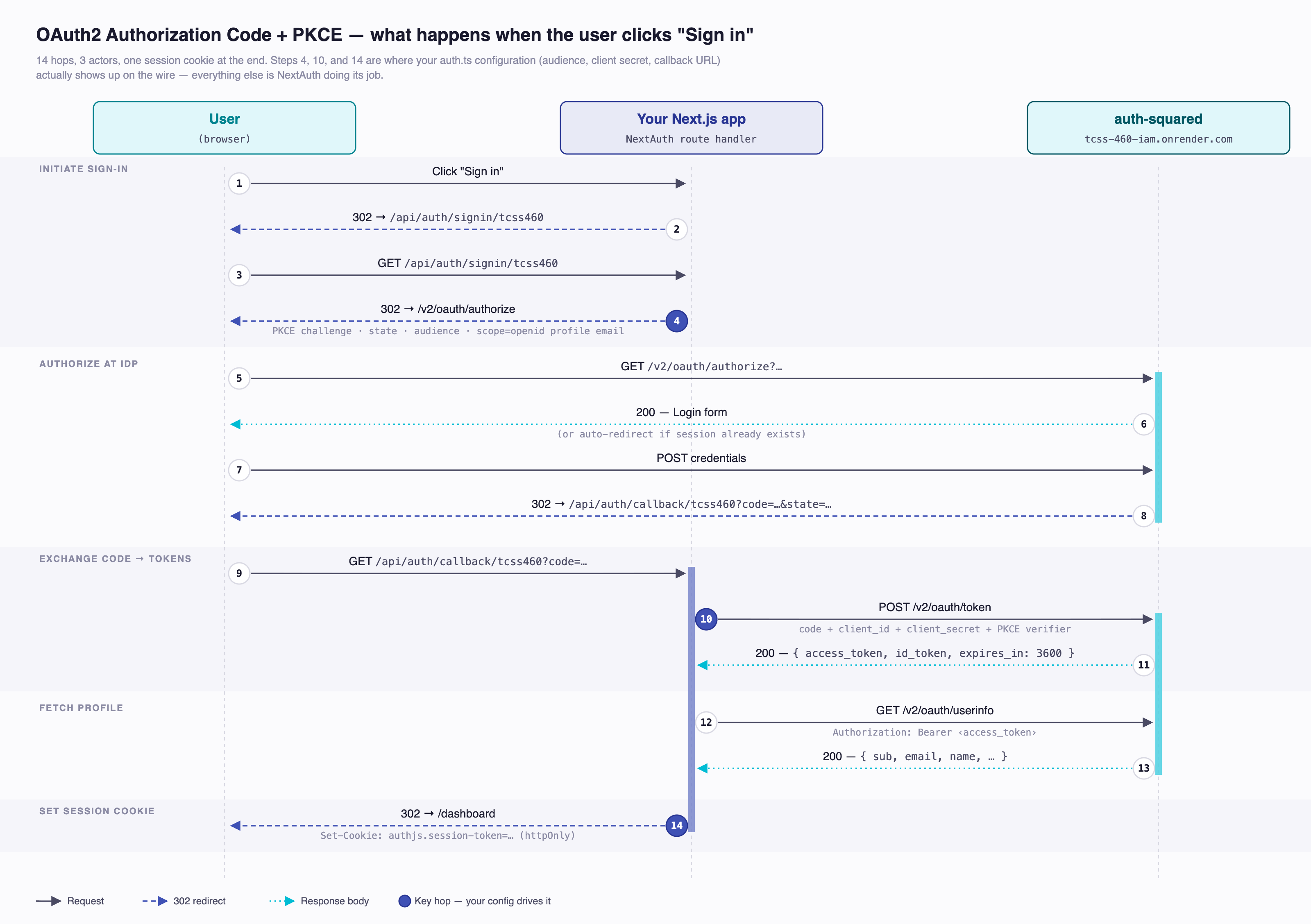
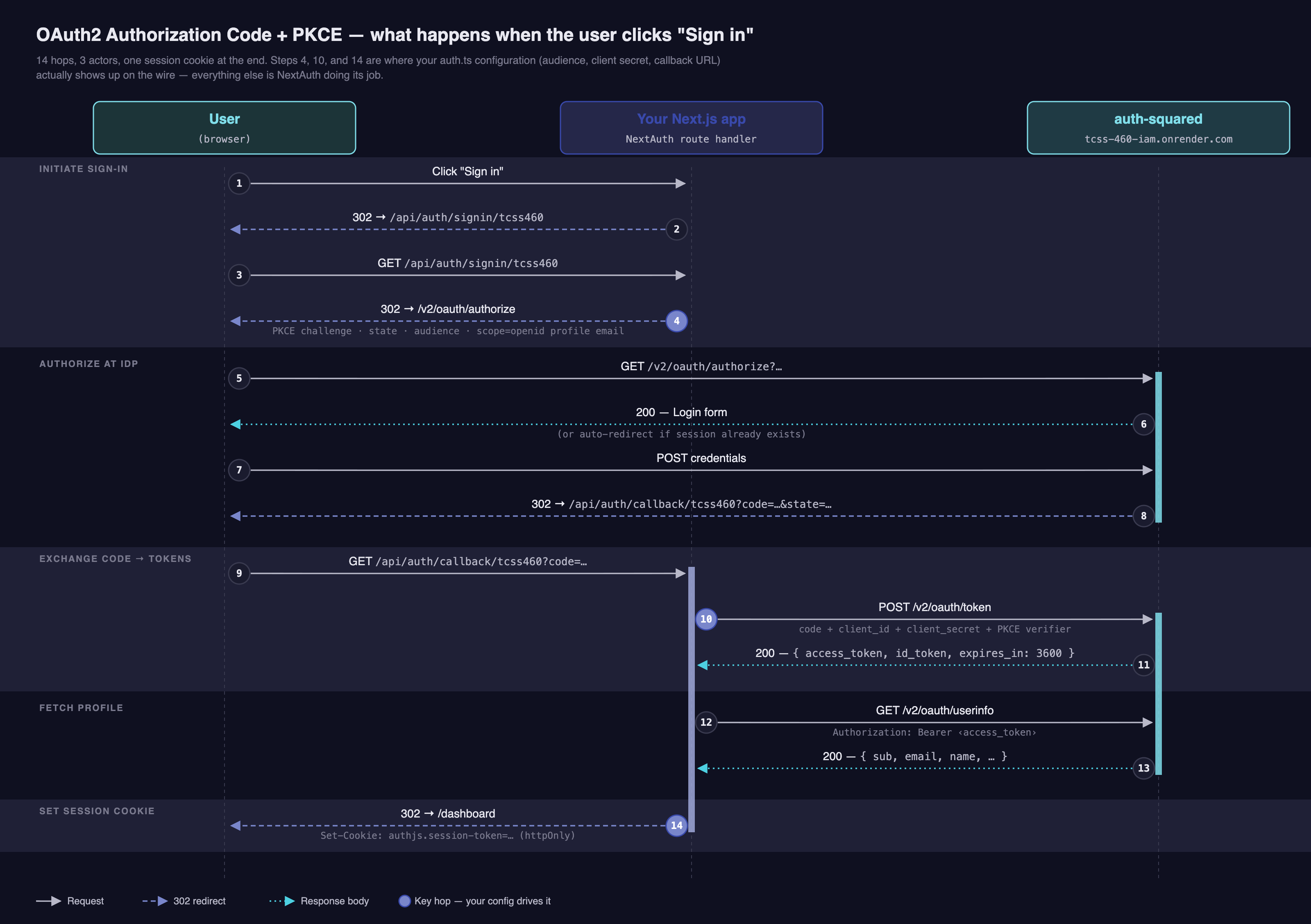
NextAuth handles every step in this diagram for you. The pieces you configured — clientId, clientSecret, audience, scope, issuer — feed into the highlighted hops (steps 4 and 9). Everything else is the library doing its job.
8 Reading the Session and Protecting Routes¶
NextAuth gives you three ways to check "is this user signed in?", each appropriate to a different rendering context.
8.1 Server components and route handlers — await auth()¶
In a server component you can await auth() directly. No props, no context, no hook. The function reads the session cookie from the incoming request, verifies it against AUTH_SECRET, and returns the session object (or null if unauthenticated).
FE-2's /profile page is the canonical example:
import { redirect } from 'next/navigation';
import { auth } from '@/lib/auth';

export default async function ProfilePage() {
  const session = await auth();
  if (!session) {
    redirect('/api/auth/signin?callbackUrl=/profile');
  }
  return <h1>Hello {session.user?.email}</h1>;
}
This is the right pattern for one-off protected pages — the session check runs on the server, the unauthenticated user is redirected before any HTML reaches their browser, and the protected content is never sent over the wire to anonymous callers. The redirect's callbackUrl query param is what bounces the user back here after sign-in.
8.2 Middleware — gate URL prefixes¶
If you have many protected pages, repeating the auth() check in every page file is tedious. middleware.ts lets you gate URLs once at the edge. FE-2 uses this for everything in its (dashboard) route group: see src/middleware.ts.
import { NextResponse } from 'next/server';
import { auth } from '@/lib/auth';

export default auth((request) => {
  if (!request.auth) {
    const signInUrl = new URL('/api/auth/signin', request.url);
    signInUrl.searchParams.set('callbackUrl', request.nextUrl.pathname);
    return NextResponse.redirect(signInUrl);
  }
  return NextResponse.next();
});

export const config = {
  matcher: ['/dashboard', '/messages/view', '/messages/send', '/debug'],
};
A few things to notice. auth() here is a wrapper: passed a request handler, it returns a function that populates request.auth from the session cookie before calling your handler. Wrapping it lets you decide what to do on missing auth — FE-2 redirects to /api/auth/signin with a callbackUrl query param so the user lands back where they were trying to go.
The matcher is an explicit URL list, not a prefix wildcard. FE-2's protected pages live inside the (dashboard) route group — but route groups are a routing-only convention; the parenthesized segment never appears in the URL. So we can't match /(dashboard)/:path*; we have to enumerate the actual URLs (/dashboard, /messages/view, /messages/send, /debug). Add a new dashboard page → add it to the matcher.
Pages inside the matcher's reach can render naively: they have no await auth() calls, no useSession checks, no inline sign-in CTA, because by the time they render the user is known to be signed in. Compare this with the per-page pattern in §8.1 — same outcome, different gate location.
8.3 Client components — useSession()¶
For UI that depends on session state (showing the user's name, hiding admin buttons, displaying a loading spinner), use the useSession() hook from next-auth/react.
"use client";
import { useSession } from "next-auth/react";

export function Greeting() {
  const { data: session, status } = useSession();
  if (status === "loading") return <span>Loading…</span>;
  if (status === "unauthenticated") return <span>Please sign in</span>;
  return <span>Hello {session?.user?.email}</span>;
}
status cycles "loading" → "authenticated" | "unauthenticated". Always handle the loading state — if you only check status === "authenticated", your page flashes "Please sign in" for a few hundred milliseconds on every reload before the session resolves. Users notice. (See §13.)
8.4 Decision rubric¶
| Where | Use | Why |
|---|---|---|
| Server component (page or layout) | await auth() + redirect() |
Runs server-side, never ships protected HTML to anonymous users |
| Many pages under one prefix | middleware.ts matcher |
One gate covers a whole subtree, edge-runtime fast |
| Client component (interactive UI) | useSession() hook |
Reactive — re-renders on sign-in/sign-out without a full page reload |
Route handler (app/api/.../route.ts) |
await auth() |
Same as server component — works inside any HTTP handler |
You will use all three in a real Next.js app. They are not alternatives; they are tools for different jobs.
9 Calling the Partner Backend with the Access Token¶
This is the whole point. Your partner team's backend has requireAuth on its protected routes, expecting an Authorization: Bearer <access_token> header with a token whose aud claim matches their API audience. You configured AUTH_TCSS460_AUDIENCE for that exact value (§4), so the token Auth.js holds in session.accessToken is already the right one. You just need to attach it to the outbound fetch.
Reference
The mechanics of fetch, parsing JSON responses, error handling, and the NEXT_PUBLIC_API_BASE_URL convention are covered in Consuming a Web API from the Browser. This section adds only the bearer-token overlay — the surrounding fetch shape is identical.
FE-2 wraps the bearer attachment in two helpers in src/lib/api.ts — apiGet for public reads and apiAuthed for anything that needs a token. Read those once before you write your own.
9.1 A reusable apiAuthed helper (FE-2's pattern)¶
The interesting trick here: apiAuthed is called from client components (a form's submit handler, a button's onClick), so it can't read process.env.AUTH_SECRET to verify the cookie itself. Instead, it asks Auth.js's React client for the session — which performs an internal fetch to /api/auth/session, returning the accessToken you forwarded in the session callback (§5).
import { getSession } from 'next-auth/react';

const API_BASE = process.env.NEXT_PUBLIC_API_BASE_URL ?? 'http://localhost:3001';

export class ApiError extends Error {
  constructor(public status: number, public statusText: string, public body: string) {
    super(`${status} ${statusText}: ${body}`);
    this.name = 'ApiError';
  }
}

export async function apiAuthed<T = unknown>(
  method: 'POST' | 'PUT' | 'PATCH' | 'DELETE',
  path: string,
  body?: unknown,
  options?: { signal?: AbortSignal }
): Promise<T> {
  const session = await getSession();
  if (!session?.accessToken) throw new Error('Not signed in');

  const response = await fetch(`${API_BASE}${path}`, {
    method,
    headers: {
      'Content-Type': 'application/json',
      Authorization: `Bearer ${session.accessToken}`,
    },
    body: body ? JSON.stringify(body) : undefined,
    signal: options?.signal,
  });

  if (!response.ok) {
    throw new ApiError(response.status, response.statusText, await response.text());
  }
  if (response.status === 204) return undefined as T;
  return response.json() as Promise<T>;
}
Now any client component can call the protected backend with one line:
import { apiAuthed } from '@/lib/api';

await apiAuthed('POST', '/v2/messages', { content, priority: 1 });
Use it from a form (FE-2's MessageSendForm is the canonical example).
9.2 Pattern A — server component¶
When the protected request is needed to render the page — i.e. on a page-load read, not a user click — you can fetch on the server instead and skip the round-trip through /api/auth/session:
import { redirect } from 'next/navigation';
import { auth } from '@/lib/auth';

interface Message { id: number; content: string; }

export default async function DashboardPage() {
  const session = await auth();
  if (!session?.accessToken) redirect('/api/auth/signin?callbackUrl=/dashboard');

  const response = await fetch(`${process.env.NEXT_PUBLIC_API_BASE_URL}/v2/messages`, {
    headers: { Authorization: `Bearer ${session.accessToken}` },
    cache: 'no-store', // session-bound data should not be statically cached
  });

  if (response.status === 401) redirect('/api/auth/signin?callbackUrl=/dashboard');
  if (!response.ok) throw new Error(`Backend failed: ${response.status}`);

  const { data: messages }: { data: Message[] } = await response.json();
  return <ul>{messages.map((m) => <li key={m.id}>{m.content}</li>)}</ul>;
}
Why server-fetch when you can: the access token never reaches the browser, the fetch executes server-to-server (no CORS), and the response body is rendered into HTML. A malicious extension running in the user's browser cannot steal the token from a server component.
9.3 Pattern B — client component¶
For interactive writes (a button click, a form submit) you have no choice — the action originates in the browser. FE-2's apiAuthed from §9.1 is the canonical wrapper. Inline, the shape looks like this:
'use client';

import { useSession } from 'next-auth/react';

export function CloseIssueButton({ id }: { id: number }) {
  const { data: session } = useSession();

  async function close() {
    if (!session?.accessToken) return;
    const response = await fetch(
      `${process.env.NEXT_PUBLIC_API_BASE_URL}/issues/${id}/close`,
      {
        method: 'POST',
        headers: { Authorization: `Bearer ${session.accessToken}` },
      },
    );
    if (!response.ok) alert(`Failed: ${response.status}`);
  }

  return <button onClick={close}>Close</button>;
}
Note the NEXT_PUBLIC_ prefix on the API URL — client-side fetches need a value the browser can read. The token still flows through the user's browser (it lives in their session cookie); the API URL needed to be inlined in the bundle. The token itself is not in the bundle — useSession() (and getSession(), used by apiAuthed) fetches it at runtime from /api/auth/session.
9.4 Which pattern when¶
For protected reads on page load, prefer the server-component pattern (§9.2): the token stays on your server and the response renders into HTML for free. For anything triggered by a user interaction — a form submit, a button click, an autocomplete keystroke — use the client-component pattern (§9.1 or §9.3); the action originates in the browser, so the fetch has to too. FE-2 demonstrates both: the public /messages list uses a client-side useMessages hook against the unauthenticated apiGet, and the dashboard's /messages/send submits via apiAuthed from a client component. Pick the one that fits where the work needs to happen.
10 Token Refresh¶
FE-2 deliberately doesn't implement this
The jwt callback in FE-2's auth.ts only stashes tokens on initial sign-in — there's no refresh branch. When the access token expires (~1 hour), every authenticated fetch returns 401, and the user is expected to sign out and back in. That's a deliberate teaching simplification, not a recommendation. Read this section once even though FE-2 skips it; if your Sprint 7+ app needs sessions longer than an hour, you'll wire it up here.
auth-squared issues access tokens with expires_in: 3600 — one hour. After that, your partner's backend will start returning 401 with a "jwt expired" message (Check-Off 5 Outcome B). Without refresh, the user gets unceremoniously bounced back to sign-in every 60 minutes — which is a terrible experience for anyone using your app for more than an hour.
The fix is refresh-token rotation: alongside the access token, auth-squared also issues a longer-lived refresh token. When the access token expires, you POST the refresh token to /v2/oauth/token and receive a fresh pair. This logic belongs in the jwt callback, which runs on every session lookup — perfect place to detect expiry and rotate.
10.1 The canonical pattern¶
This expands the jwt callback from §5. The account branch (initial sign-in) now also stashes the refreshToken; the post-account branch is new. Field names on the token use the same camelCase you saw in §5 (accessToken, refreshToken, accessTokenExpires) so a single next-auth.d.ts augmentation covers both — add refreshToken?: string to the JWT interface from §5 if you adopt this.
async jwt({ token, account }) {
  if (account) {
    // Initial sign-in
    return {
      ...token,
      accessToken: account.access_token,
      refreshToken: account.refresh_token,
      accessTokenExpires: account.expires_at ? account.expires_at * 1000 : undefined, // ms since epoch
    };
  }

  // Subsequent calls — check if the access token has expired.
  if (token.accessTokenExpires && Date.now() < token.accessTokenExpires) {
    return token; // still valid
  }

  // Expired — try to refresh.
  if (!token.refreshToken) {
    token.error = 'RefreshTokenError';
    return token;
  }

  try {
    const response = await fetch(`${process.env.AUTH_TCSS460_ISSUER}/v2/oauth/token`, {
      method: 'POST',
      headers: { 'Content-Type': 'application/x-www-form-urlencoded' },
      body: new URLSearchParams({
        grant_type: 'refresh_token',
        refresh_token: token.refreshToken,
        client_id: process.env.AUTH_TCSS460_CLIENT_ID!,
        client_secret: process.env.AUTH_TCSS460_CLIENT_SECRET!,
      }),
    });

    const newTokens = await response.json();
    if (!response.ok) throw newTokens;

    return {
      ...token,
      accessToken: newTokens.access_token,
      accessTokenExpires: Date.now() + newTokens.expires_in * 1000,
      // Some IdPs rotate the refresh token, some don't. Keep the new one if present.
      refreshToken: newTokens.refresh_token ?? token.refreshToken,
      error: undefined,
    };
  } catch (error) {
    console.error('Refresh failed:', error);
    token.error = 'RefreshTokenError';
    return token;
  }
},
The wire format (the JSON auth-squared returns from /v2/oauth/token) still uses snake_case — access_token, refresh_token, expires_in — which is why the assignments above destructure those names from account and newTokens before storing them as camelCase on the token.
10.2 Forwarding the error to the client¶
The session callback already forwards token.error to session.error (§5). Use it on the client to force re-login when refresh fails:
"use client";
import { useSession, signIn } from "next-auth/react";
import { useEffect } from "react";

export function SessionWatchdog() {
  const { data: session } = useSession();
  useEffect(() => {
    if (session?.error === "RefreshTokenError") {
      signIn('tcss460'); // forces a fresh sign-in flow
    }
  }, [session?.error]);
  return null;
}
Mount this somewhere persistent (e.g. inside app/layout.tsx) and refresh failures are handled automatically.
Auth.js refresh-token rotation guide
The pattern above mirrors the Auth.js v5 refresh-token rotation guide. Read it before customising — the docs cover edge cases (race conditions on parallel session lookups, single-use refresh tokens, IdPs that rotate refresh tokens on every use) that the snippet above handles by being conservative.
11 Roles and Authorization (Beyond Authentication)¶
FE-2 doesn't gate UI on roles
FE-2's pages don't branch on the user's auth-squared role — every signed-in user sees the same dashboard, can post messages, etc. The patterns below are what you'd add when an app legitimately needs role-aware UI. Adapt the type augmentation in your next-auth.d.ts to expose user.role if you adopt them.
The Week 5 reading insists on the distinction: authentication is "who are you?" — handled by Auth.js and auth-squared. Authorization is "what can you do?" — handled by your app's gate code, informed by the user's role.
auth-squared puts a role claim in the userinfo response. Forward it through the jwt and session callbacks (§5) so it surfaces as session.user.role. Then you can gate rendering on the client:
'use client';

import { useSession } from 'next-auth/react';

export function AdminPanel() {
  const { data: session } = useSession();
  if (session?.user?.role !== 'Admin') return null;
  return <button>Delete everything</button>;
}
…and you can gate route handlers and server components on the server:
import { redirect } from 'next/navigation';
import { auth } from '@/lib/auth';

export default async function AdminPage() {
  const session = await auth();
  if (session?.user?.role !== 'Admin') redirect('/');
  return <h1>Admin dashboard</h1>;
}
The FE hides; the BE enforces
A client-side role !== "Admin" check only hides the button. A user who knows the API endpoint can still call it directly with curl — and if your partner's backend does not enforce the same role check server-side, your "admin only" feature is open to anyone with a valid token. The requireRole middleware students wrote in Check-Off 5 Requirement 5 is the real gate; the front-end check is purely UX. Hide the button so users do not get confused, but do not rely on it for security.
The role claim arrives as a string from auth-squared's hierarchy: "User", "Moderator", "Admin", "SuperAdmin", "Owner". Note the PascalCase — exact-string comparisons are case-sensitive.
12 Try It Yourself — Login → Protected Page → Authenticated API Call¶
Walk through the full flow end-to-end. The fastest path is to clone FE-2 and run it locally — you'll need a backend (the deployed reference instance, or your own running locally on port 3001) and a copy of .env.local with credentials filled in.
Try It Yourself
- Clone —
git clone https://github.com/UWT-SET-TCSS460-LECTURE-MATERIALS/TCSS460-frontend-2.git && cd TCSS460-frontend-2 && npm install. - Create
.env.local— copy.env.exampleand fill inAUTH_SECRET,AUTH_TCSS460_CLIENT_ID,AUTH_TCSS460_CLIENT_SECRET. Runopenssl rand -base64 32for the secret. Leave the issuer, audience, andNEXT_PUBLIC_API_BASE_URLat their defaults. - The
localhost:3000callback is already whitelisted for the sharedtcss460-dev-sharedclient — you don't need to do anything. (Production deploys are different; see §13.) - Run
npm run dev, openhttp://localhost:3000, click "Sign in", complete the auth-squared login, and confirm the redirect lands you on/dashboard. - Open DevTools → Network, refresh, and watch the redirect chain — you should see every hop from the §7 sequence diagram.
- Visit
/messages/view— that's a public read againstapiGet. Then visit/messages/send— that's an authenticated POST throughapiAuthed. Submit a message; confirm it appears in the list. - Verify the bearer — open the POST request in DevTools and confirm the
Authorization: Bearer ...header is present. Decode the token at jwt.io and verify theaudclaim matchesbackend-3-messages. - Check
/debug— FE-2 ships a debug panel that decodes both tokens and runs JWKS verification on the access token. Use it to convince yourself the token is the same shape backend-3 verifies.
Once that loop works, swap AUTH_TCSS460_AUDIENCE and NEXT_PUBLIC_API_BASE_URL to point at your partner team's audience and deployed backend, and the same code drives your Sprint 7+ consumer.
If step 7's aud claim is wrong, re-read §3.3 and §13 — that is the Check-Off 5 Outcome C scenario, which means your AUTH_TCSS460_AUDIENCE is set to the wrong string for the backend you are calling.
13 Common Mistakes¶
The order here is rough frequency-of-occurrence, most common first.
13.1 Production redirect URI does not match — byte-exactly¶
auth-squared's client config stores a list of allowed redirect URIs and rejects any inbound auth code whose redirect does not match one of them, character for character. The default callback path Auth.js uses is /api/auth/callback/<providerId> — FE-2's provider id is tcss460, so its callback path is /api/auth/callback/tcss460. The localhost:3000 callback is already whitelisted on the shared client, but production callbacks are not.
When you deploy your Sprint 7+ FE to a public URL, send Charles your full production callback URL (https://your-prod-host.example.com/api/auth/callback/tcss460 — exact, no trailing slash, no missing s in https, no missing /tcss460 suffix). Charles adds it to your client's allowed redirect URIs in the admin portal. Do this before you deploy, not after — sign-in will fail with a redirect error from auth-squared until the URL is whitelisted. Charles personally hit this on the auth-sq deploy.
13.2 Wrong audience — the partner backend returns 401¶
You configured AUTH_TCSS460_AUDIENCE to a string that does not match what your partner backend's requireAuth expects. The token is cryptographically valid, Auth.js sees it as a successful sign-in, but every fetch to the partner returns 401. This is exactly Check-Off 5 Outcome C — verify by decoding session.accessToken at jwt.io and reading the aud claim.
13.3 AUTH_TCSS460_CLIENT_SECRET accidentally in a NEXT_PUBLIC_* variable¶
This is a security disaster — the secret ships in the JS bundle and is harvestable by anyone who views your site. Audit your .env.local: the only NEXT_PUBLIC_* vars should be public-by-design things like NEXT_PUBLIC_API_BASE_URL. Never NEXT_PUBLIC_AUTH_*.
13.4 useSession() outside <SessionProvider> returns loading forever¶
useSession() outside <SessionProvider> returns { data: undefined, status: 'loading' } forever. The hook reads from React context, and if there is no provider in the tree, the context is empty. The fix is always the same: ensure your root layout renders the Providers wrapper from §6 around {children}.
13.5 Mixing useSession() (client) with auth() (server) in the same component¶
useSession() only works in components marked 'use client'; auth() only works in server components and route handlers. Pick one based on whether the component is interactive. If a server component needs to pass the session to a client child, fetch it server-side and pass it as a prop.
13.6 Not handling the 'loading' state¶
useSession() starts as { status: 'loading' }, then resolves. If your gate is if (status === 'unauthenticated') return <SignInButton />, the page flashes the sign-in button on every reload before settling. Always handle 'loading' explicitly (return a spinner, return null, anything that is not "wrong").
13.7 Trying to read session.accessToken before exposing it via the session callback¶
By default, Auth.js does not put the access token on the session — the OAuth provider's tokens stay server-side, on the JWT, and never reach session. You have to forward them explicitly in the session callback (§5). If session.accessToken is undefined and you swear you are signed in, this is why.
13.8 Forgetting AUTH_SECRET in production¶
In dev, Auth.js helpfully picks a random secret on each restart. In prod (or with NODE_ENV=production) it refuses to start without one. The error message is reasonably clear — but the silent version of this failure is when you set the secret to an empty string by mistake. Double-check.
13.9 Letting the access token expire and not implementing refresh¶
Without §10's refresh logic — which FE-2 deliberately skips — every 60 minutes the user's session token contains an expired access token and every fetch to the partner backend returns 401. The fix is to implement the refresh dance; the workaround is to require the user to sign out and back in.
13.10 AUTH_URL mismatch in production¶
On Vercel this is auto-set; everywhere else (Render, Railway, fly.io) you set it manually. If it does not match the URL the browser is actually visiting, Auth.js builds wrong callback URLs and the redirect from auth-squared lands somewhere unexpected.
13.11 Using NEXTAUTH_* env-var names instead of AUTH_*¶
v4's vars were NEXTAUTH_SECRET, NEXTAUTH_URL. v5 renamed them to AUTH_SECRET, AUTH_URL. Most v4 tutorials still rank highly on Google. Symptoms range from "secret missing" startup errors to silent fall-back behavior. Always check authjs.dev, not next-auth.js.org.
14 Summary¶
| Concept | Key Point |
|---|---|
| Auth.js v5 (NextAuth) | Renamed library, npm package still next-auth@beta. Use the v5 docs at authjs.dev — v4 docs are wrong. |
| Env vars | AUTH_SECRET, AUTH_URL, plus provider-specific AUTH_<PROVIDER>_* (FE-2: AUTH_TCSS460_*). The NEXTAUTH_* names are v4. |
| Four pieces | lib/auth.ts (config), app/api/auth/[...nextauth]/route.ts (handlers), middleware.ts (gate), Providers wrapper in app/layout.tsx. |
| Custom OIDC provider | type: 'oidc' + issuer auto-discovers endpoints. Pass audience under authorization.params to scope the token. |
| Two callbacks | jwt decides what's on the server-side token; session decides what reaches client/server consumers. Forward accessToken (and idToken, role, etc.) explicitly. |
| Three ways to read | await auth() server-side, useSession() client-side, middleware.ts for URL-list gates. |
| Bearer token | Server-side await auth() for page-load reads (token stays on server); apiAuthed / useSession() for client-side writes. |
| Refresh | 1-hour expiry from auth-squared. FE-2 doesn't implement it; if you need a longer session, the canonical pattern lives in §10. |
| Roles | session.user.role is for hiding UI. The BE's requireRole is for actual security. FE-2 doesn't gate on roles. |
| Redirect URI | Must match byte-exactly in the auth-squared client config — for FE-2, /api/auth/callback/tcss460. |
15 References¶
Use the Auth.js v5 docs, not v4 NextAuth.js
NextAuth.js v4 docs still rank highly on Google for "next-auth" searches. The API is meaningfully different from v5. Always check the URL — authjs.dev is v5, next-auth.js.org is v4. Every link in this section points at v5.
Official Auth.js v5 documentation:
- Auth.js — Installation — the canonical install line and project setup
- Auth.js — Configuring OAuth Providers — custom OIDC provider patterns,
wellKnowndiscovery,audienceandscope - Auth.js — Refresh Token Rotation — the canonical
jwtcallback refresh pattern (basis of §10) - Auth.js — Next.js Reference —
auth(),signIn(),signOut(),handlers, middleware - Auth.js — Migrating to v5 — useful even if you never wrote v4, because it documents what changed and helps disambiguate v4 tutorials
OAuth2 and OIDC standards:
- RFC 6749 — The OAuth 2.0 Authorization Framework — the original OAuth2 spec; §1.3.1 (authorization code flow) and §6 (refresh tokens) are most relevant
- OpenID Connect Core 1.0 — the OIDC layer on top of OAuth2 (id tokens, userinfo)
- RFC 7636 — Proof Key for Code Exchange (PKCE) — the
checks: ["pkce", "state"]from §3.4
Course materials:
- Week 5 — Authentication & Authorization Concepts — theory behind every choice in this guide
- Week 8 — OAuth2 & Federated Identity — the federated-identity story this guide implements
- JWT Verification with Auth² (back-end guide) — the
requireAuthcounterpart students built in Sprint 3 - Check-Off 5: Auth-Squared — Outcomes A/B/C/D mental model (especially Outcome C for wrong-audience debugging)
- Next.js (front-end guide) — file-based routing, server vs. client components, layouts (prerequisite)
- Consuming a Web API from the Browser —
fetchmechanics this guide builds on - TCSS460-frontend-2 — The lecture demo every code excerpt above is drawn from. Next.js 15 + Auth.js v5 + MUI v7. Read the
src/lib/auth.ts,src/middleware.ts, andsrc/lib/api.tsfiles alongside §5, §8, and §9.
16 Further Reading¶
External Resources
- The OAuth 2.0 Authorization Code Flow with PKCE — Okta Developer — animated walkthrough of the redirect dance from §7
- Auth.js Discussions — JWT refresh edge cases — community-curated answers to refresh-token race conditions and parallel-request issues
- Vercel — Authentication patterns for Next.js — production-deployment guidance for NextAuth on Vercel
- OWASP — OAuth 2.0 Cheat Sheet — security checklist worth scanning before you deploy
This guide is part of TCSS 460 — Client/Server Programming, School of Engineering and Technology, University of Washington Tacoma.