JWT Verification with Auth²¶
TCSS 460 — Client/Server Programming
In Sprint 2 your API minted its own tokens with /auth/dev-login and verified them with a shared JWT_SECRET. That worked because your API was both the auth server and the resource server. Sprint 3 splits those roles: Auth² issues tokens, your API verifies them. This guide walks through the wiring — express-jwt + jwks-rsa, audience and issuer pinning, the three role gates, and the local-user upsert pattern that maps an Auth² sub to a row in your own User table.
The companion theory lives in the Week 5 concept reading. This guide assumes you've read it and concentrates on the TypeScript/Express specifics.
1 What This Guide Covers¶
By the end of this guide you'll have:
- A
requireAuthmiddleware that verifies RS256 access tokens against Auth²'s JWKS endpoint - A
resolveLocalUserhelper that maps an Auth²subclaim onto a row in your ownUsertable, fetching from/v2/oauth/userinfoon first sight - Three role gates —
requireRole,requireRoleAtLeast,hasRoleAtLeast— for the 5-tier Auth² hierarchy - A debugging mental model for the most common 401/403 failures
This guide is opinionated — it shows the exact pattern used by TCSS460-backend-3, the Sprint 3 reference implementation. When your group adapts backend-3 for your own group's API, the moving parts you'll actually rewrite are the env vars and (occasionally) the role thresholds. The middleware itself ships ready to use.
Prerequisite reading
Week 5: Authentication & Authorization Concepts — covers the why behind every choice in this guide. In particular, the asymmetric trust model (§4.4, §8), the audience/issuer claim discipline (§4.5), the IdP/application split (§5.4), and JWKS distribution (§9) are the conceptual scaffolding the code below assumes you understand.
2 The Mental Model — Sprint 2 vs. Sprint 3¶
The single biggest shift between Sprint 2 and Sprint 3 is who signs the token. In Sprint 2 you signed it. In Sprint 3 someone else does, and you only verify.
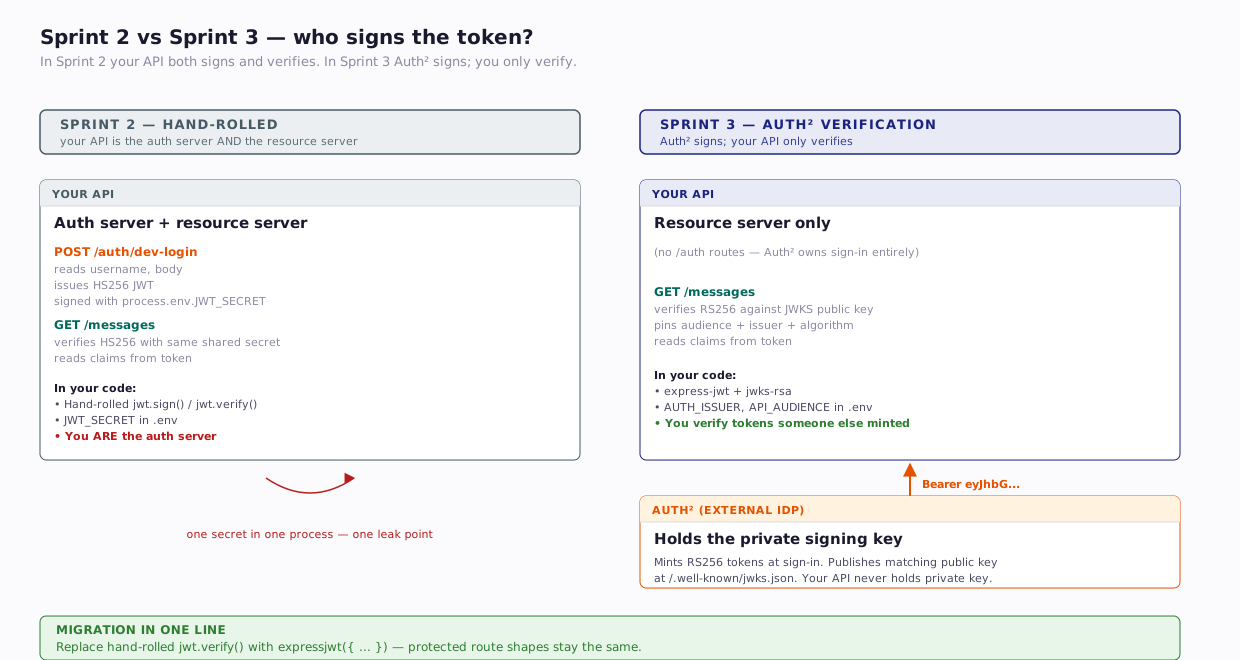
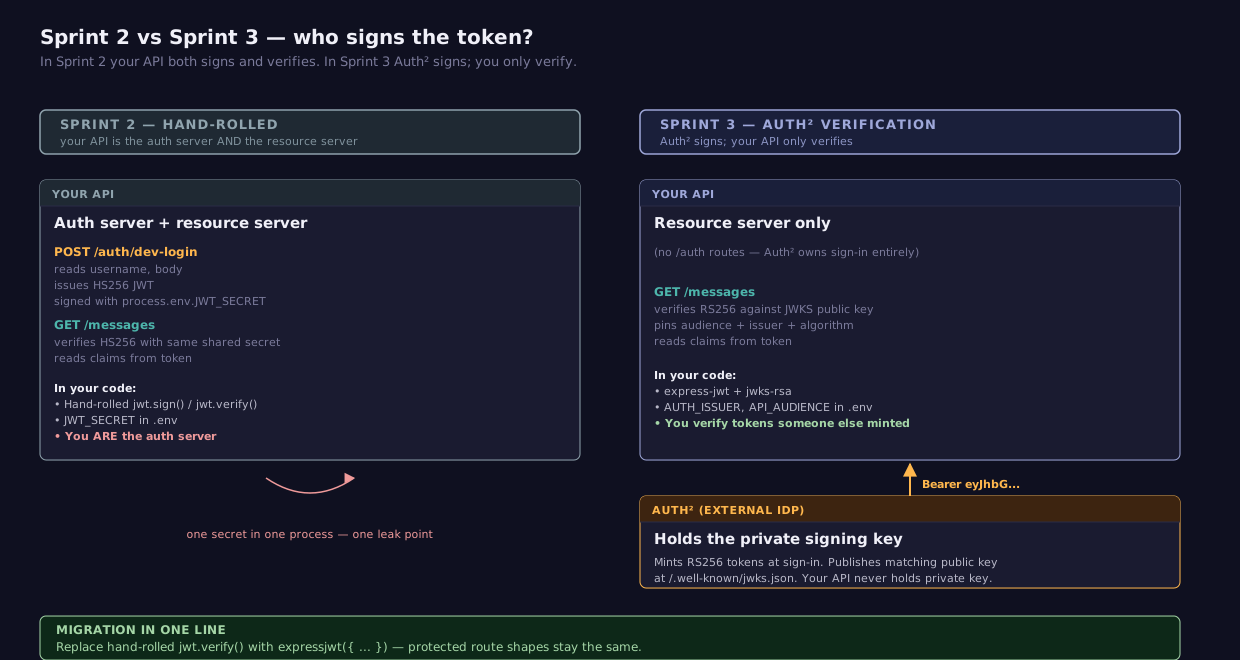
Migration in one line: replace your hand-rolled jwt.verify() with expressjwt({ ... }) from the express-jwt library, and replace your hand-rolled sign-in flow with "point users at Auth²." The shape of every protected route stays the same — only the middleware changes.
3 Setting Up: Dependencies and Environment¶
3.1 Install the libraries¶
express-jwt— Express middleware that verifies a Bearer JWT, decodes its claims, and attaches them torequest.auth. It handles the cryptography and the standard claim checks (exp,nbf,iss,aud).jwks-rsa— A helper that fetches the IdP's JWKS, picks the right key for the token'skid, caches it, and handsexpress-jwtthe public key on demand.
These two are designed to compose. jwks-rsa provides a secret function that express-jwt calls per-request to obtain the verification key.
3.2 Environment variables¶
Add two vars to your .env:
Replace group-7-api with your group's audience string — the one Auth² assigned to your tenant when your group's API client was registered. The default in backend-3's .env.example is backend-3-messages, which is backend-3's own audience as the lecture reference; your group's API has a different one.
Byte-exact strings
AUTH_ISSUER is compared byte-for-byte against the iss claim in incoming tokens. No trailing slash. The Auth² issuer URL is https://tcss-460-iam.onrender.com exactly. If you accidentally write https://tcss-460-iam.onrender.com/, every token your API receives will fail verification with "jwt issuer invalid."
You won't set a JWKS_URI env var — backend-3 derives it from AUTH_ISSUER in code (${AUTH_ISSUER}/.well-known/jwks.json). One less thing to misconfigure.
Try It Yourself
Open https://tcss-460-iam.onrender.com/.well-known/jwks.json in your browser. You'll see a JSON document with a keys array — those are the public keys Auth² uses to sign access tokens. Each key has a kid (key ID); the kid in your token's header tells the verifier which one to use. See concept reading §9 JWKS for the rotation story.
4 The requireAuth Middleware¶
Backend-3's src/middleware/requireAuth.ts is short, and every line is doing real work. Here is the verification half — the role-gate helpers from the same file are covered in §6.
import { Request, Response, NextFunction, RequestHandler, ErrorRequestHandler } from 'express';
import { expressjwt, type Request as JwtRequest } from 'express-jwt';
import jwksRsa from 'jwks-rsa';

export const ROLE_HIERARCHY = ['User', 'Moderator', 'Admin', 'SuperAdmin', 'Owner'] as const;
export type Role = (typeof ROLE_HIERARCHY)[number];

export interface AuthenticatedUser {
  sub: string;
  email?: string;
  role: Role;
  iat?: number;
  exp?: number;
  iss?: string;
  aud?: string | string[];
}

declare global {
  namespace Express {
    interface Request {
      user?: AuthenticatedUser;
    }
  }
}

const issuer = process.env.AUTH_ISSUER;
const audience = process.env.API_AUDIENCE;

if (!issuer || !audience) {
  throw new Error(
    'AUTH_ISSUER and API_AUDIENCE must be set. See .env.example for the Auth² integration.'
  );
}

const verifyJwt = expressjwt({
  secret: jwksRsa.expressJwtSecret({
    jwksUri: `${issuer}/.well-known/jwks.json`,
    cache: true,
    cacheMaxAge: 10 * 60 * 1000,
    rateLimit: true,
    jwksRequestsPerMinute: 10,
  }),
  audience,
  issuer,
  algorithms: ['RS256'],
});

const attachUser = (request: JwtRequest, _response: Response, next: NextFunction): void => {
  if (request.auth) {
    (request as Request).user = request.auth as AuthenticatedUser;
  }
  next();
};

const handleAuthError: ErrorRequestHandler = (error, _request, response, next) => {
  if (error && (error as { name?: string }).name === 'UnauthorizedError') {
    response.status(401).json({ error: 'Invalid or missing token' });
    return;
  }
  next(error);
};

export const requireAuth: Array<RequestHandler | ErrorRequestHandler> = [
  verifyJwt,
  attachUser,
  handleAuthError,
];
4.1 What each piece is doing¶
The role hierarchy is declared at the top as a const tuple so TypeScript can derive a literal-union Role type from it ('User' | 'Moderator' | 'Admin' | 'SuperAdmin' | 'Owner'). The order matters — index 0 is the lowest tier, index 4 is the highest. The role gates in §6 use that ordering directly.
The AuthenticatedUser interface describes the shape of the verified JWT claims. The sub claim is the only field guaranteed present; email is included by Auth² when available; role is the user's Auth² tenant role. The standard JWT claims (iat, exp, iss, aud) come along for the ride.
The declare global block augments Express's Request type so that downstream handlers can read request.user without a cast. This is the TypeScript convention for adding custom properties to library types — the augmentation merges with the library's own declarations at compile time.
The fail-fast block (if (!issuer || !audience)) runs at module-load time — Node executes it the first time the file is imported, before any request is served. If the env vars aren't set, the throw propagates out of the import and the process fails to start with a clear error in the boot logs. Without this guard, the misconfiguration would lurk silently until the first request hit a protected route, then surface as a confusing JWKS error inside the verifier. Failing loudly at startup is much cheaper to debug than failing per-request later.
The verifyJwt middleware is express-jwt's engine. The secret field is unusual: instead of a static value, it's a function that express-jwt calls per-request to obtain the right verification key. jwksRsa.expressJwtSecret(...) returns that function and handles the JWKS fetch, the kid lookup, and the caching. The cache (10 minutes, 10 requests per minute max) keeps your API from hammering Auth² on every single request.
Why algorithms: ['RS256'] is required. This is the algorithm-confusion defense. Without it, an attacker could craft a token whose header declares alg: HS256, sign it with the public key (which is, by design, public), and your verifier would happily use the same public key as an HMAC secret to recompute and accept it. See Week 5 reading §13.8. Pinning the algorithm lets the library reject any token whose header doesn't match.
attachUser copies request.auth (where express-jwt writes the verified claims) onto request.user. This isn't strictly necessary, but it gives downstream handlers a typed request.user instead of an unknown-ish request.auth. It's the line that makes the global type augmentation pay off.
handleAuthError turns express-jwt's UnauthorizedError into a clean 401 JSON response. Without this, a bad token surfaces as Express's default HTML error page, which is unhelpful for an API.
The exported requireAuth is the array [verifyJwt, attachUser, handleAuthError]. Express handles arrays of middleware as if they were spread, so route definitions read as a single name: router.get('/messages', requireAuth, handler).
5 Subject-as-FK: The resolveLocalUser Pattern¶
requireAuth will tell you who the bearer claims to be (their sub and role), but it does not give you a row in your own database. For any route that needs a local User PK — to set Message.authorId, to look up app-specific preferences, to show "Hello, {displayName}" — you need to map the IdP's sub onto your local User.id. That's what resolveLocalUser does.
The conceptual frame is in Week 5 reading §5.4: the IdP owns identity, your app owns application data, and sub is the foreign key that joins them.
5.1 The helper¶
Backend-3's src/auth/resolveLocalUser.ts:
import type { Request } from 'express';
import { prisma } from '@/prisma';
import type { UserModel } from '@/generated/prisma/models';

/**
 * Upserts a local User row keyed by the Auth² `sub` claim, then returns it.
 * Call at the start of any handler that needs a local User PK — e.g. to set
 * as a foreign key on Message.authorId.
 *
 * A plain helper, not Express middleware — the DB write stays visible in the
 * handler body, and the auth middleware itself is side-effect-free.
 */
export const resolveLocalUser = async (request: Request): Promise<UserModel> => {
  const { sub, email: claimEmail } = request.user!;

  // Fast path: the local row caches the Auth² enrichment, so userinfo is
  // called at most once per sub — not per request.
  const existing = await prisma.user.findUnique({ where: { subjectId: sub } });
  if (existing) {
    if (claimEmail && claimEmail !== existing.email) {
      return prisma.user.update({
        where: { subjectId: sub },
        data: { email: claimEmail },
      });
    }
    return existing;
  }

  const token = extractBearerToken(request);
  const info = token ? await fetchUserInfo(token) : undefined;

  const email = info?.email ?? claimEmail ?? `${sub}@placeholder.local`;
  const { firstName, lastName } = splitName(info?.name);
  const username =
    info?.username ?? (info?.email ? info.email.split('@')[0] : `user-${sub.slice(0, 12)}`);

  // upsert (not create) to tolerate a race between two concurrent first-time
  // requests for the same sub.
  return prisma.user.upsert({
    where: { subjectId: sub },
    update: {},
    create: { subjectId: sub, username, email, firstName, lastName },
  });
};
5.2 How the code flows¶
resolveLocalUser has two paths — a fast path that hits the database once, and a slow path that runs the first time a particular sub is seen.
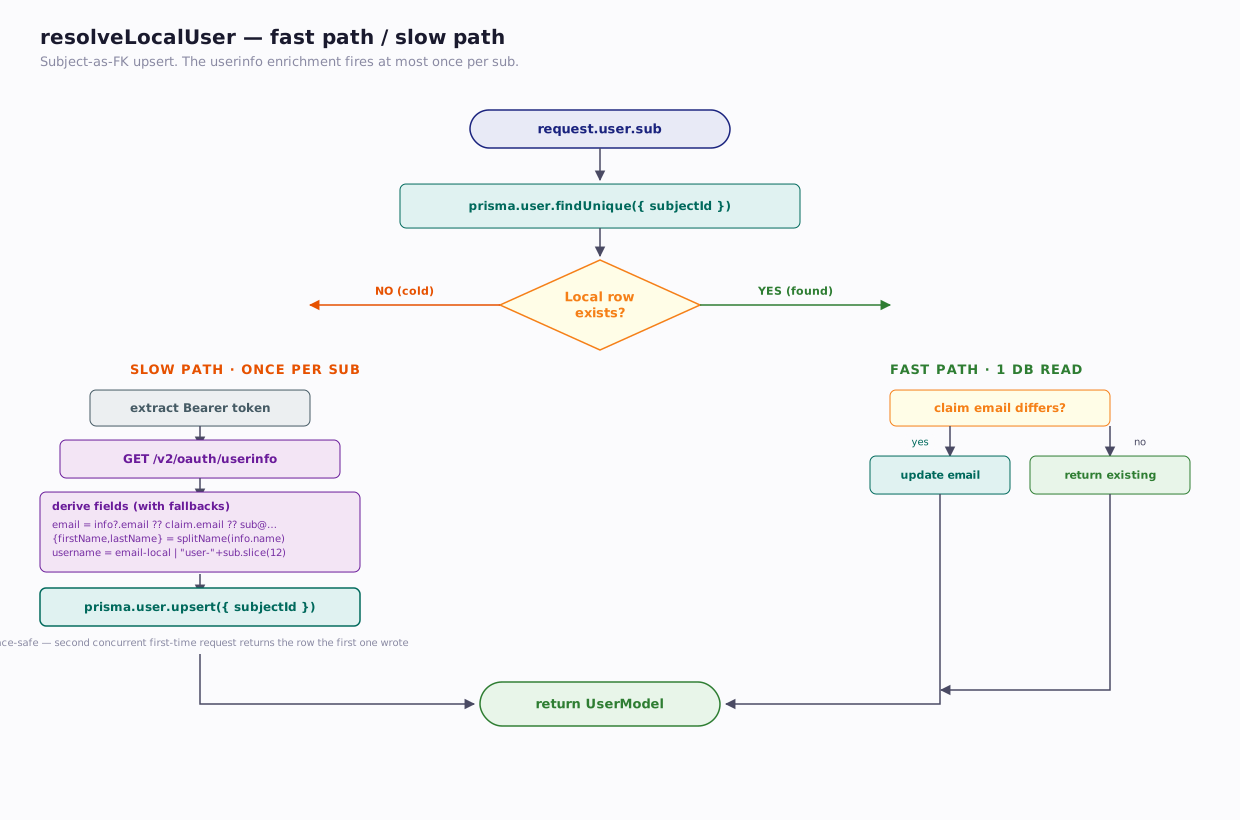
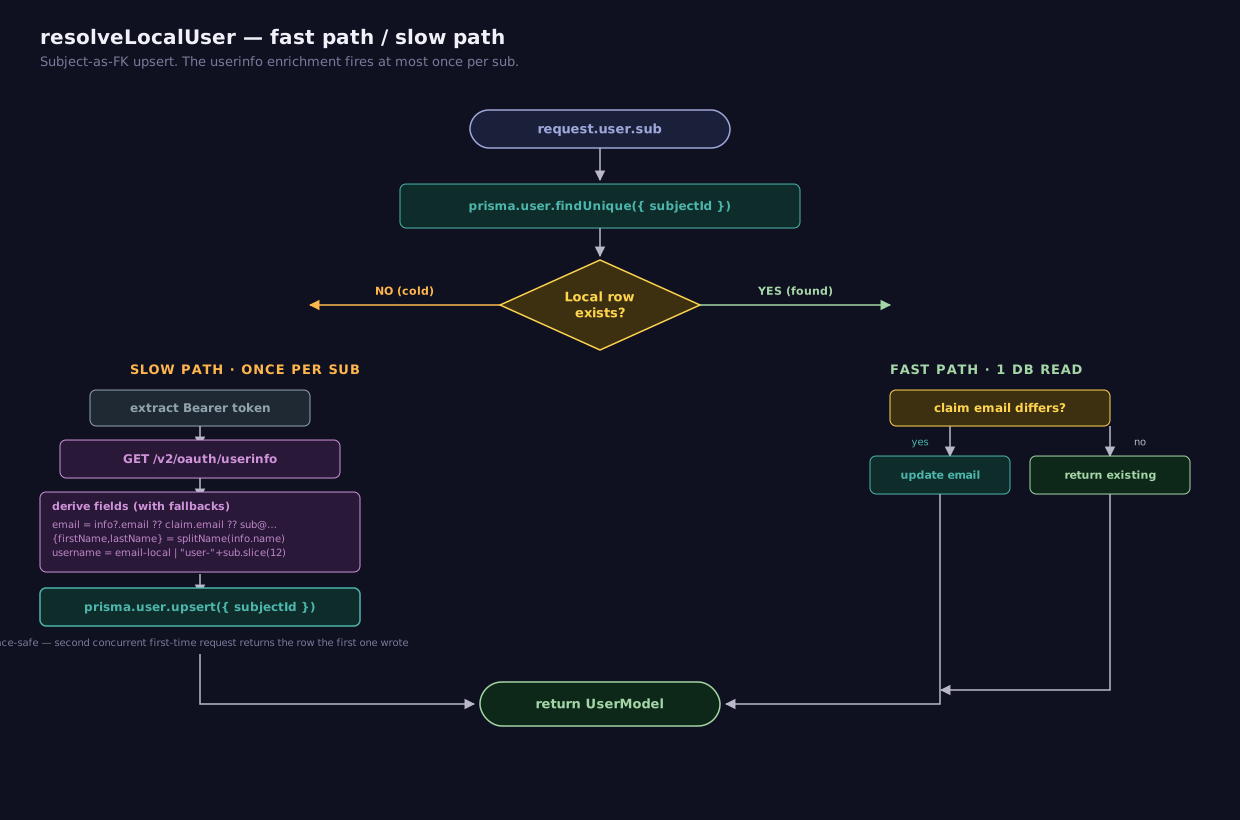
Fast path — the local row already exists. One database read, an optional email refresh if the JWT claim is newer than the local copy, and we return. The userinfo endpoint is not called. This is what every request after the first sees.
Slow path — no local row yet. We extract the same Bearer token the request arrived with, call Auth²'s /v2/oauth/userinfo to get a fuller profile (name, email, username if available), apply fallbacks for missing fields, and upsert. The upsert (rather than create) tolerates the race where two simultaneous first-time requests for the same sub both miss the cache and both try to insert; the second one finds the row the first one wrote and returns it.
The userinfo enrichment fires at most once per sub, not per request. After the first sign-in, the local row caches whatever Auth² gave us, and the fast path takes over.
5.3 Why it's a helper, not middleware¶
Two reasons.
First, side effects belong in handlers, not in middleware that runs on every protected request. Many routes don't need a local User row — a GET /health or a GET /messages that returns IDs only doesn't touch User. If resolveLocalUser were middleware, those routes would all do unnecessary database work on every request.
Second, the DB write is part of the handler's contract, not part of authentication. Reading the handler, you can see exactly when the upsert happens. If it fails — say, your DB is down — the error surfaces on the route the user actually invoked, not as a confusing 500 from a middleware they didn't know existed.
Calling it from a handler looks like:
router.post('/messages', requireAuth, async (request, response) => {
  const user = await resolveLocalUser(request);
  const message = await prisma.message.create({
    data: { content: request.body.content, authorId: user.id },
  });
  response.status(201).json(message);
});
5.4 The userinfo response shape¶
When the user is new (no local row exists), resolveLocalUser calls Auth²'s /v2/oauth/userinfo endpoint with the same Bearer token the request arrived with. Auth² responds with:
{
  "sub": "12345",
  "email": "alice@example.com",
  "name": "Alice Anderson",
  "role": "User",
  "tenant": "tcss460-sp26"
}
Three things to notice. name is concatenated — Auth² stores firstName and lastName separately, but the userinfo endpoint returns them joined. Backend-3's splitName() re-splits on the first whitespace, falling back to { firstName: 'Unknown', lastName: 'User' } when the name is empty.
There is no username field. Auth² doesn't expose username through userinfo today. Backend-3 derives a placeholder username from the email local-part (alice@example.com → alice) or from the sub itself (user-abc123def456) when neither email nor name is available.
The role here is the tenant role, not necessarily the same as the role claim in the access token — though they typically match. The token claim is what your API trusts for authorization decisions; the userinfo role is convenient for seeding your local row but should not be re-read on every request.
Try It Yourself
With a valid bearer token (see §8 for how to get one), curl the userinfo endpoint:
curl https://tcss-460-iam.onrender.com/v2/oauth/userinfo \
  -H "Authorization: Bearer <paste-your-token-here>"
You should see a JSON response with your sub, email, name, and role. This is the exact request resolveLocalUser makes on first sign-in.
6 Role Gates — Three Helpers¶
Auth² emits a 5-tier role hierarchy in PascalCase, low to high:
These are Auth² tenant roles — coarse-grained, IdP-issued, the same across every API in a tenant. App-specific permissions belong on your own User table, not in the JWT. (See Week 5 reading §5.4.)
Backend-3 ships three helpers in the same requireAuth.ts file, each suited to a different question:
6.1 requireRole(role) — exact match¶
export const requireRole = (role: Role): RequestHandler => {
  return (request, response, next) => {
    if (!request.user) {
      response.status(401).json({ error: 'Not authenticated' });
      return;
    }
    if (request.user.role !== role) {
      response.status(403).json({ error: 'Insufficient permissions' });
      return;
    }
    next();
  };
};
requireRole('Admin') admits only users with role Admin. A SuperAdmin or Owner will be rejected. This is rarely what you want for authorization, but it's useful for routes that target a specific tier — say, a "manage admins" panel that should not be visible to Owners (who have a different panel).
6.2 requireRoleAtLeast(minRole) — minimum match¶
export const requireRoleAtLeast = (minRole: Role): RequestHandler => {
  const minIdx = ROLE_HIERARCHY.indexOf(minRole);
  return (request, response, next) => {
    if (!request.user) {
      response.status(401).json({ error: 'Not authenticated' });
      return;
    }
    const userIdx = ROLE_HIERARCHY.indexOf(request.user.role);
    if (userIdx < 0 || userIdx < minIdx) {
      response.status(403).json({ error: 'Insufficient permissions' });
      return;
    }
    next();
  };
};
requireRoleAtLeast('Admin') admits Admin, SuperAdmin, and Owner. This is the gate you reach for first. Most authorization rules read naturally as "this action requires at least an Admin," not "this action requires exactly an Admin."
The implementation closes over minIdx once at gate creation, so the per-request work is two array lookups and one comparison. No string comparison, no role list scan.
6.3 hasRoleAtLeast(role, minRole) — boolean predicate¶
export const hasRoleAtLeast = (role: Role | undefined, minRole: Role): boolean => {
  if (!role) return false;
  const userIdx = ROLE_HIERARCHY.indexOf(role);
  const minIdx = ROLE_HIERARCHY.indexOf(minRole);
  return userIdx >= 0 && userIdx >= minIdx;
};
This isn't middleware — it's a function that returns true or false. Use it inside a handler when the policy is "owner OR privileged," which can't be expressed as a single middleware gate.
router.delete('/messages/:id', requireAuth, async (request, response) => {
  const user = await resolveLocalUser(request);
  const message = await prisma.message.findUnique({ where: { id: Number(request.params.id) } });

  if (!message) return response.status(404).json({ error: 'Not found' });

  // Anyone can delete their own; Moderators+ can delete anyone's.
  const isOwner = message.authorId === user.id;
  const isPrivileged = hasRoleAtLeast(request.user?.role, 'Moderator');

  if (!isOwner && !isPrivileged) {
    return response.status(403).json({ error: 'Forbidden' });
  }

  await prisma.message.delete({ where: { id: message.id } });
  response.status(204).end();
});
A middleware gate runs before the handler, so it can't see the resource being acted on. When the rule depends on the resource (ownership), the check has to happen after the resource is loaded. hasRoleAtLeast is the in-handler answer.
6.4 401 vs 403¶
The two helpers above return different status codes for different reasons. 401 Unauthorized means who are you? — there's no request.user because authentication didn't run or didn't succeed. 403 Forbidden means I know who you are, but you can't do this — authentication succeeded, but your role isn't sufficient. (Week 5 reading §5.2 covers the distinction.)
A common bug is returning 403 for both cases ("the user is forbidden from accessing without a token"). Don't — the codes are how clients distinguish "log in" from "ask for elevated access," and they signal different problems to operators reading server logs.
7 Putting It Together — A Protected Route¶
Three example routes, in increasing order of authorization complexity.
7.1 Authenticated only¶
router.get('/messages', requireAuth, async (request, response) => {
  const messages = await prisma.message.findMany({
    orderBy: { createdAt: 'desc' },
  });
  response.json(messages);
});
Any signed-in user can list messages. No role check. No local-user resolution because the handler doesn't need a local User PK to read.
7.2 Authenticated + minimum role¶
router.delete(
  '/messages/:id',
  requireAuth,
  requireRoleAtLeast('Admin'),
  async (request, response) => {
    await prisma.message.delete({ where: { id: Number(request.params.id) } });
    response.status(204).end();
  }
);
Admin, SuperAdmin, or Owner can delete any message. User and Moderator are rejected with 403.
7.3 Authenticated + ownership-or-privilege¶
The example from §6.3 — a route where the role check depends on data loaded inside the handler:
router.delete('/messages/:id', requireAuth, async (request, response) => {
  const user = await resolveLocalUser(request);
  const message = await prisma.message.findUnique({ where: { id: Number(request.params.id) } });
  if (!message) return response.status(404).json({ error: 'Not found' });

  const isOwner = message.authorId === user.id;
  const isPrivileged = hasRoleAtLeast(request.user?.role, 'Moderator');
  if (!isOwner && !isPrivileged) return response.status(403).json({ error: 'Forbidden' });

  await prisma.message.delete({ where: { id: message.id } });
  response.status(204).end();
});
7.4 The three responses to know¶
# Valid bearer token, sufficient role → 200
curl https://your-api.example.com/messages \
  -H "Authorization: Bearer <valid-token>"

# Missing or expired token → 401
curl https://your-api.example.com/messages
# { "error": "Invalid or missing token" }

# Valid token, insufficient role → 403
curl -X DELETE https://your-api.example.com/messages/1 \
  -H "Authorization: Bearer <user-tier-token>"
# { "error": "Insufficient permissions" }
Try It Yourself
Run backend-3 locally (or call your group's deployed API), grab a token from the Token Playground (§8), and exercise all three responses. The 403 is satisfying — you'll see your token validate cleanly and still get rejected because your role isn't high enough.
8 Testing Without Re-Logging-In Constantly¶
Manually walking the OAuth2 redirect flow every time you want to test a curl command is a productivity disaster. The course ships a Token Playground that does the sign-in for you and hands you a copy-pastable access token.
Token Playground
Pick your group's audience from the dropdown, click Sign In, log in to Auth² in the popup, and the playground hands you back an access token + a Refresh button. Copy the token into Postman or your Authorization: Bearer ... header for curl. When the token expires (an hour after sign-in), click Refresh — no re-typing credentials.
First-time sign-in
The first time you use the Token Playground, you'll need to create an Auth² account. A few things worth knowing about this course's tenant:
- Any email works. There is no requirement to use your
@uw.eduaddress — pick whatever you prefer. - Email verification is turned off. Your account is usable immediately after signup; you won't get a "verify your email" link.
- 2FA is not enabled. No authenticator app required for sign-in.
These relaxed settings are course-specific. A production Auth² tenant would normally require email verification (and often 2FA) before issuing tokens.
The playground is documented in detail in Sprint 3. For this guide, treat it as a black box: it's how you get a valid bearer token in your hands for testing your protected routes.
9 Debugging Failures¶
When a protected endpoint misbehaves, the answer is almost always one of a small handful of issues. The decision tree below covers them all.
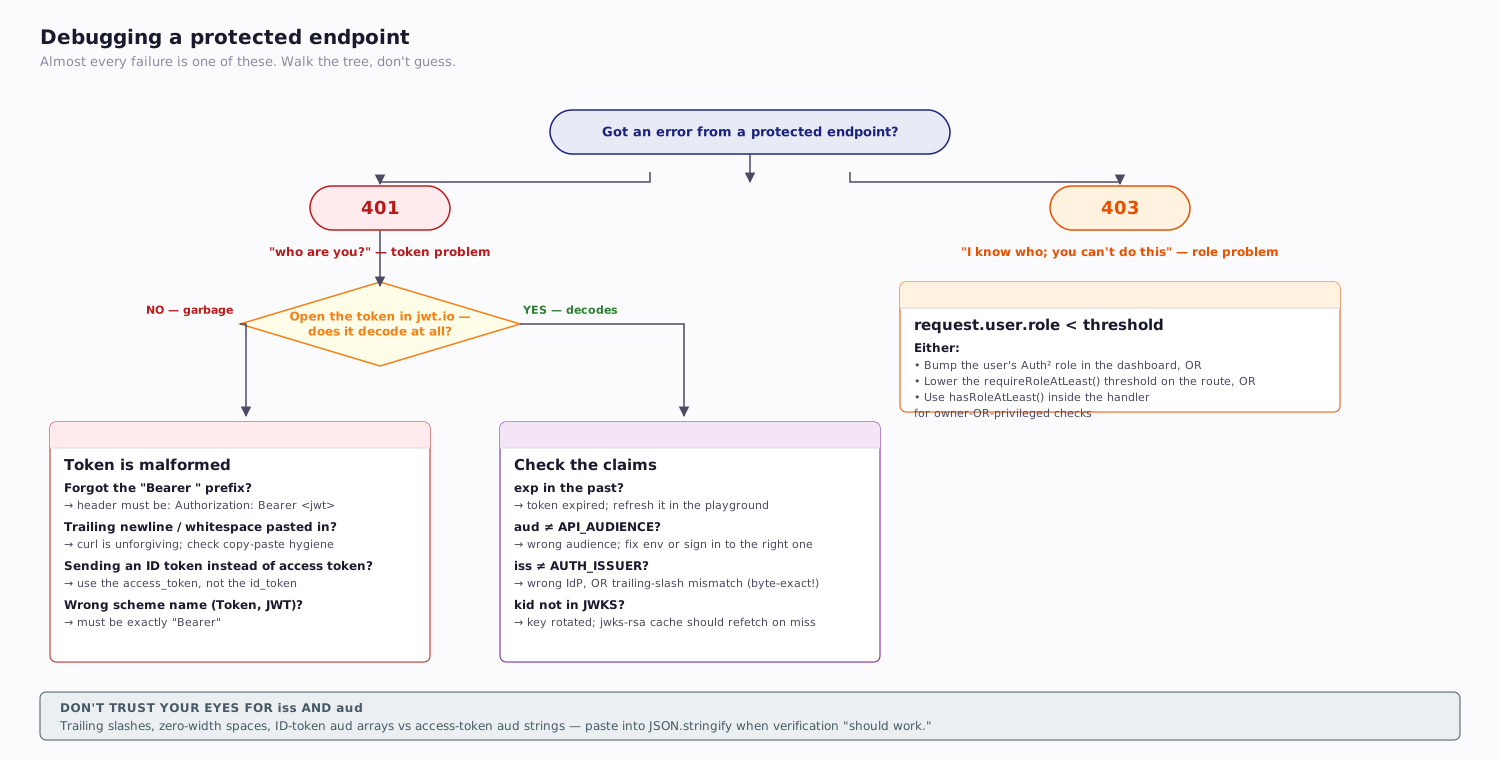
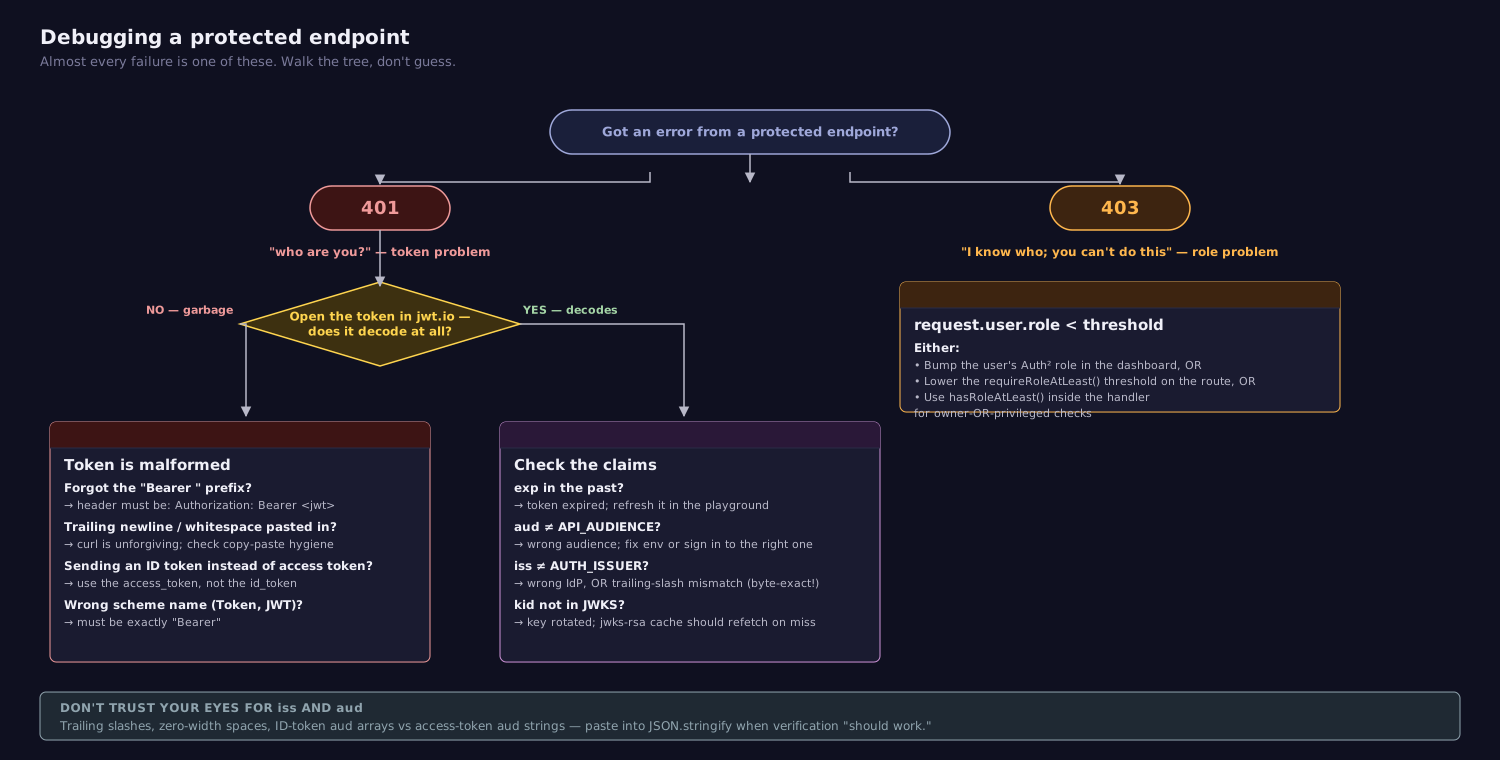
9.1 Common errors and root causes¶
| Symptom | Likely cause | Fix |
|---|---|---|
401 Invalid or missing token on every request |
Forgot Authorization: Bearer ... header, or wrong scheme name (Token, JWT) |
Use exactly Authorization: Bearer <jwt> |
401, token decodes fine on jwt.io |
aud claim doesn't match API_AUDIENCE env var |
Update .env to match the audience the token was issued for, or sign in against the correct audience |
401, token's iss looks right by eye |
Trailing slash in AUTH_ISSUER |
Remove the trailing slash. iss is byte-exact |
401, started suddenly after no code change |
Token expired (default 1 hour for Auth²) | Refresh the token in the playground, or sign in again |
500 on first request after deploy |
AUTH_ISSUER or API_AUDIENCE not set in production env |
Configure the env vars on your hosting platform; the boot-time throw will surface this loudly |
500 with "kid not found" |
JWKS cache stale after an Auth² key rotation | The jwks-rsa cache (10 min) refetches automatically; if it doesn't, restart your server |
403 Insufficient permissions for a user that should pass |
Wrong gate — requireRole('Admin') instead of requireRoleAtLeast('Admin') |
Use the "at least" gate unless you really mean exact-match |
Don't trust your eyes for iss and aud
Strings that look identical sometimes aren't. A trailing slash, a zero-width space pasted from a doc, an Aud versus aud, an ID token's aud array versus an access token's aud string. When verification fails and you've eyeballed the values four times, paste them into JSON.stringify or compare byte lengths.
10 What You Are NOT Doing (And Why)¶
A lot of the auth machinery you might expect to write is missing from this guide. That's intentional — Auth² owns those pieces, not you.
- You are not implementing OAuth2 grant flows. The authorization code flow with PKCE, the redirect dance, the consent screen — Auth² handles all of that. Your front-end (the Token Playground, your group's consumer app in later sprints) initiates it; your back-end never sees it. (Week 7 covers grant flows in depth — by then you'll already be using them.)
- You are not storing passwords. No bcrypt, no salt management, no password reset flow. Auth² owns user credentials globally; your app holds zero password material.
- You are not minting tokens. No
jwt.sign(), noJWT_SECRETin your env, no/auth/loginroute. The authorization server has the private key. Your API only verifies. - You are not implementing refresh logic. When an access token expires, the front-end exchanges its refresh token at Auth²'s
/tokenendpoint to get a new access token. Your API just sees a stream of valid bearer tokens with sliding expiries. (Concept reading §4.6 for the why.)
What you are doing is verifying tokens and mapping sub to your own user records. That's it. The narrowness of the responsibility is the point — it's what makes auth-via-IdP scalable across many APIs in a tenant.
11 Summary¶
| Concept | Key Point |
|---|---|
requireAuth |
Verifies RS256 token via JWKS; pins aud, iss, algorithms: ['RS256']; attaches request.user |
AUTH_ISSUER |
Byte-exact issuer URL; no trailing slash; matches the iss claim |
API_AUDIENCE |
Your group's audience string; matches the aud claim; note: API_, not AUTH_ |
| JWKS URL | Derived in code as ${AUTH_ISSUER}/.well-known/jwks.json; no env var needed |
algorithms: ['RS256'] |
Required — defends against alg: none and RS256→HS256 key confusion |
resolveLocalUser |
Helper, not middleware; upserts a local User row keyed by sub; called from handlers that need a User PK |
| Userinfo response | { sub, email, name, role, tenant? }; name is concatenated; no username field |
| Role hierarchy | User < Moderator < Admin < SuperAdmin < Owner (low → high) |
requireRole(role) |
Exact match; Admin does NOT admit Owner |
requireRoleAtLeast(minRole) |
Minimum-tier match; what you usually want |
hasRoleAtLeast(role, minRole) |
Boolean predicate for in-handler ownership-OR-privilege checks |
| 401 vs 403 | 401 = no/bad token; 403 = valid token, insufficient role |
| Token Playground | https://tcss460-token-playground.onrender.com — get a bearer token without walking the OAuth flow |
12 References¶
Library Documentation:
express-jwt— Express middleware that decodes Bearer JWTs and validates standard claims.jwks-rsa— JWKS client that pairs withexpress-jwtfor asymmetric verification with caching.- Express middleware guide — How Express composes middleware arrays.
Related Course Materials:
- Week 5 — Authentication & Authorization Concepts — Theory companion. The §4.5 audience/issuer story, §5.4 IdP/app split, §8 RS256 vs HS256 trust model, and §9 JWKS distribution are the conceptual base for this guide.
- Sprint 3 — Authentication & Authorization — Where students apply this guide to their own group's API.
- Auth Concepts — Common Mistakes — The §13.7 (audience/issuer) and §13.8 (algorithm confusion) entries map directly onto the verification options in this guide.
Standards & Specifications:
- RFC 7519 — JSON Web Token (JWT) — JWT structure and claim semantics.
- RFC 7517 — JSON Web Key (JWK) — The format published at
/.well-known/jwks.json. - OpenID Connect Core 1.0 — The userinfo endpoint contract.
13 Further Reading¶
External Resources
- Auth0 — A look at the latest draft for JWT Best Current Practices — RFC 8725 distilled. The algorithm-pinning rationale lives here.
express-jwtexamples — More patterns (custom error handlers, conditional auth, token sources beyond theAuthorizationheader).jwks-rsaconfiguration reference — Cache tuning, rate-limit knobs, key-rotation behavior.- Aaron Parecki — OAuth 2 Simplified — Background on the grant flows you're not implementing here, useful for Week 7.
This guide is part of TCSS 460 — Client/Server Programming, School of Engineering and Technology, University of Washington Tacoma.