The Relational Model & Data Modeling
TCSS 460 — Client/Server Programming
Every web application you use — from Netflix to Canvas to Amazon — stores data in a database. This reading introduces the relational model: how data is organized into tables with defined relationships, and how you design a schema that keeps your application's data consistent, queryable, and correct. If you have ever wished your Java ArrayList could survive a program restart, you are about to learn the tool that makes that possible.
About the Examples in This Reading
Throughout this reading, you will see examples and actual SQL that relate to a movie review application — a domain similar to your group project. These examples are not requirements and not usable code. They exist to illustrate database concepts in a context that feels familiar. Your group must determine its own data model and schema for your project.
1 Why Databases?
Consider a Java program that stores movie reviews. You might write something like this:
List<Review> reviews = new ArrayList<>();
reviews.add(new Review("Inception", 5, "Mind-bending masterpiece"));
reviews.add(new Review("The Room", 1, "So bad it's good"));
This works while the program is running. The moment the JVM shuts down — whether from a crash, a redeployment, or simply closing the terminal — every review is gone. The data lived in heap memory and died with the process.
1.1 The Persistence Problem
You could serialize the list to a file. Java's ObjectOutputStream or a simple CSV writer would get the job done. But file-based storage breaks down quickly:
- Concurrent access. Two users writing to the same file at the same time will corrupt it.
- Querying. Finding all 5-star reviews means reading the entire file and filtering in Java.
- Relationships. If reviews reference users and movies, you need multiple files that stay in sync.
- Scaling. A flat file with 10 million rows is slow to search without an index.
Databases solve all of these problems. A database management system (DBMS) is software purpose-built for storing, querying, and protecting structured data. It handles concurrency, indexing, relationships, and crash recovery so your application code does not have to.
1.2 Why Relational?
There are many kinds of databases — document stores (MongoDB), key-value stores (Redis), graph databases (Neo4j). The relational database is the oldest, most widely deployed, and most thoroughly battle-tested model. PostgreSQL, MySQL, SQLite, Oracle, and SQL Server are all relational.
The relational model matters because:
- It provides a mathematical foundation for organizing data (based on set theory and predicate logic).
- It enforces data integrity through constraints and types, catching bugs before they reach your application.
- It supports complex queries across related data using SQL — a declarative language designed specifically for this purpose.
- It is the database you are most likely to encounter in professional web development.
In this course, you will use PostgreSQL — a powerful, open-source relational database — as the data layer for your web API.
2 The Relational Model
The relational model was introduced by Edgar F. Codd in a 1970 paper at IBM (Codd, 1970). The core idea is deceptively simple: organize all data into tables (formally called relations), where each table has a fixed set of columns and a variable number of rows.
2.1 Tables, Rows, and Columns
A table represents a collection of entities of the same type. A row (or tuple) represents a single entity. A column (or attribute) represents a property of that entity.
Here is a users table:
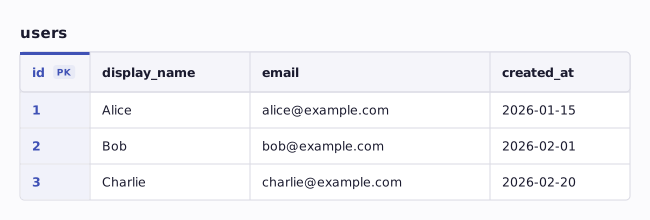
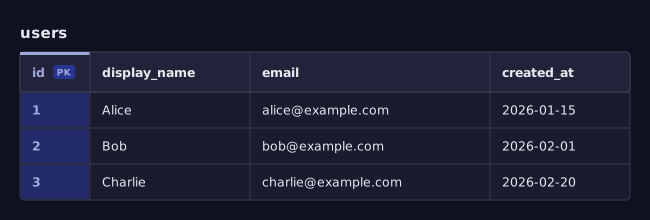
Every row has the same structure. You cannot have a row with an extra column or a missing column. This uniformity is what makes relational data so predictable and queryable.
2.2 The Java Analogy
If you come from Java, the mapping is direct:
| Relational Concept | Java Equivalent |
|---|---|
| Table | A class definition (class User) |
| Column | A field in that class (String email) |
| Row | An instance of that class (new User(...)) |
| Table contents | An ArrayList<User> holding all instances |
| Schema | The set of all class definitions in your project |
When you write a Java class, you define the shape of data:
public class User {
    private int id;
    private String displayName;
    private String email;
    private LocalDateTime createdAt;
}
A relational table definition does the same thing. The class defines what fields exist and their types. Each object is one row. The difference is that a database table persists to disk, supports concurrent access, and can be queried with SQL — your ArrayList<User> cannot do any of those things.
2.3 Schema as a Contract
A schema is the complete structural definition of your database: which tables exist, what columns each table has, what types those columns use, and what rules apply.
Think of a schema the way you think of a Java interface. An interface defines a contract — "any class that implements this must provide these methods with these signatures." A database schema defines a similar contract — "any row in this table must have these columns with these types." Just as the Java compiler rejects code that violates an interface, the database rejects data that violates the schema.
The schema is defined using SQL's Data Definition Language (DDL). Here is the DDL for the users table shown above:
CREATE TABLE users (
    id         SERIAL PRIMARY KEY,
    display_name VARCHAR(100) NOT NULL,
    email      VARCHAR(255) NOT NULL UNIQUE,
    created_at TIMESTAMP DEFAULT NOW()
);
Do not worry about every keyword yet — we will cover them throughout this reading. The important point is that the schema is explicit, written in code, and enforced by the database engine.
3 Primary Keys and Identity
In Java, two objects can have identical field values but still be different objects — they occupy different memory addresses. In a relational database, rows do not have memory addresses. You need an explicit mechanism to identify each row uniquely. That mechanism is the primary key.
3.1 What is a Primary Key?
A primary key is a column (or combination of columns) whose value is guaranteed to be unique across all rows in the table and never null. It is the row's identity.
In the users table above, id is the primary key. No two users will ever share the same id, and no user will have a null id.
Think of it like a student ID number at UW. Many students might share the name "Alex," but no two students share the same student number. The student number is the primary key of the student table.
3.2 Auto-Increment Keys
The most common approach is to let the database generate a sequential integer for each new row. In PostgreSQL, the SERIAL type does this:
When you insert a new user, you do not provide an id — the database assigns the next integer automatically (1, 2, 3, ...). This is simple, efficient, and works well for most applications.
3.3 UUID Keys
An alternative is the UUID (Universally Unique Identifier) — a 128-bit random value like 550e8400-e29b-41d4-a716-446655440000. UUIDs are useful when:
- You need IDs that are globally unique across multiple databases or services.
- You do not want sequential IDs to be guessable (e.g., a user should not be able to guess another user's profile URL by incrementing a number).
For this course, we will typically use auto-increment (SERIAL) keys for simplicity. Either approach is valid in production systems.
3.4 Natural Keys vs. Surrogate Keys
A natural key is a column that already has meaning in the domain — like an email address or a Social Security number. A surrogate key is a column that exists solely to serve as an identifier — like an auto-increment id.
We almost always use surrogate keys for primary keys:
- Natural keys can change (a user might change their email).
- Natural keys can have duplicates in edge cases (data entry errors).
- Natural keys are often strings, which are slower to compare and index than integers.
The id column is a surrogate key. The email column is a natural key — we enforce its uniqueness with a UNIQUE constraint, but it is not the primary key.
4 Data Types
Every column in a table has a data type that determines what values it can hold. This is analogous to Java's type system — just as you declare int age or String name in Java, you declare INTEGER or VARCHAR(100) in SQL.
4.1 Common Column Types
PostgreSQL supports dozens of data types. Here are the ones you will use most often:
| SQL Type | Java Equivalent | Description | Example |
|---|---|---|---|
INTEGER |
int |
Whole numbers (-2B to +2B) | 42 |
BIGINT |
long |
Large whole numbers | 9223372036854775807 |
SERIAL |
int (auto-assigned) |
Auto-incrementing integer | 1, 2, 3, ... |
VARCHAR(n) |
String (max length) |
Variable-length text up to n chars |
'Alice' |
TEXT |
String |
Unlimited-length text | Long review body |
BOOLEAN |
boolean |
TRUE or FALSE |
TRUE |
TIMESTAMP |
LocalDateTime |
Date and time | '2026-03-28 14:30:00' |
NUMERIC(p,s) |
BigDecimal |
Exact decimal (precision, scale) | 9.99 |
UUID |
UUID |
128-bit unique identifier | '550e8400-...' |
4.2 Choosing the Right Type
Choosing the right type is not cosmetic — it affects storage, performance, and correctness. Some guidelines:
Use VARCHAR(n) when you know a reasonable maximum length. A display_name column rarely needs more than 100 characters. Setting a limit prevents accidental storage of enormous strings.
Use TEXT for free-form content. Review bodies and comments can be any length. TEXT imposes no length limit in PostgreSQL and performs identically to VARCHAR — the only difference is whether you want an explicit upper bound.
Use INTEGER or BIGINT for counts and IDs. Do not use VARCHAR for a field that is always numeric. The database cannot do arithmetic on strings, and comparisons are slower.
Use BOOLEAN for binary state. Do not store 'yes'/'no' as strings or 0/1 as integers when the value is inherently true-or-false. BOOLEAN is self-documenting and type-safe.
Use TIMESTAMP for points in time. Storing dates as strings ('2026-03-28') prevents the database from doing date arithmetic, timezone conversion, and range queries.
Use NUMERIC for money and ratings. Floating-point types (REAL, DOUBLE PRECISION) introduce rounding errors. If a rating is 4.5, store it as NUMERIC(2,1), not as a REAL.
The parallel to Java is clear: you would not use a String to store a number in Java, and you should not use VARCHAR to store a number in SQL. Types are not just labels — they are contracts that the database enforces.
5 Relationships Between Tables
A single table can store one kind of entity. Real applications have multiple kinds of entities that are related to each other. Users write reviews. Reviews are about movies. Movies belong to genres. These relationships are the heart of relational modeling.
5.1 Foreign Keys: The Link Between Tables
A foreign key is a column in one table that references the primary key of another table. It is the mechanism that connects rows across tables.
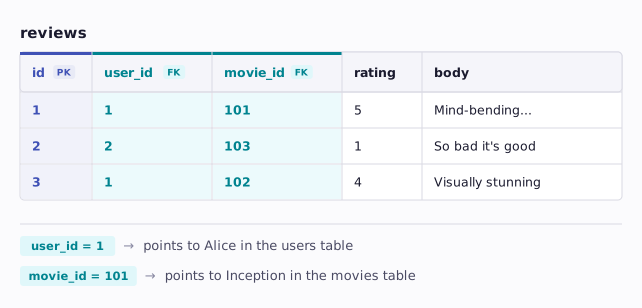
Consider a reviews table where each review is written by a user and is about a movie. We have not defined the movies table yet — we will in section 8. For now, just notice that movie_id references it the same way user_id references users:
CREATE TABLE reviews (
    id         SERIAL PRIMARY KEY,
    user_id    INTEGER NOT NULL REFERENCES users(id),
    movie_id   INTEGER NOT NULL REFERENCES movies(id),
    rating     INTEGER NOT NULL CHECK (rating BETWEEN 1 AND 5),
    body       TEXT,
    created_at TIMESTAMP DEFAULT NOW()
);
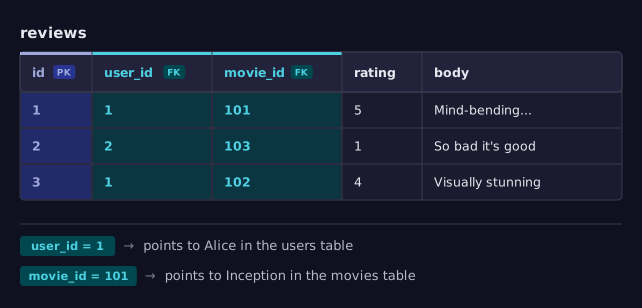
The user_id and movie_id columns are foreign keys. Each stores the id of a row in another table. The REFERENCES clause tells the database: "this value must match an existing id in the referenced table."
In Java terms, a foreign key is like an object reference. When a Review object has a User author field, it points to a User object. A foreign key does the same thing, but instead of a memory address, it uses the primary key value:
public class Review {
    private int id;
    private User author;  // object reference in Java
    private Movie movie;  // object reference in Java
    private int rating;
    private String body;
}
5.2 One-to-Many Relationships
The users-to-reviews relationship is one-to-many: one user can write many reviews, but each review belongs to exactly one user.
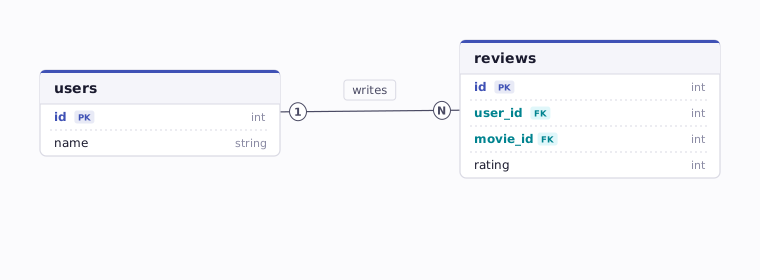
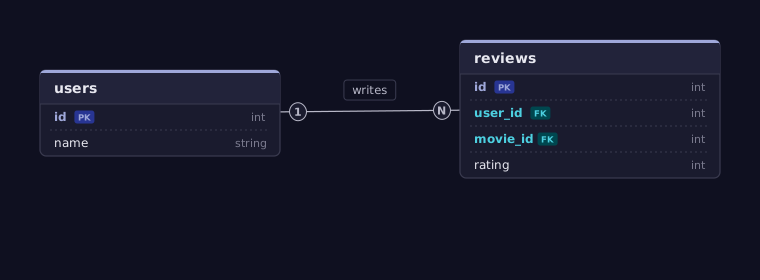
The pattern is always the same: the foreign key lives on the "many" side. Each review row contains the user_id of its author. You never put a list of review IDs inside the user row — relational databases do not have array-of-references the way Java objects do.
In Java, you might model this as:
public class User {
    private int id;
    private String name;
    private List<Review> reviews;  // one user has many reviews
}
In a relational database, that List<Review> does not exist as a column. Instead, each Review row points back to its User via the user_id foreign key. When you need all reviews for a user, you query the reviews table filtered by user_id.
One-to-many is the most common relationship in web applications. Other examples:
- One movie has many reviews
- One user has many login sessions
- One genre has many movies
5.3 Many-to-Many Relationships
Some relationships go both ways. Consider users and movies in a "watchlist" feature: one user can add many movies to their watchlist, and one movie can appear on many users' watchlists. This is a many-to-many relationship.
Relational databases cannot represent many-to-many directly. You need a join table (also called a junction table or associative table) that sits between the two entities:
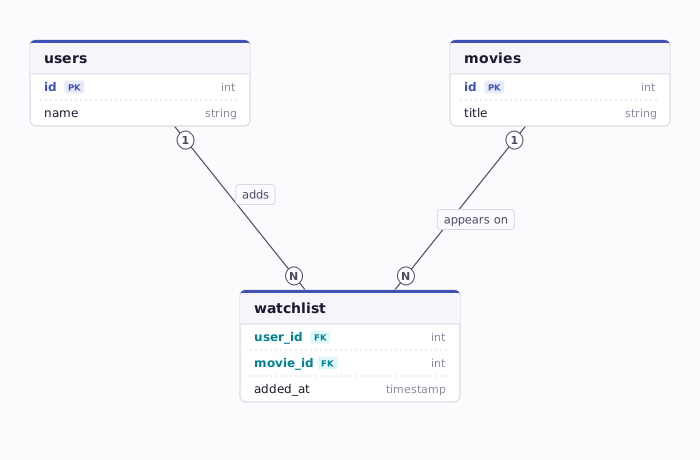
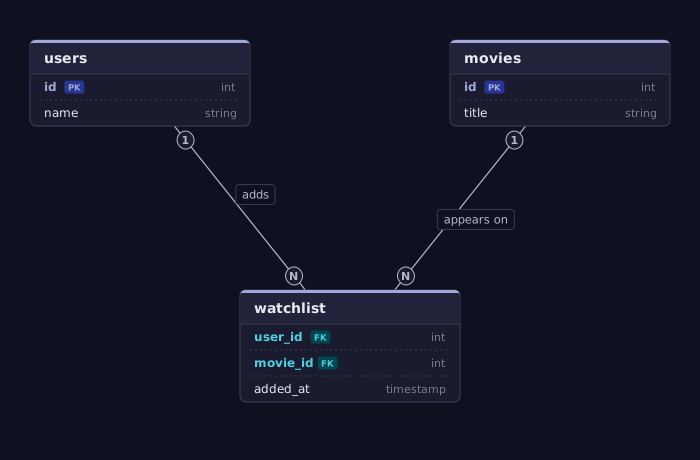
The watchlist table has two foreign keys — one pointing to users, one pointing to movies. Each row represents one user-movie pairing:
CREATE TABLE watchlist (
    user_id  INTEGER REFERENCES users(id),
    movie_id INTEGER REFERENCES movies(id),
    added_at TIMESTAMP DEFAULT NOW(),
    PRIMARY KEY (user_id, movie_id)
);
Notice the composite primary key: PRIMARY KEY (user_id, movie_id). This ensures a user cannot add the same movie to their watchlist twice — the combination must be unique.
In Java, you might model this as a Set<Movie> on the User class and a Set<User> on the Movie class. The join table is the relational equivalent of maintaining both sides of that bidirectional reference.
5.4 Visualizing Relationships
When designing a schema, it helps to sketch an entity-relationship (ER) diagram. Here is a simplified view for a movie review application:
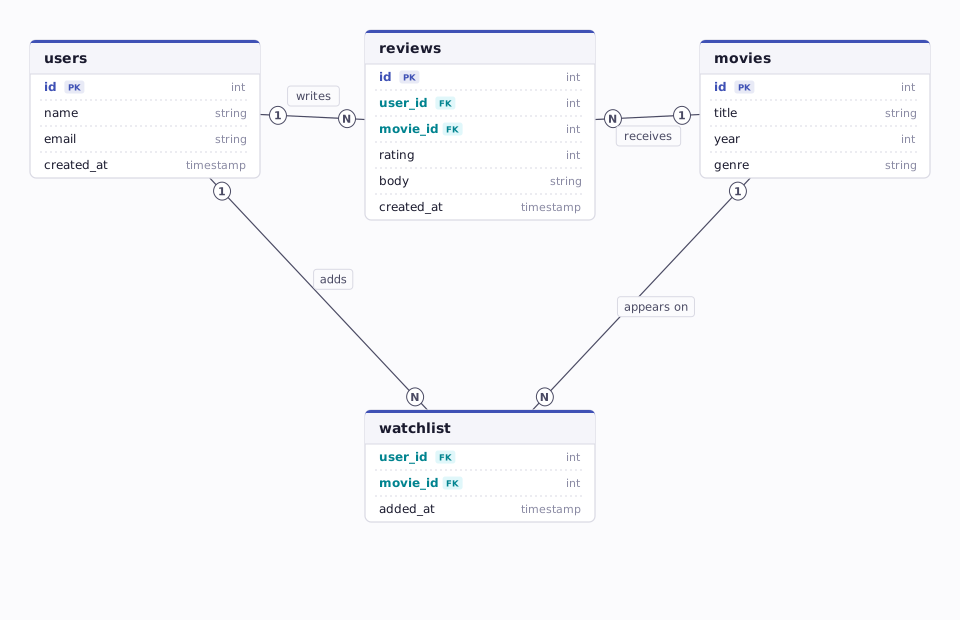
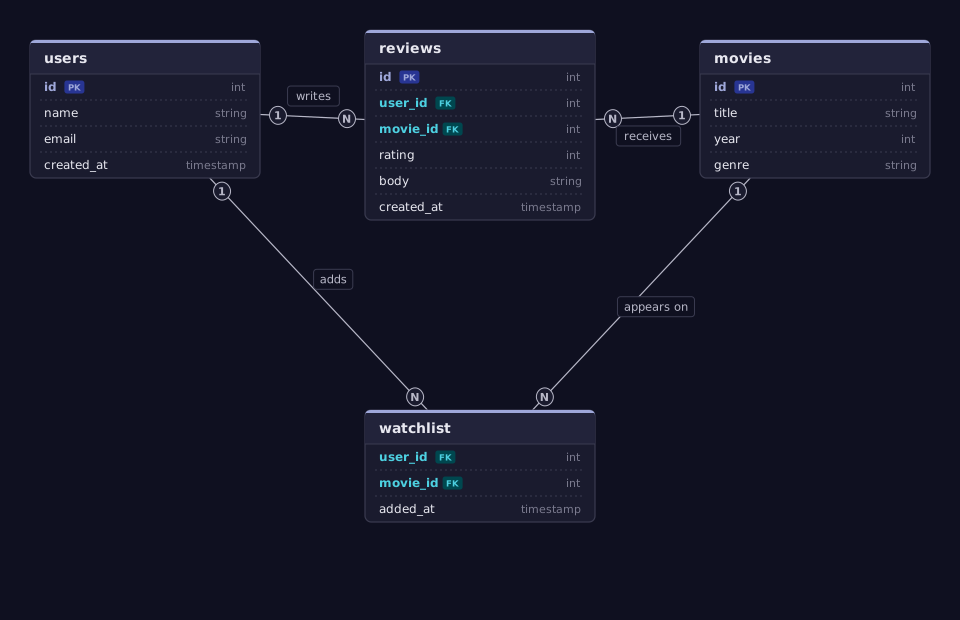
Reading this diagram:
- A user can write many reviews (1:M from
userstoreviews). - A movie can have many reviews (1:M from
moviestoreviews). - Users and movies have a many-to-many relationship through the
watchlistjoin table.
5.5 One-to-One Relationships
You might wonder: what about one-to-one? If every user has exactly one profile, is that a separate table?
Usually, no. A one-to-one relationship is just columns in the same table. A user's display_name, email, and created_at are all one-to-one with the user — and they live in the users table directly.
You would split into a separate table only when there is a specific reason:
- Access control. Sensitive data (password hashes, API keys) in a separate table so it can have different access permissions.
- Optional data. If most users will not have the data (e.g., a detailed bio), a separate table avoids many null columns.
- Performance. Separating rarely-accessed large columns (like a profile image blob) from frequently-queried small columns.
For this course, one-to-one will almost always mean "more columns on the same table."
6 Data Integrity and Constraints
One of the most powerful features of a relational database is its ability to reject invalid data. Constraints are rules you declare in the schema that the database enforces automatically. They are your first line of defense against bugs — catching bad data before it ever reaches your application code.
In your Java courses, you learned about invariants — conditions that must always be true about an object. A Rating object might enforce that its value is between 1 and 5. You maintained invariants through private fields, constructor validation, and careful setter methods:
public class Rating {
    private final int value;

    public Rating(int value) {
        if (value < 1 || value > 5) {
            throw new IllegalArgumentException("Rating must be 1-5");
        }
        this.value = value;
    }
}
Database constraints are the same idea, applied to persistent data. Instead of throwing an IllegalArgumentException, the database rejects the INSERT or UPDATE statement. The principle is identical — define the rules once, enforce them automatically, and never trust calling code to get it right on its own.
6.1 NOT NULL
A NOT NULL constraint means the column must always have a value. No row can be inserted or updated with a null in that column.
Why it matters: If every user must have a display name, enforce it in the schema. Without NOT NULL, your application could accidentally insert a user with no name, and you would only discover the problem when the front end tries to render a blank name badge.
In Java, this is like the difference between allowing a field to be null and requiring it in the constructor. The database provides the guarantee that Java's type system cannot.
6.2 UNIQUE
A UNIQUE constraint ensures no two rows have the same value in the specified column(s).
This prevents two users from registering with the same email address. If your application tries to insert a duplicate, the database returns an error — your API can catch it and return a meaningful response to the client.
6.3 CHECK
A CHECK constraint validates that a value satisfies a condition.
This guarantees every rating is between 1 and 5, inclusive. A client sending rating: 0 or rating: 99 will be rejected by the database. You should also validate in your application code — but the database constraint is a safety net that catches anything your validation misses.
6.4 DEFAULT
A DEFAULT provides a value when none is specified during insertion.
When you insert a new row without specifying created_at, the database fills it in with the current timestamp. This is convenient and eliminates an entire category of bugs where code forgets to set a timestamp.
6.5 Foreign Key Constraints
We saw foreign keys in the relationships section. The constraint aspect is worth highlighting separately:
This guarantees referential integrity — you cannot create a review that references a user who does not exist. You also cannot delete a user who has reviews (unless you explicitly configure cascade behavior). The database prevents your data from becoming an inconsistent mess of dangling references.
In Java, a dangling reference would be like having a Review object whose author field points to a User that was garbage-collected. Java prevents this with the garbage collector. A database prevents the equivalent problem with foreign key constraints.
6.6 Why Constraints Matter
You might wonder: why not just validate in the application code? You should — but constraints provide an additional layer of protection:
- Multiple clients. Your web API is not the only thing that can write to the database. Admin scripts, data migrations, and other services might bypass your API. The database constraints protect against all of them.
- Defense in depth. Application bugs happen. A constraint catches the data error even if your validation code has a bug.
- Documentation. Constraints make the rules explicit in the schema. A new developer reading the
CREATE TABLEstatement immediately understands: ratings are 1-5, emails are unique, every review has an author.
The stakes are higher than they might seem from a classroom exercise. In a production database with thousands or millions of rows, a single corrupted record can be extraordinarily difficult to find. Bad data does not announce itself — it silently propagates. A review with a null user_id breaks the reviews page. An email that violated a uniqueness constraint causes login failures for the wrong user. A rating of 0 skews every average on the site. By the time someone notices, the bad data may have been served to users, exported to analytics, or replicated to backup systems. Fixing it often means writing custom migration scripts and manually verifying affected rows. Constraints prevent these problems at the source — it is always cheaper to reject bad data on the way in than to find and repair it after the fact.
7 Normalization (Briefly)
Normalization is the process of organizing your tables to reduce data duplication and avoid update anomalies. The core principle is simple: do not repeat data — reference it.
7.1 The Problem with Duplication
Imagine storing movie information directly in the reviews table:
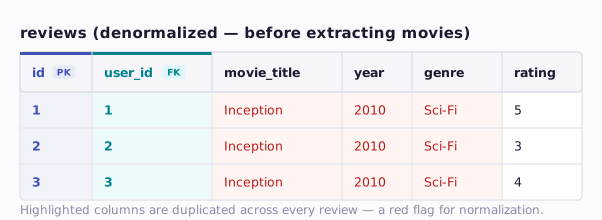
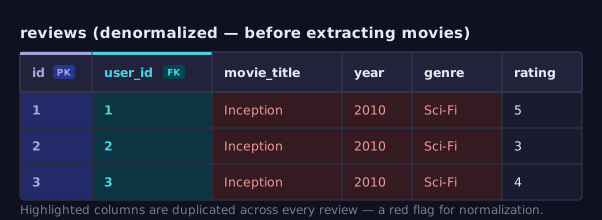
The movie title, year, and genre are duplicated in every review of that movie. This creates three problems:
- Wasted storage. The same data is stored repeatedly.
- Update anomalies. If you need to fix a typo in the genre, you must update every row. Miss one, and your data is inconsistent.
- Insertion anomalies. You cannot record a movie's information until someone writes a review of it.
7.2 The Normalized Solution
Move the movie data into its own table and reference it:
CREATE TABLE movies (
    id    SERIAL PRIMARY KEY,
    title VARCHAR(255) NOT NULL,
    year  INTEGER,
    genre VARCHAR(100)
);

CREATE TABLE reviews (
    id       SERIAL PRIMARY KEY,
    user_id  INTEGER NOT NULL REFERENCES users(id),
    movie_id INTEGER NOT NULL REFERENCES movies(id),
    rating   INTEGER NOT NULL CHECK (rating BETWEEN 1 AND 5),
    body     TEXT,
    created_at TIMESTAMP DEFAULT NOW()
);
Now the movie's title, year, and genre are stored once. Each review references the movie by its id. Fixing a typo requires updating a single row in the movies table.
The Java analogy is straightforward. You would not copy all of a User's fields into every Review object. You would store a reference to the User object:
// BAD: duplicating data
public class Review {
    private String authorName;   // copied from User
    private String authorEmail;  // copied from User
    private String movieTitle;
    private int rating;
}

// GOOD: referencing other objects
public class Review {
    private User author;    // reference to User object
    private Movie movie;    // reference to Movie object
    private int rating;
    private String body;
}
The same principle applies in database design. Instead of copying fields, you store a foreign key that references the original row.
7.3 When Denormalization Is Okay
Normalization is the default strategy, but it is not an absolute rule. Sometimes duplicating data is the right call:
- Read performance. Joining many tables on every request can be slow. Storing a frequently-read value alongside the row that needs it can eliminate expensive joins.
- Historical accuracy. If a user changes their display name, should their old reviews show the new name or the old one? Storing the name at the time of the review (a snapshot) might be intentional.
- Caching and derived data. Storing a movie's average rating in the
moviestable (updated on each new review) avoids recalculating it on every page load.
The rule of thumb: normalize first, denormalize with intention. Start with a clean, normalized schema. If you later identify a performance problem caused by excessive joins, denormalize that specific case and document why.
8 From Concept to Schema
Let us bring everything together by designing a schema for a movie review application — the kind of application you will build in this course.
8.1 Identifying the Entities
Start by listing the nouns in your domain — these are candidates for tables:
- Users — people who use the application
- Movies — the films being reviewed (in our project, this data comes from TMDB, but we still need to reference movies in our own database)
- Reviews — written opinions with a rating
- Watchlist entries — movies a user wants to see
8.2 Mapping Relationships
Next, identify how these entities relate:
- A user writes many reviews (one-to-many)
- A movie has many reviews (one-to-many)
- A user has many watchlist entries, and a movie can be on many watchlists (many-to-many)
8.3 Defining the Tables
Now write the DDL. Start with tables that have no foreign keys (they depend on nothing), then add tables that reference them:
-- Users: no foreign keys, so create this first
CREATE TABLE users (
    id           SERIAL PRIMARY KEY,
    display_name VARCHAR(100) NOT NULL,
    email        VARCHAR(255) NOT NULL UNIQUE,
    password_hash VARCHAR(255) NOT NULL,
    role         VARCHAR(20) DEFAULT 'user',
    created_at   TIMESTAMP DEFAULT NOW()
);

-- Movies: stores references to external TMDB data
CREATE TABLE movies (
    id           SERIAL PRIMARY KEY,
    tmdb_id      INTEGER NOT NULL UNIQUE,
    title        VARCHAR(255) NOT NULL,
    release_year INTEGER,
    poster_path  VARCHAR(255),
    added_at     TIMESTAMP DEFAULT NOW()
);

-- Reviews: references both users and movies
CREATE TABLE reviews (
    id         SERIAL PRIMARY KEY,
    user_id    INTEGER NOT NULL REFERENCES users(id),
    movie_id   INTEGER NOT NULL REFERENCES movies(id),
    rating     INTEGER NOT NULL CHECK (rating BETWEEN 1 AND 5),
    body       TEXT,
    created_at TIMESTAMP DEFAULT NOW(),
    UNIQUE (user_id, movie_id)  -- one review per user per movie
);

-- Watchlist: join table for user-movie many-to-many
CREATE TABLE watchlist (
    user_id    INTEGER REFERENCES users(id) ON DELETE CASCADE,
    movie_id   INTEGER REFERENCES movies(id) ON DELETE CASCADE,
    added_at   TIMESTAMP DEFAULT NOW(),
    PRIMARY KEY (user_id, movie_id)
);
8.4 Reading the Schema
Take a moment to read this schema as a specification. Without any application code, you can determine:
- Every user has a unique email and a display name.
- Passwords are stored as hashes (never plain text).
- A user can have a role (defaulting to
'user'). - Movies are linked to TMDB via
tmdb_id, which is unique — no duplicate movie entries. - Every review has a rating between 1 and 5.
- A user can review a movie at most once (
UNIQUE (user_id, movie_id)). - Deleting a user cascades to their watchlist entries (but not their reviews — you might want to keep reviews for historical purposes).
This is the power of a well-designed schema. It encodes your business rules directly in the data layer. The schema is documentation, validation, and enforcement all in one place.
8.5 The Design Process
Designing a schema is an iterative process. Here is a practical approach:
- List your entities — the nouns in your domain.
- Define columns — what properties does each entity have? What types?
- Identify relationships — how do entities connect? One-to-many or many-to-many?
- Add constraints — what rules must the data follow? NOT NULL? UNIQUE? CHECK?
- Review for normalization — is any data duplicated? Can you extract it into its own table?
- Write the DDL — make it concrete with
CREATE TABLEstatements. - Test with sample data — insert a few rows and try some queries. Do the results make sense?
This process will feel familiar if you have designed Java class hierarchies. The difference is that you are designing for persistence, relationships, and integrity rather than behavior and inheritance.
9 Summary
| Concept | Key Point |
|---|---|
| Database | Software that stores, queries, and protects structured data — solving persistence, concurrency, and integrity |
| Relational model | Data organized into tables (rows and columns) with defined relationships |
| Table | A collection of entities of the same type — like a Java ArrayList<YourClass> |
| Schema | The structural definition of all tables, columns, and rules — like Java interfaces and class definitions |
| Primary key | A column that uniquely identifies each row — every table needs one |
| Foreign key | A column that references another table's primary key — the link between related data |
| One-to-many | One entity has many related entities (user → reviews); foreign key on the "many" side |
| Many-to-many | Both sides have many; requires a join table with two foreign keys |
| Constraints | Rules enforced by the database: NOT NULL, UNIQUE, CHECK, DEFAULT, REFERENCES |
| Normalization | Do not repeat data — reference it; denormalize only with intention |
| DDL | SQL statements (CREATE TABLE) that define the schema |
10 References
This reading draws from the following sources:
Foundational Research:
- Codd, E. F. (1970). A Relational Model of Data for Large Shared Data Banks. Communications of the ACM, 13(6), 377-387. https://doi.org/10.1145/362384.362685
Technical Documentation:
- PostgreSQL Documentation — Data Types — Official reference for all PostgreSQL data types.
- PostgreSQL Documentation — Constraints — Official reference for table constraints (NOT NULL, UNIQUE, CHECK, foreign keys).
- PostgreSQL Documentation — CREATE TABLE — Full DDL syntax reference.
Standards & Specifications:
- SQL:2023 Standard (ISO/IEC 9075) — The international standard for SQL. PostgreSQL closely follows this standard.
11 Further Reading
External Resources
- PostgreSQL Tutorial - Beginner-friendly tutorials covering PostgreSQL from installation through advanced queries.
- Database Normalization Explained (1NF, 2NF, 3NF) - Visual walkthrough of normalization forms with examples.
- Use The Index, Luke - A guide to database indexing and SQL performance, explained for developers.
- Prisma's Data Guide — What are Database Schemas? - Accessible introduction from the ORM you will use later in this course.
This reading is part of TCSS 460 — Client/Server Programming, School of Engineering and Technology, University of Washington Tacoma.