Async Concepts
TCSS 460 — Client/Server Programming
Every meaningful operation in a web server — reading a file, querying a database, calling an external API — takes time. Asynchronous programming is how Node.js handles that time without grinding to a halt. This guide builds the mental model you need before writing any server-side TypeScript: why async exists, how the event loop works, and the patterns that make it possible.
1 Why Async Matters for Web APIs
Imagine a coffee shop with one barista. A customer orders a pour-over that takes three minutes. In a synchronous coffee shop, the barista stands there watching the water drip for three minutes while a line of twenty people waits. In an asynchronous coffee shop, the barista starts the pour-over, takes the next customer's order, starts their espresso, takes the next order — and circles back to finish each drink when it's ready.
Node.js is that single barista. It runs your TypeScript on one thread. When your Express route handler needs to:
- Read a file from disk
- Query a PostgreSQL database via Prisma
- Call an external API like TMDB
- Send an email or write a log
...each of those operations involves waiting. Waiting for the disk, the network, the database server. If your code blocks — sits there doing nothing until the result comes back — then every other request to your server is frozen. No other user gets a response until that one operation finishes.
This is not a theoretical problem. A single blocking database query that takes 200 milliseconds means your server can handle at most 5 requests per second. An async server handling the same query can juggle thousands of connections while that query is in flight.
Important
Async programming is not optional in Node.js — it is the fundamental execution model. Every route handler you write in this course will deal with async operations. Understanding this model is not background knowledge; it is a prerequisite for writing any working server code.
1.1 The Scale of the Problem
Consider what happens when a request arrives at a web API:
- The server parses the incoming HTTP request
- A route handler runs
- The handler queries a database (network round trip: 1-50ms)
- The handler might call an external API for additional data (network round trip: 50-500ms)
- The handler builds a JSON response and sends it back
Steps 3 and 4 involve I/O — input/output operations that require waiting for something outside the server process. During that wait, a synchronous server does nothing. An asynchronous server handles other requests.
Now scale that up. Amazon processes tens of thousands of requests per second across their services. Netflix serves over 200 million subscribers, each generating multiple API calls as they browse and stream. Every one of those requests involves database queries, service-to-service calls, and external lookups — all I/O operations that take time. Without async programming, you would need a separate thread (and its associated memory overhead) for every single in-flight request. With async, a single process can coordinate thousands of concurrent operations by simply keeping track of what is waiting and what is ready.
2 Synchronous vs. Asynchronous Execution
2.1 Synchronous: Line by Line, Wait for Each
In synchronous code, each line finishes before the next one starts. This is what you are used to from Java — every method call completes before the next line executes:
// Synchronous execution — each line blocks until complete
const config = readFileSync("config.json", "utf-8");  // blocks here
console.log("Config loaded");                           // runs after file is read
const data = queryDatabaseSync("SELECT * FROM users");  // blocks here
console.log("Data loaded");                             // runs after query finishes
console.log("Done");
The execution order is always: read file, print "Config loaded", query database, print "Data loaded", print "Done". Each step waits for the previous one to finish. If the file read takes 10ms and the database query takes 200ms, the total time is at least 210ms, and nothing else can happen during that time on this thread.
2.2 Asynchronous: Start a Task, Move On, Handle the Result Later
Asynchronous code starts an operation and moves on immediately. When the operation finishes, a callback or promise handles the result:
import { readFile } from "fs";

console.log("Starting...");

readFile("config.json", "utf-8", (error, data) => {
  console.log("Config loaded");
});

console.log("This runs BEFORE the file is loaded!");
Output:
The readFile call starts the file read and returns immediately. The callback function — the (error, data) => { ... } part — runs later, when the file system reports that the read is complete. Meanwhile, the next line of code executes without waiting.
This is fundamentally different from what you are used to. Code does not execute top-to-bottom in the order you read it. The order depends on when operations complete.
2.3 How Node.js Handles Concurrency
You might wonder: if Node.js runs on a single thread, how does it do multiple things at once?
The answer is that your TypeScript code runs on one thread, but Node.js delegates I/O operations — file reads, network requests, database queries — to the operating system, which handles them efficiently outside your thread. Your code is the coordinator: it dispatches work and processes results. The actual waiting happens elsewhere.
This means:
- There is no
Threadclass orExecutorServicelike you may have seen in Java - You never manually create or manage threads
- Shared-state concurrency bugs (race conditions, deadlocks) are largely eliminated because only one piece of your code runs at a time
- The memory overhead per connection is minimal — just the callback waiting to run, not an entire thread stack
Common Misconception
"Single-threaded" does not mean "slow." Node.js delegates I/O operations to the operating system, which handles them efficiently. The single thread is just the coordinator — it dispatches work and processes results. The actual I/O happens outside your thread.
3 The Event Loop
The event loop is the mechanism that makes single-threaded async programming work. You do not need to understand every implementation detail, but you do need a clear mental model of what happens when your code runs.
3.1 Three Key Components
Think of the Node.js runtime as having three parts:
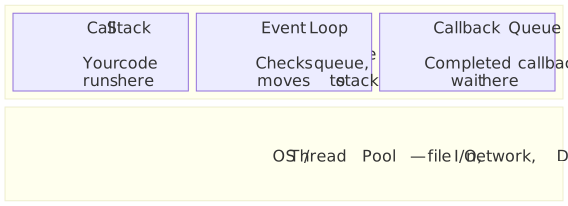
Call Stack: Where your code actually executes. Functions are pushed on when called and popped off when they return. Only one function runs at a time — this is what "single-threaded" means.
Callback Queue: When an async operation completes (file read finishes, HTTP response arrives, timer fires), its callback function is placed in this queue. It waits here until the call stack is empty.
Event Loop: A continuous loop that checks: "Is the call stack empty? If so, take the next callback from the queue and push it onto the stack." That is essentially the whole job.
3.2 Walking Through an Example
Let us trace what happens with this code:
Even though the timeout is 0 milliseconds, the output is always:
Here is why:
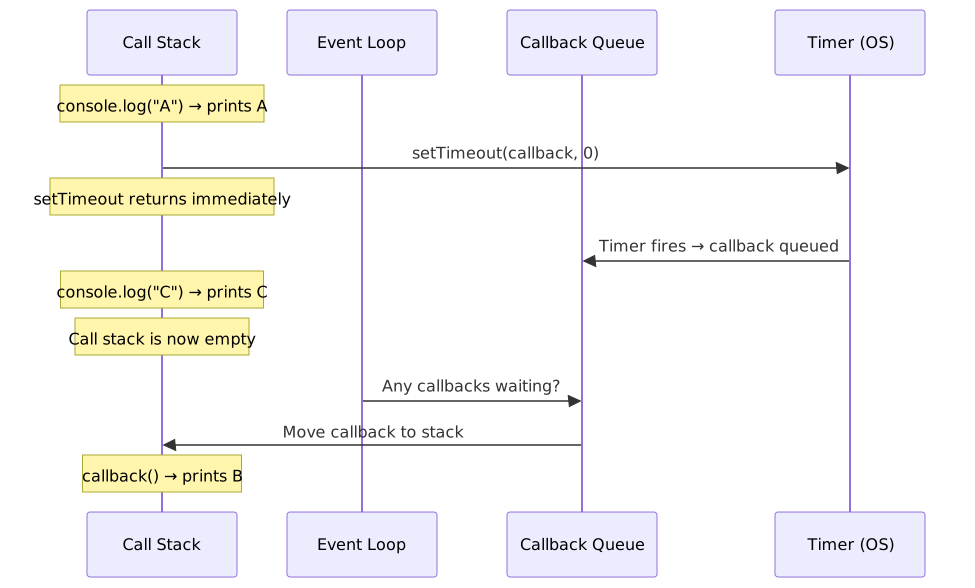
The key insight: even with a 0ms timer, the callback goes through the queue. It cannot run until the call stack is empty. That is why "C" always prints before "B."
3.3 Why This Lets Node.js Handle Thousands of Connections
Now you can see why Node.js scales well for I/O-heavy workloads like web APIs:
- A request comes in. Express pushes your route handler onto the call stack.
- Your handler calls
prisma.user.findMany()— this starts a database query. - The query is delegated to the OS/thread pool. Your handler returns. The call stack is empty.
- While the database is working, the event loop picks up the next incoming request. Another route handler runs.
- The database query completes. Its callback (or promise resolution) is placed in the queue.
- When the stack is empty again, the event loop picks up that callback, and your code processes the query results and sends the response.
With this model, a single Node.js process can handle thousands of concurrent connections — not because it runs thousands of threads, but because it spends almost no time waiting. It dispatches I/O, moves on, and handles results as they arrive.
Gen AI & Learning: Event Loops in AI Systems
The event loop model is not unique to Node.js. Many AI agent frameworks use similar event-driven architectures — dispatching API calls to language models, handling results asynchronously, and managing multiple conversations concurrently. Understanding this pattern prepares you for building systems beyond traditional web APIs.
4 Callbacks — The Original Pattern
Callbacks are the oldest async pattern in Node.js. A callback is a function you pass as an argument to an async function. When the operation completes, your callback is called with the result (or an error).
4.1 The Error-First Convention
Node.js established a convention called error-first callbacks: the first parameter is always an error (or null if there is no error), and the second parameter is the result:
import { readFile } from "fs";

readFile("data.txt", "utf-8", (error, data) => {
  if (error) {
    console.error("Failed to read file:", error.message);
    return;
  }
  console.log("File contents:", data);
});
You pass a function that will be called later, when the I/O operation finishes. This is the fundamental mechanism — everything else in async programming builds on this idea.
4.2 Why Callbacks Fell Out of Favor
Callbacks work fine for a single operation. The problem emerges when you need to do several async operations in sequence — where each step depends on the result of the previous one. You end up nesting callbacks inside callbacks, producing deeply indented code commonly called callback hell or the pyramid of doom:
// Callback hell — each step nests inside the previous
readFile("config.json", "utf-8", (error, configData) => {
  if (error) { /* handle */ return; }
  queryDatabase(config.connectionString, (error, users) => {
    if (error) { /* handle */ return; }
    fetchFromAPI(url, (error, enrichedData) => {
      if (error) { /* handle */ return; }
      console.log("Result:", enrichedData);
    });
  });
});
The problems compound quickly: each level needs its own error handling, the flow reads diagonally instead of top-to-bottom, and combining results from parallel operations is awkward. This motivated the move to promises.
You Will Still See Callbacks
Despite their problems, callbacks are everywhere in older Node.js code and many npm packages. You need to recognize the pattern even though you will not write new code this way.
5 Promises — The Modern Foundation
A Promise is an object that represents a value that will exist in the future. Instead of passing a callback, you get back an object that you can attach handlers to.
5.1 The Mental Model
Think of a promise like an order receipt at a restaurant. You place your order (start an async operation) and get a receipt (a Promise object). The receipt is not your food — it is a placeholder for food that will arrive later. The receipt can be in one of three states:
| State | Meaning | Analogy |
|---|---|---|
| Pending | Operation is still in progress | Your order is being prepared |
| Fulfilled | Operation completed successfully | Your food is ready |
| Rejected | Operation failed | The kitchen is out of that ingredient |
Once a promise moves from pending to fulfilled or rejected, it never changes again. A fulfilled promise stays fulfilled. A rejected promise stays rejected. This is called being settled.
5.2 How Promises Solved Callback Hell
Promises introduced two key improvements: chaining and centralized error handling. Instead of nesting callbacks, you chain .then() calls that read top-to-bottom, with a single .catch() at the end:
readFilePromise("config.json")
  .then((configData) => {
    const config = JSON.parse(configData);
    return queryDatabasePromise(config.connectionString);
  })
  .then((users) => {
    return fetchFromAPIPromise(buildUrl(users));
  })
  .then((enrichedData) => {
    console.log("Result:", enrichedData);
  })
  .catch((error) => {
    // ONE error handler for the entire chain
    console.error("Failed:", error.message);
  });
Compare the shape: callbacks nest rightward into a pyramid; promise chains stay flat and read in order. One .catch() handles errors from any step in the chain.
5.3 From Chaining to async/await
Promise chaining was a major improvement over callbacks, but it has largely been replaced by an even cleaner syntax: async/await. With async/await, you write asynchronous code that looks synchronous. Compare the same operation written both ways:
async function processData(): Promise<void> {
  const configData = await readFilePromise("config.json");
  const config = JSON.parse(configData);
  const users = await queryDatabasePromise(config.connectionString);
  const enrichedData = await fetchFromAPIPromise(buildUrl(users));
  console.log("Result:", enrichedData);
}
function processData(): Promise<void> {
  return readFilePromise("config.json")
    .then((configData) => {
      const config = JSON.parse(configData);
      return queryDatabasePromise(config.connectionString);
    })
    .then((users) => {
      return fetchFromAPIPromise(buildUrl(users));
    })
    .then((enrichedData) => {
      console.log("Result:", enrichedData);
    })
    .catch((error) => {
      console.error("Failed:", error.message);
    });
}
Same behavior as the promise chain — fully non-blocking, errors propagate the same way — but the code reads like a simple list of steps. This is the syntax you will use throughout this course.
Promises Are Still the Foundation
async/await is not a replacement for promises — it is syntax built on top of promises. Every await expression operates on a Promise. Understanding what promises are and how they work (this guide) is essential for understanding the syntax you will write (the next guide).
6 Summary
| Concept | Key Point |
|---|---|
| Why async matters | Every I/O operation (DB, network, file) blocks if done synchronously — freezing all other requests |
| Sync vs. async | Sync waits for each operation; async starts operations and handles results later |
| Single-threaded | Node.js runs your code on one thread but delegates I/O to the OS — no thread management needed |
| Event loop | Run code on call stack, delegate I/O, process callbacks from queue when stack is empty |
| Callbacks | Original pattern — pass a function to run when operation completes; error-first convention; nesting leads to callback hell |
| Promises | Modern foundation — object representing a future value; three states (pending, fulfilled, rejected); flat chaining with .then() |
| async/await | Current standard — promise-based code that reads like synchronous code; covered in depth in the next guide |
What Comes Next
This guide covered the concepts — why async exists, how the event loop works, and how the patterns evolved from callbacks through promises to async/await. The next guide, Async in TypeScript, is where you write code: Promise<T> types, async/await syntax, error handling, and the patterns you will use daily in your Express route handlers and Prisma queries.
7 References
Official Documentation:
- MDN Web Docs — Introducing asynchronous JavaScript — Mozilla's introduction to async concepts
- MDN Web Docs — Using Promises — Comprehensive guide to promise usage
- MDN Web Docs — Promise — Promise API reference
- Node.js Docs — The Node.js Event Loop — Official explanation of the event loop
- Node.js Docs — Don't Block the Event Loop — Why and how to avoid blocking
Tutorials:
- javascript.info — Promises, async/await — Thorough tutorial series on async patterns
8 Further Reading
External Resources
- Philip Roberts — What the heck is the event loop anyway? — The definitive conference talk explaining the event loop (26 min video, highly recommended)
- Lydia Hallie — JavaScript Visualized: Event Loop — Visual, animated explanation of the event loop
- Node.js Design Patterns — Book covering async patterns in depth (Chapters 3-5)
This guide is part of TCSS 460 — Client/Server Programming, School of Engineering and Technology, University of Washington Tacoma.