Styling React Apps & Component Libraries¶
TCSS 460 — Client/Server Programming
Once you have a working React app, you have to make it look like something. There are a lot of ways to do that, and the names — Tailwind, Bootstrap, MUI, shadcn/ui, Chakra, Mantine — get thrown around as if they all mean the same thing. They don't. This guide gives you the taxonomy, walks through the three options you are most likely to actually pick (Tailwind, Bootstrap, MUI), and explains how to choose one for your Sprint 5+ consumer app.
This guide assumes you have read HTML, CSS & the DOM and React Fundamentals. The lecture demos — TCSS460-frontend-1 and TCSS460-frontend-2 — both use MUI v7, so most of the inline references point there. You are not required to use MUI in your own work; pick the option that fits your team.
1 The Taxonomy¶
The first thing to understand is that "styling library" is a category that hides at least three very different products. Tailwind, Bootstrap, and MUI are not three flavors of the same thing — they sit at different points on a spectrum from "raw CSS" to "pre-built components."
1.1 Four points on the spectrum¶
| Approach | What it gives you | Examples | You write |
|---|---|---|---|
| Plain CSS / CSS Modules | Nothing — you write every rule | (the browser) | .button { padding: 8px 16px; ... } |
| Utility-first CSS | A vocabulary of single-purpose classes | Tailwind CSS | <button class="px-4 py-2 rounded"> |
| CSS framework | Pre-styled classes for common UI patterns | Bootstrap, Bulma | <button class="btn btn-primary"> |
| Component library | Real React components with props | MUI, Chakra, Mantine | <Button variant="contained"> |
The further down the table, the more is decided for you. At the top, you control every pixel and write every line of CSS. At the bottom, someone else has already designed the button — you import it and pass props.
There is also a fifth, newer category — headless components + utility CSS (shadcn/ui, Radix UI) — which we cover briefly in §6. For Sprint 5+, you will most likely pick one of the first four.
1.2 Why the distinction matters¶
The category determines how you think about UI:
- With utility CSS (Tailwind), you still build every component yourself. There is no
<Button>— you build one out of<button class="...">with a long list of utility classes. The library hands you a vocabulary, not parts. - With a component library (MUI), you start from
<Button variant="contained" color="primary">. The component already handles focus rings, ripple effects, accessibility attributes, dark mode, and so on. You configure it; you do not assemble it.
These are different jobs. A utility framework saves you from writing padding: 8px 16px by hand. A component library saves you from designing a button. You can use both at once (Tailwind for layout + MUI for interactive controls), but most teams pick one philosophy and stick to it because mixing styling systems is the single most common source of UI mess in student projects.
Pick one and commit
Do not import Bootstrap and MUI and hand-roll Tailwind on the same screen. Each system has its own opinions about resets, typography, spacing units, and colors, and they will fight each other. Pick one before Sprint 5 and stay with it through Sprint 8.
2 Plain CSS Is Still a Real Option¶
Before reaching for a library, remember that vanilla CSS is fine for a small consumer app. The lecture demos use MUI because they need to demonstrate a polished UI quickly across many features, but a focused Sprint 5+ app with five or six screens does not actually need a 300 KB component library. If you write good CSS, you ship a smaller, faster, more accessible site.
The two production-grade ways to use plain CSS in a React app:
2.1 A global stylesheet¶
Import a .css file anywhere in your component tree (typically src/app/globals.css in Next.js, or src/index.css in Vite). Every rule is global.
:root {
  --color-primary: #1565c0;
  --color-bg: #ffffff;
  --space-1: 0.5rem;
  --space-2: 1rem;
}

.button {
  padding: var(--space-1) var(--space-2);
  border-radius: 4px;
  background: var(--color-primary);
  color: white;
  border: none;
  cursor: pointer;
}
import "./globals.css";

export function Button({ label }: { label: string }) {
  return <button className="button">{label}</button>;
}
This works, but the class button is global — anyone, anywhere, who writes .button {} will collide with you. For a 6-screen app it's fine; for anything larger, use CSS Modules.
2.2 CSS Modules — scoped CSS the modern way¶
A CSS Module is a .module.css file whose class names are automatically scoped to the file that imports them. No global collisions, no naming conventions to invent. Both Vite and Next.js support this out of the box — no configuration needed.
.card {
  padding: 1rem;
  border: 1px solid #ddd;
  border-radius: 8px;
}

.title {
  font-weight: 600;
  margin-bottom: 0.5rem;
}
import styles from "./MessageCard.module.css";

export function MessageCard({ title, body }: { title: string; body: string }) {
  return (
    <div className={styles.card}>
      <h3 className={styles.title}>{title}</h3>
      <p>{body}</p>
    </div>
  );
}
Behind the scenes, the build tool rewrites styles.card to a unique name like MessageCard_card__a3f9b. Two files can both define .card with no collision.
The scoping is per-import, not just per-file — you can import two .module.css files that both define .card into the same component and use them side by side:
import redStyles from "./RedCard.module.css";    // defines .card
import blueStyles from "./BlueCard.module.css";  // also defines .card

export function Showcase() {
  return (
    <>
      <div className={redStyles.card}>Red variant</div>
      <div className={blueStyles.card}>Blue variant</div>
    </>
  );
}
redStyles.card and blueStyles.card resolve to different mangled class names — no collision, no !important arms race. You can even stack both on one element (className={`${redStyles.card} ${blueStyles.card}`}) if you want both rule sets to apply, in which case last-imported wins for conflicting properties.
Try It Yourself
- In a Next.js scaffold, create
src/app/page.module.csswith one rule. - Import it as
import styles from "./page.module.css"inpage.tsx. - Open the rendered HTML in DevTools — note the mangled class name. That's the scoping at work.
When to stop here: if your app has well under twenty distinct UI elements and you are comfortable writing CSS, CSS Modules + a small globals.css for variables is the cleanest stack you can pick. Everything below this section is optional convenience.
3 Tailwind CSS — Utility-First¶
Tailwind CSS is the dominant utility-first framework. Instead of writing CSS rules, you compose UI from many tiny single-purpose class names directly on JSX elements.
// Plain CSS approach: write a `.card` rule, then apply it
<div className="card">...</div>

// Tailwind approach: compose utilities inline
<div className="p-4 border border-gray-200 rounded-lg shadow-sm">...</div>
The trade is no naming things (no .card, .message-card, .message-card__title) in exchange for verbose class strings.
3.1 Setup with Next.js¶
When you run create-next-app and answer Yes to "Would you like to use Tailwind CSS?", everything is wired up for you. Tailwind v4 is the current major version (4.3 as of May 2026), and it has a notably different setup from v3 — there is no longer a tailwind.config.js file. Configuration lives entirely in CSS via the @theme directive.
A fresh Next.js + Tailwind v4 scaffold gives you:
my-app/
├── src/app/globals.css      ← contains `@import "tailwindcss";`
├── postcss.config.mjs       ← registers `@tailwindcss/postcss`
└── package.json             ← deps include tailwindcss + @tailwindcss/postcss
globals.css ends up looking like this:
@import "tailwindcss";

@theme {
  --color-brand: #1565c0;
  --font-display: "Inter", sans-serif;
}
Variables in the @theme block become utility classes automatically — --color-brand becomes bg-brand, text-brand, border-brand. Tailwind v4 ships a new Rust-based engine that produces full builds roughly 3.8× faster than v3, with incremental builds up to two orders of magnitude faster (release notes).
3.2 A real component¶
type Props = { title: string; body: string; priority: 1 | 2 | 3 };

export function MessageCard({ title, body, priority }: Props) {
  const priorityColor =
    priority === 3 ? "text-red-600" :
    priority === 2 ? "text-amber-600" :
    "text-gray-500";

  return (
    <article className="rounded-lg border border-gray-200 bg-white p-4 shadow-sm hover:shadow-md transition">
      <header className="flex items-baseline justify-between mb-2">
        <h3 className="text-lg font-semibold">{title}</h3>
        <span className={`text-sm font-medium ${priorityColor}`}>P{priority}</span>
      </header>
      <p className="text-gray-700">{body}</p>
    </article>
  );
}
What is happening:
rounded-lg,border,bg-white,p-4,shadow-sm— single-purpose utilities you compose into a cardflex items-baseline justify-between— flexbox layout (the same flex you learned inhtml-css-dom.md)- Conditional classes (
priorityColor) — just a TypeScript expression that evaluates to a string of class names hover:shadow-md transition— thehover:prefix is a Tailwind variant that applies the utility only on hover
3.3 Why people love it (and why people don't)¶
Strengths:
- No CSS file context-switching — everything is in the JSX
- Constraint-driven design — Tailwind's spacing scale (
p-1,p-2,p-4,p-8) gives you a consistent rhythm without thinking about it - Tiny production CSS — Tailwind only emits the utilities you actually use
- Maps cleanly onto raw CSS —
flex gap-3is justdisplay: flex; gap: 0.75rem. Skills transfer.
Trade-offs:
- Verbose
classNamestrings are hard to scan at first - You still build every interactive component yourself — Tailwind gives you no
<Button>, no<Dialog>, no<Select> - Two developers can solve the same layout problem ten different ways unless the team writes a style guide
Companions worth knowing:
- shadcn/ui — a copy-paste component library built on Tailwind plus an accessible primitive layer (Base UI by default in 2026, with Radix UI still supported for existing projects). Not an npm package — you run a CLI that drops the source code for
<Button>,<Dialog>, etc. into your repo, and you own and modify it from there. Currently the most-recommended pairing for new Tailwind projects.
4 Bootstrap — The CSS Framework¶
Bootstrap is the original mass-market CSS framework — a pre-styled set of components and a 12-column grid that you wire up by adding class names. It originated at Twitter in 2011 and is still everywhere. The current major version is Bootstrap 5.
In a React app, you do not use Bootstrap directly — you use React-Bootstrap (current version 2.10.x), which wraps Bootstrap's CSS in real React components and removes Bootstrap's old jQuery dependency.
4.1 Setup¶
Then import the CSS once at the top of your app:
import "bootstrap/dist/css/bootstrap.min.css";

export default function RootLayout({ children }: { children: React.ReactNode }) {
  return (
    <html lang="en">
      <body>{children}</body>
    </html>
  );
}
4.2 A real component¶
import { Card, Badge } from "react-bootstrap";

type Props = { title: string; body: string; priority: 1 | 2 | 3 };

export function MessageCard({ title, body, priority }: Props) {
  const variant = priority === 3 ? "danger" : priority === 2 ? "warning" : "secondary";

  return (
    <Card className="mb-3">
      <Card.Body>
        <div className="d-flex justify-content-between align-items-baseline mb-2">
          <Card.Title>{title}</Card.Title>
          <Badge bg={variant}>P{priority}</Badge>
        </div>
        <Card.Text>{body}</Card.Text>
      </Card.Body>
    </Card>
  );
}
Note the mix: real React components (<Card>, <Badge>) plus Bootstrap utility classes (d-flex, mb-3). Bootstrap is half-component-library, half-CSS-framework — and after using it, you should recognize that it sits right between Tailwind and MUI on the taxonomy from §1.
4.3 When Bootstrap fits¶
- You want a familiar look — Bootstrap is what most prototypes and admin dashboards on the open web look like
- You want fast scaffolding with sensible defaults and zero design choices
- Your team already knows Bootstrap from another course or job
Where it falls down: customization beyond the default theme is genuinely awkward — you fight Sass variable overrides, and the visual identity is so recognizable that "uses Bootstrap" can read as "didn't pick a design." For most new React projects in 2026, MUI or a Tailwind-based stack is a stronger default. Bootstrap is the right answer when you specifically value its conventions.
5 MUI — The Component Library¶
Material UI (MUI) is a comprehensive React component library implementing Google's Material Design system. It is the choice of both lecture demos (FE-1 and FE-2) and the most-used React component library overall — roughly 8 million weekly npm downloads as of 2026.
The current major version is MUI v9 (MUI skipped v8 to realign majors with MUI X). v9 builds on v7's slot-pattern standardization and the App Router integration via AppRouterCacheProvider. The lecture demos are pinned at MUI v7; the patterns below work identically in v9 — only the install version changes.
5.1 Setup with Next.js (App Router)¶
The @mui/material-nextjs package handles the SSR cache wiring you would otherwise have to write by hand. Wrap your root layout:
import { AppRouterCacheProvider } from "@mui/material-nextjs/v15-appRouter";
import { ThemeProvider } from "@mui/material/styles";
import CssBaseline from "@mui/material/CssBaseline";
import theme from "@/theme";

export default function RootLayout({ children }: { children: React.ReactNode }) {
  return (
    <html lang="en">
      <body>
        <AppRouterCacheProvider>
          <ThemeProvider theme={theme}>
            <CssBaseline />
            {children}
          </ThemeProvider>
        </AppRouterCacheProvider>
      </body>
    </html>
  );
}
What each piece does:
AppRouterCacheProvider— collects MUI's CSS during SSR so the server-rendered HTML is fully styled before hydration (no flash of unstyled content)ThemeProvider— supplies the theme object that every MUI component reads fromCssBaseline— MUI's CSS reset; normalizes browser defaults
You can see this exact pattern in TCSS460-frontend-2/src/app/layout.tsx.
5.2 The theme is your single source of truth¶
Every color, font, and spacing unit in an MUI app should come from the theme — not from hex literals or hardcoded px values in components.
import { createTheme } from "@mui/material/styles";

export default createTheme({
  palette: {
    primary:   { main: "#1565c0" },
    secondary: { main: "#9c27b0" },
    error:     { main: "#d32f2f" },
  },
  typography: {
    fontFamily: '"Inter", "Helvetica", sans-serif',
    h1: { fontSize: "2.5rem", fontWeight: 600 },
  },
  shape: { borderRadius: 8 },
});
Now any component that does color="primary" or <Box sx={{ bgcolor: "primary.main" }}> reads from this theme. Switch the brand color in one place and the whole app updates.
5.3 A real component¶
import { Card, CardContent, Typography, Chip, Box } from "@mui/material";

type Props = { title: string; body: string; priority: 1 | 2 | 3 };

export function MessageCard({ title, body, priority }: Props) {
  const color = priority === 3 ? "error" : priority === 2 ? "warning" : "default";

  return (
    <Card sx={{ mb: 2 }}>
      <CardContent>
        <Box sx={{ display: "flex", justifyContent: "space-between", alignItems: "baseline", mb: 1 }}>
          <Typography variant="h6">{title}</Typography>
          <Chip label={`P${priority}`} color={color} size="small" />
        </Box>
        <Typography variant="body2" color="text.secondary">{body}</Typography>
      </CardContent>
    </Card>
  );
}
Two things to notice:
- Components, not classes.
<Card>,<Typography>,<Chip>are real React components with props (variant="h6",color="error",size="small"). The library has decided what a "card" is; you configure it. - The
sxprop. This is MUI's inline-styles escape hatch — tokens likemb: 2resolve tomargin-bottom: 16px(8px * 2 from the theme's spacing unit). It is the right place for one-off layout tweaks; the wrong place for hex colors (use theme tokens like"primary.main"instead).
5.4 Strengths and trade-offs¶
Strengths:
- Comprehensive — buttons, dialogs, tables, date pickers, autocomplete, data grids, all designed to work together
- Accessibility built in — keyboard navigation, ARIA roles, focus management
- Theming is excellent — one config file controls the whole app
- Mature — every common UI need has a documented answer
Trade-offs:
- Bundle size.
@mui/materialis roughly 150 KB minified + gzipped before tree-shaking (live numbers on Bundlephobia). Tree-shaking trims that for any one app, but you will still ship more JS than a Tailwind-only app. - Learned look. MUI apps look like MUI apps unless you put real effort into theming. That's fine for an internal tool, less fine for a product.
- The
sxprop is non-standard. It is great when you know it; it is one more thing to learn.
For the lecture demos, MUI was the right call because we needed a polished, consistent UI across many features without designing one from scratch. For your Sprint 5+ app, MUI is a fine default — but it is a default, not a requirement.
6 Other Options Worth Knowing About¶
You may hear these names. Brief framing so you know what they are:
| Library | Category | One-line summary |
|---|---|---|
| Chakra UI | Component library | MUI competitor with simpler theming; strong accessibility; smaller component catalog |
| Mantine | Component library | Newer alternative to MUI with a large component set and built-in hooks library |
| Ant Design | Component library | Enterprise dashboard look (think internal admin tools); huge component set |
| shadcn/ui | Headless + Tailwind | Copy-paste components built on Tailwind + an accessible primitive layer (Base UI default; Radix supported). You own the source. |
| Radix UI | Headless primitives | Unstyled, accessible behaviors (dialogs, dropdowns, tooltips). You bring your own visual style. |
The two genuinely interesting newcomers are shadcn/ui and the headless-primitive layer it sits on top of (Base UI by default as of 2026, with Radix UI still supported). They split "behavior" (accessible, keyboard-navigable dropdowns, dialogs, etc.) from "appearance" (colors, spacing). Base UI / Radix give you the unstyled behavior; shadcn/ui ships pre-styled Tailwind versions of those primitives that you copy directly into your codebase. The result is a Tailwind-based stack that gives you real components without a runtime dependency on a third-party component library.
For TCSS 460, this stack is overkill — but if you keep working in React after this course, learn it. As of 2026 it is the most-recommended setup for new React projects that want both Tailwind's flexibility and a head-start on accessible components.
7 How to Choose¶
A short decision flow for your Sprint 5+ consumer app:
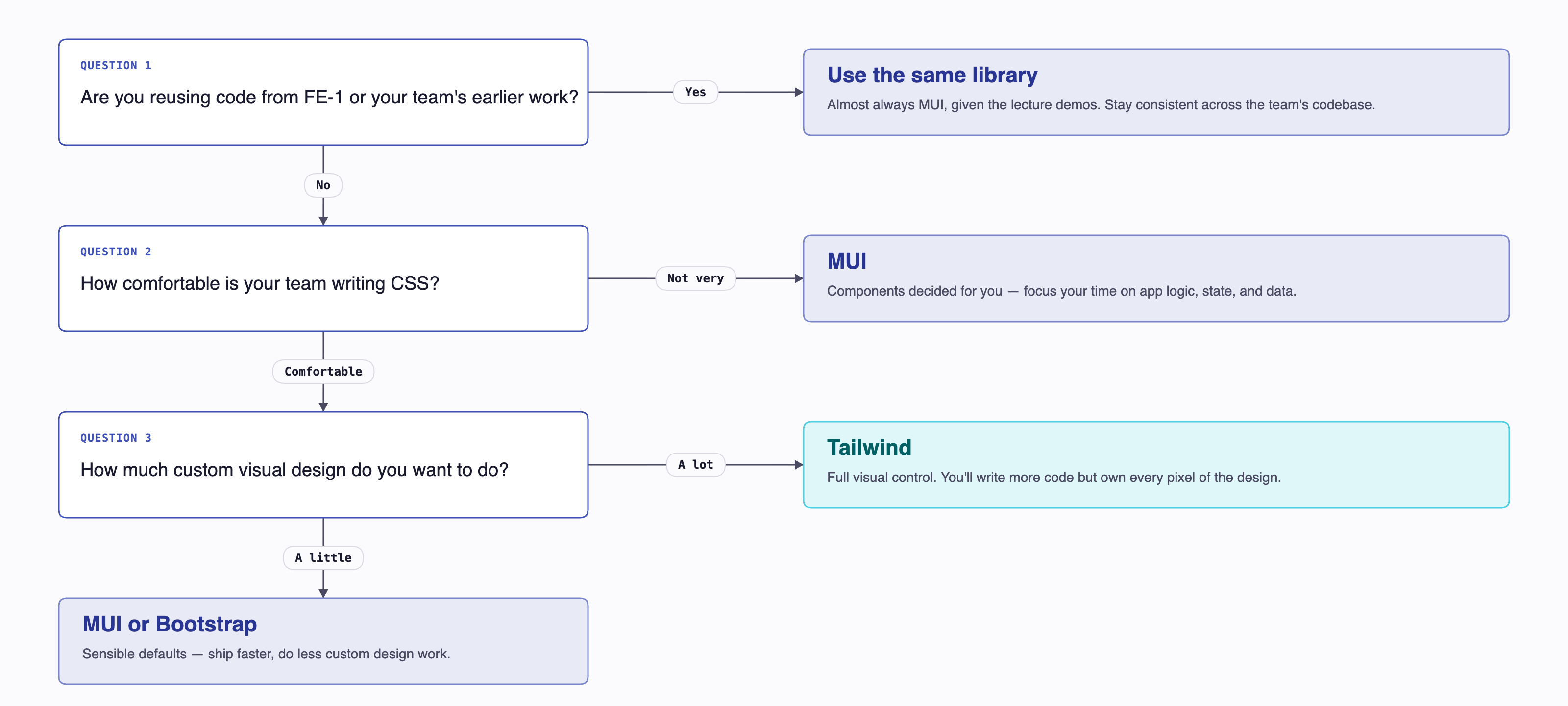
The honest summary: for most TCSS 460 groups, MUI is the path of least resistance because the lecture demos already use it, the <PrioritySelector> and similar components from FE-2 port cleanly into your work, and you spend the quarter on the parts that matter (state, data fetching, auth) instead of CSS. Pick something else only if your team has a real reason to.
What we recommend by default
- Default: MUI v9 (the lecture demos are on v7; v9 patterns are the same)
- If your team really wants more visual control: Tailwind v4
- If you are nostalgic for an earlier course: Bootstrap (via React-Bootstrap)
- If you want to learn what new React projects are doing: Tailwind v4 + shadcn/ui (extra-credit territory; not what we will demonstrate in lecture)
8 Common Mistakes¶
8.1 Importing two systems "to see which I like"¶
You install Bootstrap and MUI. Both ship CSS resets. Both define spacing scales. Your <button> ends up with conflicting styles you cannot trace because they are coming from two different stylesheets loaded in unpredictable order. Cut over completely to one or the other before building.
8.2 Hardcoding hex colors in component files¶
// BAD — hex literal in a component
<Box sx={{ bgcolor: "#1565c0" }}>...</Box>

// GOOD — theme token
<Box sx={{ bgcolor: "primary.main" }}>...</Box>
If you want to rebrand later, the second version is a one-line change in your theme. The first version requires search-and-replace across the entire codebase.
8.3 Inline style={{}} everywhere¶
style={{ marginBottom: "16px" }} works but bypasses every system advantage — no theme integration, no responsive breakpoints, no hover states. Use the library's idiomatic styling: className="mb-4" (Tailwind), sx={{ mb: 2 }} (MUI), or a CSS Module.
8.4 Not using <CssBaseline /> (MUI)¶
MUI components assume the browser's default stylesheet has been normalized. Without <CssBaseline /> near the root of your tree, you get random small visual bugs (margins on <body>, inconsistent button rendering across browsers). Always include it.
8.5 Forgetting that styling libraries ≠ design¶
A component library makes individual elements look reasonable. It does not give you good information hierarchy, consistent spacing, or readable layouts. Those come from design choices you make. The libraries handle the small things so you can focus on the big things — but you still have to handle the big things.
9 Summary¶
| Concept | Key Point |
|---|---|
| Taxonomy | Plain CSS → Utility CSS (Tailwind) → CSS framework (Bootstrap) → Component library (MUI). Different categories, different mental models. |
| Plain CSS / CSS Modules | Always a real option. CSS Modules give scoped class names with zero config in Vite/Next.js. |
| Tailwind v4 | Utility classes composed inline in JSX. CSS-first config via @theme. No tailwind.config.js. ~70% smaller production CSS than v3. |
| Bootstrap | Pre-styled components + utility classes. Use via react-bootstrap in React. Half-component-library, half-CSS-framework. Recognizable look. |
| MUI v9 | Full React component library (lecture demos are on v7; v9 is API-compatible for what we use). Theme is the single source of truth. sx prop for one-off styles. |
| shadcn/ui + Radix | Newest stack. Copy-paste Tailwind components built on accessible Radix primitives. Worth learning post-course. |
| Picking one | Pick one before Sprint 5 and commit. MUI is the default that aligns with the lecture demos. |
| Theme tokens, not hex literals | Whatever you pick, route colors and spacing through the library's theme system. |
10 References¶
Official Documentation:
- Tailwind CSS v4 Docs — Next.js install guide for v4
- Tailwind CSS v4 Release Notes — what changed from v3
- Material UI — MUI component reference
- MUI Next.js Integration — App Router setup with
AppRouterCacheProvider - Introducing MUI v9 — what changed from v7 (v8 was skipped)
- Bootstrap 5 Docs — Bootstrap framework
- React Bootstrap — React wrapper for Bootstrap 5
- shadcn/ui — copy-paste components on Radix + Tailwind
- Radix UI Primitives — headless accessible components
- Chakra UI — alternative React component library
- Mantine — alternative React component library
Lecture Demos:
- TCSS460-frontend-1 — Vite + React 19 + MUI v7
- TCSS460-frontend-2 — Next.js 15 + React 19 + MUI v7
11 Further Reading¶
External Resources
- React UI Libraries in 2025: Comparing shadcn/ui, Radix, Mantine, MUI, Chakra & more — extended comparison of the modern landscape
- Best React UI Frameworks Guide (Boundev) — practical comparison of MUI, Chakra, shadcn, Radix
- CSS Modules — the spec / reference implementation
- MDN — Using CSS custom properties (variables) — the foundation for any modern theming approach
This guide is part of TCSS 460 — Client/Server Programming, School of Engineering and Technology, University of Washington Tacoma.