Networking Fundamentals
TCSS 460 — Client/Server Programming
Every web application you will build in this course depends on the internet working correctly beneath it. This reading introduces the foundational networking concepts — protocol layers, addressing, name resolution, and the client-server model — that make web communication possible. Understanding these fundamentals will help you reason about what happens when your code sends a request and waits for a response.
1 Why Networking Matters for Web Developers
You have spent the last two years writing programs that run on a single machine. Your Java applications read from System.in, write to System.out, and everything happens in one process on one computer. That changes now.
In client/server programming, your code runs on two different machines that communicate over a network. The server you build in this course will run on one computer (eventually a cloud server), while the clients — web browsers, mobile apps, other servers — run somewhere else entirely. Between them sits the internet: a vast collection of interconnected networks spanning the globe.
This means you need to think about problems that never existed in your single-machine Java programs:
- Latency. A method call in Java takes nanoseconds. A network request takes milliseconds at best — and sometimes seconds or more. Your code must handle the wait.
- Failure. When you call a method in Java, it either returns a value or throws an exception. On a network, requests can silently disappear. Connections can drop mid-transfer. The server can crash between receiving your request and sending a response.
- Addressing. In a single program, you call a method by name. On a network, you need to know where the other machine is (its address) and which program on that machine should handle your request (its port).
- Serialization. Java objects live in memory. To send data across a network, you must convert it to a format both sides understand — typically JSON in modern web development.
None of these problems are optional. Every web developer encounters them daily. This reading gives you the vocabulary and mental models to understand what is happening beneath your web application code.
2 The Internet vs. the Web
People use "the internet" and "the web" interchangeably, but they are different things.
2.1 The Internet
The internet is the global network of interconnected computer networks. It is physical infrastructure — undersea cables, fiber optic lines, wireless links, routers, and switches — plus the protocols that allow data to move across that infrastructure.
The internet predates the web by roughly two decades. The ARPANET, funded by the U.S. Department of Defense's Advanced Research Projects Agency, sent its first message between UCLA and Stanford Research Institute on October 29, 1969 (Leiner et al., 2009). By the 1980s, the adoption of the TCP/IP protocol suite unified what had been disparate research networks into a single interconnected network — the internet (Cerf & Kahn, 1974).
The internet supports many different applications: email (SMTP), file transfer (FTP), remote access (SSH), video streaming, online gaming, and more. The web is just one of these applications.
2.2 The World Wide Web
The World Wide Web is a system of interlinked documents and resources, accessed via the internet using the HTTP protocol. Tim Berners-Lee proposed it in 1989 while working at CERN, and the first website went live in 1991 (Berners-Lee, 1989).
The web is built on three technologies:
| Technology | Purpose | Analogy |
|---|---|---|
| HTML | Structure and content of documents | The blueprint of a building |
| HTTP | Protocol for requesting and delivering documents | The postal service that delivers the blueprint |
| URLs | Addresses that identify documents | The street address of the building |
The distinction matters for this course: you will use the internet (specifically TCP/IP networking) to build web applications (specifically HTTP-based APIs and web pages). Understanding the layers beneath the web helps you debug problems, optimize performance, and build more robust systems.
3 The Protocol Stack (TCP/IP Model)
When your browser requests a web page, the request does not magically teleport to the server. It passes through a series of protocol layers, each responsible for one aspect of the communication. This layered design is called a protocol stack.
3.1 What is a Protocol?
A protocol is an agreed-upon set of rules that two parties follow so they can communicate successfully. The concept is not unique to computers — protocols exist everywhere in human communication.
Think about ordering coffee at a drive-through. Both you and the cashier follow an unwritten protocol:
- You pull up to the speaker and wait for a greeting
- The cashier says "Welcome, what can I get you?"
- You state your order
- The cashier repeats it back and gives a total
- You pull to the window, pay, and receive your drink
If either side breaks the protocol — if you start shouting your order before the cashier greets you, or if the cashier hands you food without telling you the total — the interaction breaks down. Both sides need to agree on the format, the order of steps, and what each message means.
But here is the critical difference between human communication and computer communication: humans can usually figure it out anyway. If you walk up to the counter and just say "large latte," the cashier does not crash — they adapt. They skip the greeting, take your order, and move on. Humans are remarkably good at recovering from broken protocols because we understand intent, not just format.
Computers cannot do this. If your browser sends a request that does not follow HTTP's rules — wrong format, missing required headers, bytes in the wrong order — the server does not think "oh, they probably meant a GET request." It rejects the message or ignores it entirely. Computers are literal. They follow the protocol exactly as specified, and if either side deviates, communication fails. This is why protocols must be precise, unambiguous, and agreed upon in advance.
Gen AI & Learning: LLMs and Protocol Flexibility
Interestingly, large language models (LLMs) like the ones powering AI coding assistants blur this line. An LLM can look at a malformed HTTP request and infer what the sender probably meant — much like a human cashier adapting to an out-of-order interaction. This ability to interpret intent from imperfect input is part of what makes LLMs feel so different from traditional software. But your Express server is not an LLM — it is traditional software, and it needs requests that follow the protocol exactly.
Network protocols work the same way as the strict computer model. HTTP is a protocol that says: "The client sends a request line (GET /page), then headers, then optionally a body. The server responds with a status line (200 OK), then headers, then a body." TCP is a protocol that says: "Before sending data, both sides must complete a three-way handshake." Every layer of the networking stack has its own protocol — its own set of rules — and both sides must follow them for communication to work.
3.2 Why Layers?
Imagine building a web application where your code had to handle everything: constructing the HTTP request, breaking it into packets, computing checksums, determining the route through the network, converting data to electrical signals on the wire, and reversing the whole process on the other end. That would be unmanageable.
Layering solves this through separation of concerns — a principle you already know from object-oriented design. Each layer handles one responsibility and provides a clean interface to the layer above it. The HTTP layer does not need to know how packets are routed. The routing layer does not need to know what is inside the packets. Each layer trusts the one below it to do its job.
3.3 The Four Layers
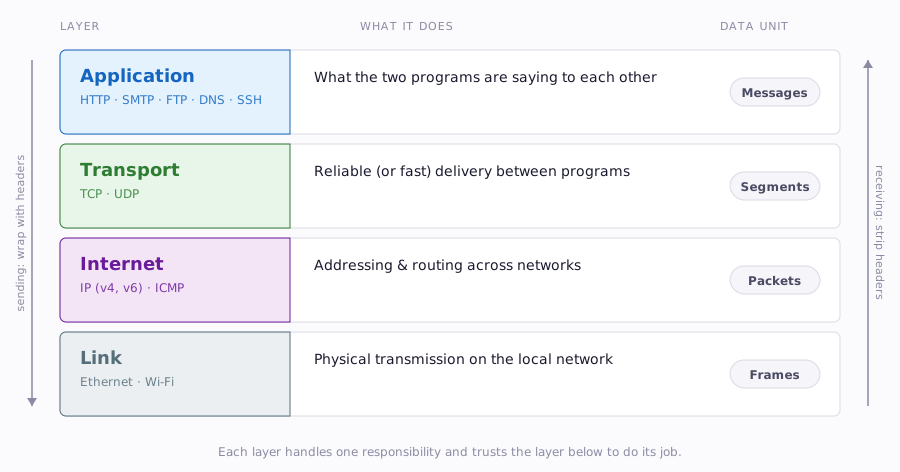
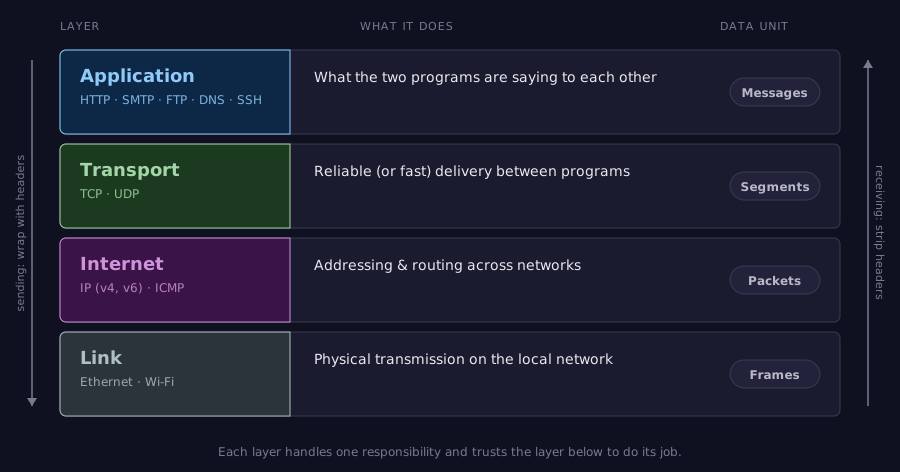
The TCP/IP model (also called the Internet Protocol Suite) organizes network communication into four layers (RFC 1122; Braden, 1989):
| Layer | Responsibility | Deals With | Example Protocols |
|---|---|---|---|
| Application | Application-specific communication | Messages, requests, responses | HTTP, SMTP, FTP, DNS |
| Transport | Reliable (or fast) delivery between programs | Segments, ports, flow control | TCP, UDP |
| Internet | Addressing and routing across networks | Packets, IP addresses, routing | IP (v4, v6), ICMP |
| Link | Physical transmission on local network | Frames, MAC addresses, signals | Ethernet, Wi-Fi |
3.4 How a Request Travels Through the Stack
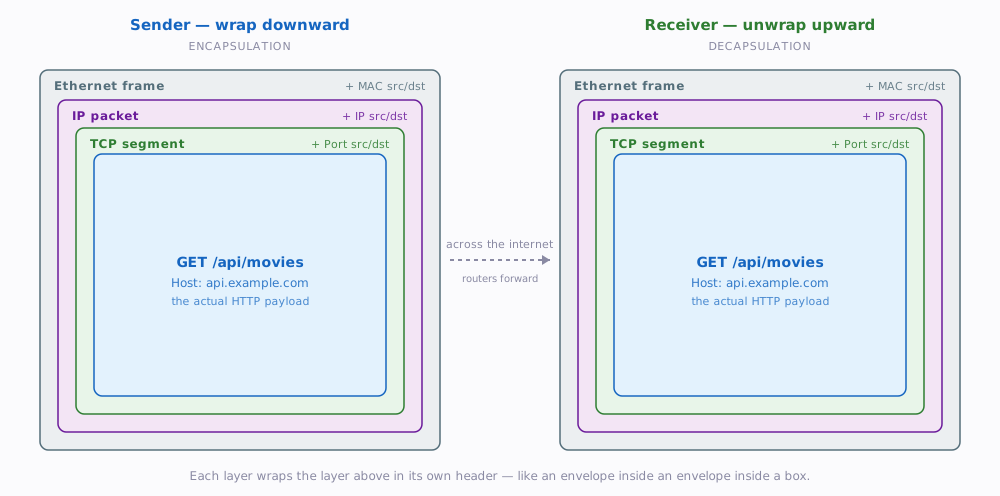
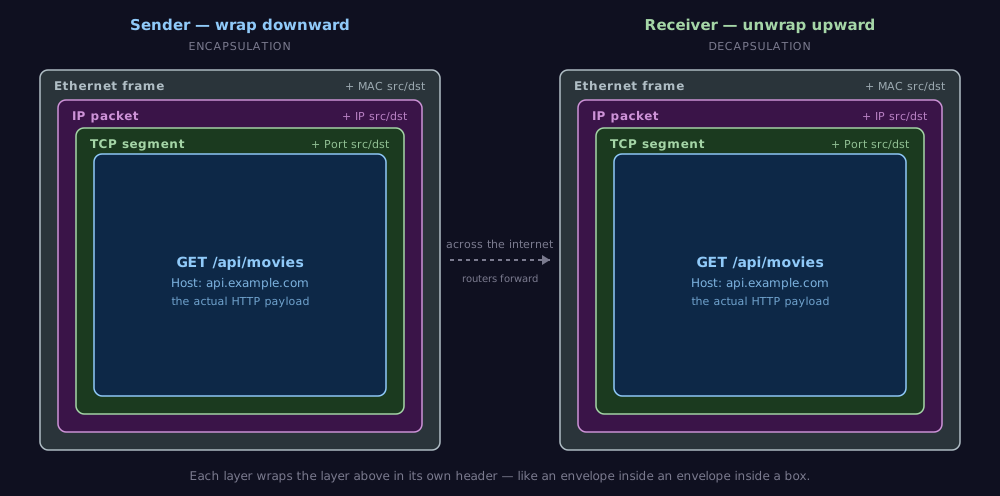
When your browser sends an HTTP request to a server, the data passes down through the layers on your machine, travels across the network, then passes up through the layers on the server. Here is what happens at each step:
Going down (sending):
- Application layer: Your browser constructs an HTTP request:
GET /api/movies HTTP/1.1. - Transport layer: TCP wraps the HTTP data in a segment, adding the source port (your browser's randomly assigned port) and the destination port (80 for HTTP, 443 for HTTPS).
- Internet layer: IP wraps the TCP segment in a packet, adding the source IP address (your machine) and the destination IP address (the server).
- Link layer: The packet is wrapped in an Ethernet frame with hardware (MAC) addresses for the next hop on the local network, and sent as electrical signals, light pulses, or radio waves.
Going up (receiving): The server's network card receives the raw signals. Each layer strips its own header, extracts the payload, and passes it up. By the time the data reaches the server's application layer, it is a clean HTTP request — just as the browser originally sent it.
This process is called encapsulation on the way down and decapsulation on the way up. Each layer wraps the previous layer's data in its own header, like placing a letter (HTTP) into an envelope (TCP) into a shipping box (IP) into a delivery truck (Link).
3.5 A Note on the OSI Model
You may encounter the OSI (Open Systems Interconnection) model in textbooks. The OSI model has seven layers instead of four, splitting the application and link layers into finer categories. It was developed by the International Organization for Standardization (ISO) as a reference framework (ISO/IEC 7498-1, 1994).
In practice, the internet runs on TCP/IP, not OSI. The OSI model is useful as a teaching tool, but TCP/IP is what your code actually uses. This course uses the TCP/IP model.
4 IP Addresses and Ports
For two programs to communicate over a network, each needs an address. IP addresses identify machines; ports identify programs on those machines.
4.1 IP Addresses
An IP address is a numerical label assigned to every device on a network. It serves two purposes: identifying the device and providing a location for routing.
4.1.1 IPv4
IPv4 addresses are 32 bits long, written as four decimal numbers separated by dots:
Each number ranges from 0 to 255 (one byte). This gives roughly 4.3 billion possible addresses (2^32). That sounded like a lot in the 1980s, but the world ran out of unallocated IPv4 addresses in 2011 (IANA, 2011). Technologies like NAT (Network Address Translation) have kept IPv4 working by allowing many devices to share a single public address, but the long-term solution is IPv6.
Some IPv4 address ranges are reserved for special purposes:
| Range | Purpose |
|---|---|
127.0.0.0/8 |
Loopback (your own machine) |
10.0.0.0/8 |
Private networks |
192.168.0.0/16 |
Private networks |
172.16.0.0/12 |
Private networks |
4.1.2 IPv6
IPv6 addresses are 128 bits long, written as eight groups of four hexadecimal digits:
This provides approximately 3.4 x 10^38 addresses — enough to give a unique address to every atom on the surface of the Earth, many times over. IPv6 adoption has been gradual; as of the mid-2020s, roughly 40-45% of Google users access their services over IPv6 (Google, 2025).
For this course, most of your work will use IPv4 addresses, especially the loopback address during local development.
4.2 Ports
An IP address gets you to the right machine, but a machine runs many programs simultaneously — a web server, a database, an email server, and more. Ports identify which program should receive the data.
A port is a 16-bit number (0 to 65535). Think of it this way: the IP address gets you to the right building, but the building has many doors. The port is the specific door you knock on. Door 80 leads to the web server. Door 5432 leads to the database. Door 22 leads to the SSH terminal. Same building, different services behind different doors.
| Port Range | Name | Purpose |
|---|---|---|
| 0 - 1023 | Well-known ports | Reserved for standard services |
| 1024 - 49151 | Registered ports | Assigned to specific applications |
| 49152 - 65535 | Dynamic/private | Used temporarily by client programs |
Some well-known ports you will encounter:
| Port | Protocol | Service |
|---|---|---|
| 80 | HTTP | Web traffic (unencrypted) |
| 443 | HTTPS | Web traffic (encrypted) |
| 22 | SSH | Secure remote access |
| 5432 | PostgreSQL | Database server |
| 3000 | — | Common dev server port (Express, Next.js) |
| 8080 | — | Common alternative HTTP port |
When your browser visits http://example.com, it connects to port 80 by default. When you visit https://example.com, it connects to port 443. When you run a development server on your laptop and visit http://localhost:3000, you are connecting to port 3000 on your own machine.
4.3 localhost and 127.0.0.1
During development, you will constantly use localhost — a hostname that always resolves to the IP address 127.0.0.1, which is the loopback address. Traffic sent to 127.0.0.1 never leaves your machine; it loops back to the same computer (RFC 5735; Cotton & Vegoda, 2010).
This is how you will test your web API before deploying it. You will start your server on your laptop, and it will listen on something like localhost:3000. Your browser (also on your laptop) will send requests to localhost:3000, and the operating system routes them back to your server process — all without involving the actual network.
Here is a Java example that demonstrates this. You may have used ServerSocket in earlier courses for basic I/O — a web server works on the same principle, just at a larger scale:
import java.net.ServerSocket;
import java.net.Socket;
import java.io.InputStream;

// A minimal server listening on localhost:8080
ServerSocket server = new ServerSocket(8080);
System.out.println("Listening on localhost:8080...");

Socket client = server.accept();  // blocks until a client connects
InputStream in = client.getInputStream();
// Read the request bytes...
When you run this and open http://localhost:8080 in your browser, the browser connects to your Java program through the loopback interface. No network involved — just your operating system routing data between two programs on the same machine.
5 DNS — Turning Names into Addresses
Humans are bad at remembering numbers. We prefer google.com to 142.250.80.46. The Domain Name System (DNS) translates human-readable domain names into IP addresses.
5.1 The Domain Hierarchy
Domain names are organized in a hierarchical tree structure, read from right to left:
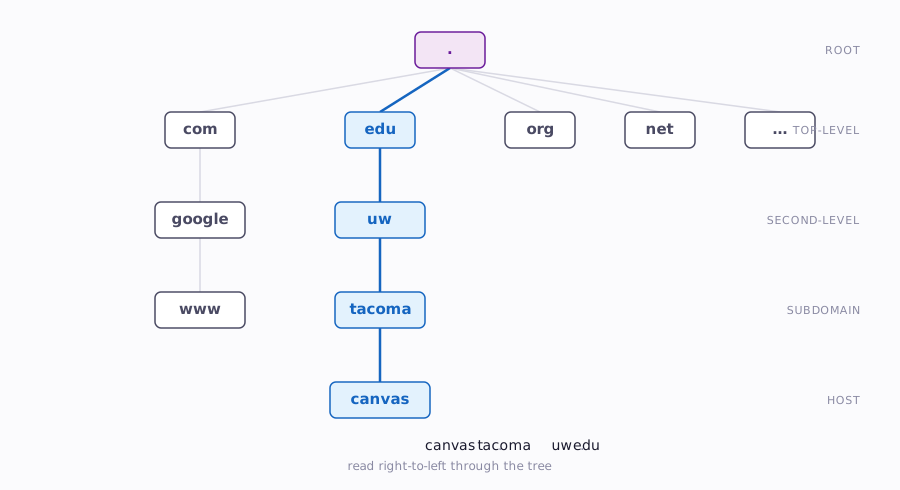
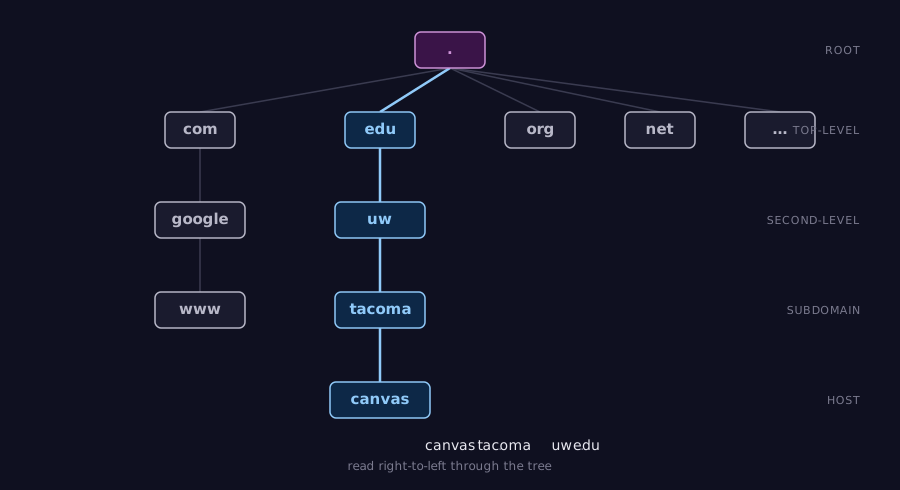
The full domain name canvas.tacoma.uw.edu breaks down as:
| Part | Name | Level |
|---|---|---|
. |
Root | The starting point of all DNS lookups |
edu |
Top-Level Domain (TLD) | Managed by a TLD registry |
uw |
Second-Level Domain | Registered by the University of Washington |
tacoma |
Subdomain | Created by UW for the Tacoma campus |
canvas |
Subdomain | Created for the Canvas LMS |
5.2 The Resolution Process
When you type example.com into your browser, your computer does not magically know its IP address. A multi-step resolution process finds it. The process was defined in the original DNS specification (Mockapetris, 1987).
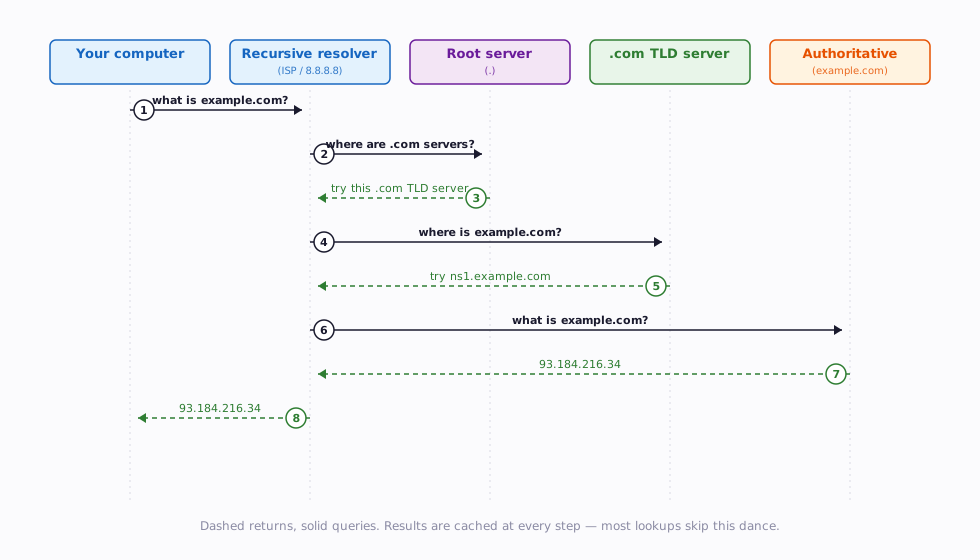
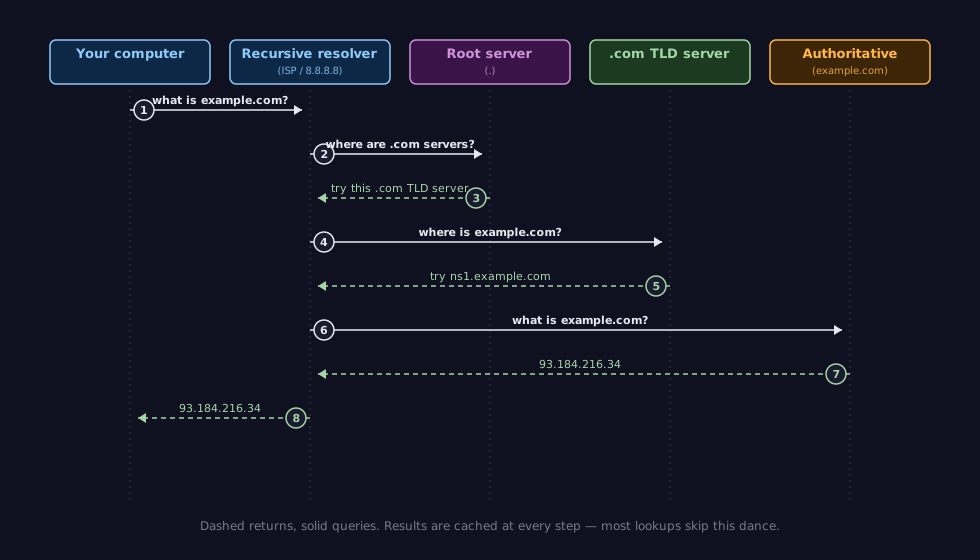
Step by step:
- Your computer checks its local DNS cache. If it recently looked up
example.com, it already has the answer. - If not cached, it asks a recursive resolver — typically your ISP's DNS server, or a public one like Google's
8.8.8.8or Cloudflare's1.1.1.1. - The resolver asks a root name server, "Where can I find
.comdomains?" - The root server responds with the address of a
.comTLD name server. - The resolver asks the TLD server, "Where can I find
example.com?" - The TLD server responds with the address of the authoritative name server for
example.com. - The resolver asks the authoritative server, "What is the IP address for
example.com?" - The authoritative server responds with the IP address (e.g.,
93.184.216.34). - The resolver caches the result and sends it back to your computer.
This entire process typically takes 20-120 milliseconds. Caching at multiple levels (your browser, your OS, the resolver) means most DNS lookups in practice are much faster — often under 1 millisecond for recently visited domains.
5.3 Why DNS Matters for Development
DNS matters for web development in several practical ways:
- Custom domains. When you deploy your project, you may configure a custom domain. This means creating DNS records that point your domain name to your server's IP address.
- Debugging. When your application "can't reach the server," the problem is sometimes DNS, not your code. Knowing the resolution process helps you isolate the issue.
- localhost. The hostname
localhostis resolved locally (usually via the operating system's hosts file, not DNS), which is why it works without an internet connection.
6 TCP vs. UDP
The transport layer provides two main protocols: TCP (Transmission Control Protocol) and UDP (User Datagram Protocol). They offer fundamentally different guarantees, and the choice between them determines how your application handles data delivery.
6.1 TCP — Reliable Delivery
TCP provides reliable, ordered, error-checked delivery of data between applications. It was defined alongside IP in the foundational paper that established internet architecture (Cerf & Kahn, 1974) and formally specified in RFC 793 (Postel, 1981).
TCP guarantees:
- Delivery. If a packet is lost, TCP retransmits it automatically.
- Order. Packets may arrive out of order; TCP reassembles them in the correct sequence.
- Integrity. Checksums detect corruption. Damaged data is retransmitted.
- Flow control. TCP adjusts transmission speed to avoid overwhelming the receiver.
To provide these guarantees, TCP requires a connection — a persistent, two-way communication channel between client and server. Establishing this connection requires a three-step handshake:
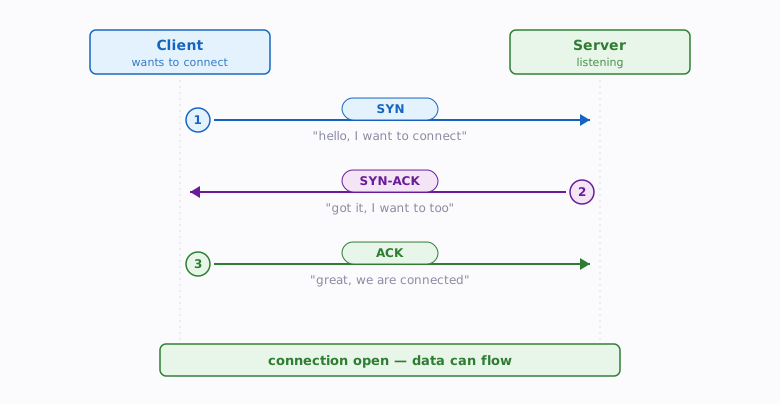
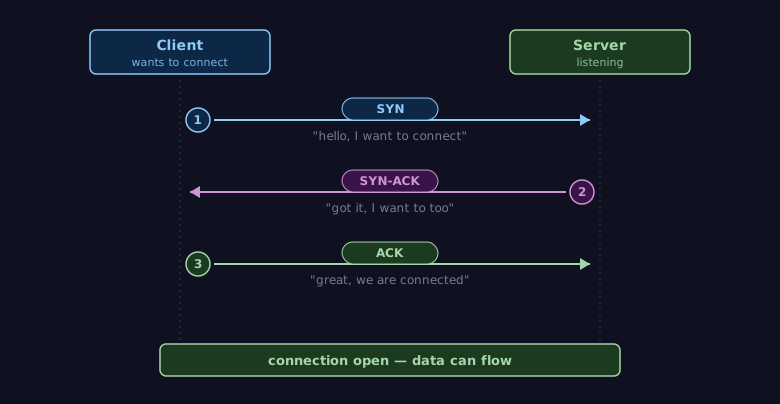
This handshake adds latency — you must wait for three messages before any data can flow. But for web applications, the reliability is worth the cost.
6.2 UDP — Fast but Unreliable
UDP provides connectionless, best-effort delivery. It sends data without establishing a connection, without guaranteeing delivery, and without guaranteeing order (Postel, 1980).
UDP is simpler and faster — no handshake, no retransmission, no ordering. But if a packet is lost, UDP does not notice or care. The application must handle it.
6.3 Comparing TCP and UDP
| Feature | TCP | UDP |
|---|---|---|
| Connection | Required (3-way handshake) | None (fire and forget) |
| Delivery guarantee | Yes (retransmission) | No |
| Order guarantee | Yes (sequence numbers) | No |
| Error detection | Checksum + retransmission | Checksum only |
| Speed | Slower (overhead for reliability) | Faster (minimal overhead) |
| Use cases | Web, email, file transfer, APIs | Video streaming, gaming, DNS lookups, VoIP |
6.4 Why HTTP Uses TCP
HTTP is built on top of TCP because web communication demands reliability. When your browser requests a web page or your API client sends a POST request to create a new record, you need all the data to arrive, in the correct order, without corruption. A web page with missing chunks or a JSON response with jumbled bytes is useless.
The performance cost of TCP's reliability is acceptable for web applications. The three-way handshake adds some latency to the first request, but features like HTTP keep-alive (reusing connections for multiple requests) and HTTP/2 multiplexing minimize this overhead for subsequent requests.
You will not use UDP directly in this course, but knowing it exists helps you understand why TCP-based protocols (HTTP, HTTPS) behave the way they do — and why they are sometimes slower than you might expect.
7 Client-Server Model
The client-server model is the fundamental architecture of web applications. It defines how two programs — the client and the server — interact over a network.
7.1 The Request/Response Pattern
In the client-server model:
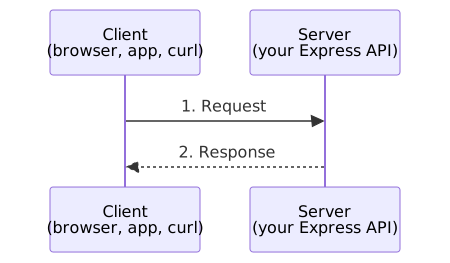
- The client initiates communication by sending a request.
- The server listens for incoming requests, processes them, and sends back a response.
- The server does not initiate communication — it only responds to clients.
This is the pattern behind every web page you have ever loaded, every API call you will ever make, and every form submission your users will ever submit.
Compare this to a method call in Java:
| Java Method Call | Client-Server Request |
|---|---|
result = calculator.add(2, 3) |
GET /api/calculator/add?a=2&b=3 |
| Method name identifies the operation | URL path identifies the operation |
| Parameters passed directly | Parameters passed in URL or request body |
| Return value comes back immediately | Response comes back over the network |
| Guaranteed to complete (or throw) | May timeout, fail, or be lost |
| Nanoseconds | Milliseconds to seconds |
The key difference is the network boundary. A Java method call is synchronous and reliable. A network request is inherently asynchronous, unreliable, and slow. This difference shapes everything about how you write web application code.
7.2 Servers Listen, Clients Connect
A server is a program that:
- Binds to a specific port (e.g., port 3000).
- Listens for incoming connections on that port.
- Accepts connections from clients.
- Processes the request and sends a response.
- Repeats — waiting for the next connection.
A client is a program that:
- Knows the server's address (IP + port).
- Connects to the server.
- Sends a request.
- Waits for the response.
- Processes the response.
Here is the server side in Java — a simplified version of what every web server does:
import java.net.ServerSocket;
import java.net.Socket;
import java.io.BufferedReader;
import java.io.InputStreamReader;
import java.io.PrintWriter;

public class SimpleServer {
    public static void main(String[] args) throws Exception {
        // 1. Bind to port 8080 and listen
        ServerSocket serverSocket = new ServerSocket(8080);
        System.out.println("Server listening on port 8080...");

        while (true) {
            // 2. Accept a client connection (blocks until one arrives)
            Socket clientSocket = serverSocket.accept();

            // 3. Read the request
            BufferedReader in = new BufferedReader(
                new InputStreamReader(clientSocket.getInputStream()));
            String requestLine = in.readLine();
            System.out.println("Received: " + requestLine);

            // 4. Send a response
            PrintWriter out = new PrintWriter(
                clientSocket.getOutputStream(), true);
            out.println("HTTP/1.1 200 OK");
            out.println("Content-Type: text/plain");
            out.println();
            out.println("Hello from the server!");

            // 5. Close this connection, go back to waiting
            clientSocket.close();
        }
    }
}
And the client side — a Java program that connects to this server:
import java.net.HttpURLConnection;
import java.net.URL;
import java.io.BufferedReader;
import java.io.InputStreamReader;

public class SimpleClient {
    public static void main(String[] args) throws Exception {
        // 1. Know the server's address
        URL url = new URL("http://localhost:8080/hello");

        // 2. Connect and send a GET request
        HttpURLConnection connection =
            (HttpURLConnection) url.openConnection();
        connection.setRequestMethod("GET");

        // 3. Read the response
        BufferedReader in = new BufferedReader(
            new InputStreamReader(connection.getInputStream()));
        String line;
        while ((line = in.readLine()) != null) {
            System.out.println(line);
        }

        // 4. Clean up
        in.close();
        connection.disconnect();
    }
}
If you run the server and then run the client, the client connects to localhost:8080, sends an HTTP GET request, and prints the server's response. This is the client-server model in action — the same pattern your Express API and React front end will use, just at a higher level of abstraction.
7.3 Sockets — The Connection Abstraction
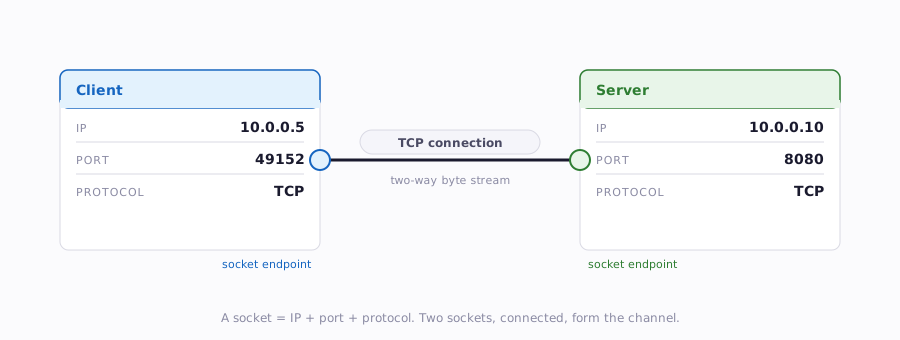
You may have noticed ServerSocket and Socket in the Java examples above. A socket is the programming abstraction for a network connection endpoint. It represents one end of a two-way communication channel between two programs.
A socket is identified by the combination of:
- An IP address (which machine)
- A port number (which program on that machine)
- A protocol (TCP or UDP)
Think of a socket like a Scanner connected to System.in, except the input comes from across the network instead of from the keyboard. Just as Scanner.nextLine() blocks until the user types something, socket.getInputStream().read() blocks until data arrives from the network.
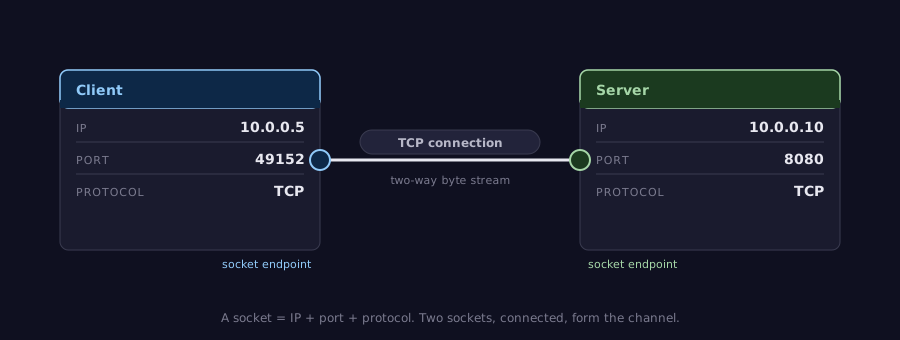
In this course, you will not work with raw sockets. Express (your server framework) and the browser's fetch API handle socket management for you. But understanding that sockets exist beneath the abstractions helps you reason about connection limits, timeouts, and resource management.
7.4 One Server, Many Clients
A key characteristic of the client-server model is that a single server handles requests from many clients simultaneously. Your deployed API might receive requests from dozens of users at the same time, each expecting a timely response.
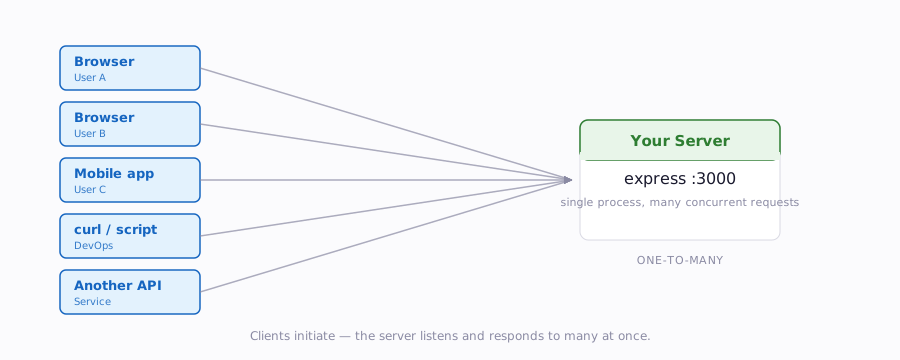
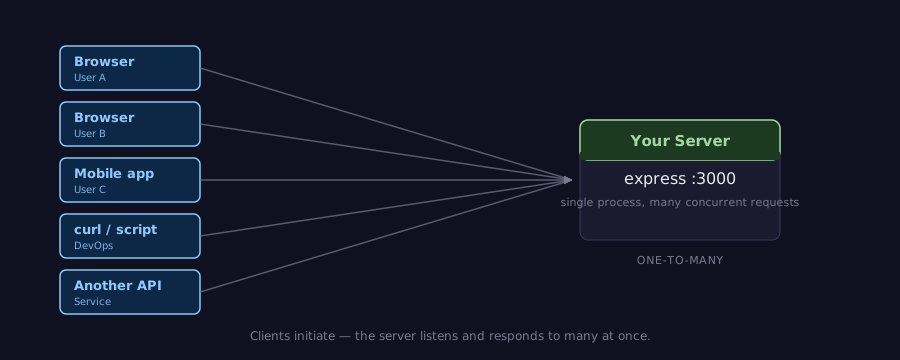
How the server handles multiple simultaneous clients — through threading, event loops, or asynchronous I/O — is a topic you will explore when you build your Express API. For now, know that the client-server model is inherently one-to-many: one server, many clients.
8 Summary
| Concept | Key Point |
|---|---|
| Internet vs. Web | The internet is the network infrastructure; the web is an application built on top of it using HTTP, HTML, and URLs |
| Protocol stack | Network communication is organized into layers (Application, Transport, Internet, Link), each with a specific responsibility |
| Encapsulation | Each layer wraps the layer above it with its own header; the reverse (decapsulation) happens on the receiving end |
| IP addresses | Numerical labels that identify machines on a network; IPv4 (32-bit) is common, IPv6 (128-bit) is the future |
| Ports | 16-bit numbers that identify which program on a machine should receive the data; well-known ports include 80 (HTTP) and 443 (HTTPS) |
| localhost | The hostname for your own machine (127.0.0.1); used extensively during development |
| DNS | Translates human-readable domain names into IP addresses through a hierarchical resolution process |
| TCP | Reliable, ordered, connection-based delivery; used by HTTP because web communication demands reliability |
| UDP | Fast, connectionless, best-effort delivery; used for streaming and gaming where speed matters more than reliability |
| Client-server model | Clients initiate requests, servers listen and respond; this pattern is the foundation of all web applications |
| Sockets | The programming abstraction for a network connection endpoint, identified by IP address + port + protocol |
9 References
This reading draws from the following sources:
Standards & Specifications:
- RFC 793 — Transmission Control Protocol (Postel, 1981)
- RFC 768 — User Datagram Protocol (Postel, 1980)
- RFC 1122 — Requirements for Internet Hosts (Braden, 1989)
- RFC 1034 — Domain Names: Concepts and Facilities (Mockapetris, 1987)
- RFC 1035 — Domain Names: Implementation and Specification (Mockapetris, 1987)
- RFC 5735 — Special Use IPv4 Addresses (Cotton & Vegoda, 2010)
- ISO/IEC 7498-1:1994 — Information Technology, Open Systems Interconnection, Basic Reference Model (ISO, 1994)
Historical Sources:
- Berners-Lee, T. (1989). Information Management: A Proposal. CERN. https://www.w3.org/History/1989/proposal.html
- Cerf, V., & Kahn, R. (1974). A Protocol for Packet Network Intercommunication. IEEE Transactions on Communications, 22(5), 637-648.
- Leiner, B. M., Cerf, V. G., Clark, D. D., Kahn, R. E., Kleinrock, L., Lynch, D. C., Postel, J., Roberts, L. G., & Wolff, S. (2009). A Brief History of the Internet. ACM SIGCOMM Computer Communication Review, 39(5), 22-31.
Technical Documentation:
- MDN Web Docs — How the Web Works
- Google IPv6 Statistics (Google, 2025)
- IANA IPv4 Address Space Registry (IANA, 2011)
10 Further Reading
External Resources
- Cloudflare Learning Center — What is DNS? — Clear visual explanation of the DNS resolution process
- Julia Evans — Networking Zines — Illustrated guides to networking concepts (HTTP, DNS, and more)
- Computerphile — TCP/IP Model — Video explanation of the protocol stack
- Beej's Guide to Network Programming — The classic guide to socket programming in C (for the curious)
This reading is part of TCSS 460 — Client/Server Programming, School of Engineering and Technology, University of Washington Tacoma.