Async in TypeScript
TCSS 460 — Client/Server Programming
Every meaningful operation in a web API — querying a database, calling an external service, reading a file — takes time. TypeScript gives you tools to write asynchronous code that is both type-safe and readable. This guide covers the practical async patterns you will use daily in your Express route handlers.
Prerequisite
This guide assumes you have read Async Concepts, which covers the event loop, callbacks, and promises at a conceptual level. Here we focus on the TypeScript syntax and patterns you will actually write.
1 Promises in TypeScript
The Async Concepts guide introduced promises as objects representing future values. TypeScript builds on that foundation by adding something JavaScript alone cannot: you declare what type the future value will be.
1.1 The Promise<T> Type
When you write a function that performs an async operation, you annotate its return type with Promise<T>, where T is the type of the resolved value:
function fetchGreeting(): Promise<string> {
  return new Promise((resolve) => {
    setTimeout(() => {
      resolve("Hello, TCSS 460!");
    }, 1000);
  });
}
The compiler now knows that when this promise resolves, the result is a string — not any, not unknown, but specifically string. If you try to treat the result as a number, TypeScript catches it at compile time.
1.2 Typed Promises with Interfaces
In a real application, your async functions return structured data. Define an interface and use it as the type parameter:
interface User {
  id: number;
  name: string;
  email: string;
}

function findUserById(id: number): Promise<User> {
  // Imagine this queries a database
  return new Promise((resolve) => {
    resolve({ id, name: "Alice", email: "alice@example.com" });
  });
}
When you consume this function, TypeScript knows the resolved value has id, name, and email:
findUserById(42).then((user) => {
  console.log(user.name);   // TypeScript knows this is string
  console.log(user.age);    // Compile error: Property 'age' does not exist on type 'User'
});
Try It Yourself
- Create a file called
promise-demo.ts - Write a function
rollDice(): Promise<number>that resolves with a random number 1-6 after 500ms - Call it with
.then()and log the result - Run it with
npx ts-node promise-demo.ts - Notice how the type annotation guarantees the
.then()callback receives anumber
2 async/await — Syntactic Sugar
In the previous guide, you saw a .then() chain next to its async/await equivalent. The difference in readability was dramatic — same behavior, but the async/await version read like a simple list of steps. Now let's dig into how async/await works and why it is the standard pattern for this course.
2.1 The async Keyword
Adding async before a function declaration does two things:
- The function automatically returns a
Promise - You can use
awaitinside the function body
Even though return user looks like it returns a User, the function actually returns Promise<User>. TypeScript enforces this — the return type annotation must be Promise<T>, not T.
2.2 The await Keyword
await pauses execution of the async function until the promise resolves, then unwraps the resolved value:
async function greetUser(id: number): Promise<string> {
  const user: User = await findUserById(id);    // Pauses here until the promise resolves
  return `Hello, ${user.name}!`;                 // Continues after resolution
}
Without await, user would be Promise<User> — a promise object, not the actual user data. With await, the type is unwrapped to User.
2.3 Comparing Styles
Here is the same operation written two ways. Both are functionally identical:
Promise chain (.then()):
function getUserEmail(id: number): Promise<string> {
  return findUserById(id).then((user) => {
    return user.email;
  });
}
async/await:
async function getUserEmail(id: number): Promise<string> {
  const user = await findUserById(id);
  return user.email;
}
Multiple steps — where async/await really shines:
// Promise chain — nested and hard to follow
function processOrder(orderId: number): Promise<string> {
  return findOrder(orderId)
    .then((order) => findUserById(order.userId))
    .then((user) => sendEmail(user.email, "Order confirmed"))
    .then((result) => result.messageId);
}

// async/await — reads top to bottom like synchronous code
async function processOrder(orderId: number): Promise<string> {
  const order = await findOrder(orderId);
  const user = await findUserById(order.userId);
  const result = await sendEmail(user.email, "Order confirmed");
  return result.messageId;
}
The async/await version reads like a recipe: find the order, then find the user, then send the email. Each step clearly depends on the previous one.
Gen AI & Learning: Why Syntax Still Matters
AI coding assistants generate async code fluently. But when you debug a production issue at 2 AM, you need to understand why await matters and what happens when it is missing. The compiler catches type errors, but it cannot catch logic errors in your async flow. Understanding the mechanics lets you read, debug, and reason about AI-generated code with confidence.
3 Error Handling with try/catch
In synchronous code, errors propagate up the call stack. In async code with .then(), you chain a .catch(). With async/await, you use the familiar try/catch block — but with an important TypeScript twist.
3.1 Basic try/catch
async function getUser(id: number): Promise<User | null> {
  try {
    const user = await findUserById(id);
    return user;
  } catch (error) {
    console.error("Failed to find user:", error);
    return null;
  }
}
If findUserById rejects (throws), execution jumps to the catch block. If it resolves, the catch block is skipped entirely. This is exactly like synchronous try/catch.
3.2 try/catch with Promises Under the Hood
The try/catch block works with await because await converts a rejected promise into a thrown exception. Without await, you would need .catch():
// With .then()/.catch() — explicit promise handling
function getUser(id: number): Promise<User | null> {
  return findUserById(id)
    .then((user) => {
      return user;
    })
    .catch((error) => {
      console.error("Failed to find user:", error);
      return null;
    });
}

// With async/await — try/catch handles the same rejected promise
async function getUser(id: number): Promise<User | null> {
  try {
    const user = await findUserById(id);
    return user;
  } catch (error) {
    console.error("Failed to find user:", error);
    return null;
  }
}
Both versions handle a rejected promise the same way. The async/await version just lets you use the try/catch syntax you already know instead of chaining .catch().
3.3 Typing Errors: The unknown Problem
In TypeScript, caught errors are typed as unknown — not Error, not string, just unknown. This is intentional: anything can be thrown in JavaScript (throw "oops", throw 42, throw null).
You must narrow the type before using error properties:
async function getUser(id: number): Promise<User | null> {
  try {
    const user = await findUserById(id);
    return user;
  } catch (error: unknown) {
    // Cannot do: error.message  (Property 'message' does not exist on type 'unknown')

    if (error instanceof Error) {
      console.error("Error message:", error.message);
      console.error("Stack trace:", error.stack);
    } else {
      console.error("Unexpected error:", error);
    }
    return null;
  }
}
Always Type Errors as unknown
TypeScript's strict mode enforces catch (error: unknown). Even if your project does not enforce it yet, always type errors as unknown and narrow before use. This is the professional pattern you will see in production codebases.
3.4 Error Handling in Express Route Handlers
In an Express route handler, you typically catch errors and send an appropriate HTTP response:
app.get("/users/:id", async (request: Request, response: Response) => {
  try {
    const id = parseInt(request.params.id);
    const user = await findUserById(id);

    if (!user) {
      response.status(404).json({ error: "User not found" });
      return;
    }

    response.json(user);
  } catch (error: unknown) {
    console.error("Database error:", error);
    response.status(500).json({ error: "Internal server error" });
  }
});
This pattern — try the operation, handle the "not found" case, catch unexpected errors — is the bread and butter of Express development. You will write variations of this dozens of times.
Try It Yourself
- Create a simple Express app with a
GET /users/:idroute - Write a mock
findUserByIdthat rejects whenidis 0 and resolves otherwise - Test the route with valid and invalid IDs
- Verify that errors return a 500 status and valid requests return 200
4 Multiple Async Operations
Real route handlers often need multiple async results. How you combine them matters — sometimes dramatically.
4.1 Sequential Execution
When one operation depends on the result of another, you must run them sequentially:
async function getUserWithPosts(id: number): Promise<UserWithPosts> {
  const user = await findUserById(id);          // Step 1: Find the user
  const posts = await findPostsByUserId(user.id); // Step 2: Uses user.id from step 1
  return { ...user, posts };
}
Step 2 cannot start until step 1 finishes because it needs user.id. This is the correct approach when there is a data dependency.
Timing: If each query takes 200ms, the total time is ~400ms (200 + 200).
4.2 Parallel Execution with Promise.all
When operations are independent — neither needs the other's result — run them in parallel:
async function getDashboardData(userId: number): Promise<Dashboard> {
  const [user, notifications, recentActivity] = await Promise.all([
    findUserById(userId),
    getNotifications(userId),
    getRecentActivity(userId),
  ]);

  return { user, notifications, recentActivity };
}
All three queries start at the same time. Promise.all resolves when all three are done.
Timing: If each query takes 200ms, the total time is ~200ms (not 600ms). All three run concurrently.
4.3 The Timing Difference Visualized
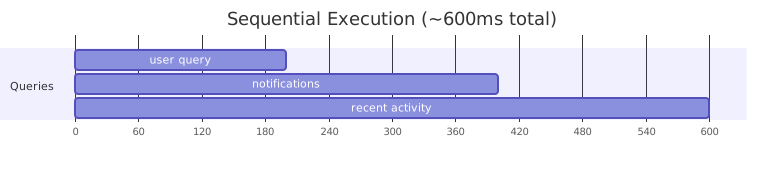
Consider fetching a user profile, their notifications, and their recent activity — three independent database queries, each taking 200ms.
Sequential (one after another):
Parallel (all at once with Promise.all):
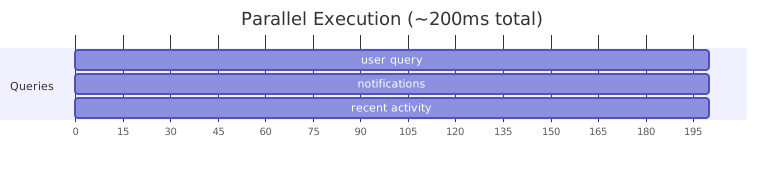
That is a 3x speedup — and the gap grows with more operations. In a production API handling hundreds of requests per second, this difference is enormous.
4.4 Promise.all Error Behavior
Promise.all has fail-fast behavior: if any promise rejects, the entire Promise.all rejects immediately. The other promises continue running, but their results are discarded.
async function getDashboardData(userId: number): Promise<Dashboard> {
  try {
    const [user, notifications, recentActivity] = await Promise.all([
      findUserById(userId),
      getNotifications(userId),      // If this fails...
      getRecentActivity(userId),
    ]);
    return { user, notifications, recentActivity };
  } catch (error: unknown) {
    // ...we land here, even if the other two succeeded
    console.error("Dashboard fetch failed:", error);
    throw error;
  }
}
Promise.allSettled for Partial Results
If you want all results regardless of individual failures, use Promise.allSettled(). It resolves when all promises complete (fulfilled or rejected) and gives you the status of each one. This is useful when some data is optional — for example, showing a user profile even if their notification count failed to load.
4.5 Choosing Sequential vs. Parallel
The decision is straightforward:
| Situation | Pattern | Why |
|---|---|---|
| Step 2 needs the result of step 1 | Sequential (await one at a time) |
Data dependency — no choice |
| Operations are independent | Promise.all |
No dependency — run concurrently for speed |
| Some results are optional | Promise.allSettled |
Tolerate partial failures |
Try It Yourself
- Write two async functions that each call
setTimeoutfor 1 second and resolve with a string - Call them sequentially with two
awaitstatements — measure the time withDate.now() - Call them in parallel with
Promise.all— measure again - You should see ~2 seconds for sequential, ~1 second for parallel
5 Async in Express Route Handlers
Express is where all of these patterns come together. Every route handler that touches a database or external API will be async.
5.1 The Basic Pattern
The standard async Express route handler follows this shape:
import { Request, Response } from "express";

app.get("/movies/:id", async (request: Request, response: Response) => {
  try {
    const movieId = parseInt(request.params.id);

    if (isNaN(movieId)) {
      response.status(400).json({ error: "Movie ID must be a number" });
      return;
    }

    const movie = await movieService.findById(movieId);

    if (!movie) {
      response.status(404).json({ error: "Movie not found" });
      return;
    }

    response.json(movie);
  } catch (error: unknown) {
    console.error("Error fetching movie:", error);
    response.status(500).json({ error: "Internal server error" });
  }
});
The pattern: validate input, perform async operation, handle "not found", return data, catch everything else.
5.2 Multiple Async Calls in a Route
A realistic route handler often combines sequential and parallel patterns:
app.get("/movies/:id/details", async (request: Request, response: Response) => {
  try {
    const movieId = parseInt(request.params.id);

    // Step 1: Get the movie (must happen first — we need the movie to exist)
    const movie = await movieService.findById(movieId);

    if (!movie) {
      response.status(404).json({ error: "Movie not found" });
      return;
    }

    // Step 2: Get related data in parallel (all depend on movieId, but not each other)
    const [cast, reviews, similar] = await Promise.all([
      movieService.getCast(movieId),
      movieService.getReviews(movieId),
      movieService.getSimilar(movieId),
    ]);

    response.json({ movie, cast, reviews, similar });
  } catch (error: unknown) {
    console.error("Error fetching movie details:", error);
    response.status(500).json({ error: "Internal server error" });
  }
});
Step 1 is sequential because we need to confirm the movie exists before fetching related data. Step 2 is parallel because cast, reviews, and similar movies are independent of each other.
5.3 Async Errors in Express
Express 5 automatically catches errors thrown in async route handlers and forwards them to your error-handling middleware. This means you do not need any special wrappers to prevent unhandled promise rejections.
You should still use try/catch in most handlers — not to prevent crashes, but to send meaningful HTTP responses (404 for not found, 400 for bad input, etc.) instead of letting every error become a generic 500.
Express 4 Legacy
If you read older tutorials or Stack Overflow answers, you will see warnings about wrapping every async handler in try/catch or using an asyncHandler wrapper function. This was necessary in Express 4, where an unhandled promise rejection would cause the request to hang indefinitely — no response, no error, just silence. Express 5 fixed this, but the advice persists in older content.
6 Common Async Mistakes
These are the mistakes students make most often. Each one compiles without errors but produces bugs that are difficult to diagnose.
6.1 Forgetting await
The single most common async mistake: calling an async function without await.
The Silent Bug: Missing await
The bug:
async function logUser(id: number): Promise<void> {
  const user = findUserById(id);  // Missing await!
  console.log(user.name);         // Runtime error or undefined
}
Without await, user is a Promise<User> object — not a User. Accessing .name on a promise object gives undefined (not an error), so your code silently produces wrong results.
The fix:
TypeScript can sometimes catch this — if you try to use a Promise<User> where a User is expected, the compiler will flag the type mismatch. But in loose contexts (logging, string interpolation), the error slips through silently.
How to Spot It
If you see [object Promise] in your logs or responses instead of actual data, you forgot an await somewhere. Search for calls to async functions that are missing the await keyword.
6.2 await Inside a Loop
Using await inside a loop forces sequential execution when parallel would be faster and correct.
await Pauses the Function, Not the Server
A common misconception: await does not block the Node.js event loop. It pauses only the current function's execution. While your function waits for a database query, the event loop is free to handle other incoming requests, run other route handlers, and process other callbacks. This is the whole point of the async model from the Async Concepts guide — await is syntactic sugar over promises, and promises are non-blocking.
The problem with await in a loop is not that it blocks the server — it is that it makes this particular request slower than it needs to be.
Sequential Loop When Parallel Would Work
The bug:
async function getUsers(ids: number[]): Promise<User[]> {
  const users: User[] = [];
  for (const id of ids) {
    const user = await findUserById(id);  // Waits for each one before starting the next
    users.push(user);
  }
  return users;
}
If each query takes 200ms and you have 10 IDs, this takes ~2000ms. Each query waits for the previous one to finish, even though they are completely independent.
The fix:
async function getUsers(ids: number[]): Promise<User[]> {
  const users = await Promise.all(
    ids.map((id) => findUserById(id))
  );
  return users;
}
10x faster, same result.
When Sequential Loops Are Correct
Sometimes you do need sequential execution in a loop — for example, when each iteration depends on the previous result, or when you are respecting a rate limit on an external API. The key is to make the choice deliberately, not accidentally.
6.3 Not Handling Errors (Silent Failures)
When you call an async function without await and without .catch(), rejected promises vanish silently.
Fire and Forget — The Invisible Failure
The bug:
app.post("/users", async (request: Request, response: Response) => {
  const user = await createUser(request.body);

  // Send welcome email — no await, no .catch()
  sendWelcomeEmail(user.email);  // If this fails, nobody knows

  response.status(201).json(user);
});
If sendWelcomeEmail rejects, the error is silently swallowed. No log entry, no alert, no indication that emails are failing. In production, you might not notice for days.
The fix (option A — await it):
app.post("/users", async (request: Request, response: Response) => {
  try {
    const user = await createUser(request.body);
    await sendWelcomeEmail(user.email);  // Now errors are caught by the outer try/catch
    response.status(201).json(user);
  } catch (error: unknown) {
    console.error("Error:", error);
    response.status(500).json({ error: "Internal server error" });
  }
});
The fix (option B — fire and forget, but log failures):
app.post("/users", async (request: Request, response: Response) => {
  try {
    const user = await createUser(request.body);

    // Fire and forget — but at least log failures
    sendWelcomeEmail(user.email).catch((error) => {
      console.error("Failed to send welcome email:", error);
    });

    response.status(201).json(user);
  } catch (error: unknown) {
    console.error("Error:", error);
    response.status(500).json({ error: "Internal server error" });
  }
});
Option B is appropriate when the email is not critical to the response — you want to respond to the client immediately but still know if the email failed.
6.4 Returning Inside a .then() Chain
Mixing .then() and async/await leads to confusing code where return does not do what you expect.
Mixed Patterns Create Confusion
The bug:
async function getMovieTitle(id: number): Promise<string> {
  movieService.findById(id).then((movie) => {
    return movie.title;  // This returns from the .then() callback, not from getMovieTitle
  });
  // getMovieTitle returns undefined (wrapped in a Promise)
}
The return movie.title inside .then() returns from the arrow function, not from getMovieTitle. Since getMovieTitle has no explicit return statement, it implicitly returns undefined.
The fix:
async function getMovieTitle(id: number): Promise<string> {
  const movie = await movieService.findById(id);
  return movie.title;  // This returns from getMovieTitle — clear and correct
}
Pick one style: either .then() chains or async/await. Mixing them invites exactly this class of bug.
Try It Yourself
- Write an array of 5 user IDs
- Implement
getUserswithawaitinside aforloop - Implement
getUsersParallelwithPromise.alland.map() - Time both with
console.time()/console.timeEnd() - Use a mock
findUserByIdthat takes 500ms (viasetTimeout) - Observe the difference: ~2500ms sequential vs. ~500ms parallel
7 Summary
| Concept | Key Point |
|---|---|
Promise<T> |
TypeScript adds type safety to async results — the compiler knows what the resolved value will be |
async |
Marks a function as asynchronous; it will always return a Promise |
await |
Pauses the current function (not the server) until the promise resolves and unwraps the value from Promise<T> to T |
try/catch |
Handles rejected promises; caught errors are unknown — narrow before use |
Sequential await |
Use when step 2 depends on step 1 — each operation waits for the previous |
Promise.all |
Use when operations are independent — runs them concurrently for significant speedups |
| Express async handlers | Use try/catch for meaningful error responses; Express 5 catches unhandled rejections automatically |
Missing await |
Most common async bug — results in Promise objects where you expected data |
await in loops |
Forces sequential execution — use Promise.all with .map() for independent operations |
| Silent failures | Always handle rejected promises — either await them or attach .catch() |
8 References
Official Documentation:
- TypeScript Handbook — Type Declarations — Covers the type system fundamentals used with Promise types
- MDN — Using Promises — Comprehensive guide to Promise mechanics
- MDN — async function — Reference for
asyncfunction declarations - MDN — await — Reference for the
awaitoperator - MDN — Promise.all() — Reference for parallel promise execution
- Express.js — Error Handling — Official Express guide on handling errors in middleware and route handlers
Tutorials:
- TypeScript Deep Dive — Async Await — Practical async/await patterns in TypeScript
9 Further Reading
External Resources
- MDN — Promise.allSettled() — Alternative to
Promise.allthat does not fail fast - MDN — Promise.race() — Resolves or rejects with the first settled promise
- Node.js — Understanding the Event Loop — How Node.js schedules async work under the hood
- Express 5 Migration Guide — Covers native async error handling in Express 5
This guide is part of TCSS 460 — Client/Server Programming, School of Engineering and Technology, University of Washington Tacoma.